
Välj språk

Application Form – Proof of Age Card (Victoria)

  1. Land Australien
  2. Språk engelsk
  3. Avdelning Victoria Police
  4. Aktivitet Identification Documents
Application Form – Proof of Age Card (Victoria)

The Proof of Age Card is the most widely accepted form of identification for residents of Victoria who need to prove they are over 18. Whether you’re buying alcohol, entering a licensed venue, or simply need a reliable photo ID, the age card is quick to obtain when you use the correct application form.

Formize makes the process completely digital – no printing, scanning, or faxing required. Just click the Fill out this form button, let the Formize PDF Filler load, and complete the fields directly in your browser.

Why You Need a Proof of Age Card in Victoria

  • Accepted by all licensed premises, clubs, and gambling venues.
  • Convenient alternative to a driver’s licence or passport.
  • Valid for ten years and can be re‑issued online.

How to Fill the Victoria Age Card Application Online

Follow the simple steps in the How‑to section below. The Formize PDF Filler automatically validates your entries, so you’ll know instantly if something is missing.

Required Identification Documents

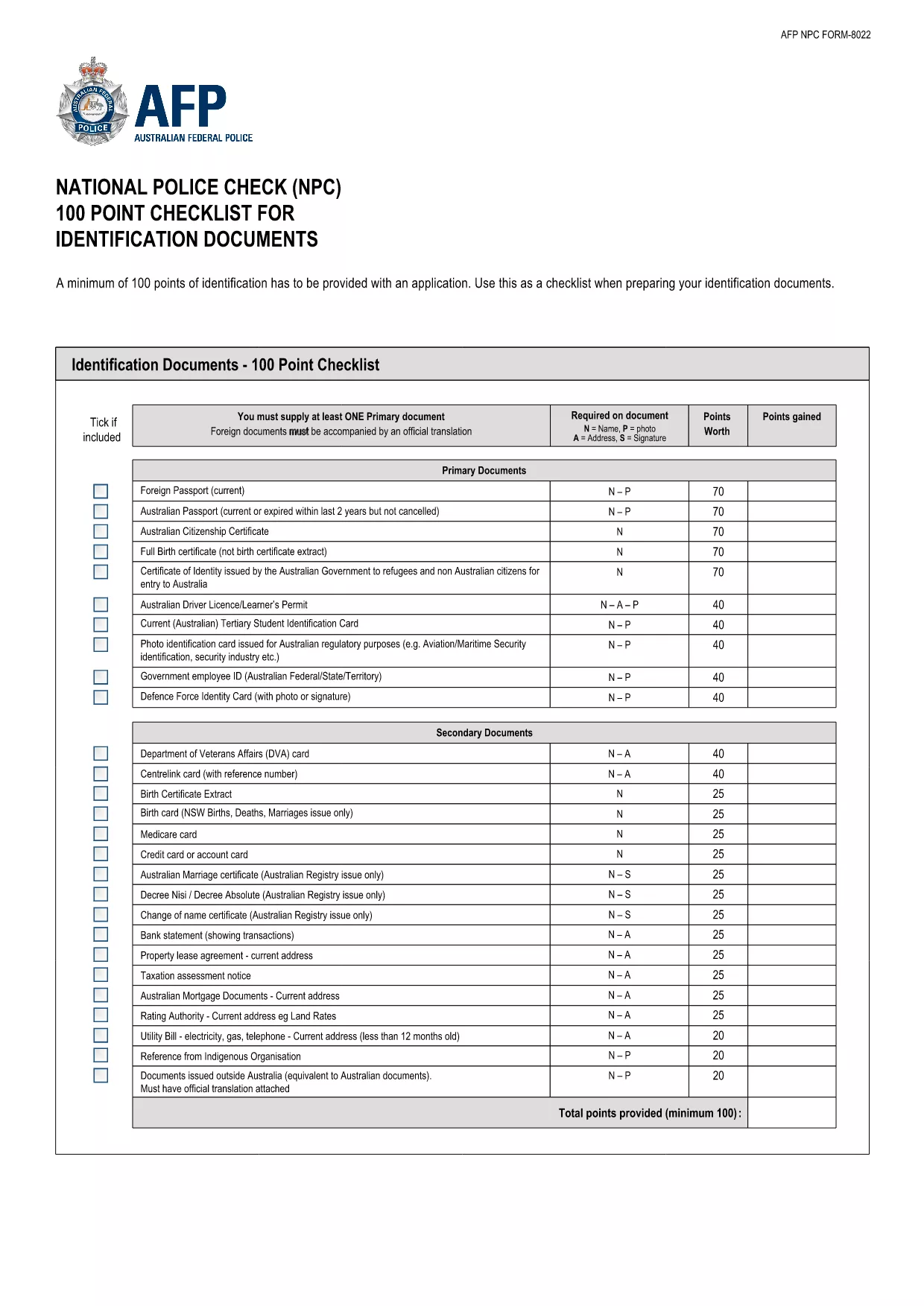
To prove your identity you must provide a minimum of 100 points of identification. Our downloadable 100‑Point Checklist outlines every acceptable document – from birth certificates to utility bills.

Common Mistakes to Avoid

  • Leaving the “Signature” field blank – the system will reject the form.
  • Uploading an expired ID document – ensure all documents are current.
  • Entering a mismatched address – the address on your proof of residence must match the one on your ID.

Download the Official 100‑Point ID Checklist (PDF)

The checklist below is the official guide from the Australian Federal Police. Keep it handy while you gather your documents.

Download the 100‑Point Checklist (PDF)

FAQ
  • What is a Proof of Age Card?

    It is a government‑issued photo identification card that confirms the holder is 18 years or older. It is accepted across Victoria for age‑restricted purchases and entry.

  • Do I need a driver’s licence to apply?

    No. The age card is an alternative to a driver’s licence or passport. You only need to meet the 100‑point ID requirement.

  • How long does the application take?

    If all documents are correct, the online portion takes about 10‑15 minutes. Processing by Service Victoria typically takes 7‑10 business days.

  • Can I apply if I’m a non‑resident of Victoria?

    You must provide proof of Victorian residence (e.g., utility bill, rental agreement) to be eligible for the card.

  • Is there a fee for the proof of age card?

    Yes, the standard fee is AU$35. You can pay online during the submission process.

  • What documents count toward the 100‑point ID total?

    A full list is in the downloadable 100‑Point Checklist PDF. Common items include birth certificates, Medicare cards, utility bills, and bank statements.

  • What if my application is rejected?

    You will receive an email detailing the missing or incorrect information. Correct the issue and resubmit using the same Formize link.

  • Can I renew my age card online?

    Yes, renewals can be completed through the same online form once your card is within six months of expiry.

HUR

Så här fyller du i proof of age card victoria gratis, online i 5 enkla steg:

  1. 1
    Click the Fill Out This Form Button
    On the page, locate the bright “Fill out this form” button and click it. This launches the Formize PDF Filler in a new window.
  2. 2
    Wait for the Formize PDF Filler to Load
    The filler loads the fillable PDF automatically. A loading spinner will appear for a few seconds – this is normal.
  3. 3
    Complete Each Field
    Enter your personal details, address, and upload scanned copies of your identification documents. The filler checks for required fields in real time.
  4. 4
    Review and Submit
    Double‑check all entries, then click “Submit”. The system will generate a PDF receipt that you can save or print.
  5. 5
    Save or Print Confirmation
    Download the completed application and the confirmation receipt. You’ll need to present these when you visit a Service Victoria centre.
Formize PDF Filler app
HANDLA OM

proof of age card victoria mall

Med den traditionella uppsättningen funktioner för att visa och fylla i ett PDF-dokument, kombinerat med fördelarna med en webbapplikation och responsiv layout, kan du slutföra proof of age card victoria på några minuter.

FUNKTIONER

PDF-fyllare

Det enklaste sättet att fylla i proof of age card victoria online

  • Fyll snabbt i proof of age card victoria
    Letar du efter ett sätt att snabbt fylla proof of age card victoria online? Med vår online gratis PDF-formulärfyllare vet du hur du redigerar och fyller i detta pdf-dokument på mindre än en minut.
  • Lätt att använda online PDF-redigerare
    Är du trött på att skriva ut PDF-filer så att du kan redigera dem innan du skannar om och skickar tillbaka dem? Redigera PDF-dokument gratis online. Använd vår online pdf-redigerare för att spara tid och papper.
  • Bra verktyg, alla plattformar
    Undrar du hur man fyller i proof of age card victoria på en Mac, eller kanske hur man använder ett PDF-fyllmedel gratis? Våra online PDF-verktyg fungerar på alla plattformar.
  • Säker fillagring
    Färdiga "proof of age card victoria"-filer lagras i en säker databas som hanteras av Amazon Cloud-hosting. Du kan ta bort dina filer från vårt system när som helst. I alla fall raderas dessa filer automatiskt efter 24 timmar.
  • Chatta med proof of age card victoria
    Chatta med "proof of age card victoria" på Chatize som är en gratis PDF-läsare. Ställ frågor och få svar från "proof of age card victoria". Klicka bara på knappen Chatta med dokument ovan.

Ta bort fyllningssession

Ta bort den valda fyllningssessionen? I det här fallet kommer dina framsteg i att fylla i formuläret att gå förlorade.

Ta bort redigeringssession

Vill du ta bort den valda redigeringssessionen? I det här fallet kommer dina framsteg i att skapa och redigera formuläret att gå förlorade.