
Välj språk

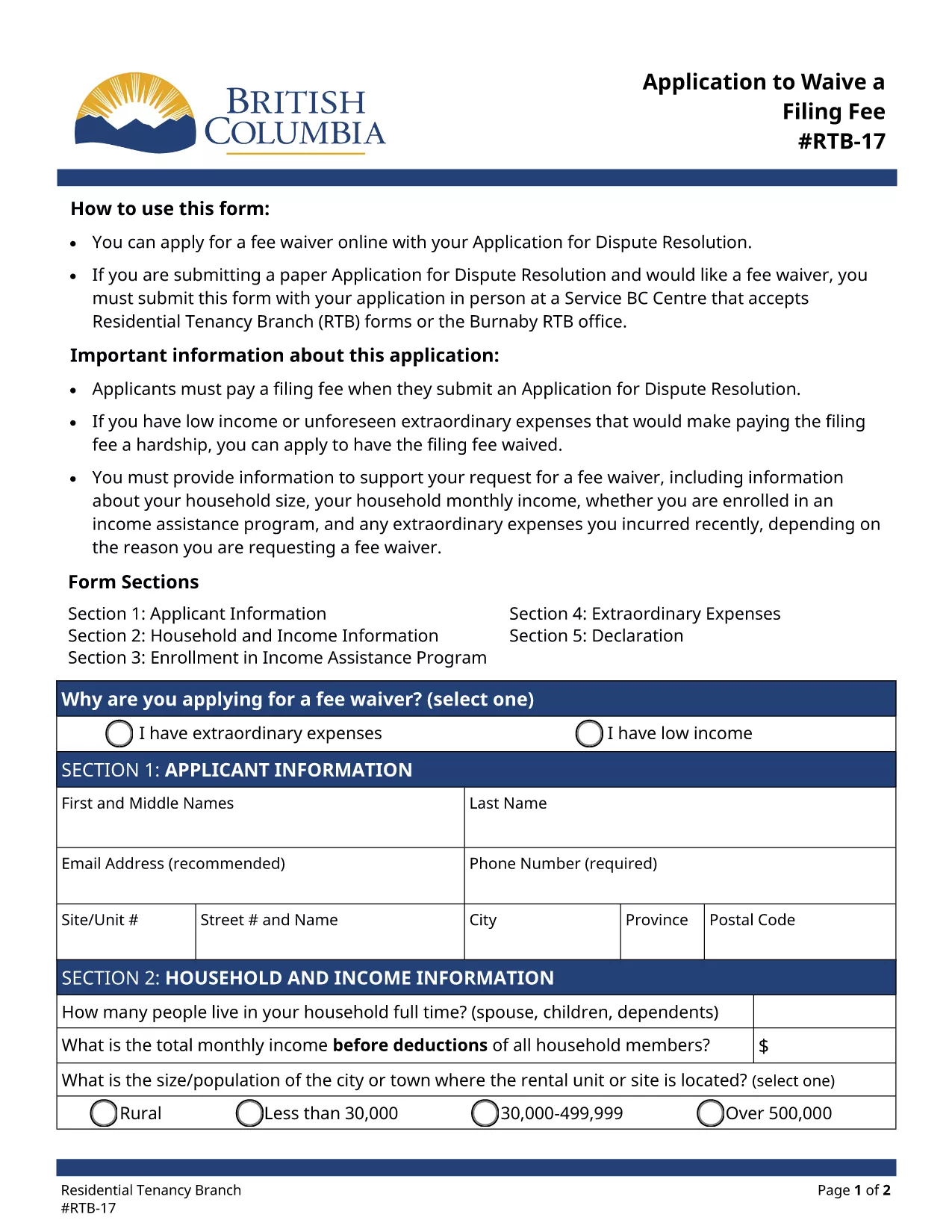
RTB‑17 Application to Waive a Filing Fee (Fillable PDF)

  1. Språk engelsk
  2. Land Kanada
  3. Aktivitet Arrende
  4. stat British Columbia
RTB‑17 Application to Waive a Filing Fee (Fillable PDF)

The RTB‑17 Application to Waive a Filing Fee is the official form used by the British Columbia Residential Tenancy Branch (RTB) when a tenant or landlord needs to request a waiver for the filing fee associated with a dispute resolution application. This form is required under the Residential Tenancy Act and must be completed accurately to avoid processing delays.

What is the RTB‑17 Fee Waiver Form?

RTB‑17 allows applicants to explain why they cannot afford the standard filing fee. Typical reasons include low income, loss of employment, or other financial hardships. The form collects basic personal information, details about the dispute, and supporting documentation.

How to Fill Out RTB‑17 Online with Formize

Formize provides a seamless, fillable PDF experience directly in your browser—no Adobe Reader required. Follow the simple steps below to complete the form in minutes.

Common Mistakes to Avoid When Completing RTB‑17

  • Leaving required fields blank – every field marked with an asterisk must be completed.
  • Submitting outdated contact information – ensure phone numbers and email addresses are current.
  • Failing to attach supporting documents – include proof of income or hardship when requested.

Where to Submit the Completed RTB‑17 Form

After you finish the online fillable version, you can either:

  1. Print and deliver the form in person to a Service BC Centre that accepts RTB forms.
  2. Mail the printed form to the Residential Tenancy Branch address listed on the form.
  3. Submit the PDF electronically through the RTB’s online portal (if available).

Download the Fillable RTB‑17 PDF

If you prefer to work offline, you can download the official fillable PDF directly from the government website. The file is fully compatible with Formize’s PDF Filler.

FAQ
  • Who is eligible to request a fee waiver using RTB‑17?

    Any tenant or landlord who can demonstrate financial hardship—such as low income, unemployment, or other documented reasons—may apply for a waiver.

  • Can I submit RTB‑17 electronically?

    Yes, after completing the fillable PDF with Formize you can upload the saved file to the RTB’s online portal, if the portal is available for fee‑waiver submissions.

  • What supporting documents should I attach?

    Typical documents include recent pay stubs, a notice of termination of employment, social assistance statements, or any proof that shows you cannot afford the filing fee.

  • How long does it take for the RTB to process a fee waiver?

    Processing times vary, but most fee‑waiver requests are reviewed within 10‑14 business days after receipt of the completed form and supporting evidence.

  • Do I need Adobe Reader to fill out RTB‑17?

    No. Formize’s online PDF filler lets you complete the form directly in your browser without installing Adobe Reader.

  • What if I make a mistake after submitting?

    You can submit a corrected RTB‑17 form with a brief note explaining the changes. Include a copy of the original submission for reference.

  • Is there a cost to use Formize’s fillable PDF service?

    Formize offers free access to fillable PDF forms like RTB‑17. No hidden fees are charged for completing or downloading the form.

HUR

Så här fyller du i RTB-17 gratis, online i 5 enkla steg:

  1. 1
    Click the Fill‑out Button
    On the page, click the bright "Fill out this form" button to launch the Formize PDF Filler.
  2. 2
    Wait for the Filler to Load
    The fillable PDF loads directly in your browser. No download or extra software is required.
  3. 3
    Enter Your Information
    Complete each required field, attach any supporting documents, and double‑check for accuracy.
  4. 4
    Review and Submit
    When you’re satisfied, click "Submit" to generate a completed PDF you can print or save.
  5. 5
    Save a Copy
    Download the final PDF for your records and bring the printed copy to a Service BC Centre or mail it as instructed.
Formize PDF Filler app
HANDLA OM

Blanketter för hyresvärdar och/eller hyresgäster att föreslå åtgärder som rör hyresavtal.

RTB-17 är den typ av bostadsrättsavtal som används av de flesta privata hyresvärdar och bostadsrättsföreningar.

Det finns ett antal frågor där hyresvärdar eller hyresgäster ska följa vissa regler som anges i bestämmelserna. I vissa fall kan det vara nödvändigt för dem att fylla i ett formulär, kallat ”föreskrivet formulär”, som föreslår en åtgärd som kan påverka den andra parten i hyresavtalet.

Blanketterna kallas för föreskrivna blanketter eftersom formuleringarna i dem är noggrant utformade för att säkerställa att den som fyller i blanketten och den som den delges kan förstå vad som föreslås och vad de kan göra som svar. Underlåtenhet att visa rätt formulär kan ogiltigförklara den åtgärd som föreslås.

Du får inte ändra ordalydelsen i dessa formulär om inte ett formulär säger att du får göra det. Om du ändrar formuleringen kan formuläret ogiltigförklaras. Du måste också följa eventuella uppsägningstider som anges i formuläret.

FUNKTIONER

PDF-fyllare

Det enklaste sättet att fylla i RTB-17 online

  • Fyll snabbt i RTB-17
    Letar du efter ett sätt att snabbt fylla RTB-17 online? Med vår online gratis PDF-formulärfyllare vet du hur du redigerar och fyller i detta pdf-dokument på mindre än en minut.
  • Lätt att använda online PDF-redigerare
    Är du trött på att skriva ut PDF-filer så att du kan redigera dem innan du skannar om och skickar tillbaka dem? Redigera PDF-dokument gratis online. Använd vår online pdf-redigerare för att spara tid och papper.
  • Bra verktyg, alla plattformar
    Undrar du hur man fyller i RTB-17 på en Mac, eller kanske hur man använder ett PDF-fyllmedel gratis? Våra online PDF-verktyg fungerar på alla plattformar.
  • Säker fillagring
    Färdiga "RTB-17"-filer lagras i en säker databas som hanteras av Amazon Cloud-hosting. Du kan ta bort dina filer från vårt system när som helst. I alla fall raderas dessa filer automatiskt efter 24 timmar.
  • Chatta med RTB-17
    Chatta med "RTB-17" på Chatize som är en gratis PDF-läsare. Ställ frågor och få svar från "RTB-17". Klicka bara på knappen Chatta med dokument ovan.

Ta bort fyllningssession

Ta bort den valda fyllningssessionen? I det här fallet kommer dina framsteg i att fylla i formuläret att gå förlorade.

Ta bort redigeringssession

Vill du ta bort den valda redigeringssessionen? I det här fallet kommer dina framsteg i att skapa och redigera formuläret att gå förlorade.