
Välj språk

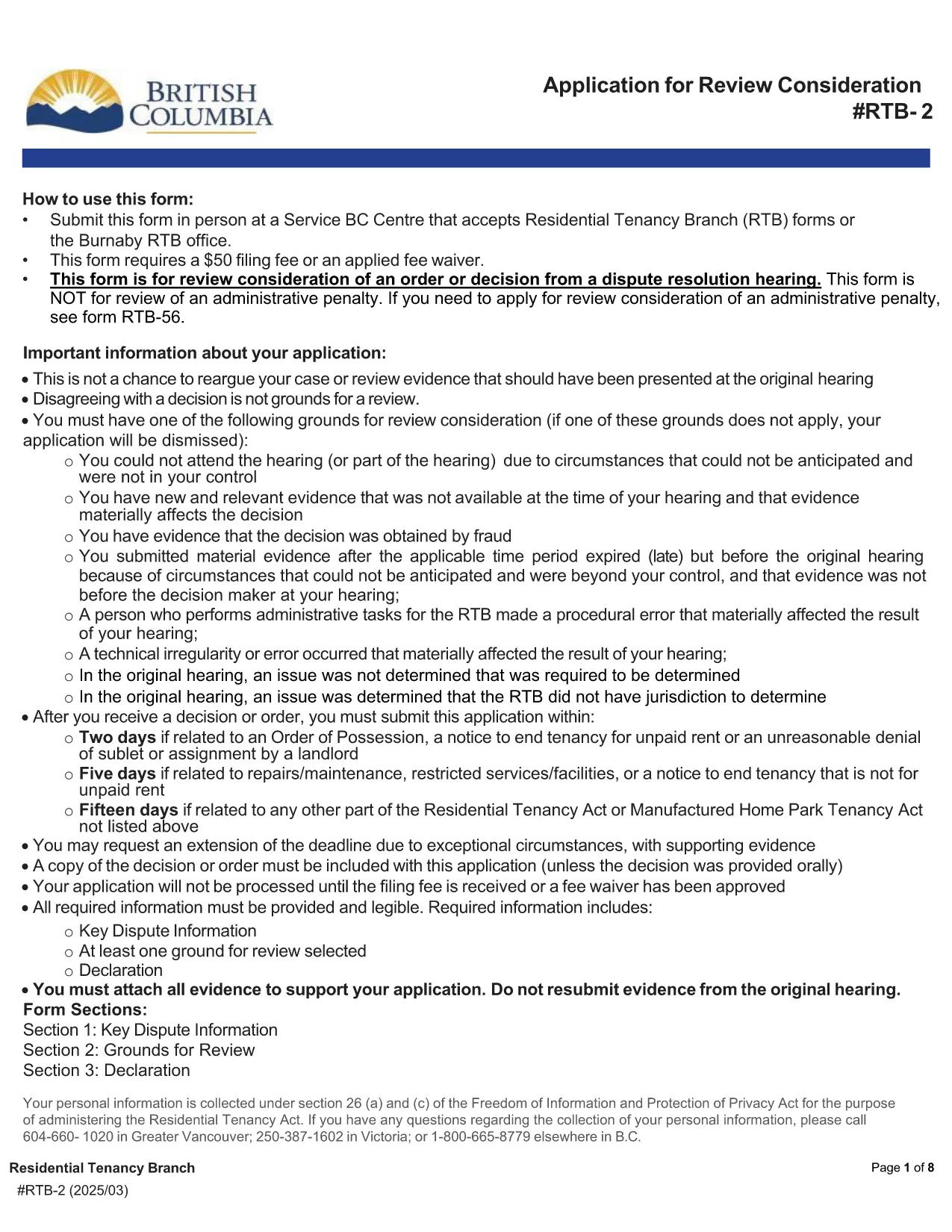
RTB‑2 Review Consideration Form – Fillable PDF for BC Tenancy Disputes

  1. Språk engelsk
  2. Land Kanada
  3. Aktivitet Arrende
  4. stat British Columbia
RTB‑2 Review Consideration Form – Fillable PDF for BC Tenancy Disputes

What Is the RTB‑2 Form?

The RTB‑2, or Review Consideration Form, is the official application used in British Columbia to request a review of an order or decision issued after a Residential Tenancy Branch (RTB) dispute resolution hearing. Landlords and tenants use this form when they believe the decision was made in error or when new evidence is available.

How to Complete the RTB‑2 Online

Formize makes the RTB‑2 completely fillable directly in your browser. Follow these simple steps:

  1. Click the "Fill out this form" button on this page.
  2. Wait a few seconds while the Formize PDF Filler app loads the fillable RTB‑2.
  3. Enter all required information – party details, hearing date, reasons for review, and any supporting documents.
  4. Use the built‑in validation to catch missing fields before you submit.
  5. When finished, click Submit to download the completed PDF, then print or email it as required.

Common Mistakes to Avoid

  • Leaving required fields blank: The form will not validate until every mandatory field is filled.
  • Incorrect filing fee amount: The standard fee is $50 unless you qualify for a fee waiver.
  • Submitting the wrong version: Always use the latest PDF (linked below) to ensure compliance with current RTB rules.
  • Missing supporting evidence: Attach any new documents that justify a review request.

Where to Submit the Completed Form

After you download the filled‑out RTB‑2, you can submit it in one of the following ways:

  • In person at any Service BC Centre that accepts RTB forms.
  • By mail to the RTB office listed on the form.
  • Electronically via the RTB’s online portal (if you have an account).

Remember to include the $50 filing fee or a completed fee‑waiver request.

Download the Official PDF

If you prefer to work offline, you can download the official, government‑issued RTB‑2 PDF directly from the link below. The file is fully fillable with Adobe Reader or any modern PDF viewer.

Download RTB‑2 Form (PDF)

FAQ
  • Who can use the RTB‑2 form?

    Both landlords and tenants in British Columbia may use the RTB‑2 to request a review of a dispute resolution decision.

  • Is there a fee to file the RTB‑2?

    Yes, the standard filing fee is $50. A fee waiver can be requested if you meet the eligibility criteria outlined on the form.

  • Can I edit the PDF after I download it?

    Yes, the PDF is fully fillable. You can edit it using Formize online or any PDF editor like Adobe Acrobat Reader.

  • What supporting documents should I attach?

    Attach any new evidence, correspondence, or records that were not considered in the original hearing and that support your request for review.

  • How long do I have to submit the RTB‑2 after the decision?

    You must file the RTB‑2 within 30 days of receiving the original decision, unless an extension is granted by the RTB.

  • Can I submit the form electronically?

    Yes, if you have an RTB online account you can upload the completed PDF directly through the RTB portal.

  • What happens after I submit the RTB‑2?

    The RTB will review your application, may schedule a new hearing, and will issue a written decision on the review request.

HUR

Så här fyller du i RTB-2 gratis, online i 5 enkla steg:

  1. 1
    Click the Fill‑out Button
    Press the "Fill out this form" button on the page to launch the Formize PDF Filler.
  2. 2
    Wait for the Form to Load
    A few seconds later the fillable RTB‑2 PDF will appear in the browser.
  3. 3
    Enter All Required Information
    Complete each field, attach supporting documents, and double‑check the filing fee details.
  4. 4
    Validate and Review
    Use the built‑in validation to ensure no required fields are missing.
  5. 5
    Download or Submit
    When satisfied, click "Submit" to download the completed PDF and follow the submission instructions.
Formize PDF Filler app
HANDLA OM

Blanketter för hyresvärdar och/eller hyresgäster att föreslå åtgärder som rör hyresavtal.

RTB-2 är en av hyresformulären som hänvisar till de dokument som används i processen för att upprätta och hantera ett hyresavtal. Dessa formulär används vanligtvis av hyresvärdar, fastighetsförvaltare eller hyresgäster för att beskriva villkoren för hyresavtalet. Här är några vanliga hyresformer:

Hyresavtal: Hyresavtalet, även känt som hyresavtalet eller hyresavtalet, är ett juridiskt bindande avtal mellan hyresvärden och hyresgästen. Den anger båda parters rättigheter och skyldigheter, inklusive hyrestidens varaktighet, hyresbelopp, betalningsvillkor, deposition, underhållsansvar och alla andra villkor som är specifika för hyresavtalet.

Ansökan om hyra: Blivande hyresgäster fyller vanligtvis i ett ansökningsformulär för uthyrning när de ansöker om en hyresfastighet. Detta formulär samlar in personlig information om den sökande, såsom deras namn, kontaktuppgifter, anställningshistorik, hyreshistorik och referenser. Hyresansökan hjälper hyresvärdar att bedöma hyresgästers lämplighet och fatta välgrundade beslut.

Meddelande om utrymning: Detta formulär används av antingen hyresvärden eller hyresgästen för att meddela om avsikt att säga upp hyresförhållandet. Uppsägningstiden som krävs kan variera beroende på lokala lagar och villkoren i hyresavtalet.

Besked om hyreshöjning: Om hyresvärden har för avsikt att höja hyran under hyrestiden, lämnar de vanligtvis ett meddelande om hyreshöjning till hyresgästen. Detta meddelande informerar hyresgästen om den kommande hyresjusteringen och följer lagkraven gällande hyreshöjningar.

formulär för begäran om underhåll och reparation: Dessa formulär tillåter hyresgäster att rapportera underhålls- eller reparationsproblem till hyresvärden eller fastighetsförvaltaren. Formuläret beskriver detaljerna om problemet, de begärda reparationerna och all annan relevant information.

Samtycke till bakgrundskontroll eller kreditkontroll: Hyresvärdar kan kräva att hyresgäster fyller i ett samtyckesformulär som godkänner en bakgrundskontroll eller kreditkontroll. Detta formulär låter hyresvärden verifiera hyresgästens bakgrund, kreditvärdighet och hyreshistorik.

Inventarie- och skickrapport: Detta formulär används för att dokumentera hyresfastighetens skick i början och slutet av hyresförhållandet. Den beskriver tillståndet för varje rum och eventuella befintliga skador, vilket säkerställer att båda parter har ett register över fastighetens skick för att lösa tvister angående säkerhetsdepositioner eller skadeanspråk.

Det här är några exempel på hyresformer som vanligtvis används i uthyrningsprocessen. De specifika formerna och kraven kan variera beroende på lokala lagar och de specifika omständigheterna för hyresavtalet. Det är viktigt att konsultera lokala bestämmelser och söka professionell rådgivning för att säkerställa efterlevnad och använda lämpliga formulär för ditt specifika hyresavtal.

FUNKTIONER

PDF-fyllare

Det enklaste sättet att fylla i RTB-2 online

  • Fyll snabbt i RTB-2
    Letar du efter ett sätt att snabbt fylla RTB-2 online? Med vår online gratis PDF-formulärfyllare vet du hur du redigerar och fyller i detta pdf-dokument på mindre än en minut.
  • Lätt att använda online PDF-redigerare
    Är du trött på att skriva ut PDF-filer så att du kan redigera dem innan du skannar om och skickar tillbaka dem? Redigera PDF-dokument gratis online. Använd vår online pdf-redigerare för att spara tid och papper.
  • Bra verktyg, alla plattformar
    Undrar du hur man fyller i RTB-2 på en Mac, eller kanske hur man använder ett PDF-fyllmedel gratis? Våra online PDF-verktyg fungerar på alla plattformar.
  • Säker fillagring
    Färdiga "RTB-2"-filer lagras i en säker databas som hanteras av Amazon Cloud-hosting. Du kan ta bort dina filer från vårt system när som helst. I alla fall raderas dessa filer automatiskt efter 24 timmar.
  • Chatta med RTB-2
    Chatta med "RTB-2" på Chatize som är en gratis PDF-läsare. Ställ frågor och få svar från "RTB-2". Klicka bara på knappen Chatta med dokument ovan.

Ta bort fyllningssession

Ta bort den valda fyllningssessionen? I det här fallet kommer dina framsteg i att fylla i formuläret att gå förlorade.

Ta bort redigeringssession

Vill du ta bort den valda redigeringssessionen? I det här fallet kommer dina framsteg i att skapa och redigera formuläret att gå förlorade.