
Välj språk

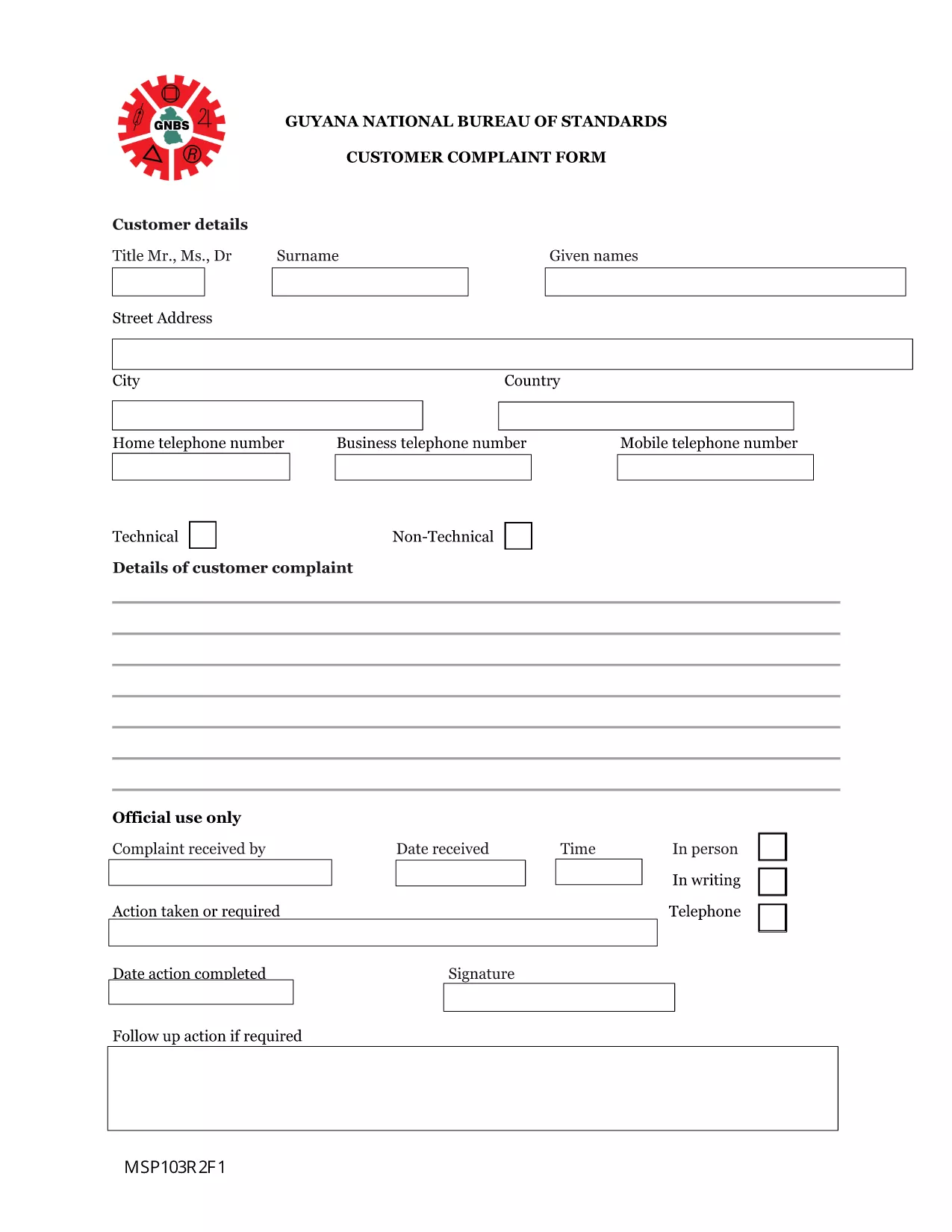
Guyana Customer Complaint Form – Fillable PDF

  1. Språk engelsk
  2. Land Guyana
  3. Aktivitet Hälsa
Guyana Customer Complaint Form – Fillable PDF

Need to lodge a complaint with the Guyana National Bureau of Standards or another regulatory body? Our Guyana Customer Complaint Form is available as a fully fillable PDF so you can complete it online in minutes. No extra software, no printing – simply click the button, fill out the fields, and submit.

What Is the Guyana Customer Complaint Form?

This form is the official document used by the National Bureau of Standards (and related agencies) to record consumer complaints about products, services, or business practices. It captures essential details such as:

  • Complainant’s contact information
  • Details of the product or service
  • Nature of the complaint and supporting evidence
  • Desired resolution

How to Fill the Form Using Formize PDF Filler

Follow these quick steps to complete the form without downloading any software:

  1. Click the “Fill out this form” button below.
  2. Wait a few seconds while the Formize PDF Filler app loads in your browser.
  3. Enter your information directly into the highlighted fields.
  4. Use the Upload button to attach any supporting documents (photos, receipts, etc.).
  5. Review the completed form, then click Submit to send it to the appropriate agency.

Common Mistakes to Avoid

  • Leaving required fields blank: The form will not submit if mandatory sections are empty.
  • Providing incomplete contact details: Double‑check phone numbers and email addresses.
  • Uploading unsupported file types: Use PDF, JPG, or PNG for attachments.
  • Submitting after the statutory deadline: Complaints should be filed within 30 days of the incident.

Where to Submit Your Completed Complaint

Once you click Submit, the Formize system securely routes your complaint to the National Bureau of Standards’ intake desk. You will receive an automated confirmation email with a reference number for tracking.

Frequently Asked Questions

Below are answers to the most common queries about this form.

FAQ
  • Do I need Adobe Acrobat to fill this form?

    No. The Formize PDF Filler works in any modern browser, so you can complete the form without Adobe Acrobat.

  • Can I save a draft and finish later?

    Yes. Use the “Save as Draft” button in the Formize interface, then return to the saved link to continue.

  • What types of attachments are allowed?

    You can attach PDF, JPG, or PNG files up to 5 MB each.

  • Is my personal information secure?

    All data is encrypted during transmission and stored on secure Formize servers until it is delivered to the agency.

  • How long does it take for the agency to respond?

    The National Bureau of Standards typically acknowledges receipt within 2 business days and may request additional information within 10 days.

  • Can I submit the form on a mobile device?

    Absolutely. The Formize PDF Filler is fully responsive and works on smartphones and tablets.

HUR

Så här fyller du i Guyana complaint form gratis, online i 4 enkla steg:

  1. 1
    Open the Fillable Form
    Click the “Fill out this form” button on this page. The Formize PDF Filler will open directly in your browser.
  2. 2
    Load the Formize PDF Filler
    Wait a few seconds while the app loads. No download or installation is required.
  3. 3
    Enter Your Information
    Type your answers into each highlighted field. Use the “Upload” button for any supporting documents.
  4. 4
    Review and Submit
    Double‑check all entries, then click the “Submit” button. You’ll receive a confirmation email with a reference number.
Formize PDF Filler app
HANDLA OM

Ansökningsformulär för Medicare

Guyana complaint form är en av Medicare-formulär som är dokument som används i administrationen av Medicare-programmet, som är ett federalt sjukförsäkringsprogram i USA främst för individer som är 65 år och äldre, såväl som vissa yngre individer med funktionshinder eller specifik medicinsk betingelser. Dessa formulär används för olika ändamål relaterade till att registrera sig för, hantera och få tillgång till Medicare-förmåner. Här är några vanliga Medicare-former:

Ansökningsformulär för Medicare: Dessa formulär, såsom CMS-40B, används för att ansöka om Medicare-förmåner, inklusive del A (sjukhusförsäkring) och/eller del B (sjukförsäkring). De kräver personlig information, såsom namn, adress, personnummer och information om aktuellt sjukförsäkringsskydd.

Medicare-registreringsformulär: Dessa formulär, såsom CMS-855B för vårdgivare, används av vårdpersonal, leverantörer och organisationer för att registrera sig i Medicare-programmet. De samlar information om leverantören eller organisationen och deras kvalifikationer för att delta i Medicare.

Medicare-anspråksformulär: Dessa formulär, såsom CMS-1500 eller UB-04, används för att lämna in anspråk på återbetalning av medicinska tjänster som tillhandahållits till Medicare-mottagare. Sjukvårdsleverantörer eller leverantörer fyller i dessa formulär för att begära betalning för täckta tjänster.

Medicare receptbelagda läkemedelsplaner: Dessa formulär, såsom CMS-10260, används för att registrera sig i Medicare Part D-planer för receptbelagda läkemedel eller för att göra ändringar i befintliga planer. De behöver information om de mediciner en förmånstagare tar och deras föredragna apotek.

Medicare Authorization Forms: Dessa formulär, såsom CMS-10114, används för att tillåta utlämnande av personlig hälsoinformation från Medicares register till utsedda individer eller organisationer. Detta gör det möjligt för förmånstagare att ge tillgång till sina journaler för specifika ändamål.

Medicare-överklagandeformulär: Dessa formulär, såsom CMS-20027, används för att begära ett överklagande om ett anspråk avslås eller om det finns en oenighet med ett Medicare-beslut. De tillhandahåller en process för stödmottagarna eller deras företrädare för att söka en granskning av täckningsbeslut eller betalningsbeslut.

Detta är bara några exempel på de olika Medicare-former som finns. De specifika formerna och kraven kan variera, så det är viktigt att konsultera den officiella Medicare-webbplatsen eller kontakta Medicares administrativa myndighet för korrekt och uppdaterad information.

FUNKTIONER

PDF-fyllare

Det enklaste sättet att fylla i Guyana complaint form online

  • Fyll snabbt i Guyana complaint form
    Letar du efter ett sätt att snabbt fylla Guyana complaint form online? Med vår online gratis PDF-formulärfyllare vet du hur du redigerar och fyller i detta pdf-dokument på mindre än en minut.
  • Lätt att använda online PDF-redigerare
    Är du trött på att skriva ut PDF-filer så att du kan redigera dem innan du skannar om och skickar tillbaka dem? Redigera PDF-dokument gratis online. Använd vår online pdf-redigerare för att spara tid och papper.
  • Bra verktyg, alla plattformar
    Undrar du hur man fyller i Guyana complaint form på en Mac, eller kanske hur man använder ett PDF-fyllmedel gratis? Våra online PDF-verktyg fungerar på alla plattformar.
  • Säker fillagring
    Färdiga "Guyana complaint form"-filer lagras i en säker databas som hanteras av Amazon Cloud-hosting. Du kan ta bort dina filer från vårt system när som helst. I alla fall raderas dessa filer automatiskt efter 24 timmar.
  • Chatta med Guyana complaint form
    Chatta med "Guyana complaint form" på Chatize som är en gratis PDF-läsare. Ställ frågor och få svar från "Guyana complaint form". Klicka bara på knappen Chatta med dokument ovan.

Ta bort fyllningssession

Ta bort den valda fyllningssessionen? I det här fallet kommer dina framsteg i att fylla i formuläret att gå förlorade.

Ta bort redigeringssession

Vill du ta bort den valda redigeringssessionen? I det här fallet kommer dina framsteg i att skapa och redigera formuläret att gå förlorade.