
Välj språk

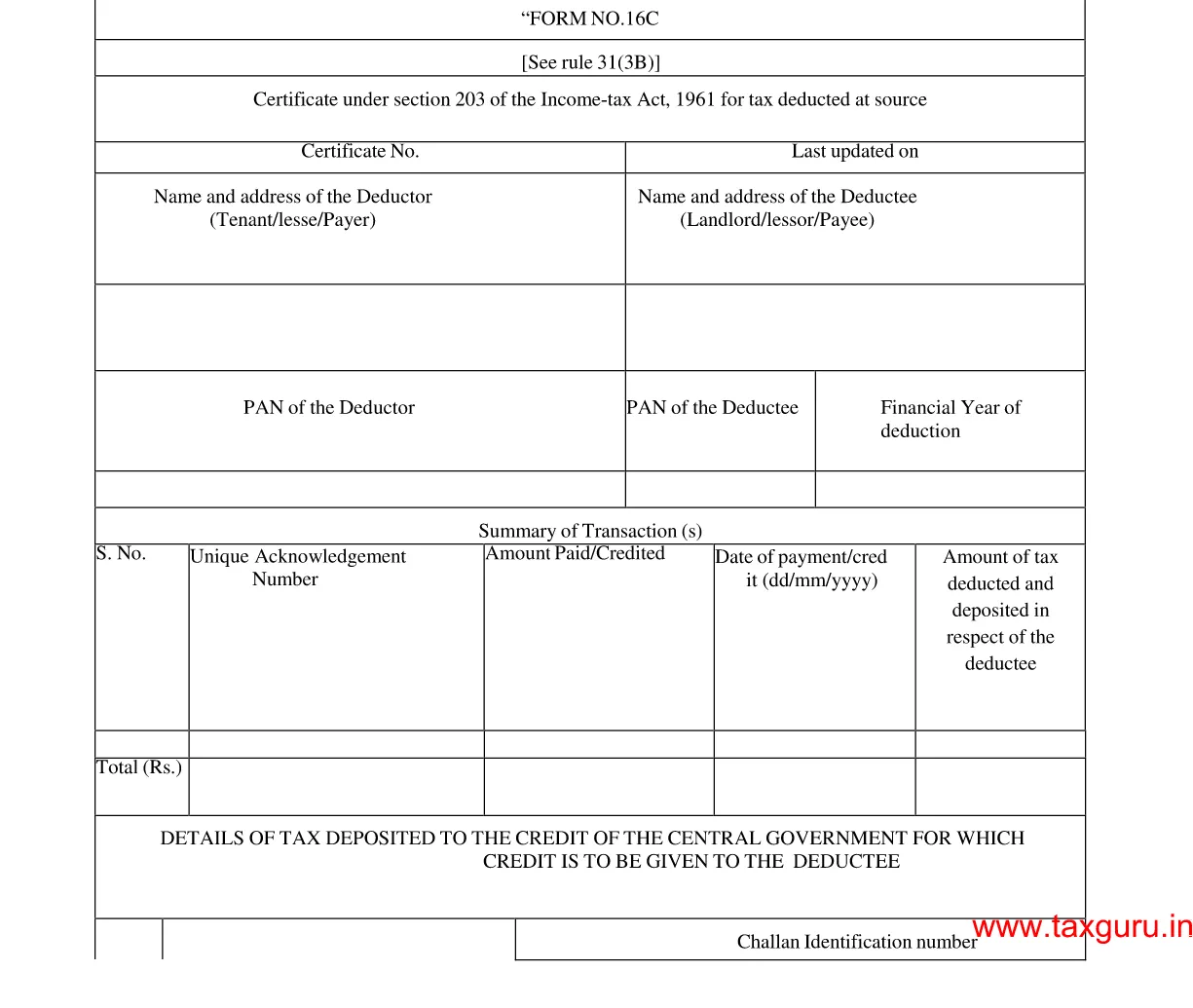
Form 16C – Fillable Tax Deduction Statement (Section 194‑IB)

  1. Land Indien
  2. Språk engelsk
  3. Avdelning Income Tax Department
  4. Aktivitet Skatter
Form 16C – Fillable Tax Deduction Statement (Section 194‑IB)

Form 16C is the official statement used by deductors to report tax deducted at source (TDS) under Section 194‑IB of the Income Tax Act, India. It details the amount deducted, the recipient’s PAN, and the date of deduction. With Formize’s fillable PDF, you can complete and submit the form in minutes—no paper, no hassle.

What is Form 16C?

Form 16C serves as a challan‑cum‑statement that records TDS on payments such as interest on securities, dividends, and other specified incomes. The form must be filed electronically with the Income Tax Department after the deduction is made.

Who Needs to File Form 16C?

  • Any person or entity deducting tax under Section 194‑IB.
  • Financial institutions, mutual funds, and companies paying interest or dividend income.
  • Businesses that have made taxable payments to residents or non‑residents.

How to Fill Form 16C Online

Follow these simple steps to complete the form without leaving the page:

  1. Click the "Fill out this form" button below.
  2. The Formize PDF Filler app loads automatically in your browser.
  3. Enter the required details (deductor name, PAN, amount, etc.) in the fillable fields.
  4. Review the information, then click Save or Download to get a completed PDF.

Common Mistakes to Avoid

  • Incorrect PAN: Double‑check the PAN of both deductor and deductee.
  • Wrong financial year: Ensure the year matches the period of deduction.
  • Missing signatures: The form requires the signature of the person responsible for deduction.
  • Incomplete head codes: Use the correct major and minor head codes as per the Income Tax rules.

Download the Fillable PDF

Ready to start? Click the button below to open the fillable version of Form 16C directly in your browser.

Fill out this form

FAQ
  • What is the purpose of Form 16C?

    Form 16C records tax deducted at source under Section 194‑IB and serves as a challan‑cum‑statement for the Income Tax Department.

  • Who is required to file Form 16C?

    Any person or entity that deducts tax on interest, dividends, or similar payments under Section 194‑IB must file Form 16C.

  • Can I edit the PDF on a mobile device?

    Yes. The Formize PDF Filler works on all modern browsers, including mobile Chrome and Safari.

  • Do I need a digital signature to submit Form 16C?

    A physical signature is required on the printed form. For electronic filing, the form can be uploaded without a digital signature, but the deductor’s signature must be present on the original copy.

  • What are the major and minor head codes?

    These codes classify the nature of the payment. For example, major head code 2 and minor head code 0 are commonly used for interest payments.

  • How do I correct a mistake after submission?

    File a revised Form 16C with the corrected details before the end of the financial year, and inform the deductee of the changes.

HUR

Så här fyller du i Form 16C gratis, online i 4 enkla steg:

  1. 1
    Open the Fillable Form
    Click the "Fill out this form" button. The Formize PDF Filler loads instantly in your browser.
  2. 2
    Enter Required Information
    Complete each fillable field—deductor details, PAN, amount deducted, and the applicable head codes.
  3. 3
    Validate and Save
    Review the entered data, ensure no fields are missing, then click Save to store the completed PDF on your device.
  4. 4
    Submit to the Tax Department
    Upload the saved PDF through the Income Tax e‑filing portal as per the filing deadline.
Formize PDF Filler app
HANDLA OM

Skatteformulär

Form 16C är ett av skatteformulären som är dokument som används för att rapportera information om skatter till relevant skattemyndighet. Det finns olika typer av skatteformulär, inklusive federala, statliga och lokala skatteformulär, som kan variera beroende på skattebetalarens omständigheter och plats.

FUNKTIONER

PDF-fyllare

Det enklaste sättet att fylla i Form 16C online

  • Fyll snabbt i Form 16C
    Letar du efter ett sätt att snabbt fylla Form 16C online? Med vår online gratis PDF-formulärfyllare vet du hur du redigerar och fyller i detta pdf-dokument på mindre än en minut.
  • Lätt att använda online PDF-redigerare
    Är du trött på att skriva ut PDF-filer så att du kan redigera dem innan du skannar om och skickar tillbaka dem? Redigera PDF-dokument gratis online. Använd vår online pdf-redigerare för att spara tid och papper.
  • Bra verktyg, alla plattformar
    Undrar du hur man fyller i Form 16C på en Mac, eller kanske hur man använder ett PDF-fyllmedel gratis? Våra online PDF-verktyg fungerar på alla plattformar.
  • Säker fillagring
    Färdiga "Form 16C"-filer lagras i en säker databas som hanteras av Amazon Cloud-hosting. Du kan ta bort dina filer från vårt system när som helst. I alla fall raderas dessa filer automatiskt efter 24 timmar.
  • Chatta med Form 16C
    Chatta med "Form 16C" på Chatize som är en gratis PDF-läsare. Ställ frågor och få svar från "Form 16C". Klicka bara på knappen Chatta med dokument ovan.

Ta bort fyllningssession

Ta bort den valda fyllningssessionen? I det här fallet kommer dina framsteg i att fylla i formuläret att gå förlorade.

Ta bort redigeringssession

Vill du ta bort den valda redigeringssessionen? I det här fallet kommer dina framsteg i att skapa och redigera formuläret att gå förlorade.