
Välj språk

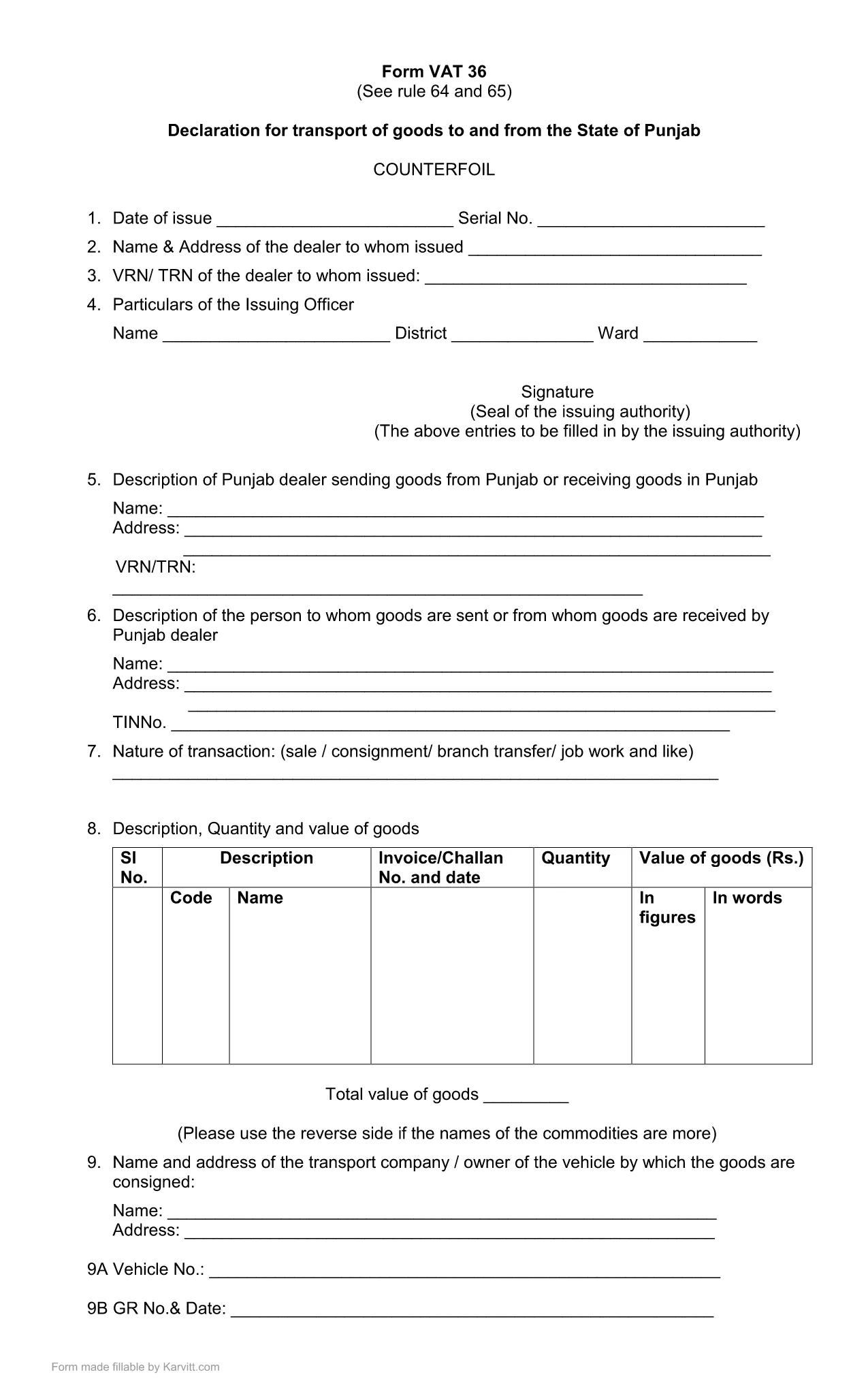
Punjab Form No. 36 – Fillable PDF for Transport Declaration

  1. Språk engelsk
  2. Land Indien
  3. Aktivitet Skatter
  4. Avdelning Punjab Revenue Department
Punjab Form No. 36 – Fillable PDF for Transport Declaration

Punjab Form No. 36 is the official declaration required for the transport of goods to and from the State of Punjab. The form is used by traders, logistics companies, and anyone moving taxable goods across state borders. Our fillable PDF keeps the original layout while allowing you to type, select, and calculate directly in the browser.

What Is Punjab Form 36?

The form is part of the Punjab VAT (Value Added Tax) system. It captures details such as the consignor, consignee, vehicle number, goods description, and the tax amount payable for each shipment. Submitting a correctly completed Form 36 helps avoid penalties and ensures smooth clearance of goods.

How to Fill Punjab Form 36 Online

Instead of downloading the PDF and opening a separate editor, simply click the "Fill out this form" button on this page. The Formize PDF Filler app will load in your browser, presenting the same fields you see in the official PDF. Follow the steps below to complete the form:

  1. Click Fill out this form and wait for the Formize PDF Filler to load.
  2. Enter all required information: trader details, vehicle registration, goods description, and tax calculations.
  3. Review the auto‑calculated totals. Adjust any entries if needed.
  4. Click Save & Download to get a completed PDF you can print or email to the Punjab Revenue Department.

Common Mistakes & Tips for Accurate Submission

  • Incorrect GSTIN or PAN: Double‑check the numbers before saving.
  • Vehicle number format: Use the exact format as on the registration certificate.
  • Missing signatures: The form requires the authorized signatory’s signature; you can add a digital signature in the filler.
  • Tax calculation errors: The filler automatically calculates totals—verify the base amount and applicable rate.

By following these guidelines, you can submit Punjab Form 36 quickly, accurately, and without the need for additional software.

FAQ
  • What is the purpose of Punjab Form No. 36?

    Form 36 is a declaration for the transport of taxable goods to and from Punjab. It records details of the shipment and calculates the applicable VAT.

  • Do I need Adobe Acrobat to fill this form?

    No. With Formize you can fill the form directly in your browser without installing any additional software.

  • Can I submit the form electronically?

    The form must be printed and signed, then submitted to the Punjab Revenue Department as per their guidelines. The filled PDF can be saved for your records.

  • What if I make a mistake after saving?

    Open the saved PDF again in the Formize filler, correct the fields, and re‑save. Ensure the final version is the one you submit.

  • Is there a fee to download Punjab Form 36?

    No, the fillable PDF is provided free of charge for personal and business use.

  • Which version of the form is the latest?

    The PDF linked on this page is the most recent version (updated March 2021). Check the top of the form for the revision date.

  • Do I need a digital signature?

    A digital signature is optional in the filler. The final printed form must be signed by an authorized signatory before submission.

HUR

Så här fyller du i Punjab Form 36 gratis, online i 4 enkla steg:

  1. 1
    Open the Formize PDF Filler
    Click the "Fill out this form" button on the page. The Formize PDF Filler loads directly in your browser.
  2. 2
    Enter Required Details
    Fill in trader information, vehicle number, goods description, and tax amounts in the highlighted fields.
  3. 3
    Verify Auto‑Calculations
    The filler automatically totals the tax. Double‑check the numbers before proceeding.
  4. 4
    Save and Download
    When all fields are completed, click "Save & Download" to obtain a printable PDF copy for submission.
Formize PDF Filler app
HANDLA OM

Blanketter för inkomstskatteavdelningen

Punjab Form 36 är ett av de officiella formulären som används av Indiens inkomstskatteavdelning för att administrera och samla in inkomstskatter. Dessa formulär används av skattebetalare för att redovisa sina inkomster, avdrag och skattskyldighet till skattemyndigheten.

Här är några vanliga formulär för inkomstskatteavdelningen i Indien:

ITR-1 (Sahaj): Detta formulär används av individer som har inkomster från lön, egendom i ett hus och andra källor som ränta, pension eller familjepension. Det är tillämpligt för individer med total inkomst upp till Rs. 50 lakhs.

ITR-2: Detta formulär används av individer och hinduer Odelade familjer (HUF) som har inkomst från andra källor än företag eller yrke. Det är tillämpligt för individer som har en total inkomst som överstiger Rs. 50 lakhs eller har utländska tillgångar/inkomster.

ITR-3: Det här formuläret används av individer och HUFs ha inkomst från företag eller yrke. Den är tillämplig för personer som har inkomst från ett partnerskapsföretag och yrkesverksamma som utövar ett yrke.

ITR-4 (Sugam): Detta formulär används av individer, HUF:er och företag (andra än LLP) som har valt det presumtiva skattesystemet enligt sektionerna 44AD, 44ADA eller 44AE i inkomstskattelagen.

Formulär 16: Detta formulär tillhandahålls av arbetsgivare till anställda och innehåller detaljer av lön, källskatt (TDS) och annan relaterad information. Det hjälper anställda att lämna in sina inkomstdeklarationer korrekt.

Formulär 26AS: Detta är inte ett formulär utan en årlig konsoliderad skattedeklaration som ger en sammanfattning av skatterelaterad information som TDS, förskottsskatt och självskattning som betalas av skattebetalaren. Det hjälper skattebetalare att korsverifiera sina skatteskulder samtidigt som de lämnar in sina inkomstdeklarationer.

Det här är bara några exempel på formulär för inkomstskatteavdelningen i Indien. De specifika formerna och kraven kan variera beroende på typen av inkomst, skattebetalarkategori och skattelagar som råder i Indien. Det är viktigt att konsultera den officiella webbplatsen för Indiens inkomstskatteavdelning (www.incometaxindia.gov.in) eller söka professionell rådgivning för att få korrekt och uppdaterad information om de specifika inkomstskatteformulär som är relevanta för din skattesituation i Indien.

FUNKTIONER

PDF-fyllare

Det enklaste sättet att fylla i Punjab Form 36 online

  • Fyll snabbt i Punjab Form 36
    Letar du efter ett sätt att snabbt fylla Punjab Form 36 online? Med vår online gratis PDF-formulärfyllare vet du hur du redigerar och fyller i detta pdf-dokument på mindre än en minut.
  • Lätt att använda online PDF-redigerare
    Är du trött på att skriva ut PDF-filer så att du kan redigera dem innan du skannar om och skickar tillbaka dem? Redigera PDF-dokument gratis online. Använd vår online pdf-redigerare för att spara tid och papper.
  • Bra verktyg, alla plattformar
    Undrar du hur man fyller i Punjab Form 36 på en Mac, eller kanske hur man använder ett PDF-fyllmedel gratis? Våra online PDF-verktyg fungerar på alla plattformar.
  • Säker fillagring
    Färdiga "Punjab Form 36"-filer lagras i en säker databas som hanteras av Amazon Cloud-hosting. Du kan ta bort dina filer från vårt system när som helst. I alla fall raderas dessa filer automatiskt efter 24 timmar.
  • Chatta med Punjab Form 36
    Chatta med "Punjab Form 36" på Chatize som är en gratis PDF-läsare. Ställ frågor och få svar från "Punjab Form 36". Klicka bara på knappen Chatta med dokument ovan.

Ta bort fyllningssession

Ta bort den valda fyllningssessionen? I det här fallet kommer dina framsteg i att fylla i formuläret att gå förlorade.

Ta bort redigeringssession

Vill du ta bort den valda redigeringssessionen? I det här fallet kommer dina framsteg i att skapa och redigera formuläret att gå förlorade.