
Välj språk

Form 1040‑NR Schedule NEC (SP) – Fillable PDF

  1. Land USA
  2. Språk spanska
  3. Aktivitet Skatter
  4. Avdelning Internal Revenue Service
Form 1040‑NR Schedule NEC (SP) – Fillable PDF

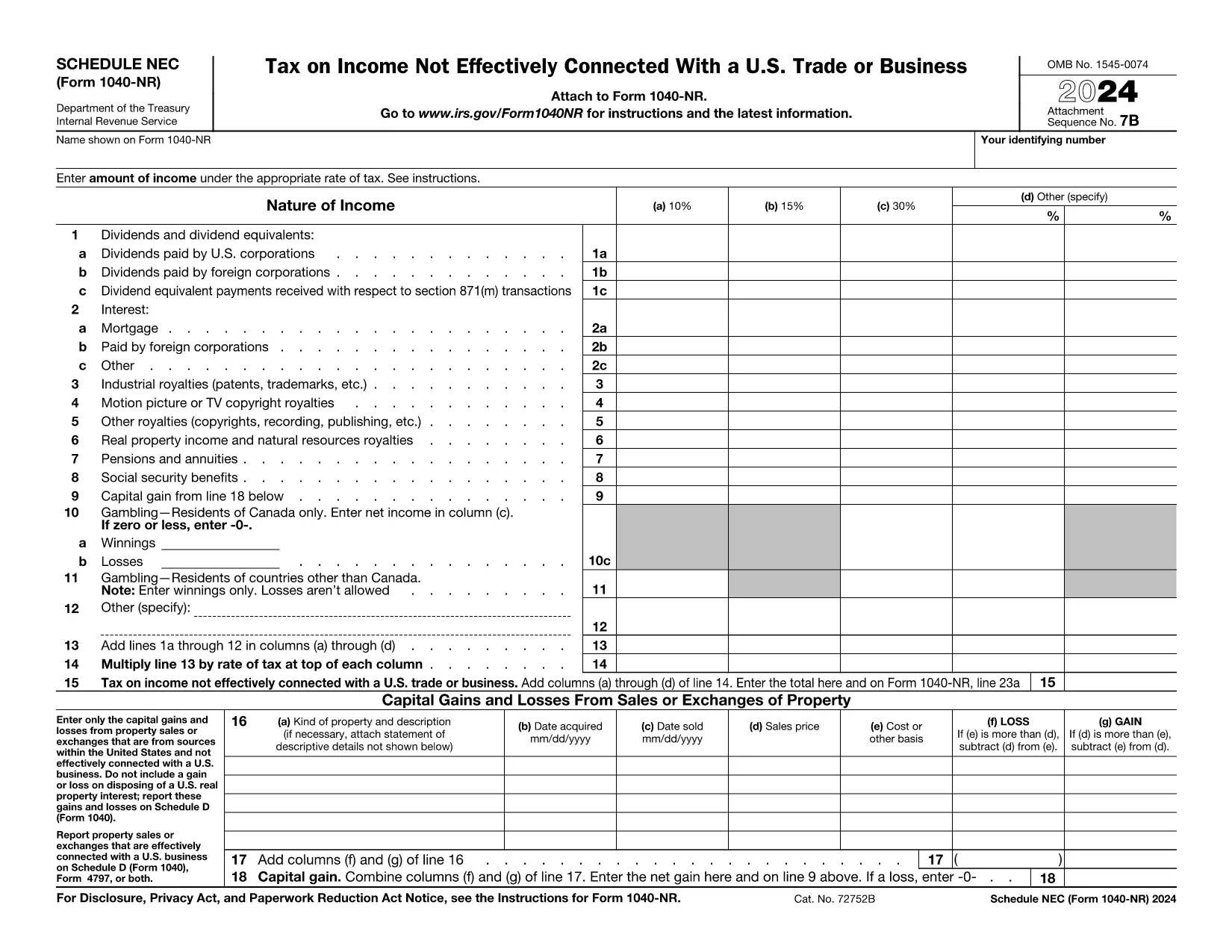
The Schedule NEC (SP) is the supplemental page attached to the Form 1040‑NR that reports income not effectively connected with a U.S. trade or business (non‑ECI). It is used by nonresident aliens to calculate the tax on U.S. source income such as dividends, interest, and certain capital gains.

This page lets you access a fillable PDF version of Schedule NEC (SP) that works directly with Formize’s online PDF Filler. No extra software is required – simply click the button, fill in your numbers, and download the completed form.

What Is Schedule NEC (SP)?

Schedule NEC (SP) separates taxable U.S. source income into three rate columns (10 %, 15 %, 30 % or a treaty‑adjusted rate). Each line corresponds to a specific type of income, allowing you to apply the correct withholding or treaty rate before the total is carried to Form 1040‑NR.

How to Fill Out Schedule NEC (SP) Online

Using Formize’s PDF filler, the process is streamlined:

  • Enter your personal information at the top of the form.
  • Select the appropriate tax‑rate column for each income item.
  • Enter the dollar amount for each line (dividends, interest, royalties, etc.).
  • The filler automatically totals each column and calculates the overall tax liability.
  • Save or download the completed PDF to attach to your Form 1040‑NR filing.

Common Mistakes to Avoid

  • Mixing ECI with non‑ECI income: Only non‑effectively connected items belong on Schedule NEC.
  • Using the wrong tax‑rate column: Verify treaty rates before selecting columns (a‑d).
  • Leaving lines blank: Even a $0 entry should be entered to keep the form complete.
  • Forgetting to attach Schedule NEC to Form 1040‑NR: The Schedule is not filed separately.

Where to Find Tax Treaty Information

The IRS maintains a list of current U.S. tax treaties. Visit the IRS Tax Treaties page to confirm the reduced rate or exemption that applies to your country of residence.

Download the Fillable PDF

Ready to start? Click the button below, let Formize load the fillable version of Schedule NEC (SP), and complete your non‑resident tax reporting in minutes.

Instruktioner

FAQ
  • Who must file Schedule NEC (SP) with Form 1040‑NR?

    Any nonresident alien who has U.S. source income that is not effectively connected with a U.S. trade or business must report that income on Schedule NEC (SP).

  • What is the difference between columns (a)–(d) on the schedule?

    Columns (a)–(c) represent the standard 10 %, 15 %, and 30 % tax rates. Column (d) is for a treaty‑adjusted rate or another special rate specified by a tax treaty.

  • Can I use the same PDF for the 2023 and 2024 tax years?

    The Schedule NEC layout changes only rarely. Verify the year on the PDF header; the linked fillable version is the most recent version available.

  • Do I need to attach supporting documents for each income line?

    Generally, you do not attach separate documents to Schedule NEC, but keep the source statements (e.g., 1099‑INT, 1099‑DIV) in case the IRS requests verification.

  • How do I know which treaty rate applies to me?

    Check the IRS “U.S. Tax Treaties” webpage for the treaty between the United States and your country of residence. The treaty will specify reduced rates or exemptions for each type of income.

  • Is the fillable PDF compatible with Mac and Windows?

    Yes. Formize’s online filler works in all modern browsers on macOS, Windows, and Linux without additional software.

HUR

Så här fyller du i Form 1040-NR Schedule NEC gratis, online i 5 enkla steg:

  1. 1
    Open the Fillable Form
    Click the “Fill out this form” button on the page. The Formize PDF Filler will open in a new window.
  2. 2
    Wait for the Filler to Load
    A brief loading screen appears while the fillable PDF is prepared. This only takes a few seconds.
  3. 3
    Enter Your Information
    Type your personal details and income amounts directly into the fields. The filler automatically formats numbers and totals columns.
  4. 4
    Review and Save
    Double‑check all entries, then click “Save” or “Download” to obtain the completed Schedule NEC (SP) PDF.
  5. 5
    Attach to Form 1040‑NR
    Print or electronically attach the finished Schedule NEC to your Form 1040‑NR when filing your U.S. nonresident tax return.
Formize PDF Filler app
HANDLA OM

Skatteformulär

Form 1040-NR Schedule NEC är ett av skatteformulären som är dokument som används för att rapportera information om skatter till relevant skattemyndighet. Det finns olika typer av skatteformulär, inklusive federala, statliga och lokala skatteformulär, som kan variera beroende på skattebetalarens omständigheter och plats.

FUNKTIONER

PDF-fyllare

Det enklaste sättet att fylla i Form 1040-NR Schedule NEC online

  • Fyll snabbt i Form 1040-NR Schedule NEC
    Letar du efter ett sätt att snabbt fylla Form 1040-NR Schedule NEC online? Med vår online gratis PDF-formulärfyllare vet du hur du redigerar och fyller i detta pdf-dokument på mindre än en minut.
  • Lätt att använda online PDF-redigerare
    Är du trött på att skriva ut PDF-filer så att du kan redigera dem innan du skannar om och skickar tillbaka dem? Redigera PDF-dokument gratis online. Använd vår online pdf-redigerare för att spara tid och papper.
  • Bra verktyg, alla plattformar
    Undrar du hur man fyller i Form 1040-NR Schedule NEC på en Mac, eller kanske hur man använder ett PDF-fyllmedel gratis? Våra online PDF-verktyg fungerar på alla plattformar.
  • Säker fillagring
    Färdiga "Form 1040-NR Schedule NEC"-filer lagras i en säker databas som hanteras av Amazon Cloud-hosting. Du kan ta bort dina filer från vårt system när som helst. I alla fall raderas dessa filer automatiskt efter 24 timmar.
  • Chatta med Form 1040-NR Schedule NEC
    Chatta med "Form 1040-NR Schedule NEC" på Chatize som är en gratis PDF-läsare. Ställ frågor och få svar från "Form 1040-NR Schedule NEC". Klicka bara på knappen Chatta med dokument ovan.

Ta bort fyllningssession

Ta bort den valda fyllningssessionen? I det här fallet kommer dina framsteg i att fylla i formuläret att gå förlorade.

Ta bort redigeringssession

Vill du ta bort den valda redigeringssessionen? I det här fallet kommer dina framsteg i att skapa och redigera formuläret att gå förlorade.