
Välj språk

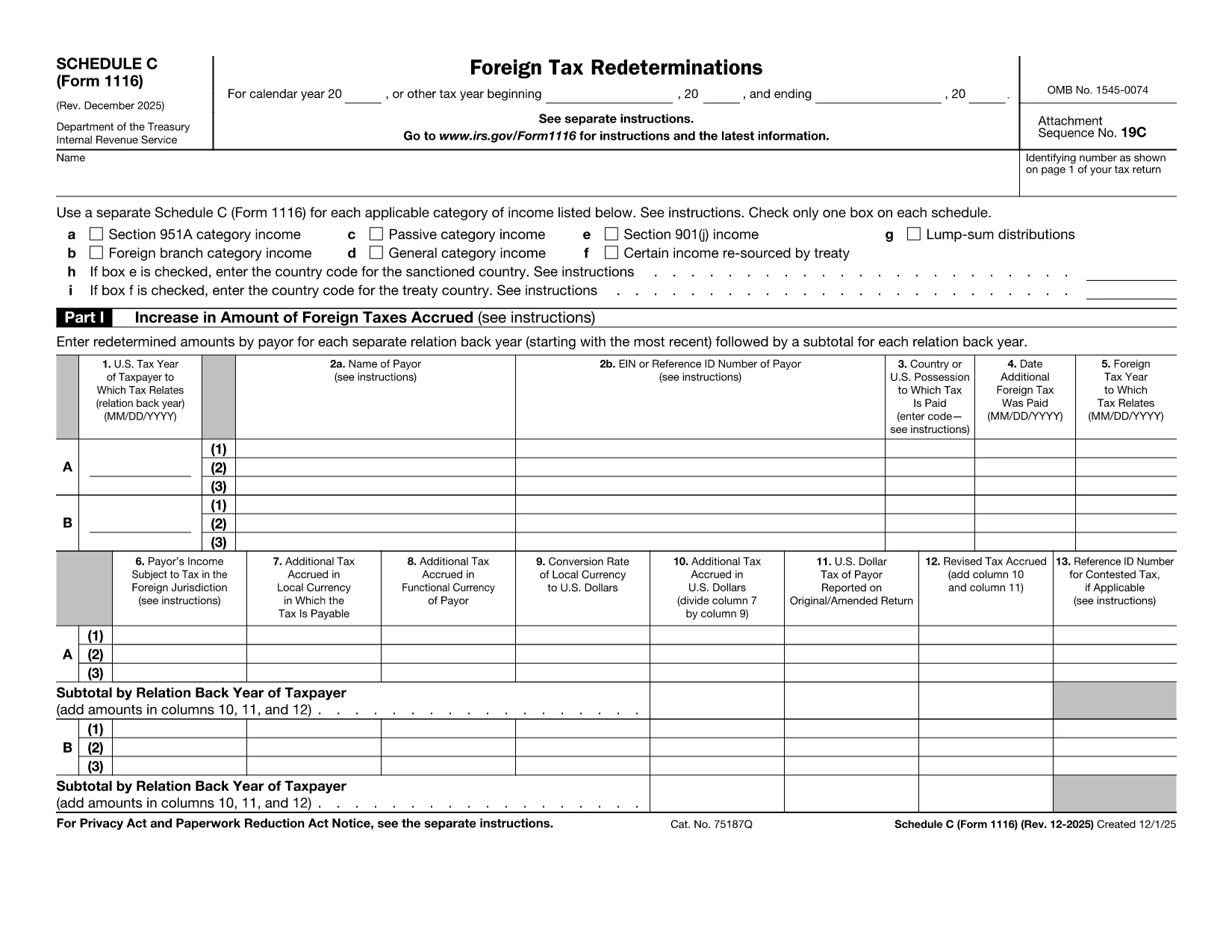
Form 1116 Schedule C – Fillable PDF for Foreign Tax Credit

  1. Land USA
  2. Språk engelsk
  3. Aktivitet Skatter
  4. Avdelning Internal Revenue Service
Form 1116 Schedule C – Fillable PDF for Foreign Tax Credit

Form 1116 Schedule C is the supplemental worksheet used with the IRS Form 1116 to report foreign tax redeterminations and adjustments. Taxpayers who receive refunds, credits, or other changes to foreign taxes must complete this schedule to keep the Foreign Tax Credit accurate.

Our fillable PDF version is fully compatible with the Formize PDF Filler app, letting you fill, sign, and download the completed form without printing a single page.

What Is Form 1116 Schedule C?

Schedule C captures any redetermination of foreign tax amounts after the original Form 1116 was filed. Typical scenarios include:

  • Receiving a refund from a foreign government.
  • Amending a prior year foreign tax credit claim.
  • Adjusting foreign tax credits for an Alternative Minimum Tax (AMT) calculation.

How to Complete the Fillable PDF Online

Instead of downloading the PDF and opening a separate editor, simply click the "Fill out this form" button on this page. The Formize PDF Filler app will load, and you can:

  1. Enter your personal information and tax year.
  2. Provide the original foreign tax amount and the new corrected amount.
  3. Check the appropriate boxes for regular or AMT calculations.
  4. Save, preview, and download the completed Schedule C.

Common Mistakes to Avoid

  • Skipping the box for the correct tax year. Each Schedule C must match the year of the original Form 1116.
  • Leaving the "Refund" or "Additional Tax" fields blank. Even a $0 entry should be entered to avoid IRS processing delays.
  • Using the wrong Schedule version. The Schedule C for 2022‑2023 is the one linked below; older versions may be rejected.

Where to Find Help and Resources

For detailed instructions, see the IRS instructions that accompany Form 1116. If you need clarification on foreign tax credit rules, consult a qualified tax professional or refer to IRS Publication 514.

Instruktioner

FAQ
  • Do I need to file Schedule C with every Form 1116?

    Only file Schedule C when you have a foreign tax redetermination—such as a refund, credit, or AMT adjustment—after the original Form 1116 was submitted.

  • Can I use the same Schedule C for multiple tax years?

    No. Each Schedule C must correspond to the specific tax year of the original Form 1116. Use the version dated for that year.

  • Is the fillable PDF version legally acceptable?

    Yes. The IRS accepts electronically completed PDF worksheets as long as they are legible, signed (if required), and attached to the appropriate tax return.

  • What if I made an error after submitting the Schedule C?

    You can file an amended Schedule C along with an amended Form 1116 (Form 1040X) to correct any mistakes.

  • Do I need a tax professional to complete Schedule C?

    While many taxpayers can complete it themselves, complex foreign tax situations often benefit from professional guidance to ensure the credit is calculated correctly.

  • How long should I keep a copy of Schedule C?

    Retain the completed Schedule C and supporting documentation for at least seven years, the same period the IRS may audit foreign tax credit claims.

HUR

Så här fyller du i Form 1116 Schedule C gratis, online i 5 enkla steg:

  1. 1
    Open the Fillable Form
    Click the "Fill out this form" button on the page. The Formize PDF Filler app will launch in your browser.
  2. 2
    Enter Your Information
    Fill in the taxpayer name, SSN, tax year, and the original foreign tax amount as shown on your original Form 1116.
  3. 3
    Record the Redetermination
    Enter the corrected foreign tax amount, select whether it is a refund or additional tax, and indicate if the AMT version is required.
  4. 4
    Review and Save
    Use the preview feature to verify all entries, then click "Save & Download" to obtain the completed Schedule C PDF.
  5. 5
    Attach to Your Return
    Include the saved Schedule C with your amended Form 1116 when filing with the IRS.
Formize PDF Filler app
HANDLA OM

Federala skatteformulär

Form 1116 Schedule C är ett av federala skatteformulär som är dokument som används för att rapportera och lämna in federal inkomstskatt till Internal Revenue Service (IRS) i USA. Dessa formulär används av individer, företag och organisationer för att rapportera sina inkomster, avdrag och annan relevant information som behövs för att beräkna deras federala skatteskuld.

Det vanligaste federala skatteformuläret är formulär 1040, som används av enskilda skattebetalare för att rapportera sin personliga inkomstskatt. Andra vanliga formulär inkluderar formulär 1065 för partnerskap, formulär 1120 för företag och formulär 990 för skattebefriade organisationer.

Federala skatteformulär kräver vanligtvis att skattebetalarna rapporterar olika inkomstkällor, såsom löner, löner och tips, såväl som inkomster från investeringar, hyresfastigheter och andra källor. Blanketterna tillåter också skattebetalare att kräva avdrag och krediter för olika utgifter, såsom välgörenhetsbidrag, ränta på bolån och sjukvårdskostnader.

Det är viktigt att lämna in federala skatteformulär korrekt och i tid, eftersom underlåtenhet att göra det kan resultera i straffavgifter och ränteavgifter från IRS.

FUNKTIONER

PDF-fyllare

Det enklaste sättet att fylla i Form 1116 Schedule C online

  • Fyll snabbt i Form 1116 Schedule C
    Letar du efter ett sätt att snabbt fylla Form 1116 Schedule C online? Med vår online gratis PDF-formulärfyllare vet du hur du redigerar och fyller i detta pdf-dokument på mindre än en minut.
  • Lätt att använda online PDF-redigerare
    Är du trött på att skriva ut PDF-filer så att du kan redigera dem innan du skannar om och skickar tillbaka dem? Redigera PDF-dokument gratis online. Använd vår online pdf-redigerare för att spara tid och papper.
  • Bra verktyg, alla plattformar
    Undrar du hur man fyller i Form 1116 Schedule C på en Mac, eller kanske hur man använder ett PDF-fyllmedel gratis? Våra online PDF-verktyg fungerar på alla plattformar.
  • Säker fillagring
    Färdiga "Form 1116 Schedule C"-filer lagras i en säker databas som hanteras av Amazon Cloud-hosting. Du kan ta bort dina filer från vårt system när som helst. I alla fall raderas dessa filer automatiskt efter 24 timmar.
  • Chatta med Form 1116 Schedule C
    Chatta med "Form 1116 Schedule C" på Chatize som är en gratis PDF-läsare. Ställ frågor och få svar från "Form 1116 Schedule C". Klicka bara på knappen Chatta med dokument ovan.

Ta bort fyllningssession

Ta bort den valda fyllningssessionen? I det här fallet kommer dina framsteg i att fylla i formuläret att gå förlorade.

Ta bort redigeringssession

Vill du ta bort den valda redigeringssessionen? I det här fallet kommer dina framsteg i att skapa och redigera formuläret att gå förlorade.