Välj språk

Form 1120-F Schedule V – Fillable PDF

  1. Land USA
  2. Språk engelsk
  3. Aktivitet Skatter
  4. Avdelning Internal Revenue Service
Form 1120-F Schedule V – Fillable PDF

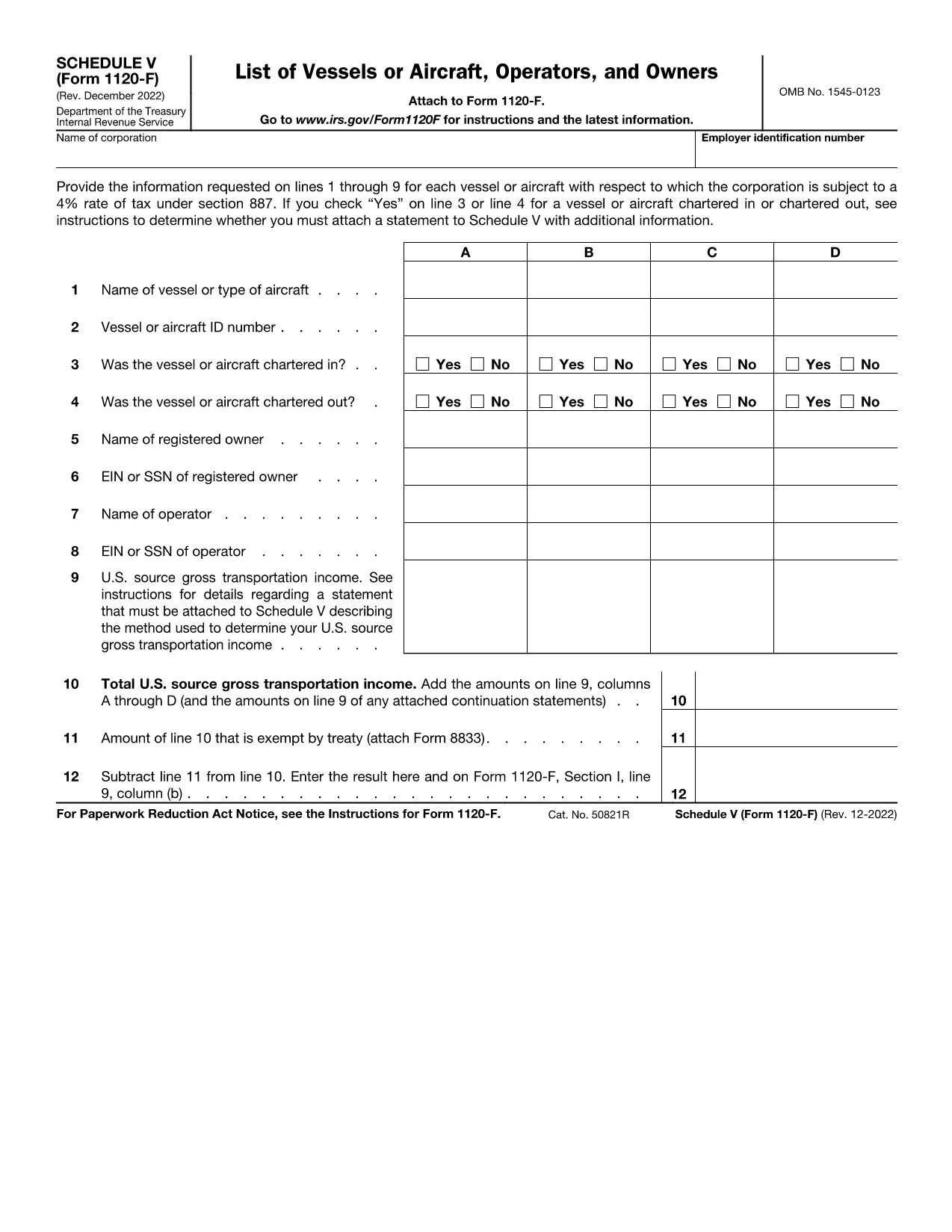
Schedule V (Form 1120-F) is the supplemental schedule used by foreign corporations to report vessel or aircraft activities that are subject to the 4% tax rate under IRC §887. If your corporation owns, charters, or operates any qualifying vessel or aircraft, you must fill out lines 1‑9 for each asset.

What Is Schedule V?

Schedule V captures detailed information about each vessel or aircraft, including identification numbers, charter status, and the amount of tax owed. The IRS requires this schedule to be attached to Form 1120-F when the 4% tax applies.

How to Complete Schedule V Online

With Formize’s fillable PDF, you can complete Schedule V directly in your browser—no download‑edit‑upload cycle needed. Simply click the "Fill out this form" button, wait for the Formize PDF Filler app to load, and start entering your data.

  • Enter the vessel or aircraft name and identification number.
  • Indicate whether the asset was chartered in, chartered out, or both.
  • Provide the tax‑calculating figures for each line as instructed.
  • Review the completed schedule and use the built‑in validation to catch common errors.

Common Mistakes to Avoid

Even experienced filers slip up. Keep an eye on these frequent errors:

  • Leaving line 3 or line 4 blank when a charter exists.
  • Entering the wrong vessel identification number (e.g., IMO vs. registration).
  • Mis‑calculating the 4% tax amount—use the Formize calculator for accuracy.
  • Forgetting to attach an additional statement when the schedule requires it.

Where to Submit Your Completed Form

After you’ve saved the filled Schedule V, attach it to your Form 1120-F filing. Submit the combined package to the IRS address listed in the Form 1120-F instructions or upload it through the IRS e‑file system if you’re filing electronically.

Need a printable copy? The fillable PDF also offers a Download button so you can keep a hard copy for your records.

Instruktioner

FAQ
  • What is the purpose of Schedule V on Form 1120-F?

    Schedule V reports vessel or aircraft activities that trigger the 4% foreign corporation tax under IRC §887. It must be attached to Form 1120‑F when applicable.

  • Can I fill out Schedule V directly in my browser?

    Yes. Using Formize’s fillable PDF, you can complete Schedule V online without downloading any software.

  • Do I need to attach a separate statement if I answer “Yes” on line 3 or 4?

    If you answer “Yes” to chartering in or out, the IRS instructions require an additional statement with more details. The Formize app provides a template you can fill and attach.

  • Is the fillable PDF version the same as the IRS paper form?

    The fillable PDF is an exact replica of the IRS Schedule V (Form 1120‑F) with interactive fields, ensuring compliance with the official format.

  • How do I submit the completed Schedule V with my Form 1120-F?

    Attach the saved PDF to your Form 1120‑F filing and submit it either by mail to the IRS address in the instructions or electronically through the IRS e‑file system.

  • What if I make a mistake after submitting?

    You can file an amended Form 1120‑F with a corrected Schedule V. Keep a copy of the original filing for reference.

HUR

Så här fyller du i Form 1120-F Schedule V gratis, online i 4 enkla steg:

  1. 1
    Open the Fillable Form
    Click the “Fill out this form” button on the page. The Formize PDF Filler app will load in your browser.
  2. 2
    Enter Vessel or Aircraft Details
    Fill in each line (1‑9) with the required information, such as identification numbers and charter status.
  3. 3
    Validate and Review
    Use the built‑in validation to check for missing fields or calculation errors. Correct any issues before saving.
  4. 4
    Save or Download
    When finished, click “Save” to store the completed Schedule V in your Formize account, or click “Download” to get a PDF copy for printing or offline filing.
Formize PDF Filler app
HANDLA OM

Blanketter för Internal Revenue Service (IRS).

Form 1120-F Schedule V är ett av de officiella skatteformulären som används i USA för att rapportera inkomster, kräva avdrag och krediter, beräkna skatteskuld och uppfylla andra skatterelaterade skyldigheter. IRS är det federala organ som ansvarar för att administrera och upprätthålla de interna skattelagarna i USA.

Här är några exempel på Internal Revenue Service-formulär:

Formulär 1040: Detta är det primära individuella inkomstdeklarationsformuläret som används av de flesta skattebetalare. Den används för att redovisa olika typer av inkomster, kräva avdrag och krediter, beräkna skattskyldighet och avgöra om en skattskyldig är skyldig tilläggsskatt eller har rätt till återbetalning.

Formulär 1099: Det finns olika varianter av Form 1099, till exempel 1099-MISC, 1099-INT, 1099-DIV, etc. Dessa formulär används för att rapportera inkomster som privatpersoner eller företag tagit emot från olika källor än anställning, till exempel egenföretagare inkomst, ränteintäkter, utdelningsinkomster och hyresintäkter.

Formulär W-2: Detta formulär används av arbetsgivare för att rapportera löner som betalats ut till anställda och skatter undanhållit sin lön. Anställda använder informationen på formulär W-2 för att fylla i sina individuella skattedeklarationer.

Formulär 941: Arbetsgivare använder detta formulär för att rapportera anställningsskatter, inklusive federal inkomstskatt, socialförsäkringsskatt och Medicare-skatt, för sina anställda.

Formulär 1065: Detta formulär används av partnerskap för att rapportera sina inkomster, avdrag och skatteskuld. Partnerskap själva betalar inte inkomstskatt; i stället redovisar delägarna sin andel av partnerskapsinkomsten på sina individuella deklarationer.

Formulär 1120: Detta är formuläret för företagsskattedeklaration som används av C-företag för att rapportera sin inkomst, avdrag och skattskyldighet.

Formulär 990: Detta formulär används av skattebefriade organisationer, såsom ideella organisationer och välgörenhetsorganisationer, för att rapportera sin ekonomiska information, aktiviteter och efterlevnad av skattelagar.

Formulär 8862: Detta formulär används av skattebetalare som tidigare gjort anspråk på inkomstskatteavdraget (EITC) men fick det förkastat och vill nu göra anspråk på det igen.

Detta är bara några exempel på de många IRS-formulär som finns för att uppfylla olika skatterelaterade skyldigheter. De specifika formulär som krävs för en individ eller företag beror på deras unika omständigheter, inkomstkällor och avdrag. Det är tillrådligt att konsultera den officiella webbplatsen för Internal Revenue Service (www.irs.gov) eller söka professionell skatterådgivning för att få korrekt och uppdaterad information om den specifika IRS formulär som är relevanta för din skattesituation.

FUNKTIONER

PDF-fyllare

Det enklaste sättet att fylla i Form 1120-F Schedule V online

  • Fyll snabbt i Form 1120-F Schedule V
    Letar du efter ett sätt att snabbt fylla Form 1120-F Schedule V online? Med vår online gratis PDF-formulärfyllare vet du hur du redigerar och fyller i detta pdf-dokument på mindre än en minut.
  • Lätt att använda online PDF-redigerare
    Är du trött på att skriva ut PDF-filer så att du kan redigera dem innan du skannar om och skickar tillbaka dem? Redigera PDF-dokument gratis online. Använd vår online pdf-redigerare för att spara tid och papper.
  • Bra verktyg, alla plattformar
    Undrar du hur man fyller i Form 1120-F Schedule V på en Mac, eller kanske hur man använder ett PDF-fyllmedel gratis? Våra online PDF-verktyg fungerar på alla plattformar.
  • Säker fillagring
    Färdiga "Form 1120-F Schedule V"-filer lagras i en säker databas som hanteras av Amazon Cloud-hosting. Du kan ta bort dina filer från vårt system när som helst. I alla fall raderas dessa filer automatiskt efter 24 timmar.
  • Chatta med Form 1120-F Schedule V
    Chatta med "Form 1120-F Schedule V" på Chatize som är en gratis PDF-läsare. Ställ frågor och få svar från "Form 1120-F Schedule V". Klicka bara på knappen Chatta med dokument ovan.

Ta bort fyllningssession

Ta bort den valda fyllningssessionen? I det här fallet kommer dina framsteg i att fylla i formuläret att gå förlorade.

Ta bort redigeringssession

Vill du ta bort den valda redigeringssessionen? I det här fallet kommer dina framsteg i att skapa och redigera formuläret att gå förlorade.