
Välj språk

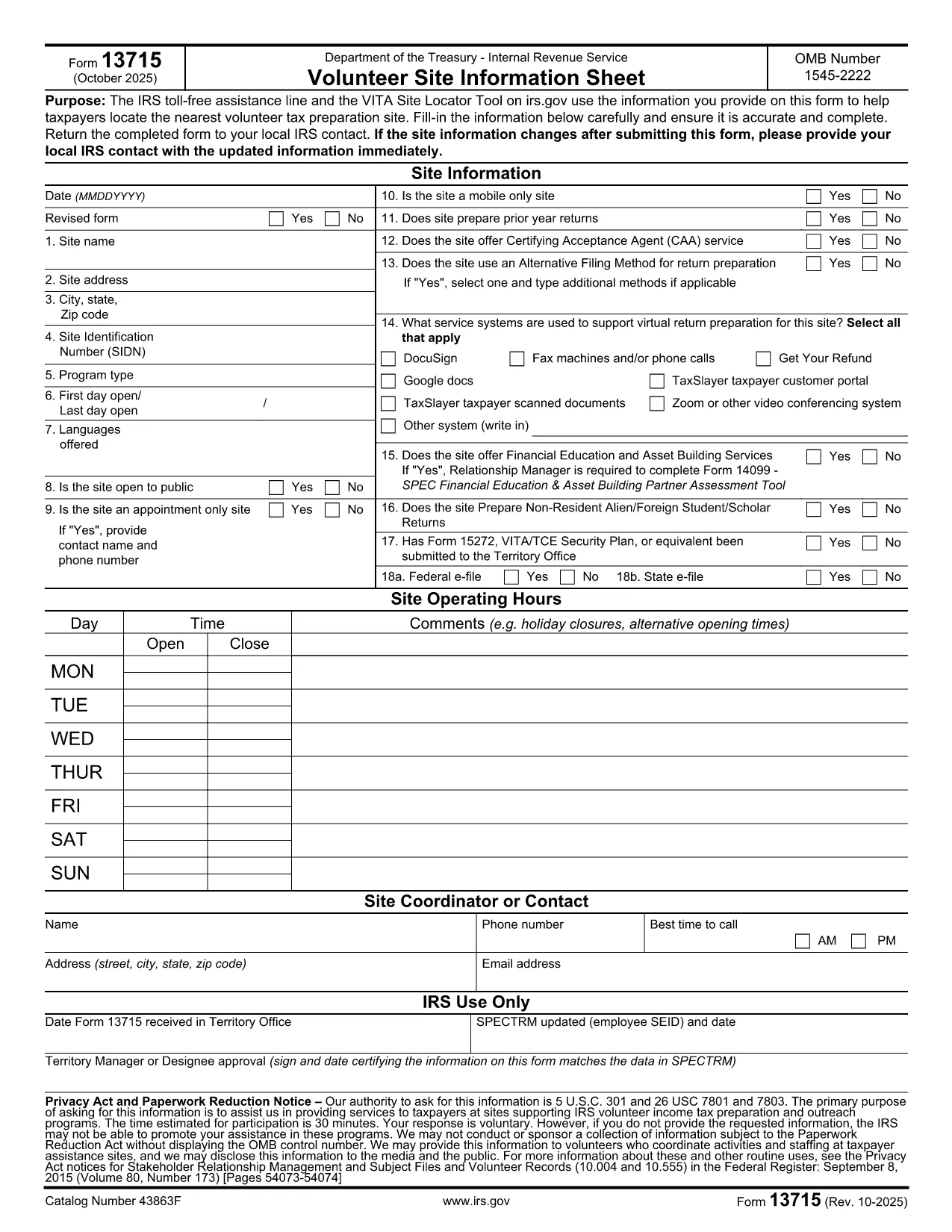
Form 13715 – Volunteer Site Information Sheet (Fillable PDF)

  1. Land USA
  2. Språk engelsk
  3. Aktivitet Skatter
  4. Avdelning Internal Revenue Service
Form 13715 – Volunteer Site Information Sheet (Fillable PDF)

The IRS Form 13715, also known as the Volunteer Site Information Sheet, is required for any organization that wants to be listed in the VITA (Volunteer Income Tax Assistance) Site Locator tool. This form collects essential contact and service details so taxpayers can easily find the nearest volunteer tax‑preparation site.

What Is Form 13715 and Who Needs It?

Form 13715 is issued by the Internal Revenue Service (IRS) and must be completed by:

  • Non‑profit organizations that host VITA or TCE (Tax Counseling for the Elderly) sites.
  • Community centers, libraries, churches, or any entity that provides free tax‑preparation services.

The information you provide helps the IRS toll‑free assistance line and the online site locator match taxpayers with the closest volunteer site.

How to Complete the Form Using Formize

Instead of downloading the PDF and opening it in a separate editor, simply click the "Fill out this form" button on this page. The Formize PDF Filler app will load instantly, allowing you to:

  1. Enter all required details directly in your browser.
  2. Save your progress automatically.
  3. Download a completed, IRS‑ready PDF with one click.

Common Mistakes & Tips

  • Missing phone number or email: The IRS requires at least one reliable contact method.
  • Incorrect zip code: Double‑check the ZIP to ensure the site appears in the correct geographic search.
  • Out‑of‑date service hours: Update hours each year to avoid confusion for taxpayers.

Review each field carefully before saving the final PDF.

Where to Submit the Completed Form

After you finish, print the filled‑in PDF and mail it to your local IRS VITA coordinator (address is provided on the form). Some regions also accept a scanned copy via email—check the instructions on the last page of the form.

FAQs About Form 13715

Below are quick answers to the most common questions (full FAQ list is also available further down the page).

FAQ
  • Do I need to print the form after filling it online?

    Yes. The IRS requires a hard‑copy signature on Form 13715 before it can be processed. Print the completed PDF, sign, and mail it.

  • Can I save a draft and finish later?

    Absolutely. Formize automatically saves your progress in the browser’s local storage. Return to the page later and continue where you left off.

  • Is there a fee to use Formize’s PDF filler?

    No. The fillable PDF tool is completely free for all IRS forms, including Form 13715.

  • What if I enter the wrong ZIP code?

    The site will not appear in the VITA locator for the intended area, and taxpayers may be directed elsewhere. Double‑check the ZIP before downloading.

  • How often should I update Form 13715?

    Update the form annually or whenever your contact information, service hours, or locations change.

  • Can I submit the form electronically?

    The IRS still requires a signed hard copy, but many regional VITA coordinators accept a scanned copy via email after the original is mailed.

  • Where can I find help if I have questions?

    Contact the IRS VITA hotline at 1‑800‑222‑2222 or reach out to your local IRS volunteer coordinator for assistance.

  • Is Form 13715 the same as Form 13614?

    No. Form 13715 collects site information for VITA locations, while Form 13614 is the IRS Individual Taxpayer Interview and used by volunteers to prepare returns.

HUR

Så här fyller du i Form 13715 gratis, online i 5 enkla steg:

  1. 1
    Click the Fill‑out Button
    Press the "Fill out this form" button on this page. The Formize PDF Filler loads directly in your browser—no download required.
  2. 2
    Enter Your Information
    Complete each field: organization name, contact details, service hours, and any special instructions. The form auto‑saves as you type.
  3. 3
    Review & Validate
    Use the built‑in validation to check for missing or incorrectly formatted entries. Correct any highlighted errors.
  4. 4
    Download the Completed PDF
    When all fields are filled, click the "Download PDF" button. You’ll receive an IRS‑ready, fillable PDF ready for printing or electronic submission.
  5. 5
    Submit to Your Local IRS Coordinator
    Print the PDF and mail it to the address listed on the last page, or follow any region‑specific email instructions.
Formize PDF Filler app
HANDLA OM

Skatteformulär

Form 13715 är ett av skatteformulären som är dokument som används för att rapportera information om skatter till relevant skattemyndighet. Det finns olika typer av skatteformulär, inklusive federala, statliga och lokala skatteformulär, som kan variera beroende på skattebetalarens omständigheter och plats.

FUNKTIONER

PDF-fyllare

Det enklaste sättet att fylla i Form 13715 online

  • Fyll snabbt i Form 13715
    Letar du efter ett sätt att snabbt fylla Form 13715 online? Med vår online gratis PDF-formulärfyllare vet du hur du redigerar och fyller i detta pdf-dokument på mindre än en minut.
  • Lätt att använda online PDF-redigerare
    Är du trött på att skriva ut PDF-filer så att du kan redigera dem innan du skannar om och skickar tillbaka dem? Redigera PDF-dokument gratis online. Använd vår online pdf-redigerare för att spara tid och papper.
  • Bra verktyg, alla plattformar
    Undrar du hur man fyller i Form 13715 på en Mac, eller kanske hur man använder ett PDF-fyllmedel gratis? Våra online PDF-verktyg fungerar på alla plattformar.
  • Säker fillagring
    Färdiga "Form 13715"-filer lagras i en säker databas som hanteras av Amazon Cloud-hosting. Du kan ta bort dina filer från vårt system när som helst. I alla fall raderas dessa filer automatiskt efter 24 timmar.
  • Chatta med Form 13715
    Chatta med "Form 13715" på Chatize som är en gratis PDF-läsare. Ställ frågor och få svar från "Form 13715". Klicka bara på knappen Chatta med dokument ovan.

Ta bort fyllningssession

Ta bort den valda fyllningssessionen? I det här fallet kommer dina framsteg i att fylla i formuläret att gå förlorade.

Ta bort redigeringssession

Vill du ta bort den valda redigeringssessionen? I det här fallet kommer dina framsteg i att skapa och redigera formuläret att gå förlorade.