
Välj språk

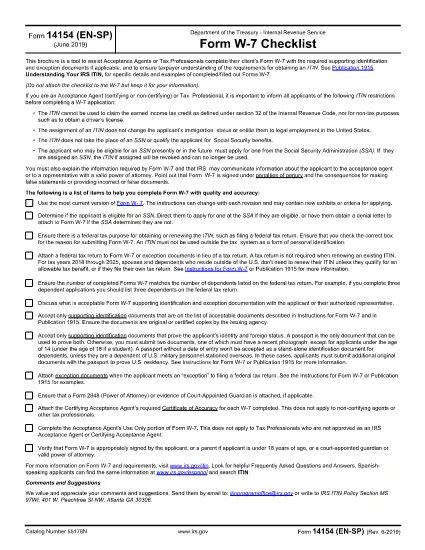
Form 14154 (EN‑SP) Fillable PDF – Bilingual ITIN Checklist

  1. Land USA
  2. Språk engelsk spanska
  3. Aktivitet Skatter
  4. Avdelning Internal Revenue Service
Form 14154 (EN‑SP) Fillable PDF – Bilingual ITIN Checklist

Form 14154 (EN‑SP) is the IRS’s bilingual checklist that helps Acceptance Agents and tax professionals gather the required documents for an Individual Taxpayer Identification Number (ITIN). The English‑Spanish version simplifies the process for clients who prefer either language.

With Formize you can fill this form directly in your browser—no extra software needed. Just click the “Fill out this form” button, wait for the Formize PDF Filler to load, and start entering information. When you’re done, download the completed PDF and attach it to your client’s ITIN application.

What Is Form 14154 (EN‑SP)?

This checklist ensures that every required identification document and exception proof is accounted for before the ITIN application is submitted. It is especially useful for Acceptance Agents who need to verify client understanding in both English and Spanish.

How to Complete the Form Online

Follow these simple steps:

  • Click the “Fill out this form” button on the page.
  • Wait for the Formize PDF Filler app to load (a few seconds).
  • Enter the client’s details in the fillable fields.
  • Upload scanned copies of identification documents directly within the filler.
  • Review, save, and download the completed PDF.

Common Mistakes & Tips

Don’t forget: every required document must be attached, and the client’s signature must be legible. Double‑check the “Document Type” column to avoid mismatches. Using the online filler reduces the risk of missing fields because required fields are highlighted in real time.

Download the Official PDF

If you prefer the original IRS version, you can download it directly from the link below. The Formize filler uses this exact file, so the layout remains unchanged.

Download Form 14154 (EN‑SP) PDF

Where to Submit the Form

After completing the checklist, attach it to the ITIN application (Form W‑7) and send the package to the IRS Acceptance Agent or directly to the IRS address listed in the Form W‑7 instructions.

FAQ
  • What is the purpose of Form 14154 (EN‑SP)?

    It is a bilingual checklist that helps Acceptance Agents verify that all required identification documents are included with an ITIN application.

  • Do I need to print the form before filling it out?

    No. With Formize you can fill the PDF online and download the completed version directly to your computer.

  • Can I use the Spanish version if I only speak English?

    Yes. The form includes both English and Spanish fields side by side, so you can work in either language.

  • Is the Formize filler free for this form?

    Filling out Form 14154 on Formize is free. You only pay if you need additional premium features, which are optional.

  • What common errors should I avoid?

    Missing signatures, mismatched document types, and leaving required fields blank are the most frequent mistakes. The online filler highlights these issues before you download.

  • Where do I send the completed checklist?

    Attach it to Form W‑7 and submit the packet to an IRS Acceptance Agent or mail it to the IRS address provided in the W‑7 instructions.

  • Is the PDF version on Formize identical to the IRS version?

    Yes. Formize uses the exact IRS PDF (f14154es.pdf) so the layout and numbering remain unchanged.

HUR

Så här fyller du i Form 14154 gratis, online i 5 enkla steg:

  1. 1
    Click the Fill Button
    Press the “Fill out this form” button on this page to launch the Formize PDF Filler.
  2. 2
    Wait for the Filler to Load
    The web app loads the official PDF in a few seconds; a loading spinner will appear.
  3. 3
    Enter Information
    Fill each highlighted field with the client’s data. Required fields are marked in red.
  4. 4
    Upload Supporting Documents
    Use the upload icons to attach scans of passports, birth certificates, or other IDs.
  5. 5
    Save and Download
    When all fields are complete, click “Save & Download” to get the finished PDF ready for submission.
Formize PDF Filler app
HANDLA OM

Skatteformulär

Form 14154 är ett av skatteformulären som är dokument som används för att rapportera information om skatter till relevant skattemyndighet. Det finns olika typer av skatteformulär, inklusive federala, statliga och lokala skatteformulär, som kan variera beroende på skattebetalarens omständigheter och plats.

FUNKTIONER

PDF-fyllare

Det enklaste sättet att fylla i Form 14154 online

  • Fyll snabbt i Form 14154
    Letar du efter ett sätt att snabbt fylla Form 14154 online? Med vår online gratis PDF-formulärfyllare vet du hur du redigerar och fyller i detta pdf-dokument på mindre än en minut.
  • Lätt att använda online PDF-redigerare
    Är du trött på att skriva ut PDF-filer så att du kan redigera dem innan du skannar om och skickar tillbaka dem? Redigera PDF-dokument gratis online. Använd vår online pdf-redigerare för att spara tid och papper.
  • Bra verktyg, alla plattformar
    Undrar du hur man fyller i Form 14154 på en Mac, eller kanske hur man använder ett PDF-fyllmedel gratis? Våra online PDF-verktyg fungerar på alla plattformar.
  • Säker fillagring
    Färdiga "Form 14154"-filer lagras i en säker databas som hanteras av Amazon Cloud-hosting. Du kan ta bort dina filer från vårt system när som helst. I alla fall raderas dessa filer automatiskt efter 24 timmar.
  • Chatta med Form 14154
    Chatta med "Form 14154" på Chatize som är en gratis PDF-läsare. Ställ frågor och få svar från "Form 14154". Klicka bara på knappen Chatta med dokument ovan.

Ta bort fyllningssession

Ta bort den valda fyllningssessionen? I det här fallet kommer dina framsteg i att fylla i formuläret att gå förlorade.

Ta bort redigeringssession

Vill du ta bort den valda redigeringssessionen? I det här fallet kommer dina framsteg i att skapa och redigera formuläret att gå förlorade.