
Välj språk

IRS Form 14157‑A (SP) – Fillable PDF

  1. Land USA
  2. Språk spanska
  3. Aktivitet Skatter
  4. Avdelning Internal Revenue Service
IRS Form 14157‑A (SP) – Fillable PDF

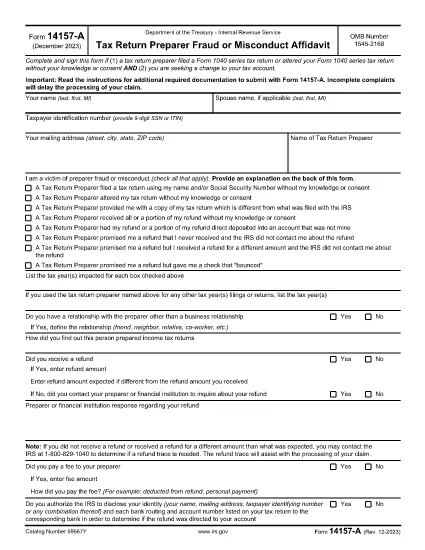
Form 14157‑A (SP) is the IRS’s official affidavit used to report fraud, misconduct, or other serious issues involving a tax return preparer. The “(SP)” designation indicates the Spanish‑language version of the form, but the same filing requirements apply to all taxpayers.

What Is Form 14157‑A (SP)?

This form must be submitted together with Form 14157 and any supporting documentation referenced in the instructions. It provides the IRS with detailed information about the alleged misconduct, allowing the agency to investigate and take corrective action.

How to Complete the Fillable PDF on Formize

Instead of downloading the PDF and opening it in a separate editor, you can fill it out directly on our site:

  1. Click the **"Fill out this form"** button below.
  2. Wait a few seconds while the Formize PDF Filler app loads.
  3. Enter all required information in the highlighted fields.
  4. Upload or draw your electronic signature in the signature field.
  5. Review the completed form for accuracy, then click **Submit** to download the signed PDF.

Common Mistakes to Avoid

  • Leaving fields blank: Every required field must be completed; otherwise the IRS will reject the form.
  • Incorrect SSN or EIN: Double‑check numbers to prevent processing delays.
  • Missing signature: The form must be signed under penalty of perjury. Use the built‑in e‑signature tool.
  • Failing to attach supporting documents: Include copies of any notices, letters, or evidence referenced in the affidavit.

Where to Send Your Completed Form

After you download the signed PDF, mail it to the address listed in the official Form 14157‑A instructions. The address varies by state, so be sure to consult the latest IRS guidance before sending.

Key Keywords for Quick Reference

Use these terms when searching for help or additional resources:

  • IRS Form 14157‑A
  • tax preparer fraud affidavit
  • fill‑able 14157‑A PDF
  • Spanish form 14157‑A
  • IRS fraud reporting form
  • electronic signature IRS form

Ready to start? Click the button below to open the fillable version instantly.

FAQ
  • Do I need to file Form 14157‑A if I’m not sure the preparer committed fraud?

    Only file the form when you have concrete evidence or a strong belief that a preparer engaged in fraud, misconduct, or willful non‑compliance. Unsubstantiated claims may delay investigations.

  • Can I submit the form electronically?

    The IRS currently requires a printed, signed copy mailed to the appropriate address. However, you can use the fillable PDF to ensure accuracy before printing.

  • What supporting documents should I attach?

    Attach any IRS notices, correspondence, receipts, or other evidence that supports your claim. Clearly label each attachment.

  • Is the Spanish version (SP) any different from the English version?

    The content and required information are identical; only the language of the instructions and field labels changes.

  • How long does the IRS take to respond?

    Response times vary. The IRS typically acknowledges receipt within 30 days, but investigations can take several months depending on complexity.

  • What penalties exist for filing a false affidavit?

    Providing false information under penalty of perjury can result in criminal charges, fines, and possible imprisonment.

  • Do I need a tax professional to help me fill out Form 14157‑A?

    While not required, a tax professional can help ensure accuracy, especially if the case involves complex issues.

HUR

Så här fyller du i IRS Form 14157-A gratis, online i 5 enkla steg:

  1. 1
    Open the Fillable Form
    Click the "Fill out this form" button on the page. The Formize PDF Filler will open in a new window.
  2. 2
    Load the Form
    Wait a few seconds while the fillable PDF loads completely.
  3. 3
    Enter Your Information
    Complete each highlighted field with accurate data, including SSN, tax year, and details of the alleged misconduct.
  4. 4
    Add an Electronic Signature
    Use the built‑in e‑signature tool to sign under penalty of perjury.
  5. 5
    Download and Submit
    Review the form, then click "Submit" to download the signed PDF. Mail it to the IRS address shown in the official instructions.
Formize PDF Filler app
HANDLA OM

Skatteformulär

IRS Form 14157-A är ett av skatteformulären som är dokument som används för att rapportera information om skatter till relevant skattemyndighet. Det finns olika typer av skatteformulär, inklusive federala, statliga och lokala skatteformulär, som kan variera beroende på skattebetalarens omständigheter och plats.

FUNKTIONER

PDF-fyllare

Det enklaste sättet att fylla i IRS Form 14157-A online

  • Fyll snabbt i IRS Form 14157-A
    Letar du efter ett sätt att snabbt fylla IRS Form 14157-A online? Med vår online gratis PDF-formulärfyllare vet du hur du redigerar och fyller i detta pdf-dokument på mindre än en minut.
  • Lätt att använda online PDF-redigerare
    Är du trött på att skriva ut PDF-filer så att du kan redigera dem innan du skannar om och skickar tillbaka dem? Redigera PDF-dokument gratis online. Använd vår online pdf-redigerare för att spara tid och papper.
  • Bra verktyg, alla plattformar
    Undrar du hur man fyller i IRS Form 14157-A på en Mac, eller kanske hur man använder ett PDF-fyllmedel gratis? Våra online PDF-verktyg fungerar på alla plattformar.
  • Säker fillagring
    Färdiga "IRS Form 14157-A"-filer lagras i en säker databas som hanteras av Amazon Cloud-hosting. Du kan ta bort dina filer från vårt system när som helst. I alla fall raderas dessa filer automatiskt efter 24 timmar.
  • Chatta med IRS Form 14157-A
    Chatta med "IRS Form 14157-A" på Chatize som är en gratis PDF-läsare. Ställ frågor och få svar från "IRS Form 14157-A". Klicka bara på knappen Chatta med dokument ovan.

Ta bort fyllningssession

Ta bort den valda fyllningssessionen? I det här fallet kommer dina framsteg i att fylla i formuläret att gå förlorade.

Ta bort redigeringssession

Vill du ta bort den valda redigeringssessionen? I det här fallet kommer dina framsteg i att skapa och redigera formuläret att gå förlorade.