
Välj språk

IRS Form 4136 – Fillable PDF for Fuel Tax Credits

  1. Land USA
  2. Språk engelsk
  3. Aktivitet Skatter
  4. Avdelning Internal Revenue Service
IRS Form 4136 – Fillable PDF for Fuel Tax Credits

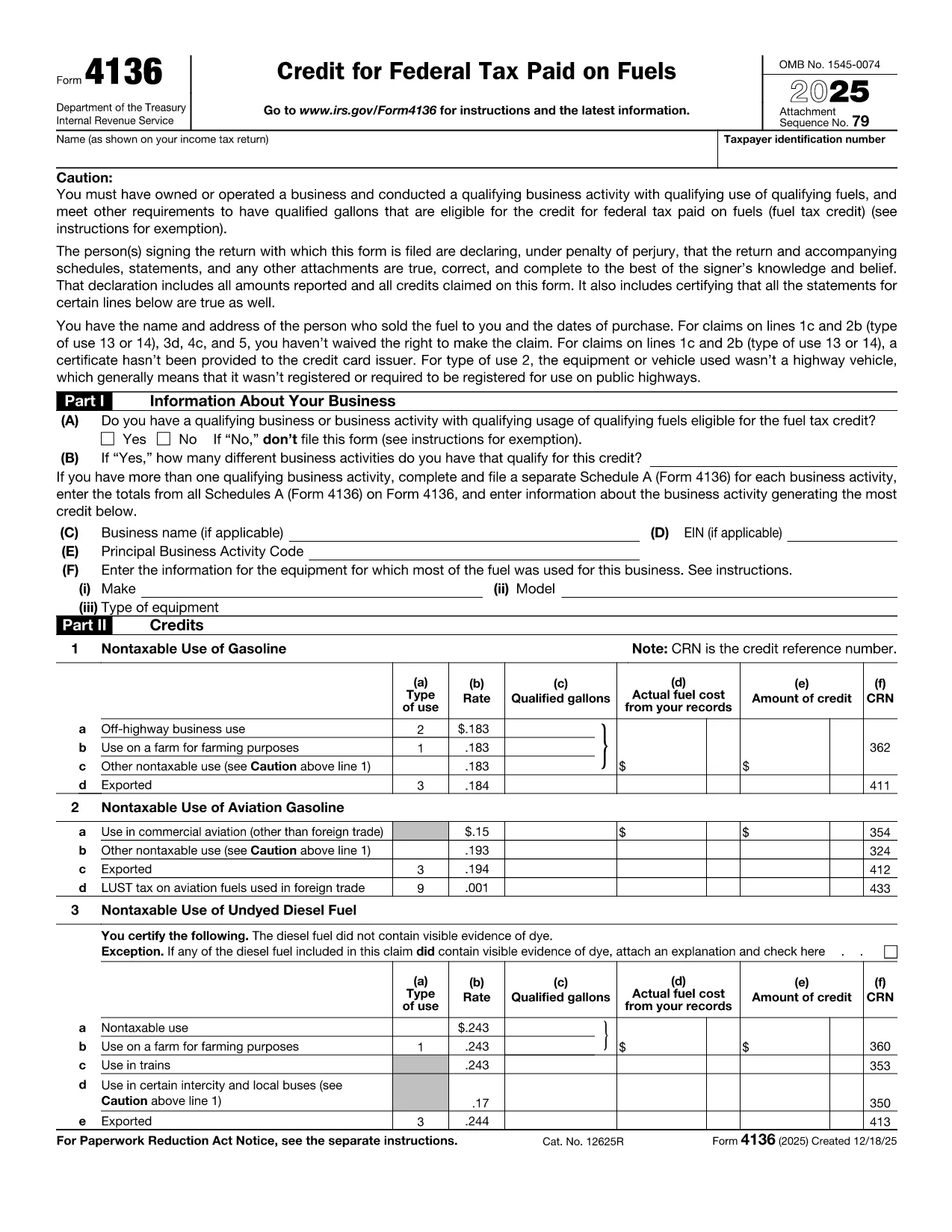
Form 4136, Credit for Federal Tax Paid on Fuels, lets eligible taxpayers claim a credit for excise taxes paid on gasoline, diesel, aviation gasoline, kerosene, and other qualified fuels. Whether you run a farming operation, a construction fleet, or an aviation business, this form can reduce your tax liability.

What Is Form 4136 and Who Can Use It?

The IRS issues Form 4136 to businesses and individuals who use fuel for non‑taxable purposes such as off‑highway equipment, farming, or export. The credit applies to:

  • Gasoline used on farms, construction sites, or in certain commercial vehicles.
  • Diesel fuel for off‑road machinery.
  • Aviation gasoline for eligible aircraft.
  • Kerosene and other special fuels.

If you are the ultimate purchaser of the fuel, you are the only party who can claim the credit.

How to Complete the Fillable Form 4136 on Formize

Instead of downloading the PDF and editing it with a separate program, simply click the “Fill out this form” button on this page. The Formize PDF Filler app will load the official fillable version of Form 4136, letting you:

  1. Enter your business name, EIN, and filing year.
  2. Select the type of fuel and the qualified use (e.g., off‑highway, farm, export).
  3. Input gallons used and the calculated credit amount.
  4. Electronically sign and submit the form directly to the IRS portal (if you have e‑file capability) or print for mailing.

The interface is fully responsive, saves your progress automatically, and validates entries to reduce errors.

Common Mistakes to Avoid When Filing Form 4136

  • Using personal fuel purchases: Only fuel used for business or qualified non‑taxable purposes qualifies.
  • Incorrect rate application: Each fuel type has a specific credit rate; double‑check the IRS rate table.
  • Missing export documentation: If you claim export credits, attach a bill of lading or customs receipt.
  • Failing to sign: The form requires a signature under penalty of perjury; the Formize app adds a digital signature field.

Download the Official Fillable PDF

When you need an offline copy, you can download the current IRS version of Form 4136 directly from the link below. The file is a fillable PDF, compatible with Adobe Acrobat, Foxit, and the Formize online editor.

Download IRS Form 4136 (PDF)

Instruktioner

FAQ
  • What types of fuel qualify for a credit on Form 4136?

    Gasoline, diesel fuel, aviation gasoline, kerosene, and other fuels listed in the IRS instructions qualify when used for non‑taxable purposes such as off‑highway business use, farming, or export.

  • Can I claim a credit for fuel used in personal vehicles?

    No. The credit is only available for fuel used in business operations or other qualified non‑taxable uses. Personal use does not qualify.

  • Do I need supporting documentation for the credit?

    Yes. Keep receipts, fuel invoices, and, for exported fuel, a bill of lading or customs documentation. The IRS may request these records during an audit.

  • Is the fillable PDF compatible with all PDF editors?

    The official Form 4136 PDF is fillable in Adobe Acrobat, Foxit Reader, and the Formize online editor. All fields retain their functionality across platforms.

  • How often is Form 4136 updated?

    The IRS releases a new version each tax year. The link provided points to the current version; older versions are available in the IRS prior‑year archive.

  • Can I file Form 4136 electronically?

    Yes, if you use tax software that supports IRS e‑file for fuel credits. Otherwise, print the completed form, sign it, and mail it with your return.

  • What is the deadline to submit Form 4136?

    Form 4136 must be filed with the tax return for the year in which the fuel was used, typically by the April filing deadline (or October if you file an extension).

HUR

Så här fyller du i Form 4136 gratis, online i 3 enkla steg:

  1. 1
    Open the Fillable Form
    Click the “Fill out this form” button on the page. The Formize PDF Filler app will load the official Form 4136.
  2. 2
    Enter Your Information
    Fill in your business name, EIN, fuel type, gallons used, and select the appropriate credit rate. The app validates each field in real time.
  3. 3
    Sign and Save
    Add your digital signature, review the summary, and either download the completed PDF for mailing or submit it electronically if you have e‑file access.
Formize PDF Filler app
HANDLA OM

Skatteformulär

Form 4136 är ett av skatteformulären som är dokument som används för att rapportera information om skatter till relevant skattemyndighet. Det finns olika typer av skatteformulär, inklusive federala, statliga och lokala skatteformulär, som kan variera beroende på skattebetalarens omständigheter och plats.

FUNKTIONER

PDF-fyllare

Det enklaste sättet att fylla i Form 4136 online

  • Fyll snabbt i Form 4136
    Letar du efter ett sätt att snabbt fylla Form 4136 online? Med vår online gratis PDF-formulärfyllare vet du hur du redigerar och fyller i detta pdf-dokument på mindre än en minut.
  • Lätt att använda online PDF-redigerare
    Är du trött på att skriva ut PDF-filer så att du kan redigera dem innan du skannar om och skickar tillbaka dem? Redigera PDF-dokument gratis online. Använd vår online pdf-redigerare för att spara tid och papper.
  • Bra verktyg, alla plattformar
    Undrar du hur man fyller i Form 4136 på en Mac, eller kanske hur man använder ett PDF-fyllmedel gratis? Våra online PDF-verktyg fungerar på alla plattformar.
  • Säker fillagring
    Färdiga "Form 4136"-filer lagras i en säker databas som hanteras av Amazon Cloud-hosting. Du kan ta bort dina filer från vårt system när som helst. I alla fall raderas dessa filer automatiskt efter 24 timmar.
  • Chatta med Form 4136
    Chatta med "Form 4136" på Chatize som är en gratis PDF-läsare. Ställ frågor och få svar från "Form 4136". Klicka bara på knappen Chatta med dokument ovan.

Ta bort fyllningssession

Ta bort den valda fyllningssessionen? I det här fallet kommer dina framsteg i att fylla i formuläret att gå förlorade.

Ta bort redigeringssession

Vill du ta bort den valda redigeringssessionen? I det här fallet kommer dina framsteg i att skapa och redigera formuläret att gå förlorade.