
Välj språk

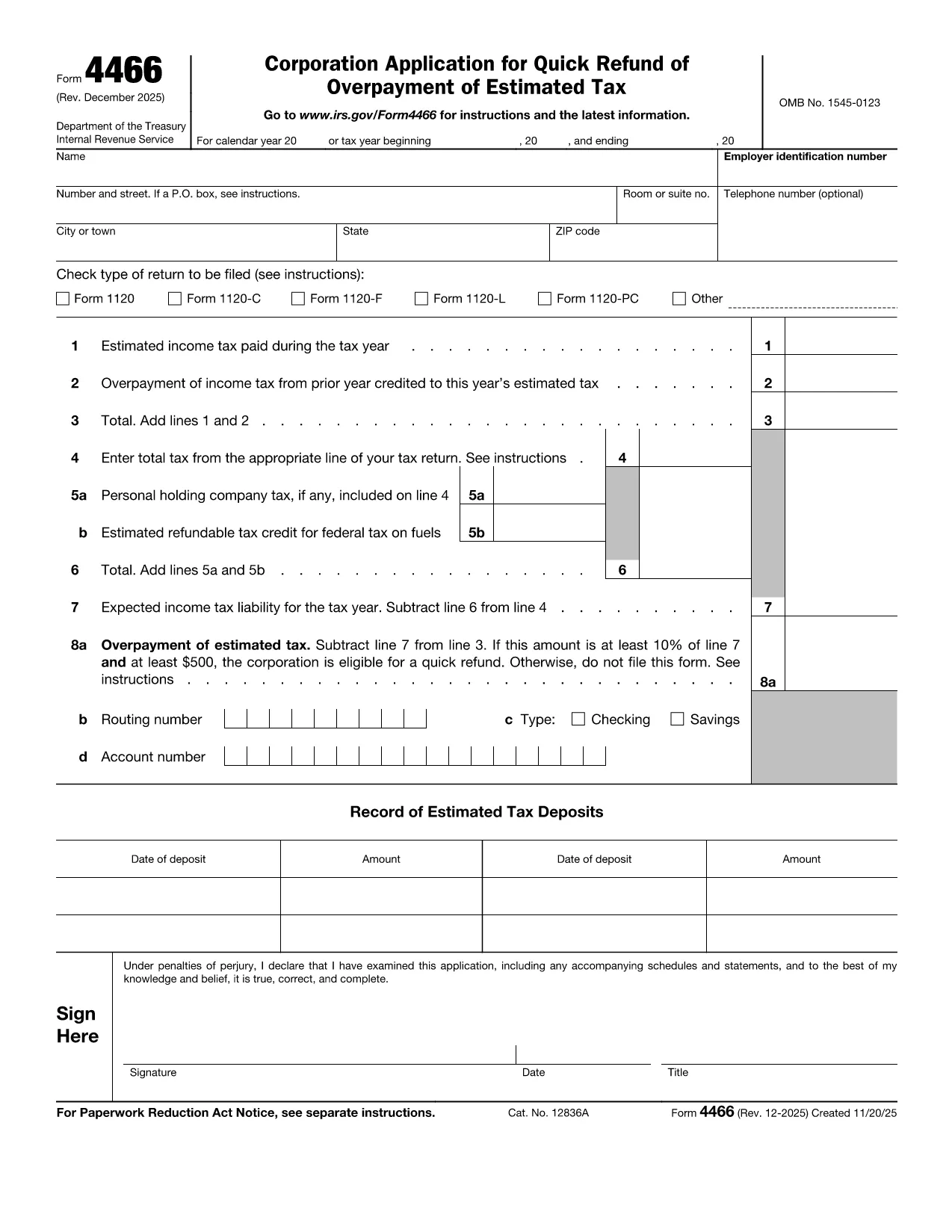
Form 4466 – Corporation Application for Quick Refund of Overpayment

  1. Land USA
  2. Språk engelsk
  3. Aktivitet Skatter
  4. Avdelning Internal Revenue Service
Form 4466 – Corporation Application for Quick Refund of Overpayment

Form 4466 is the IRS’s official Corporation Application for Quick Refund of Overpayment of Estimated Tax. Corporations that have over‑paid their estimated taxes can use this form to request a fast cash refund, helping maintain cash flow and avoid unnecessary interest.

Who Can Use Form 4466?

Only corporations (C‑corporations) that have filed a complete tax return for the year in question are eligible. Partnerships, S‑corporations, and individuals must use other refund procedures.

Key Eligibility Requirements

  • The overpayment must be at least 10 % of the expected tax liability AND at least $500.
  • The corporation must have a filed tax return (Form 1120) for the year the overpayment occurred.
  • The request must be made within the time limits set by the IRS (generally within 45 days of filing the return).

How to Complete and Submit Form 4466

Instead of downloading, printing, and scanning the PDF, simply click the "Fill out this form" button on this page. The Formize PDF Filler will load instantly, allowing you to enter data directly on the screen and submit electronically.

Common Mistakes to Avoid

  • Leaving any required field blank – the filler will highlight missing information.
  • Submitting the form before the corporate tax return is filed – the IRS will reject the application.
  • Mis‑calculating the overpayment amount – double‑check lines 9 and 10 of your return.

Processing Time & What Happens Next

The IRS aims to process Form 4466 within 45 days. You will receive a notice confirming the refund amount or explaining any issues. If you filed an extension for your tax return, it does NOT extend the deadline for Form 4466.

Ready to get your refund? Click the button below, fill the form in minutes, and let Formize handle the rest.

FAQ
  • What is the deadline to file Form 4466?

    Form 4466 must be filed before the corporation files its tax return for the year, and the IRS processes it within 45 days of receipt.

  • Can I file Form 4466 electronically?

    Yes. With Formize you can fill and submit the form online; the IRS still receives a paper copy via mail, but the online process speeds up data entry.

  • Do I need to attach my Form 1120?

    A copy of the filed corporate tax return (Form 1120) must be attached to verify the overpayment.

  • What if my overpayment is less than $500?

    The corporation does not qualify for the quick refund program; you must wait for the standard refund process.

  • How long does the IRS take to issue the refund?

    The IRS aims to process the request within 45 days, after which the refund is issued by check or direct deposit.

  • Is there a fee to use the Formize filler?

    No. Formize provides the fillable PDF for free; you only pay any standard mailing costs if you choose to mail a paper copy.

  • Can I correct a mistake after submitting?

    If you discover an error, contact the IRS immediately and submit a corrected Form 4466 with a cover letter explaining the change.

HUR

Så här fyller du i Form 4466 gratis, online i 5 enkla steg:

  1. 1
    Open the Fillable Form
    Click the "Fill out this form" button on this page. The Formize PDF Filler loads in your browser.
  2. 2
    Enter Corporate Information
    Fill in the corporation’s name, EIN, tax year, and overpayment amount exactly as shown on your filed Form 1120.
  3. 3
    Attach Required Documents
    Upload a copy of the corporate tax return and any payment receipts that verify the overpayment.
  4. 4
    Review and Submit
    Use the built‑in validation to check for missing fields, then click Submit. The form will be securely transmitted to the IRS address.
  5. 5
    Track Your Refund
    After submission, you’ll receive a confirmation email with a tracking number. Keep it for any follow‑up with the IRS.
Formize PDF Filler app
HANDLA OM

Blanketter för Internal Revenue Service (IRS).

Form 4466 är ett av de officiella skatteformulären som används i USA för att rapportera inkomster, kräva avdrag och krediter, beräkna skatteskuld och uppfylla andra skatterelaterade skyldigheter. IRS är det federala organ som ansvarar för att administrera och upprätthålla de interna skattelagarna i USA.

Här är några exempel på Internal Revenue Service-formulär:

Formulär 1040: Detta är det primära individuella inkomstdeklarationsformuläret som används av de flesta skattebetalare. Den används för att redovisa olika typer av inkomster, kräva avdrag och krediter, beräkna skattskyldighet och avgöra om en skattskyldig är skyldig tilläggsskatt eller har rätt till återbetalning.

Formulär 1099: Det finns olika varianter av Form 1099, till exempel 1099-MISC, 1099-INT, 1099-DIV, etc. Dessa formulär används för att rapportera inkomster som privatpersoner eller företag tagit emot från olika källor än anställning, till exempel egenföretagare inkomst, ränteintäkter, utdelningsinkomster och hyresintäkter.

Formulär W-2: Detta formulär används av arbetsgivare för att rapportera löner som betalats ut till anställda och skatter undanhållit sin lön. Anställda använder informationen på formulär W-2 för att fylla i sina individuella skattedeklarationer.

Formulär 941: Arbetsgivare använder detta formulär för att rapportera anställningsskatter, inklusive federal inkomstskatt, socialförsäkringsskatt och Medicare-skatt, för sina anställda.

Formulär 1065: Detta formulär används av partnerskap för att rapportera sina inkomster, avdrag och skatteskuld. Partnerskap själva betalar inte inkomstskatt; i stället redovisar delägarna sin andel av partnerskapsinkomsten på sina individuella deklarationer.

Formulär 1120: Detta är formuläret för företagsskattedeklaration som används av C-företag för att rapportera sin inkomst, avdrag och skattskyldighet.

Formulär 990: Detta formulär används av skattebefriade organisationer, såsom ideella organisationer och välgörenhetsorganisationer, för att rapportera sin ekonomiska information, aktiviteter och efterlevnad av skattelagar.

Formulär 8862: Detta formulär används av skattebetalare som tidigare gjort anspråk på inkomstskatteavdraget (EITC) men fick det förkastat och vill nu göra anspråk på det igen.

Detta är bara några exempel på de många IRS-formulär som finns för att uppfylla olika skatterelaterade skyldigheter. De specifika formulär som krävs för en individ eller företag beror på deras unika omständigheter, inkomstkällor och avdrag. Det är tillrådligt att konsultera den officiella webbplatsen för Internal Revenue Service (www.irs.gov) eller söka professionell skatterådgivning för att få korrekt och uppdaterad information om den specifika IRS formulär som är relevanta för din skattesituation.

FUNKTIONER

PDF-fyllare

Det enklaste sättet att fylla i Form 4466 online

  • Fyll snabbt i Form 4466
    Letar du efter ett sätt att snabbt fylla Form 4466 online? Med vår online gratis PDF-formulärfyllare vet du hur du redigerar och fyller i detta pdf-dokument på mindre än en minut.
  • Lätt att använda online PDF-redigerare
    Är du trött på att skriva ut PDF-filer så att du kan redigera dem innan du skannar om och skickar tillbaka dem? Redigera PDF-dokument gratis online. Använd vår online pdf-redigerare för att spara tid och papper.
  • Bra verktyg, alla plattformar
    Undrar du hur man fyller i Form 4466 på en Mac, eller kanske hur man använder ett PDF-fyllmedel gratis? Våra online PDF-verktyg fungerar på alla plattformar.
  • Säker fillagring
    Färdiga "Form 4466"-filer lagras i en säker databas som hanteras av Amazon Cloud-hosting. Du kan ta bort dina filer från vårt system när som helst. I alla fall raderas dessa filer automatiskt efter 24 timmar.
  • Chatta med Form 4466
    Chatta med "Form 4466" på Chatize som är en gratis PDF-läsare. Ställ frågor och få svar från "Form 4466". Klicka bara på knappen Chatta med dokument ovan.

Ta bort fyllningssession

Ta bort den valda fyllningssessionen? I det här fallet kommer dina framsteg i att fylla i formuläret att gå förlorade.

Ta bort redigeringssession

Vill du ta bort den valda redigeringssessionen? I det här fallet kommer dina framsteg i att skapa och redigera formuläret att gå förlorade.