
Välj språk

Form 5471 Schedule I-1 – Fillable PDF Online

  1. Land USA
  2. Språk engelsk
  3. Aktivitet Skatter
  4. Avdelning Internal Revenue Service
Form 5471 Schedule I-1 – Fillable PDF Online

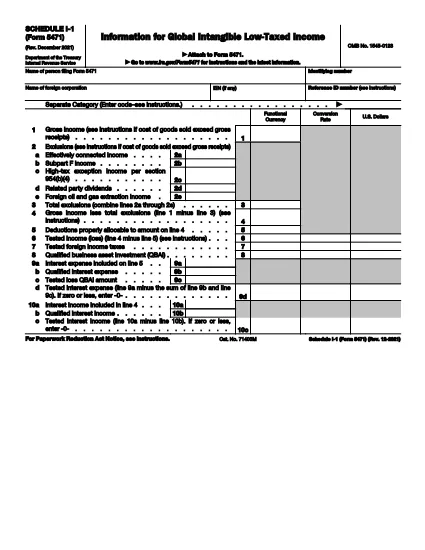
Form 5471 Schedule I‑1 is a supplemental attachment to the IRS Form 5471 series. It is used to report Global Intangible Low‑Taxed Income (GILTI) and related foreign oil and gas extraction income for U.S. shareholders of controlled foreign corporations.

Why Use a Fillable PDF?

Downloading the official IRS PDF guarantees you have the most current version. With Formize’s online PDF filler you can:

  • Complete the schedule directly in your browser – no extra software needed.
  • Save progress and return later.
  • Export a clean, printable PDF ready for filing.
  • Maintain data security with SSL‑encrypted connections.

How the Form Works

Schedule I‑1 captures detailed information on:

  • Foreign oil and gas extraction income (lines 2a‑2e).
  • Total exclusions and deductions.
  • GILTI calculations required for the 2021‑2025 tax years.

Common Mistakes to Avoid

  • Leaving lines blank: Even if a line is zero, enter “0” to avoid processing delays.
  • Mismatched totals: Ensure the sum of lines 2a‑2e matches the total exclusion amount.
  • Using an outdated version: Always use the latest PDF (Rev. December 2021) linked below.
  • Incorrect rounding: Follow IRS rounding rules – round to the nearest whole dollar unless otherwise specified.

Download the Official PDF

Click the button below to download the IRS‑approved Schedule I‑1 PDF. Then use the Fill out this form button on the page to open the Formize PDF filler.

Instruktioner

  • Form 5471 Instruktioner - Instruktioner för formulär 5471, Informationsåterlämnande av amerikanska personer med respekt för vissa utländska företag
FAQ
  • Who must file Form 5471 Schedule I-1?

    U.S. shareholders of controlled foreign corporations who have GILTI or foreign oil and gas extraction income must attach Schedule I‑1 to their Form 5471 filing.

  • Is the Schedule I-1 available as a fillable PDF?

    Yes. The IRS provides a fillable PDF (Rev. December 2021) which can be completed online using Formize’s PDF filler.

  • Can I edit the PDF on my computer without Formize?

    You can use any PDF editor, but Formize’s online filler saves your work automatically and requires no installation.

  • What is GILTI and why does it matter?

    GILTI stands for Global Intangible Low‑Taxed Income. It is a category of income that U.S. shareholders must report to prevent tax deferral on foreign earnings.

  • Do I need to attach supporting documents to Schedule I-1?

    Only if the IRS specifically requests additional detail for the items reported on lines 2a‑2e. Otherwise, the schedule itself is sufficient.

  • What if I make a mistake after filing?

    Amend the original return by filing Form 1040X and attach a corrected Schedule I‑1. Include an explanation of the changes.

  • Is there a filing deadline for Schedule I-1?

    Schedule I‑1 is due with the taxpayer’s Form 5471, which is attached to the individual’s annual tax return (typically April 15, with extensions as applicable).

HUR

Så här fyller du i Form 5471 Schedule I-1 gratis, online i 4 enkla steg:

  1. 1
    Open the Fillable Form
    Click the **Fill out this form** button on the page. The Formize PDF Filler app will load in a new browser tab.
  2. 2
    Enter Your Information
    Type directly into each field of Schedule I‑1. Use the on‑screen guidance for line numbers and required data.
  3. 3
    Save or Export
    When you finish, click **Save** to store the document in your Formize account or **Export** to download a completed PDF for filing.
  4. 4
    Review Before Submitting
    Double‑check totals, ensure no fields are left blank, and verify that all required signatures are included.
Formize PDF Filler app
HANDLA OM

Skatteformulär

Form 5471 Schedule I-1 är ett av skatteformulären som är dokument som används för att rapportera information om skatter till relevant skattemyndighet. Det finns olika typer av skatteformulär, inklusive federala, statliga och lokala skatteformulär, som kan variera beroende på skattebetalarens omständigheter och plats.

FUNKTIONER

PDF-fyllare

Det enklaste sättet att fylla i Form 5471 Schedule I-1 online

  • Fyll snabbt i Form 5471 Schedule I-1
    Letar du efter ett sätt att snabbt fylla Form 5471 Schedule I-1 online? Med vår online gratis PDF-formulärfyllare vet du hur du redigerar och fyller i detta pdf-dokument på mindre än en minut.
  • Lätt att använda online PDF-redigerare
    Är du trött på att skriva ut PDF-filer så att du kan redigera dem innan du skannar om och skickar tillbaka dem? Redigera PDF-dokument gratis online. Använd vår online pdf-redigerare för att spara tid och papper.
  • Bra verktyg, alla plattformar
    Undrar du hur man fyller i Form 5471 Schedule I-1 på en Mac, eller kanske hur man använder ett PDF-fyllmedel gratis? Våra online PDF-verktyg fungerar på alla plattformar.
  • Säker fillagring
    Färdiga "Form 5471 Schedule I-1"-filer lagras i en säker databas som hanteras av Amazon Cloud-hosting. Du kan ta bort dina filer från vårt system när som helst. I alla fall raderas dessa filer automatiskt efter 24 timmar.
  • Chatta med Form 5471 Schedule I-1
    Chatta med "Form 5471 Schedule I-1" på Chatize som är en gratis PDF-läsare. Ställ frågor och få svar från "Form 5471 Schedule I-1". Klicka bara på knappen Chatta med dokument ovan.

Ta bort fyllningssession

Ta bort den valda fyllningssessionen? I det här fallet kommer dina framsteg i att fylla i formuläret att gå förlorade.

Ta bort redigeringssession

Vill du ta bort den valda redigeringssessionen? I det här fallet kommer dina framsteg i att skapa och redigera formuläret att gå förlorade.