
Välj språk

Form 5500‑EZ – Fillable PDF for Single‑Participant Retirement Plans

  1. Land USA
  2. Språk engelsk
  3. Aktivitet Skatter
  4. Avdelning Internal Revenue Service
Form 5500‑EZ – Fillable PDF for Single‑Participant Retirement Plans

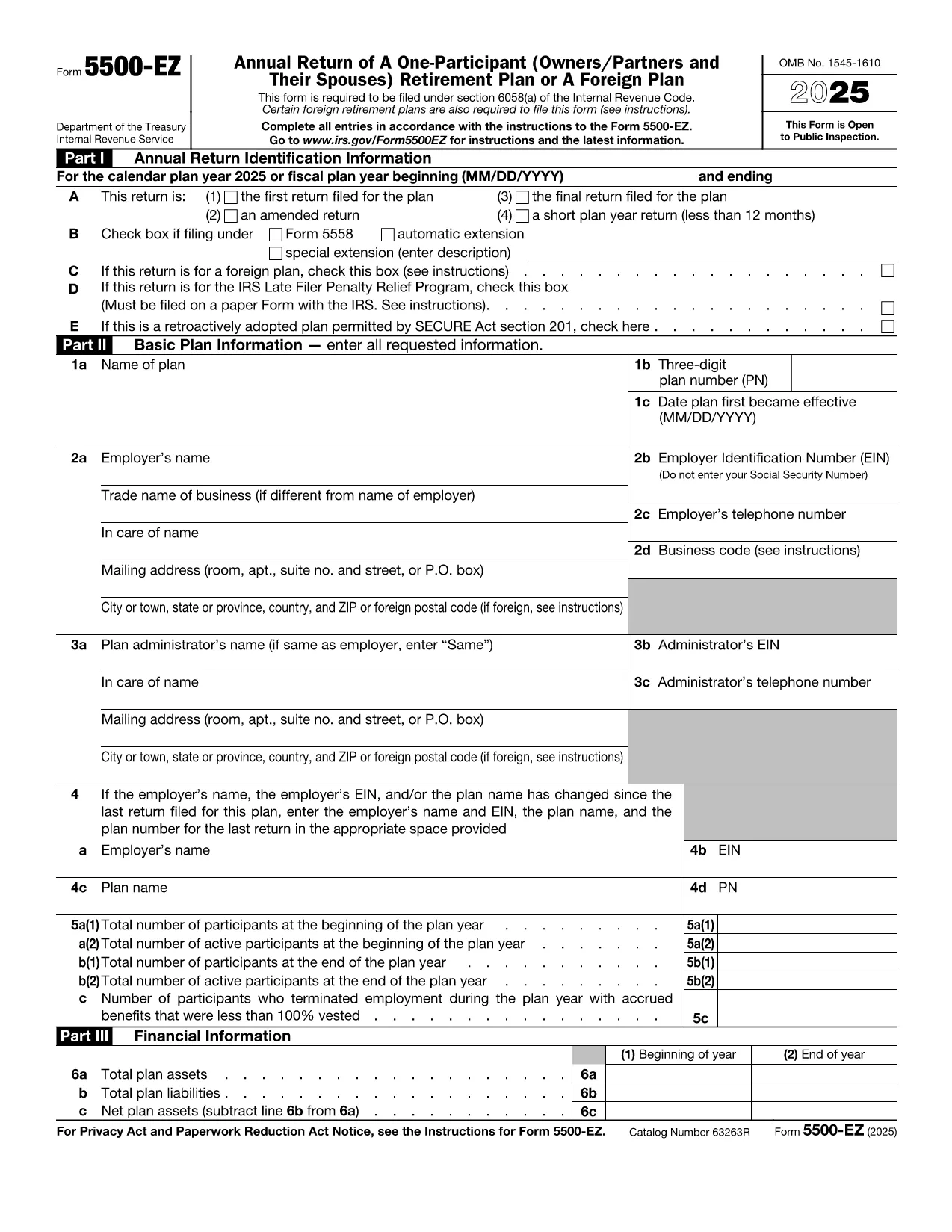
Form 5500‑EZ is the streamlined annual reporting form used by the Internal Revenue Service (IRS) for small retirement plans that have only one participant or are foreign plans. It replaces the longer Form 5500 series and includes basic plan information, number of participants, contributions, benefits, and other required details.

What Is Form 5500‑EZ?

This form is required for:

  • One‑participant pension plans (e.g., solo 401(k) or SIMPLE IRA)
  • Foreign retirement plans that meet the IRS definition of a small plan
  • Plans that do not need to file Schedule MB or Schedule SB

Filing Form 5500‑EZ on time helps you avoid penalties and keeps your retirement plan in good standing.

How to Fill Out the Form Online with Formize

Instead of downloading the PDF and editing it manually, you can complete the form directly on our site:

  1. Click the "Fill out this form" button below.
  2. The Formize PDF Filler app loads the official fillable PDF.
  3. Enter the required information in each field – the form validates data as you type.
  4. When you’re done, add your electronic signature, then save or download the completed PDF.

All changes are saved automatically, so you never lose your work.

Common Mistakes & Tips for a Smooth Filing

  • Incorrect plan year: Verify the plan year on the first page; a mismatch triggers an IRS notice.
  • Missing participant count: Even a single‑participant plan must list the exact number of participants.
  • Wrong contribution totals: Double‑check employer and employee contributions – they must equal the amounts reported on Schedule A.
  • Signature errors: Use the built‑in electronic signature tool; hand‑written signatures on a printed PDF are not accepted for e‑filings.

Download the Official IRS PDF

If you prefer the original IRS version, you can download it directly from the link below. The file is the same one used by Formize, ensuring full compatibility with the online filler.

Download Form 5500‑EZ (PDF)

Instruktioner

  • Form 5500-EZ Instruktioner - Instruktioner för Form 5500-EZ, Årlig återkomst av en deltagare (Owners/Partners och deras makar) Pensionsplan eller en utländsk plan
FAQ
  • Who must file Form 5500‑EZ?

    Any one‑participant retirement plan or foreign plan that meets the IRS definition of a small plan must file Form 5500‑EZ annually.

  • Can I file Form 5500‑EZ electronically?

    Yes. Use the IRS e‑file system or a compliant online filler like Formize, then submit the completed PDF through the FIRE system.

  • What is the filing deadline?

    The form is due by the last day of the seventh month after the plan year ends (typically July 31 for calendar‑year plans).

  • Do I need Schedule MB or Schedule SB?

    No. Form 5500‑EZ does not require Schedule MB (Money‑Based) or Schedule SB (Service‑Based).

  • What if I make a mistake after filing?

    You can file an amended Form 5500‑EZ using the same fillable PDF. Mark the form as "Amended" and include an explanation of the changes.

  • Is there a fee to use Formize's filler?

    Formize offers a free basic fillable version for Form 5500‑EZ. Advanced features may require a subscription, but the core filing process is free.

  • Can I print the completed form for a paper filing?

    Yes. After completing the form online, download the PDF and print it. Sign the printed copy if you are filing by paper.

HUR

Så här fyller du i Form 5500 EZ gratis, online i 4 enkla steg:

  1. 1
    Open the Fillable Form
    Click the "Fill out this form" button on the page. The Formize PDF Filler will load the official Form 5500‑EZ.
  2. 2
    Enter Your Information
    Complete each field. The filler validates entries in real time, helping you avoid common errors.
  3. 3
    Add Your Electronic Signature
    Use the built‑in signature tool to sign the form securely.
  4. 4
    Save or Download
    When all sections are complete, click "Save" to store the file in your account or "Download" to get the finished PDF.
Formize PDF Filler app
HANDLA OM

Blanketter för Internal Revenue Service (IRS).

Form 5500 EZ är ett av de officiella skatteformulären som används i USA för att rapportera inkomster, kräva avdrag och krediter, beräkna skatteskuld och uppfylla andra skatterelaterade skyldigheter. IRS är det federala organ som ansvarar för att administrera och upprätthålla de interna skattelagarna i USA.

Här är några exempel på Internal Revenue Service-formulär:

Formulär 1040: Detta är det primära individuella inkomstdeklarationsformuläret som används av de flesta skattebetalare. Den används för att redovisa olika typer av inkomster, kräva avdrag och krediter, beräkna skattskyldighet och avgöra om en skattskyldig är skyldig tilläggsskatt eller har rätt till återbetalning.

Formulär 1099: Det finns olika varianter av Form 1099, till exempel 1099-MISC, 1099-INT, 1099-DIV, etc. Dessa formulär används för att rapportera inkomster som privatpersoner eller företag tagit emot från olika källor än anställning, till exempel egenföretagare inkomst, ränteintäkter, utdelningsinkomster och hyresintäkter.

Formulär W-2: Detta formulär används av arbetsgivare för att rapportera löner som betalats ut till anställda och skatter undanhållit sin lön. Anställda använder informationen på formulär W-2 för att fylla i sina individuella skattedeklarationer.

Formulär 941: Arbetsgivare använder detta formulär för att rapportera anställningsskatter, inklusive federal inkomstskatt, socialförsäkringsskatt och Medicare-skatt, för sina anställda.

Formulär 1065: Detta formulär används av partnerskap för att rapportera sina inkomster, avdrag och skatteskuld. Partnerskap själva betalar inte inkomstskatt; i stället redovisar delägarna sin andel av partnerskapsinkomsten på sina individuella deklarationer.

Formulär 1120: Detta är formuläret för företagsskattedeklaration som används av C-företag för att rapportera sin inkomst, avdrag och skattskyldighet.

Formulär 990: Detta formulär används av skattebefriade organisationer, såsom ideella organisationer och välgörenhetsorganisationer, för att rapportera sin ekonomiska information, aktiviteter och efterlevnad av skattelagar.

Formulär 8862: Detta formulär används av skattebetalare som tidigare gjort anspråk på inkomstskatteavdraget (EITC) men fick det förkastat och vill nu göra anspråk på det igen.

Detta är bara några exempel på de många IRS-formulär som finns för att uppfylla olika skatterelaterade skyldigheter. De specifika formulär som krävs för en individ eller företag beror på deras unika omständigheter, inkomstkällor och avdrag. Det är tillrådligt att konsultera den officiella webbplatsen för Internal Revenue Service (www.irs.gov) eller söka professionell skatterådgivning för att få korrekt och uppdaterad information om den specifika IRS formulär som är relevanta för din skattesituation.

FUNKTIONER

PDF-fyllare

Det enklaste sättet att fylla i Form 5500 EZ online

  • Fyll snabbt i Form 5500 EZ
    Letar du efter ett sätt att snabbt fylla Form 5500 EZ online? Med vår online gratis PDF-formulärfyllare vet du hur du redigerar och fyller i detta pdf-dokument på mindre än en minut.
  • Lätt att använda online PDF-redigerare
    Är du trött på att skriva ut PDF-filer så att du kan redigera dem innan du skannar om och skickar tillbaka dem? Redigera PDF-dokument gratis online. Använd vår online pdf-redigerare för att spara tid och papper.
  • Bra verktyg, alla plattformar
    Undrar du hur man fyller i Form 5500 EZ på en Mac, eller kanske hur man använder ett PDF-fyllmedel gratis? Våra online PDF-verktyg fungerar på alla plattformar.
  • Säker fillagring
    Färdiga "Form 5500 EZ"-filer lagras i en säker databas som hanteras av Amazon Cloud-hosting. Du kan ta bort dina filer från vårt system när som helst. I alla fall raderas dessa filer automatiskt efter 24 timmar.
  • Chatta med Form 5500 EZ
    Chatta med "Form 5500 EZ" på Chatize som är en gratis PDF-läsare. Ställ frågor och få svar från "Form 5500 EZ". Klicka bara på knappen Chatta med dokument ovan.

Ta bort fyllningssession

Ta bort den valda fyllningssessionen? I det här fallet kommer dina framsteg i att fylla i formuläret att gå förlorade.

Ta bort redigeringssession

Vill du ta bort den valda redigeringssessionen? I det här fallet kommer dina framsteg i att skapa och redigera formuläret att gå förlorade.