
Välj språk

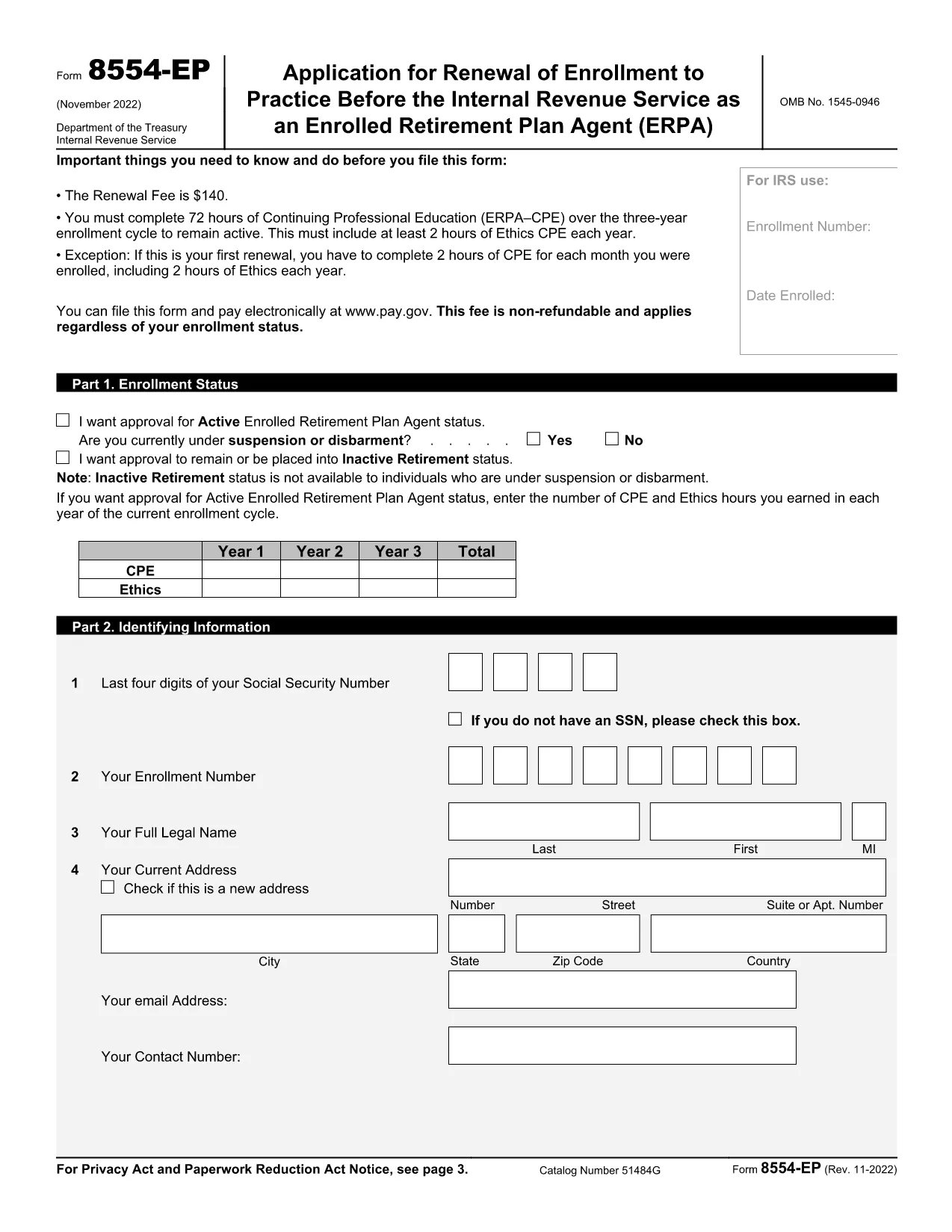
Form 8554‑EP – Enrolled Retirement Plan Agent Renewal (Fillable PDF)

  1. Land USA
  2. Språk engelsk
  3. Aktivitet Skatter
  4. Avdelning Internal Revenue Service
Form 8554‑EP – Enrolled Retirement Plan Agent Renewal (Fillable PDF)

The Form 8554‑EP is the official IRS renewal application for Enrolled Retirement Plan Agents (ERPA). Every three years, ERPA‑qualified tax professionals must submit this form to maintain their ability to practice before the IRS on retirement plan matters.

What Is Form 8554‑EP?

Form 8554‑EP (Rev. 11‑2022) collects information about your credentials, continuing professional education (CPE) credits, and any changes to your practice. The form ensures you remain in good standing with the IRS.

Who Must File This Form?

  • Individuals who are currently enrolled as Retirement Plan Agents.
  • Those whose enrollment expired or will expire within the next three years.
  • Tax professionals seeking to reactivate an inactive ERPA status.

How to Complete the Fillable PDF

Our online Formize PDF Filler loads the official IRS PDF directly in your browser. No extra software is required.

Common Mistakes to Avoid

  • Leaving any required field blank – the IRS will reject incomplete submissions.
  • Failing to attach proof of CPE credits when required.
  • Signing the form with an unauthorized signature.

Submission & Deadlines

Submit the completed form to the IRS address listed on the last page of the PDF. Keep a copy for your records. The renewal deadline is the last day of the three‑year enrollment cycle.

Ready to start? Click the button below to launch the fillable version instantly.

FAQ
  • How often do I need to renew my ERPA enrollment?

    Renewal is required every three (3) years. The IRS will notify you when your current enrollment is approaching expiration.

  • Can I submit Form 8554‑EP electronically?

    The IRS currently accepts only paper submissions for Form 8554‑EP. Use the fillable PDF to ensure accuracy, then mail the printed form.

  • What CPE documentation must I attach?

    Attach copies of certificates or transcripts that verify you have completed the required 15 CPE hours in retirement plan practice for the enrollment cycle.

  • What happens if I miss the renewal deadline?

    Your ERPA status becomes inactive, and you cannot represent clients before the IRS on retirement‑plan matters until you re‑apply and receive approval.

  • Do I need a signature on the form?

    Yes. The form must be signed by the applicant or an authorized representative. Electronic signatures are not accepted; a handwritten signature is required.

  • Is there a fee to renew my ERPA status?

    No fee is required for the renewal of Form 8554‑EP. The IRS may assess penalties only if the form is incomplete or submitted late.

  • Where can I find the official instructions for Form 8554‑EP?

    The instructions are included in the PDF itself, beginning on page 3. Additional guidance is available on the IRS website under the Retirement Plan Community section.

HUR

Så här fyller du i Form 8554-EP gratis, online i 5 enkla steg:

  1. 1
    Click the Fillable Form Button
    On this page, click the bright “Fill out this form” button. The Formize PDF Filler app will open the official Form 8554‑EP in your browser.
  2. 2
    Wait for the PDF Filler to Load
    A loading screen appears while the PDF is prepared. This only takes a few seconds.
  3. 3
    Enter Your Information
    Navigate through each field, entering your personal data, CPE credits, and any changes to your practice. Required fields are highlighted.
  4. 4
    Validate and Correct Errors
    The filler automatically checks for missing or incorrectly formatted entries. Fix any highlighted issues before proceeding.
  5. 5
    Save, Download, and Submit
    When all fields are complete, click “Save & Download.” Keep the saved copy for your records and mail the printed form to the IRS address shown on page 2.
Formize PDF Filler app
HANDLA OM

Federala skatteformulär

Form 8554-EP är ett av federala skatteformulär som är dokument som används för att rapportera och lämna in federal inkomstskatt till Internal Revenue Service (IRS) i USA. Dessa formulär används av individer, företag och organisationer för att rapportera sina inkomster, avdrag och annan relevant information som behövs för att beräkna deras federala skatteskuld.

Det vanligaste federala skatteformuläret är formulär 1040, som används av enskilda skattebetalare för att rapportera sin personliga inkomstskatt. Andra vanliga formulär inkluderar formulär 1065 för partnerskap, formulär 1120 för företag och formulär 990 för skattebefriade organisationer.

Federala skatteformulär kräver vanligtvis att skattebetalarna rapporterar olika inkomstkällor, såsom löner, löner och tips, såväl som inkomster från investeringar, hyresfastigheter och andra källor. Blanketterna tillåter också skattebetalare att kräva avdrag och krediter för olika utgifter, såsom välgörenhetsbidrag, ränta på bolån och sjukvårdskostnader.

Det är viktigt att lämna in federala skatteformulär korrekt och i tid, eftersom underlåtenhet att göra det kan resultera i straffavgifter och ränteavgifter från IRS.

FUNKTIONER

PDF-fyllare

Det enklaste sättet att fylla i Form 8554-EP online

  • Fyll snabbt i Form 8554-EP
    Letar du efter ett sätt att snabbt fylla Form 8554-EP online? Med vår online gratis PDF-formulärfyllare vet du hur du redigerar och fyller i detta pdf-dokument på mindre än en minut.
  • Lätt att använda online PDF-redigerare
    Är du trött på att skriva ut PDF-filer så att du kan redigera dem innan du skannar om och skickar tillbaka dem? Redigera PDF-dokument gratis online. Använd vår online pdf-redigerare för att spara tid och papper.
  • Bra verktyg, alla plattformar
    Undrar du hur man fyller i Form 8554-EP på en Mac, eller kanske hur man använder ett PDF-fyllmedel gratis? Våra online PDF-verktyg fungerar på alla plattformar.
  • Säker fillagring
    Färdiga "Form 8554-EP"-filer lagras i en säker databas som hanteras av Amazon Cloud-hosting. Du kan ta bort dina filer från vårt system när som helst. I alla fall raderas dessa filer automatiskt efter 24 timmar.
  • Chatta med Form 8554-EP
    Chatta med "Form 8554-EP" på Chatize som är en gratis PDF-läsare. Ställ frågor och få svar från "Form 8554-EP". Klicka bara på knappen Chatta med dokument ovan.

Ta bort fyllningssession

Ta bort den valda fyllningssessionen? I det här fallet kommer dina framsteg i att fylla i formuläret att gå förlorade.

Ta bort redigeringssession

Vill du ta bort den valda redigeringssessionen? I det här fallet kommer dina framsteg i att skapa och redigera formuläret att gå förlorade.