
Välj språk

IRS Form 990 Schedule D – Fillable PDF

  1. Land USA
  2. Språk engelsk
  3. Aktivitet Skatter
  4. Avdelning Internal Revenue Service
IRS Form 990 Schedule D – Fillable PDF

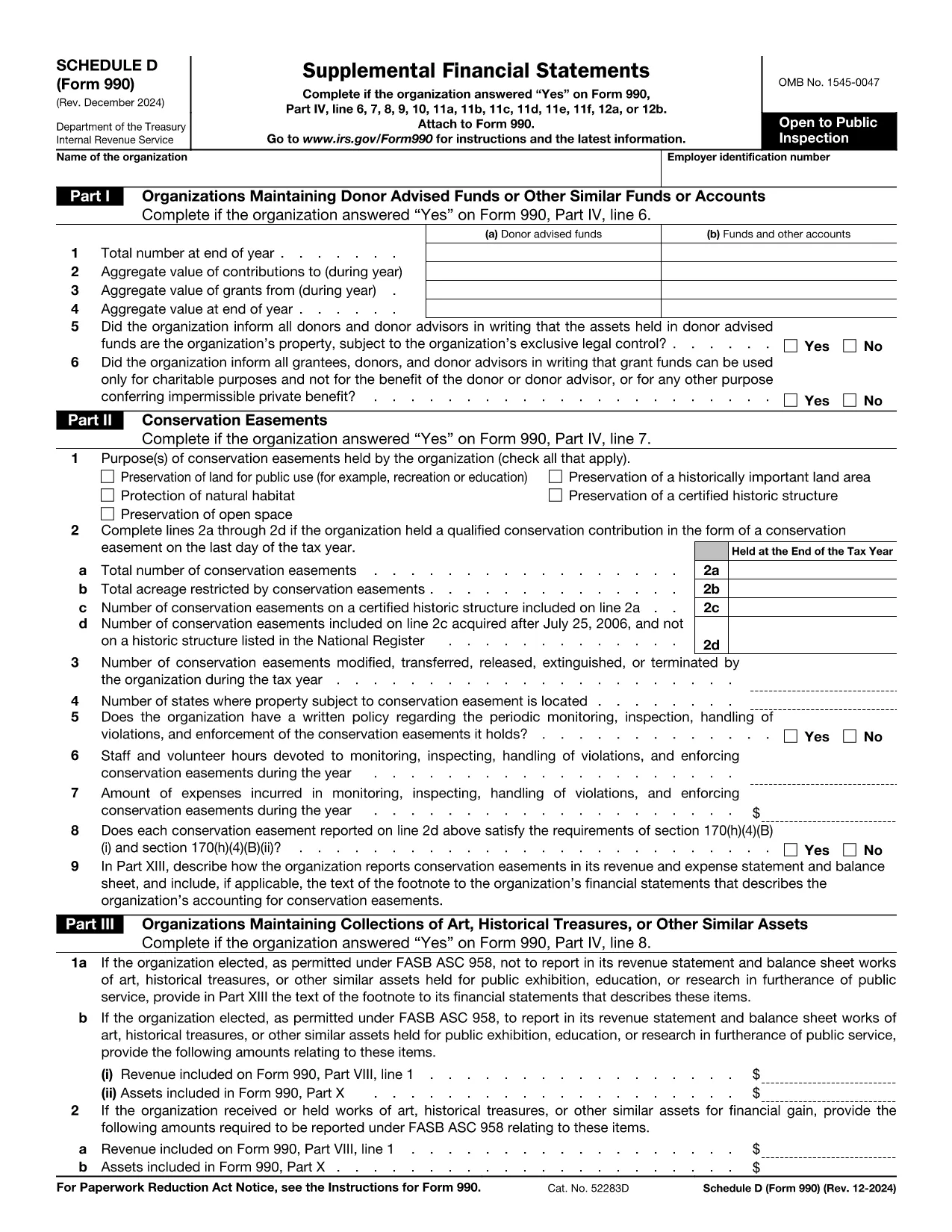
Schedule D is the supplemental attachment to the IRS Form 990 that tax‑exempt organizations use to disclose detailed information about donor‑advised funds, conservation easements, art collections, and other special assets. Getting the correct, up‑to‑date fillable PDF and completing it accurately is essential for compliance.

What Is Schedule D (Form 990)?

Schedule D (Form 990) provides the Internal Revenue Service with supplemental financial statements. It covers:

  • Donor‑advised funds and similar accounts
  • Conservation easements
  • Collections of art, historical treasures, or other valuable assets
  • Endowment, escrow, and custodial arrangements

How to Fill Schedule D Directly on Formize

Instead of downloading the PDF and opening a separate editor, simply click the "Fill out this form" button on this page. The Formize PDF Filler app will load in your browser, letting you complete every field online.

Common Mistakes to Avoid

  • Skipping Part I questions – the IRS cross‑checks these answers with the main Form 990.
  • Incorrect EIN formatting – use nine digits without dashes.
  • Leaving supplemental narrative sections blank when the schedule asks for explanations.
  • Not signing the form – the digital signature is required before submission.

Download the Official Fillable PDF

If you prefer to work offline, you can download the official Schedule D PDF directly from the IRS:

Download Form 990 Schedule D (PDF)

Frequently Asked Questions

Below are the most common questions nonprofit professionals ask about Schedule D.

Instruktioner

FAQ
  • Do I need Schedule D if I file Form 990‑EZ?

    No. Schedule D is only required when filing the full Form 990. Organizations filing Form 990‑EZ or Form 990‑N do not attach Schedule D.

  • What types of assets must be reported on Schedule D?

    Donor‑advised funds, conservation easements, art or historical collections, endowment funds, and any escrow or custodial arrangements must be disclosed.

  • Can I edit the PDF after I download it?

    Yes, but the easiest method is to use the Formize online filler, which saves changes automatically and provides a secure digital signature.

  • How long do I have to keep a copy of Schedule D?

    Nonprofit organizations must retain a copy of all filed schedules for at least three years from the filing date.

  • What are the penalties for not filing Schedule D when required?

    Failure to file can result in monetary penalties and may jeopardize the organization’s tax‑exempt status.

  • Is there a fee to use the Formize PDF Filler?

    Formize provides free access to fill out Schedule D online; no hidden fees are charged for the basic filling and download features.

  • Where should I mail the completed Schedule D?

    Schedule D is filed together with the main Form 990 at the address listed in the Form 990 instructions for your filing type.

HUR

Så här fyller du i Form 990 Schedule D gratis, online i 5 enkla steg:

  1. 1
    Click the Fill‑out Button
    Press the bright “Fill out this form” button on this page to launch the Formize PDF Filler.
  2. 2
    Wait for the Filler to Load
    The web‑based filler loads in seconds. No download or installation is required.
  3. 3
    Enter All Required Information
    Complete each section—organization name, EIN, and all Part I‑XIII questions—using the on‑screen fields.
  4. 4
    Review and Add a Digital Signature
    Use the built‑in signature tool to sign the form electronically. Review for accuracy before saving.
  5. 5
    Save, Download, or Submit
    When you’re done, click “Save” to store a copy, “Download” to get the completed PDF, or follow your organization’s submission process.
Formize PDF Filler app
HANDLA OM

Skatteformulär

Form 990 Schedule D är ett av skatteformulären som är dokument som används för att rapportera information om skatter till relevant skattemyndighet. Det finns olika typer av skatteformulär, inklusive federala, statliga och lokala skatteformulär, som kan variera beroende på skattebetalarens omständigheter och plats.

FUNKTIONER

PDF-fyllare

Det enklaste sättet att fylla i Form 990 Schedule D online

  • Fyll snabbt i Form 990 Schedule D
    Letar du efter ett sätt att snabbt fylla Form 990 Schedule D online? Med vår online gratis PDF-formulärfyllare vet du hur du redigerar och fyller i detta pdf-dokument på mindre än en minut.
  • Lätt att använda online PDF-redigerare
    Är du trött på att skriva ut PDF-filer så att du kan redigera dem innan du skannar om och skickar tillbaka dem? Redigera PDF-dokument gratis online. Använd vår online pdf-redigerare för att spara tid och papper.
  • Bra verktyg, alla plattformar
    Undrar du hur man fyller i Form 990 Schedule D på en Mac, eller kanske hur man använder ett PDF-fyllmedel gratis? Våra online PDF-verktyg fungerar på alla plattformar.
  • Säker fillagring
    Färdiga "Form 990 Schedule D"-filer lagras i en säker databas som hanteras av Amazon Cloud-hosting. Du kan ta bort dina filer från vårt system när som helst. I alla fall raderas dessa filer automatiskt efter 24 timmar.
  • Chatta med Form 990 Schedule D
    Chatta med "Form 990 Schedule D" på Chatize som är en gratis PDF-läsare. Ställ frågor och få svar från "Form 990 Schedule D". Klicka bara på knappen Chatta med dokument ovan.

Ta bort fyllningssession

Ta bort den valda fyllningssessionen? I det här fallet kommer dina framsteg i att fylla i formuläret att gå förlorade.

Ta bort redigeringssession

Vill du ta bort den valda redigeringssessionen? I det här fallet kommer dina framsteg i att skapa och redigera formuläret att gå förlorade.