
Välj språk

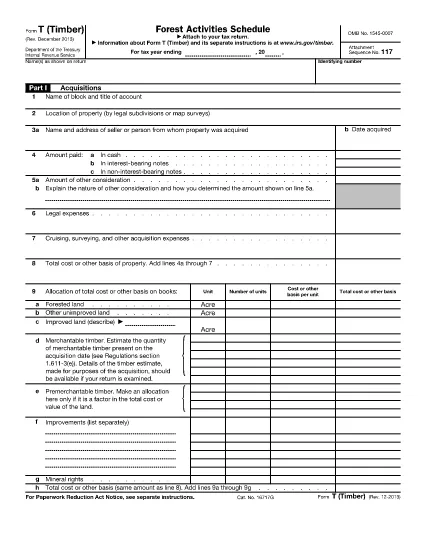
Form T (Timber) – Fillable PDF for IRS Reporting

  1. Land USA
  2. Språk engelsk
  3. Aktivitet Skatter
  4. Avdelning Internal Revenue Service
Form T (Timber) – Fillable PDF for IRS Reporting

Form T (Timber) is the IRS‑required schedule used to report timber acquisitions, depletion, sales, and reforestation activities. Whether you own a forested property, manage timber contracts, or simply need to document occasional timber sales, this fillable PDF helps you stay compliant.

What Is Form T (Timber)?

The form is part of the federal income‑tax return and captures detailed information about timber assets, including:

  • Acquisitions and exchanges of timber or forest land (Part I)
  • Timber depletion calculations (Part II)
  • Profit or loss from timber sales (Part III)
  • Reforestation and stand‑management expenses (Part IV)
  • Changes in land ownership (Part V)

Key Sections of Form T

Each part must be completed accurately to avoid IRS penalties. The most common areas where taxpayers err are:

  • Not separating reforestation projects in Part IV.
  • Incorrectly calculating depletion using the wrong unit of measure.
  • Failing to maintain a separate schedule for each timber stand.

How to Fill Out Form T Online

Our Formize fillable PDF eliminates the need for a separate editor. Follow the simple steps below to complete the form directly in your browser.

Common Mistakes to Avoid

  • Leaving Part IV blank when you incurred any reforestation expense.
  • Using outdated basis figures for timber that has been fully amortized.
  • Submitting the form without attaching supporting documentation for large timber sales.

Download the Official PDF

Click the button below to load the official IRS Form T (Timber) PDF into Formize’s secure filler. The document is the same version published by the IRS in 2013.

FAQ
  • Do I need to file Form T if I only sell timber occasionally?

    No. The IRS does not require filing Form T for occasional sales (e.g., one or two sales every 3‑4 years), but you must keep adequate records of those transactions.

  • What is the purpose of Part IV on Form T?

    Part IV reports reforestation and timber‑stand activities. It is required whenever you incur expenses for planting, thinning, burning, or other silvicultural practices.

  • Can I fill out Form T on a mobile device?

    Yes. The Formize PDF filler works on modern smartphones and tablets, allowing you to complete the form anywhere with an internet connection.

  • How do I calculate timber depletion for the year?

    Use the depletion method prescribed in the IRS instructions (cost‑or‑value method). Enter the quantity of timber cut and the depletion rate in Part II.

  • What supporting documents should I keep with Form T?

    Maintain purchase agreements, harvest receipts, reforestation invoices, and any appraisal reports. These documents substantiate the amounts reported on the form.

  • Is the PDF provided by Formize the official IRS version?

    Yes. The download link points to the official IRS Form T (Timber) PDF published in 2013, ensuring you are using the correct form.

HUR

Så här fyller du i Form T timber gratis, online i 3 enkla steg:

  1. 1
    Click the Fill‑out Button
    Press the “Fill out this form” button on the page. The PDF will open instantly in Formize’s online filler.
  2. 2
    Wait for the Filler to Load
    The Formize PDF Filler app loads the form in a secure window. No download or installation is required.
  3. 3
    Complete and Save
    Enter your information in each field, then click “Save” to download the completed PDF or email it directly to your accountant.
Formize PDF Filler app
HANDLA OM

Federala skatteformulär

Form T timber är ett av federala skatteformulär som är dokument som används för att rapportera och lämna in federal inkomstskatt till Internal Revenue Service (IRS) i USA. Dessa formulär används av individer, företag och organisationer för att rapportera sina inkomster, avdrag och annan relevant information som behövs för att beräkna deras federala skatteskuld.

Det vanligaste federala skatteformuläret är formulär 1040, som används av enskilda skattebetalare för att rapportera sin personliga inkomstskatt. Andra vanliga formulär inkluderar formulär 1065 för partnerskap, formulär 1120 för företag och formulär 990 för skattebefriade organisationer.

Federala skatteformulär kräver vanligtvis att skattebetalarna rapporterar olika inkomstkällor, såsom löner, löner och tips, såväl som inkomster från investeringar, hyresfastigheter och andra källor. Blanketterna tillåter också skattebetalare att kräva avdrag och krediter för olika utgifter, såsom välgörenhetsbidrag, ränta på bolån och sjukvårdskostnader.

Det är viktigt att lämna in federala skatteformulär korrekt och i tid, eftersom underlåtenhet att göra det kan resultera i straffavgifter och ränteavgifter från IRS.

FUNKTIONER

PDF-fyllare

Det enklaste sättet att fylla i Form T timber online

  • Fyll snabbt i Form T timber
    Letar du efter ett sätt att snabbt fylla Form T timber online? Med vår online gratis PDF-formulärfyllare vet du hur du redigerar och fyller i detta pdf-dokument på mindre än en minut.
  • Lätt att använda online PDF-redigerare
    Är du trött på att skriva ut PDF-filer så att du kan redigera dem innan du skannar om och skickar tillbaka dem? Redigera PDF-dokument gratis online. Använd vår online pdf-redigerare för att spara tid och papper.
  • Bra verktyg, alla plattformar
    Undrar du hur man fyller i Form T timber på en Mac, eller kanske hur man använder ett PDF-fyllmedel gratis? Våra online PDF-verktyg fungerar på alla plattformar.
  • Säker fillagring
    Färdiga "Form T timber"-filer lagras i en säker databas som hanteras av Amazon Cloud-hosting. Du kan ta bort dina filer från vårt system när som helst. I alla fall raderas dessa filer automatiskt efter 24 timmar.
  • Chatta med Form T timber
    Chatta med "Form T timber" på Chatize som är en gratis PDF-läsare. Ställ frågor och få svar från "Form T timber". Klicka bara på knappen Chatta med dokument ovan.

Ta bort fyllningssession

Ta bort den valda fyllningssessionen? I det här fallet kommer dina framsteg i att fylla i formuläret att gå förlorade.

Ta bort redigeringssession

Vill du ta bort den valda redigeringssessionen? I det här fallet kommer dina framsteg i att skapa och redigera formuläret att gå förlorade.