
Välj språk

IRS Form W‑4S – Fillable PDF for Sick Pay Tax Withholding

  1. Land USA
  2. Språk engelsk
  3. Aktivitet Skatter
  4. Avdelning Internal Revenue Service
IRS Form W‑4S – Fillable PDF for Sick Pay Tax Withholding

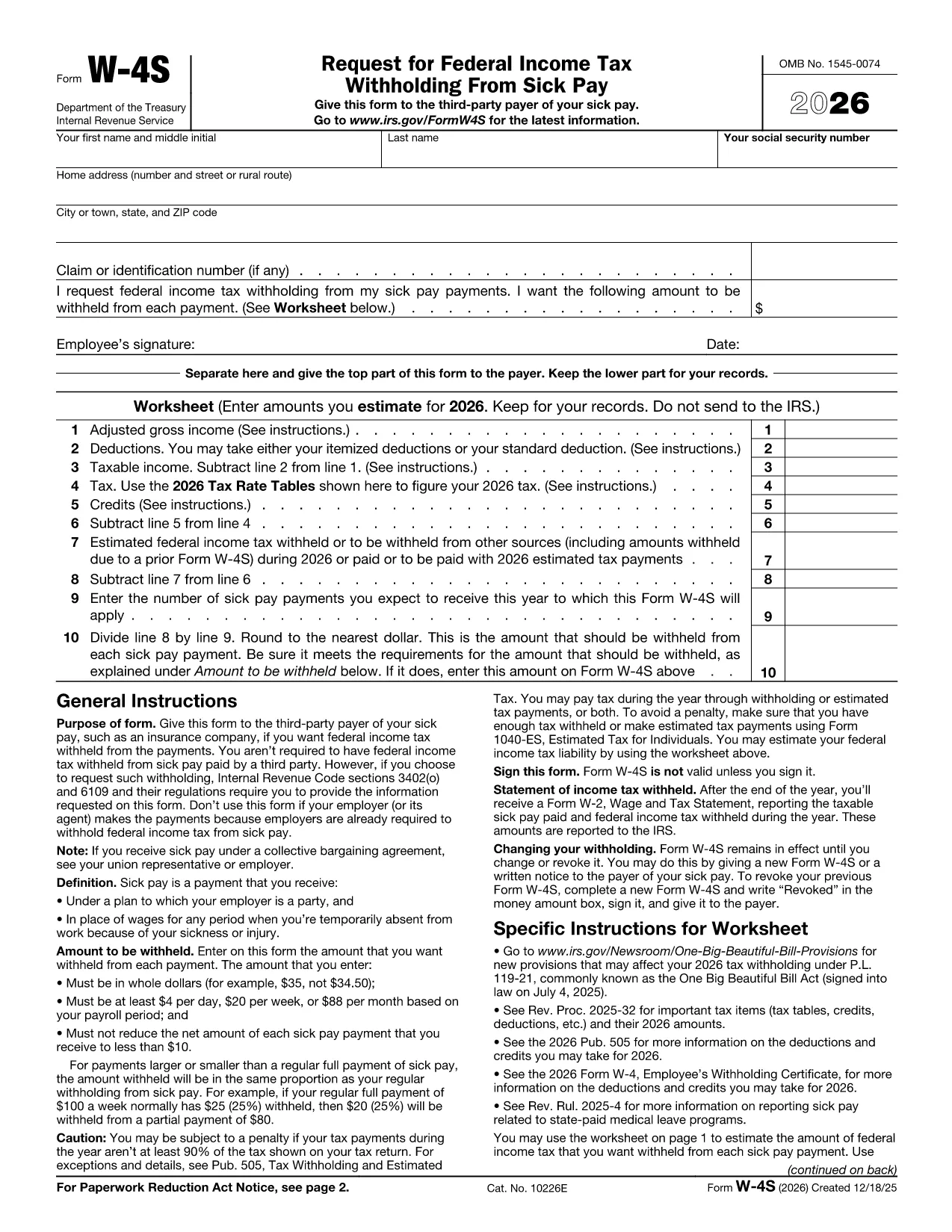
Form W‑4S, officially titled Request for Federal Income Tax Withholding From Sick Pay, is the IRS document you give to a third‑party payer (such as an insurance company) so that federal income tax can be withheld from your sick‑pay benefits.

What Is Form W‑4S?

This one‑page form has two parts: a Withholding Certificate that the payer keeps, and a Worksheet for your records. The certificate tells the payer how much tax you want taken out of each payment, while the worksheet helps you calculate the correct amount based on your projected income, deductions, and credits.

How to Complete Form W‑4S Online with Formize

Instead of downloading the PDF and editing it in a desktop program, you can fill it out instantly on our site:

  1. Click the **"Fill out this form"** button below.
  2. Wait a few seconds while the Formize PDF Filler app loads the official IRS PDF.
  3. Enter your personal information, Social Security number, and the exact dollar amount you want withheld.
  4. Complete the worksheet section to verify your calculation.
  5. Review the completed form, then click **Submit** to download a signed copy or print it for your payer.

When Should You Use Form W‑4S?

Use this form whenever you receive sick‑pay from a third‑party payer (e.g., an insurance carrier) and you want federal tax withheld. It is not required when the sick pay comes directly from your employer, because employers already withhold taxes.

Common Mistakes to Avoid

  • Entering amounts in cents – the IRS requires whole‑dollar amounts only.
  • Withholding less than the minimum: $4 per day, $20 per week, or $88 per month.
  • Reducing your net payment below $10 – the payer cannot withhold more than the payment allows.
  • Forgetting to sign and date the form – an unsigned form is invalid.

Where to Find Help

If you have questions about the calculations, consult the IRS instructions (linked on the form) or a tax professional. You can also review our detailed FAQ below.

FAQ
  • Do I need to file Form W‑4S with the IRS?

    No. You give the completed certificate to the third‑party payer of your sick pay. Keep the worksheet for your records.

  • Can I change the withholding amount later?

    Yes. Submit a new Form W‑4S whenever your financial situation changes or you want a different withholding amount.

  • What is the minimum amount the IRS allows me to withhold?

    The minimum is $4 per day, $20 per week, or $88 per month. The payer cannot withhold less than these amounts.

  • Is the Formize filler truly free?

    Yes. Formize provides a free, secure online PDF filler for IRS forms, including Form W‑4S.

  • What if my sick‑pay provider is my employer?

    Employers already withhold federal tax from sick pay, so Form W‑4S is not required in that case.

  • Can I submit the form electronically to the payer?

    Most third‑party payers accept a printed copy. Check with your payer; some may allow a scanned PDF upload.

  • What happens if I withhold too much?

    Any excess tax withheld will be refunded to you when you file your annual tax return.

  • Do I need to attach the worksheet to the payer?

    No. The worksheet is for your personal records only; only the top part of the form goes to the payer.

HUR

Så här fyller du i Form W-4S gratis, online i 5 enkla steg:

  1. 1
    Open the Fillable Form
    Click the **"Fill out this form"** button on the page. The Formize PDF Filler will open the official IRS Form W‑4S instantly.
  2. 2
    Enter Your Information
    Type your name, SSN, address, and the exact dollar amount you want withheld per payment.
  3. 3
    Complete the Worksheet
    Use the worksheet section to calculate your estimated tax based on projected income, deductions, and credits.
  4. 4
    Review and Sign
    Check all entries for accuracy, then add your electronic signature and date.
  5. 5
    Download or Print
    When you’re satisfied, click **Submit** to download the completed PDF or print it to give to your payer.
Formize PDF Filler app
HANDLA OM

Skatteformulär

Form W-4S är ett av skatteformulären som är dokument som används för att rapportera information om skatter till relevant skattemyndighet. Det finns olika typer av skatteformulär, inklusive federala, statliga och lokala skatteformulär, som kan variera beroende på skattebetalarens omständigheter och plats.

FUNKTIONER

PDF-fyllare

Det enklaste sättet att fylla i Form W-4S online

  • Fyll snabbt i Form W-4S
    Letar du efter ett sätt att snabbt fylla Form W-4S online? Med vår online gratis PDF-formulärfyllare vet du hur du redigerar och fyller i detta pdf-dokument på mindre än en minut.
  • Lätt att använda online PDF-redigerare
    Är du trött på att skriva ut PDF-filer så att du kan redigera dem innan du skannar om och skickar tillbaka dem? Redigera PDF-dokument gratis online. Använd vår online pdf-redigerare för att spara tid och papper.
  • Bra verktyg, alla plattformar
    Undrar du hur man fyller i Form W-4S på en Mac, eller kanske hur man använder ett PDF-fyllmedel gratis? Våra online PDF-verktyg fungerar på alla plattformar.
  • Säker fillagring
    Färdiga "Form W-4S"-filer lagras i en säker databas som hanteras av Amazon Cloud-hosting. Du kan ta bort dina filer från vårt system när som helst. I alla fall raderas dessa filer automatiskt efter 24 timmar.
  • Chatta med Form W-4S
    Chatta med "Form W-4S" på Chatize som är en gratis PDF-läsare. Ställ frågor och få svar från "Form W-4S". Klicka bara på knappen Chatta med dokument ovan.

Ta bort fyllningssession

Ta bort den valda fyllningssessionen? I det här fallet kommer dina framsteg i att fylla i formuläret att gå förlorade.

Ta bort redigeringssession

Vill du ta bort den valda redigeringssessionen? I det här fallet kommer dina framsteg i att skapa och redigera formuläret att gå förlorade.