
Välj språk

Fillable Form W‑7 – Application for IRS ITIN

  1. Land USA
  2. Språk engelsk
  3. Aktivitet Skatter
  4. Avdelning Internal Revenue Service
Fillable Form W‑7 – Application for IRS ITIN

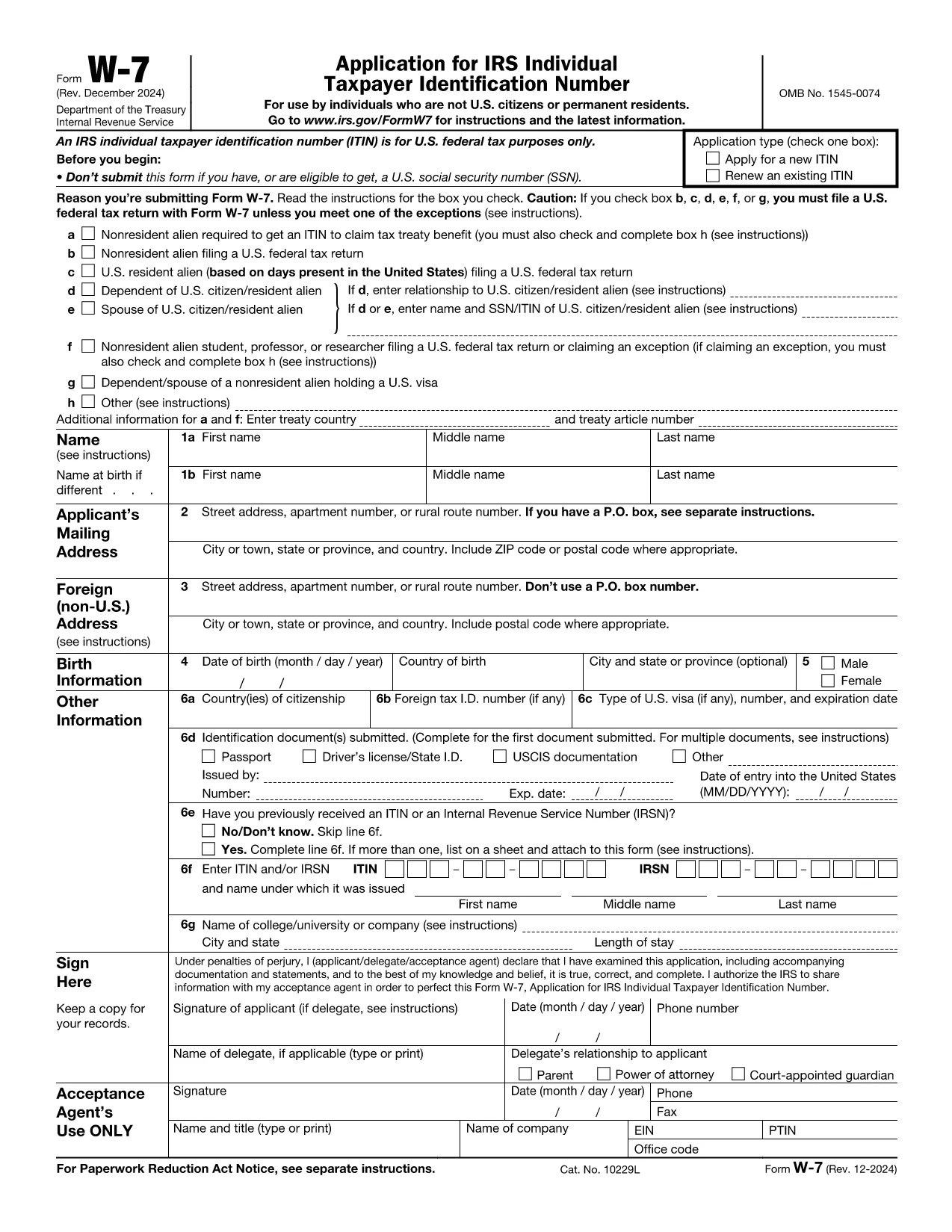
Form W‑7 is the IRS application used to obtain an Individual Taxpayer Identification Number (ITIN) for individuals who are not eligible for a Social Security Number. With Formize you can fill out the official IRS PDF online, save time, and avoid printing errors.

What is Form W‑7?

The Form W‑7 (Application for IRS Individual Taxpayer Identification Number) allows non‑resident aliens, foreign students, dependents, and spouses of U.S. taxpayers to comply with U.S. tax reporting requirements.

Key Requirements & Documents

  • Valid passport (or other accepted ID)
  • Proof of foreign status (visa, birth certificate, etc.)
  • A federal income tax return, unless you qualify for an exception
  • Completed Form W‑7 attached to your return

How to Complete the Form Online

Instead of downloading the PDF, simply click the Fill out this form button on this page. The Formize PDF Filler loads instantly, letting you type directly into each field.

Common Mistakes to Avoid

  • Leaving the “SSN” box checked when you do not have a Social Security Number.
  • Submitting an incomplete list of supporting documents.
  • Using an outdated version of the form (always use the latest PDF from the IRS).
  • Failing to sign and date the form.

Where to Submit Your Application

After you finish the online form, download the completed PDF and mail it with your supporting documents to:

IRS ITIN Operations
P.O. Box 149342
Austin, TX 78714‑9342
United States

You may also use an IRS‑approved Certified Acceptance Agent.

Instruktioner

  • Form W-7 Instruktioner - Instruktioner för Form W-7, Ansökan om IRS Individuell Taxpayer Identification Number (Användning med augusti 2019 revidering av Form W-7)
FAQ
  • Who needs to file Form W‑7?

    Anyone who is not eligible for a Social Security Number but must file a U.S. federal tax return, claim a tax treaty benefit, or be listed as a dependent/spouse on a U.S. return.

  • Can I submit Form W‑7 electronically?

    The IRS currently accepts only mailed paper submissions, but you can complete the form online with Formize and then print or email the final PDF for mailing.

  • What identification documents are accepted?

    A valid passport is the most common document. Other accepted IDs include national ID cards, foreign driver’s licenses, or a combination of birth certificate and government photo ID.

  • Do I need to attach a tax return with Form W‑7?

    Yes, in most cases you must attach the federal tax return you are filing. Exceptions exist for treaty benefits and certain students; see the form instructions for details.

  • How long does it take to receive an ITIN?

    The IRS typically processes ITIN applications within 7 weeks. If you are applying from a foreign address, allow up to 9 weeks.

  • Is there a fee to file Form W‑7?

    There is no filing fee for the form itself, but you may incur costs for certified copies of documents or for using a Certified Acceptance Agent.

HUR

Så här fyller du i Form W‑7 gratis, online i 5 enkla steg:

  1. 1
    Click the Fill out this form button
    On the Formize page, press the blue “Fill out this form” button to launch the PDF filler.
  2. 2
    Wait for the Formize PDF Filler to load
    The web app loads the official IRS Form W‑7 in a secure viewer. No software download is required.
  3. 3
    Enter your information
    Type directly into each field, using the instructions provided on the form. Use the tab key to move quickly between fields.
  4. 4
    Review and sign
    Double‑check every entry, then add your electronic signature using the built‑in signature tool.
  5. 5
    Save or email the completed form
    When you’re done, click “Download PDF” or “Email to me” and attach the file to your ITIN submission package.
Formize PDF Filler app
HANDLA OM

Federala skatteformulär

Form W‑7 är ett av federala skatteformulär som är dokument som används för att rapportera och lämna in federal inkomstskatt till Internal Revenue Service (IRS) i USA. Dessa formulär används av individer, företag och organisationer för att rapportera sina inkomster, avdrag och annan relevant information som behövs för att beräkna deras federala skatteskuld.

Det vanligaste federala skatteformuläret är formulär 1040, som används av enskilda skattebetalare för att rapportera sin personliga inkomstskatt. Andra vanliga formulär inkluderar formulär 1065 för partnerskap, formulär 1120 för företag och formulär 990 för skattebefriade organisationer.

Federala skatteformulär kräver vanligtvis att skattebetalarna rapporterar olika inkomstkällor, såsom löner, löner och tips, såväl som inkomster från investeringar, hyresfastigheter och andra källor. Blanketterna tillåter också skattebetalare att kräva avdrag och krediter för olika utgifter, såsom välgörenhetsbidrag, ränta på bolån och sjukvårdskostnader.

Det är viktigt att lämna in federala skatteformulär korrekt och i tid, eftersom underlåtenhet att göra det kan resultera i straffavgifter och ränteavgifter från IRS.

FUNKTIONER

PDF-fyllare

Det enklaste sättet att fylla i Form W‑7 online

  • Fyll snabbt i Form W‑7
    Letar du efter ett sätt att snabbt fylla Form W‑7 online? Med vår online gratis PDF-formulärfyllare vet du hur du redigerar och fyller i detta pdf-dokument på mindre än en minut.
  • Lätt att använda online PDF-redigerare
    Är du trött på att skriva ut PDF-filer så att du kan redigera dem innan du skannar om och skickar tillbaka dem? Redigera PDF-dokument gratis online. Använd vår online pdf-redigerare för att spara tid och papper.
  • Bra verktyg, alla plattformar
    Undrar du hur man fyller i Form W‑7 på en Mac, eller kanske hur man använder ett PDF-fyllmedel gratis? Våra online PDF-verktyg fungerar på alla plattformar.
  • Säker fillagring
    Färdiga "Form W‑7"-filer lagras i en säker databas som hanteras av Amazon Cloud-hosting. Du kan ta bort dina filer från vårt system när som helst. I alla fall raderas dessa filer automatiskt efter 24 timmar.
  • Chatta med Form W‑7
    Chatta med "Form W‑7" på Chatize som är en gratis PDF-läsare. Ställ frågor och få svar från "Form W‑7". Klicka bara på knappen Chatta med dokument ovan.

Ta bort fyllningssession

Ta bort den valda fyllningssessionen? I det här fallet kommer dina framsteg i att fylla i formuläret att gå förlorade.

Ta bort redigeringssession

Vill du ta bort den valda redigeringssessionen? I det här fallet kommer dina framsteg i att skapa och redigera formuläret att gå förlorade.