
Välj språk

DL 520 – Employer Testing Program Application (California DMV)

  1. Språk engelsk
  2. Land USA
  3. Aktivitet Fordonsregistrering
  4. Avdelning California DMV
DL 520 – Employer Testing Program Application (California DMV)

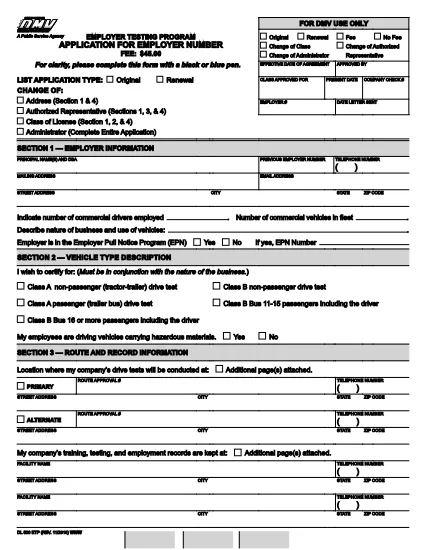
The DL 520 is the California Department of Motor Vehicles (DMV) application used by employers to obtain an employer number for the Employer Testing Program (ETP). This program allows qualified organizations to issue Certificates of Driving Skill (DL 170 ETP) to employees who operate motor vehicles in safety‑sensitive positions.

What is the DL 520 Form?

The DL 520 form collects essential information about your business, the types of testing you will conduct, and your compliance with California Vehicle Code sections related to employer‑run testing programs. Once approved, you receive an employer number that authorizes you to manage driver‑skill testing under the ETP.

Who Must Complete the DL 520?

  • Employers in California who need to test employees for driving‑skill certification (e.g., transportation, construction, utilities).
  • Companies that wish to issue DL 170 ETP certificates to qualified drivers.
  • Any organization that conducts mandatory drug, alcohol, or skills testing required by state law.

How to Fill Out the DL 520 Online with Formize

Instead of downloading, printing, and scanning, you can complete the form directly on our site:

  1. Click the “Fill out this form” button on the page.
  2. Wait a few seconds while the Formize PDF Filler app loads the fillable DL 520 PDF.
  3. Enter your employer information, testing procedures, and contact details in the highlighted fields.
  4. Review each section for accuracy; required fields are marked with an asterisk (*).
  5. When finished, click Save & Download to get a completed PDF you can email or print for submission.

The fillable PDF retains the official DMV layout, so the California DMV will accept it without any modifications.

Common Mistakes to Avoid

  • Leaving required fields blank – the DMV will reject the application.
  • Using an outdated version of the form – always use the latest PDF (linked above).
  • Incorrect employer number format – double‑check the 8‑digit number if you already have one.
  • Missing signatures – both the employer representative and the DMV inspector must sign.
  • Submitting a scanned image of a handwritten form – the fillable PDF ensures legibility.

Where to Submit the Completed Form

After saving your completed DL 520 PDF, mail or fax it to the address listed on the form’s last page. You may also deliver a printed copy to your local DMV office. Keep a copy for your records.

Need help? Review the FAQs below or contact your nearest California DMV office.

FAQ
  • Do I need to print the DL 520 after filling it online?

    The California DMV accepts a printable PDF. You can either submit the electronic file by fax or print a hard copy for mailing.

  • How long does it take to get an employer number after submitting DL 520?

    Processing typically takes 7‑10 business days once the DMV receives a complete and correctly signed application.

  • Can I use the DL 520 for multiple locations?

    Yes. The employer number applies to all locations under the same legal entity, but each site must follow the same testing procedures.

  • What if I make a mistake after downloading the completed PDF?

    You must correct the error on a new copy of the form. The DMV does not accept handwritten alterations on a submitted PDF.

  • Is there a filing fee for the DL 520 application?

    There is no fee to submit the DL 520 itself, but the DMV may charge fees for issuing the employer number and subsequent certificates.

  • Do I need a separate DL 520 for each type of test (drug, alcohol, skill)?

    A single DL 520 authorizes all testing types covered under the Employer Testing Program, provided they are described in the application.

HUR

Så här fyller du i DL 520 gratis, online i 4 enkla steg:

  1. 1
    Open the Fillable Form
    Click the “Fill out this form” button on the page. The Formize PDF Filler will load the DL 520 PDF automatically.
  2. 2
    Enter Your Information
    Type your employer name, address, testing procedures, and other required details into the highlighted fields.
  3. 3
    Review and Save
    Check every section for completeness, then click “Save & Download” to obtain a completed PDF ready for submission.
  4. 4
    Submit to the DMV
    Print the saved PDF (if required) and mail, fax, or deliver it to your local California DMV office as instructed on the form.
Formize PDF Filler app
HANDLA OM

Formulär för registrering av fordon

DL 520 är en av DMV-formulär, även känd som Department of Motor Vehicles-formulär, som är dokument som används i olika transaktioner och processer relaterade till motorfordon. DMV är en statlig myndighet som ansvarar för körkort, fordonsregistrering och upprätthållande av motorfordonslagar. De specifika DMV-formulären som är tillgängliga kan variera beroende på jurisdiktion, men här är några vanliga exempel:

Körkortsformulär: Dessa formulär används för att ansöka om ett körkort eller för att begära ändringar eller förnyelser. De kräver vanligtvis personlig information, identitetsbevis och kan innehålla avsnitt för medicinsk information eller körhistorik.

Fordonsregistreringsformulär: Dessa formulär används för att registrera ett motorfordon hos DMV. De kräver fordonsinformation, ägarinformation och försäkringsbevis.

Titelöverföringsformulär: När du köper eller säljer ett fordon används dessa formulär för att överföra äganderätten från en part till en annan. De kräver information om köparen, säljaren, fordonsinformation och kan innehålla en köpeskilling.

Blanketter för frigörande av ansvar för fordon: När du säljer eller överför äganderätten till ett fordon meddelar dessa formulär DMV att säljaren inte längre är ansvarig för fordonet. Det hjälper till att skydda säljaren från ansvar för olyckor eller incidenter som involverar fordonet efter försäljningen.

Blanketter för förnyelse av registreringsskyltar och registreringar: Dessa formulär används för att förnya fordonsregistrering eller begära nya registreringsskyltar. De kräver vanligtvis information om den registrerade ägaren, aktuell registreringsinformation och betalning av tillämpliga avgifter.

formulär för begäran om körjournaler: Dessa formulär tillåter individer att begära sina körjournaler från DMV, som ger information om köröverträdelser, licensstatus och andra relevanta detaljer.

Special- eller personliga registreringsskyltformulär: Dessa formulär används för att ansöka om personliga registreringsskyltar eller specialskyltar, som tillåter individer att anpassa sin registreringsskylt med specifika tecken eller mönster.

Det här är bara några exempel på de många formulär som kan vara tillgängliga via DMV. De specifika formulären och kraven kan variera beroende på jurisdiktion, så det är viktigt att konsultera den lokala DMV-webbplatsen eller besöka ett DMV-kontor för att få rätt formulär för dina specifika behov.

FUNKTIONER

PDF-fyllare

Det enklaste sättet att fylla i DL 520 online

  • Fyll snabbt i DL 520
    Letar du efter ett sätt att snabbt fylla DL 520 online? Med vår online gratis PDF-formulärfyllare vet du hur du redigerar och fyller i detta pdf-dokument på mindre än en minut.
  • Lätt att använda online PDF-redigerare
    Är du trött på att skriva ut PDF-filer så att du kan redigera dem innan du skannar om och skickar tillbaka dem? Redigera PDF-dokument gratis online. Använd vår online pdf-redigerare för att spara tid och papper.
  • Bra verktyg, alla plattformar
    Undrar du hur man fyller i DL 520 på en Mac, eller kanske hur man använder ett PDF-fyllmedel gratis? Våra online PDF-verktyg fungerar på alla plattformar.
  • Säker fillagring
    Färdiga "DL 520"-filer lagras i en säker databas som hanteras av Amazon Cloud-hosting. Du kan ta bort dina filer från vårt system när som helst. I alla fall raderas dessa filer automatiskt efter 24 timmar.
  • Chatta med DL 520
    Chatta med "DL 520" på Chatize som är en gratis PDF-läsare. Ställ frågor och få svar från "DL 520". Klicka bara på knappen Chatta med dokument ovan.

Ta bort fyllningssession

Ta bort den valda fyllningssessionen? I det här fallet kommer dina framsteg i att fylla i formuläret att gå förlorade.

Ta bort redigeringssession

Vill du ta bort den valda redigeringssessionen? I det här fallet kommer dina framsteg i att skapa och redigera formuläret att gå förlorade.