Välj språk

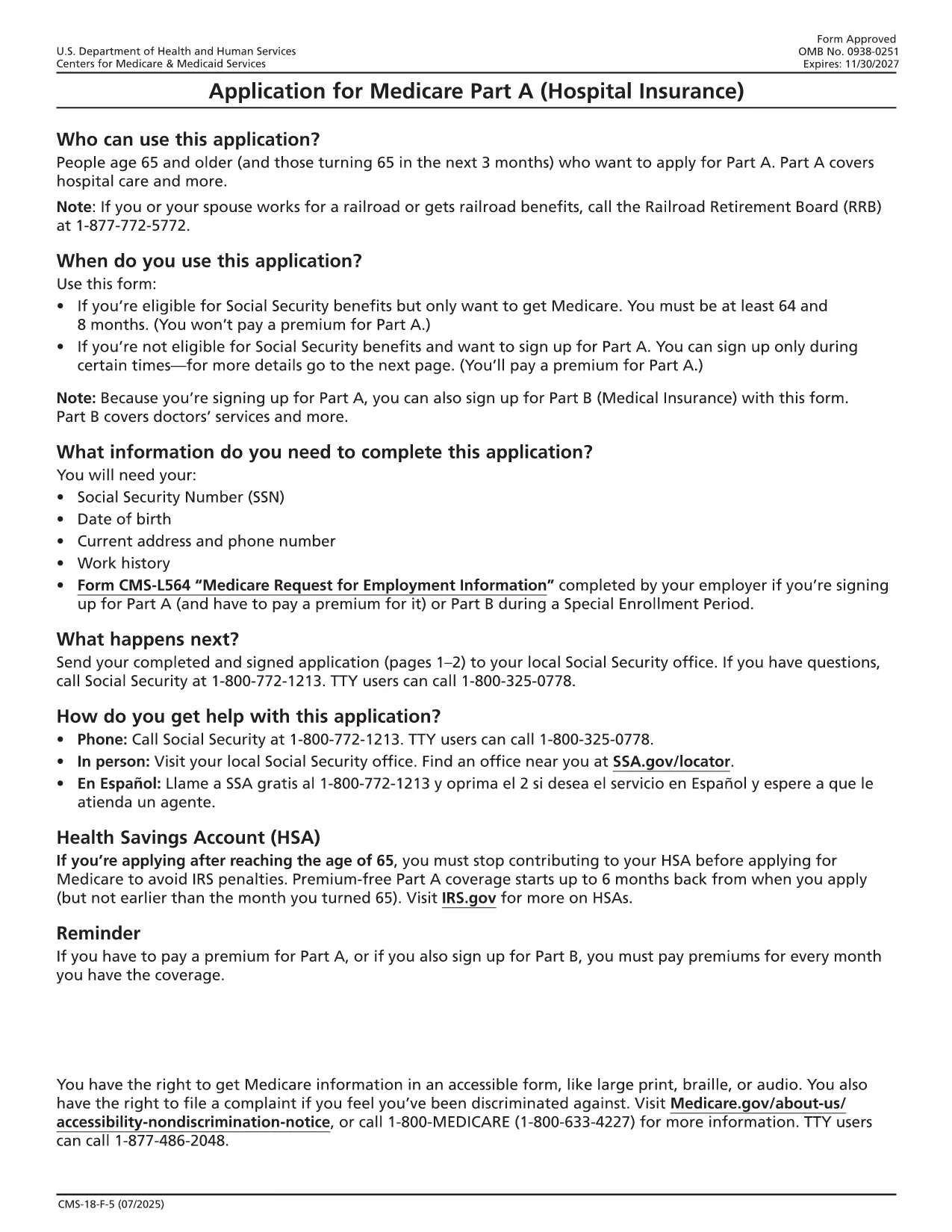
Medicare Part A Application Form (CMS‑18F5) – Fillable PDF

  1. Land USA
  2. Språk engelsk
  3. Aktivitet Healthcare
  4. Avdelning CMS
Medicare Part A Application Form (CMS‑18F5) – Fillable PDF

The CMS‑18F5 is the official application for Medicare Part A (Hospital Insurance). Whether you’re enrolling for the first time or updating your information, the fillable PDF on this page lets you complete the form quickly without printing or scanning.

Our integrated Fill out this form button launches the Formize PDF Filler app directly in your browser. All fields are interactive, and you can save your progress, add an electronic signature, and download the completed PDF in seconds.

What is the Medicare Part A Application?

Medicare Part A provides coverage for inpatient hospital stays, skilled nursing facility care, hospice, and some home health services. The CMS‑18F5 form collects personal details, citizenship status, employment history, and other information required by the Centers for Medicare & Medicaid Services (CMS) to determine eligibility.

How to Fill Out the CMS‑18F5 Form Online

  • Step 1: Click the “Fill out this form” button on this page.
  • Step 2: Wait for the Formize PDF Filler to load (usually a few seconds).
  • Step 3: Complete each field. The filler includes tool‑tips and automatic date formatting.
  • Step 4: Add your electronic signature in the designated box.
  • Step 5: Review the form, then click “Download Completed PDF” or “Print & Mail” according to your preference.

Common Mistakes to Avoid

Even a small error can delay processing. Keep these tips in mind:

  • Double‑check Social Security numbers and dates of birth.
  • Provide a current mailing address; PO boxes are not accepted for eligibility verification.
  • Ensure the signature matches the one on file with the Social Security Administration.
  • Do not leave any required fields blank; the filler will highlight missing information.

Eligibility Requirements

Generally, you qualify for Part A if you:

  • Are 65 years or older, or
  • Receive Social Security Disability Insurance (SSDI) for 24 months, or
  • Have End‑Stage Renal Disease (ESRD) or Amyotrophic Lateral Sclerosis (ALS).

Where to Submit Your Completed Form

After downloading the filled PDF, you can:

  • Mail it to your local Social Security Administration office.
  • Upload it securely through the SSA Medicare portal if you have an online account.
  • Bring a printed copy to your nearest SSA office for in‑person assistance.

Using Formize’s fillable PDF saves you time, reduces errors, and keeps your personal data protected.

FAQ
  • Is the CMS‑18F5 form free to download?

    Yes, the fillable PDF is provided by the federal government at no cost. Formize only hosts the interactive version.

  • Can I submit the completed form electronically?

    You can upload the filled PDF through the Social Security Administration’s online portal if you have an account, or mail a printed copy.

  • What if I make a mistake after downloading?

    Simply reopen the saved PDF in Formize, edit the incorrect fields, and re‑download the corrected version.

  • Do I need a digital signature for Part A?

    An electronic signature is accepted as long as it matches the signature on file with the SSA.

  • How long does processing take after I submit?

    Processing typically takes 30‑45 days. You’ll receive a notice by mail confirming your enrollment status.

  • Is my personal information secure while using Formize?

    Formize uses SSL encryption and does not store any of your data on its servers after the session ends.

HUR

Så här fyller du i Medicare Part A application gratis, online i 5 enkla steg:

  1. 1
    Open the Fillable Form
    Click the “Fill out this form” button on the page. The Formize PDF Filler will open in a new tab.
  2. 2
    Load the Formizer App
    Wait a few seconds while the filler loads the CMS‑18F5 document.
  3. 3
    Complete All Required Fields
    Enter your personal information, citizenship details, and employment history. Tool‑tips appear for each field.
  4. 4
    Add Your Electronic Signature
    Use the signature field to draw or type your signature. This satisfies the legal signing requirement.
  5. 5
    Save or Submit
    Click “Download Completed PDF” to save a copy, or print and mail it to the SSA as instructed.
Formize PDF Filler app
HANDLA OM

Medicare Part A application mall

Med den traditionella uppsättningen funktioner för att visa och fylla i ett PDF-dokument, kombinerat med fördelarna med en webbapplikation och responsiv layout, kan du slutföra Medicare Part A application på några minuter.

FUNKTIONER

PDF-fyllare

Det enklaste sättet att fylla i Medicare Part A application online

  • Fyll snabbt i Medicare Part A application
    Letar du efter ett sätt att snabbt fylla Medicare Part A application online? Med vår online gratis PDF-formulärfyllare vet du hur du redigerar och fyller i detta pdf-dokument på mindre än en minut.
  • Lätt att använda online PDF-redigerare
    Är du trött på att skriva ut PDF-filer så att du kan redigera dem innan du skannar om och skickar tillbaka dem? Redigera PDF-dokument gratis online. Använd vår online pdf-redigerare för att spara tid och papper.
  • Bra verktyg, alla plattformar
    Undrar du hur man fyller i Medicare Part A application på en Mac, eller kanske hur man använder ett PDF-fyllmedel gratis? Våra online PDF-verktyg fungerar på alla plattformar.
  • Säker fillagring
    Färdiga "Medicare Part A application"-filer lagras i en säker databas som hanteras av Amazon Cloud-hosting. Du kan ta bort dina filer från vårt system när som helst. I alla fall raderas dessa filer automatiskt efter 24 timmar.
  • Chatta med Medicare Part A application
    Chatta med "Medicare Part A application" på Chatize som är en gratis PDF-läsare. Ställ frågor och få svar från "Medicare Part A application". Klicka bara på knappen Chatta med dokument ovan.

Ta bort fyllningssession

Ta bort den valda fyllningssessionen? I det här fallet kommer dina framsteg i att fylla i formuläret att gå förlorade.

Ta bort redigeringssession

Vill du ta bort den valda redigeringssessionen? I det här fallet kommer dina framsteg i att skapa och redigera formuläret att gå förlorade.