
Välj språk

Form 750-F Fillable PDF – Download & Complete Online

  1. Språk engelsk
  2. Land USA
  3. Aktivitet Legal Forms
  4. Avdelning justitiedepartementet
Form 750-F Fillable PDF – Download & Complete Online

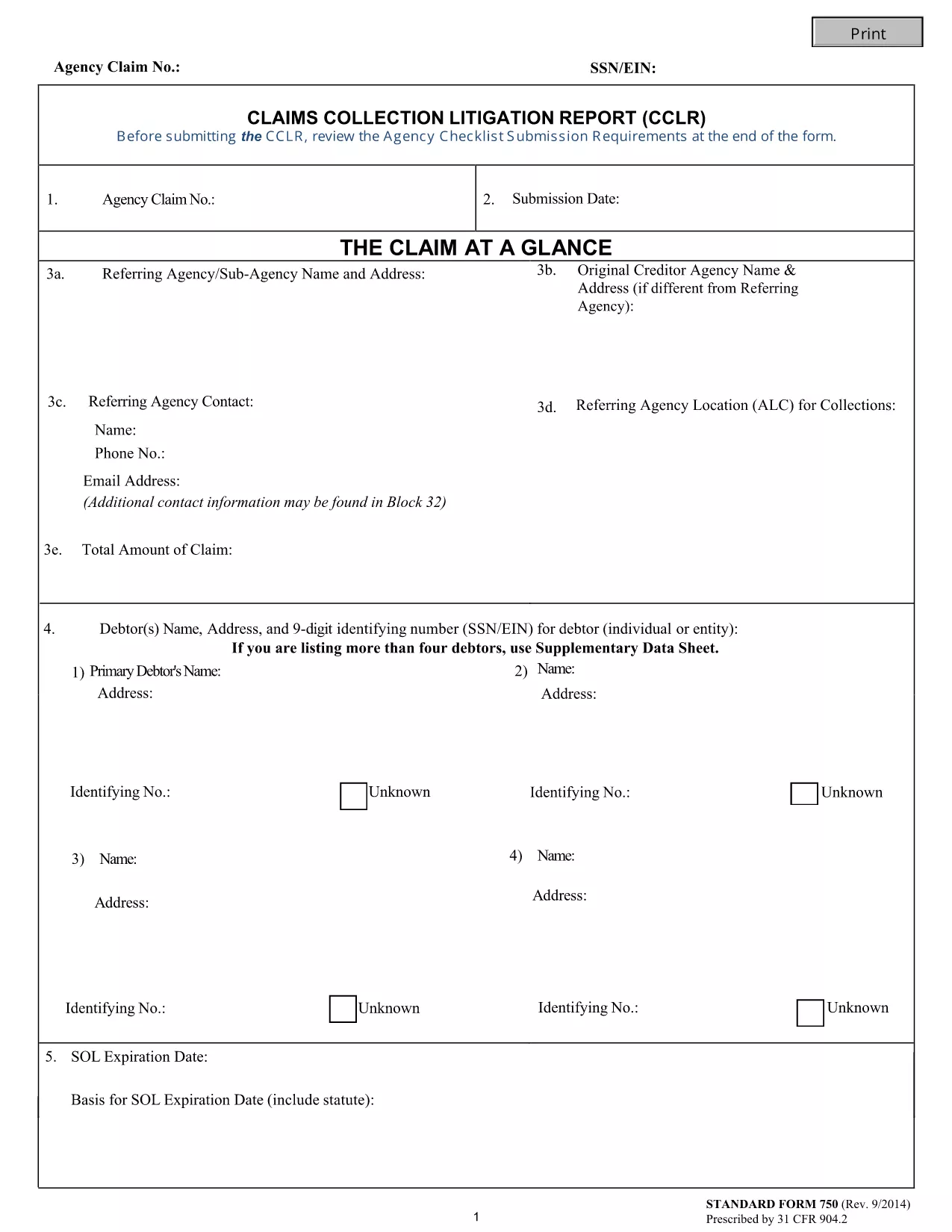
The Form 750-F (Standard Form 750) is the Department of Justice’s official debt‑substantiation report required under 31 CFR 904.2. It is used by government agencies and contractors to document and justify the collection of debts owed to the United States.

Our fillable PDF version lets you complete the form directly in your browser—no Adobe Acrobat or other editor needed. Simply click the button below, let the Formize PDF Filler load, and start typing.

What Is Form 750-F?

Form 750-F collects detailed information about the debtor, the nature of the debt, and the actions taken to recover the amount. It is commonly called the “Debt Substantiation List” and is required for:

  • Federal contract compliance audits
  • Department of Justice investigations
  • Any agency that must prove the validity of a debt before collection

How to Fill Out Form 750-F Online

Follow the step‑by‑step guide below to complete the form quickly and accurately.

Common Mistakes to Avoid

Even small errors can delay processing. Keep these tips in mind:

  • Do not leave required fields blank.
  • Use the exact format for dates (MM/DD/YYYY).
  • Enter the full legal name of the debtor as it appears on official records.
  • Double‑check dollar amounts for commas and decimal points.

Where to Submit the Completed Form

After you have saved the completed PDF, submit it according to the instructions on the covering letter of your agency or the specific contract notice. Most agencies accept electronic uploads through their secure portals.

FAQs About Form 750-F

Find quick answers to the most common questions below. If you need more help, consult your agency’s legal department.

FAQ
  • Is Form 750-F required for all federal contracts?

    Only contracts that involve debt recovery or collection actions require Form 750-F. Check your contract clause or contact your contracting officer for confirmation.

  • Can I edit the PDF after I download it?

    Yes, but using the Formize online filler is recommended because it preserves the original formatting and prevents accidental corruption of the file.

  • What should I do if I make a mistake while filling the form?

    You can clear the field and re‑enter the correct information. If you have already saved the PDF, simply open it again in the Formize filler and edit the needed sections.

  • Do I need a digital signature on Form 750-F?

    Most agencies accept an electronic signature generated by the PDF filler. Confirm with your agency whether a handwritten signature is required.

  • How long should I keep a copy of the completed Form 750-F?

    Retain a copy for at least three years, or longer if your agency’s record‑keeping policy specifies a different period.

  • Is there a cost to use the Formize PDF Filler?

    No. The Formize PDF Filler is free for all users accessing fillable forms on Formize.com.

  • Can I submit the form directly from the filler?

    The filler allows you to download the completed PDF. Submission must be done through your agency’s designated portal or mailing address.

HUR

Så här fyller du i Form 750-F gratis, online i 5 enkla steg:

  1. 1
    Click the Fill‑out Button
    Press the “Fill out this form” button on the page. The Formize PDF Filler app will open in a new tab.
  2. 2
    Wait for the Filler to Load
    The app loads the fillable PDF automatically. This usually takes a few seconds.
  3. 3
    Complete All Required Fields
    Enter the requested information exactly as it appears on your source documents. Required fields are marked with an asterisk.
  4. 4
    Review and Save
    Use the built‑in preview to double‑check your entries, then click “Save” to download the completed PDF to your device.
  5. 5
    Submit or Print
    Follow your agency’s instructions to upload the PDF electronically or print and mail a hard copy.
Formize PDF Filler app
HANDLA OM

Blanketter för justitiedepartementet (DOJ).

Form 750-F är en av de officiella formulären som används av det amerikanska justitiedepartementet och dess olika avdelningar, byråer och komponenter. DOJ är en federal verkställande avdelning som ansvarar för att upprätthålla federala lagar, försvara Förenta staternas intressen i rättsliga frågor och administrera rättvisa.

Här är några exempel på formulär för justitiedepartementet:

Ansökan om federalt bistånd (SF-424): Detta formulär används av organisationer som ansöker om federala anslag eller ekonomiskt bistånd som administreras av DOJ eller dess komponenter. Den samlar in information om organisationen, det föreslagna projektet och budgeten.

formulär för medborgerliga rättigheter: Detta formulär används för att lämna in ett klagomål till DOJ:s Civil Rights Division angående påstådda brott mot medborgerliga rättigheter, såsom diskriminering på grund av ras, kön, funktionshinder eller nationellt ursprung.

Formulär för begäran om anmälan om offer: Detta formulär används av brottsoffer för att begära meddelande om status och förfaranden i ett federalt brottmål, som en del av DOJ:s ansträngningar att tillhandahålla information och stöd till brottsoffer.

Immigrationsformulär: DOJ:s Executive Office for Immigration Review (EOIR) administrerar immigrationsdomstolar och immigrationsrelaterade förfaranden. Olika formulär används i immigrationsdomstolsförfaranden, såsom blankett EOIR-42B för ansökningar om befrielse från avlägsnande eller blankett EOIR-28 för överklaganden.

ATF-formulär: Bureau of Alcohol, Tobacco, Firearms and Explosives (ATF), en del av DOJ, har sin egen uppsättning formulär för olika ändamål, som nämnts i ett tidigare svar.

Drug Enforcement Administration (DEA) Blanketter: DEA, en annan del av DOJ, använder sina egna formulär för frågor som rör kontrollerade ämnen, inklusive ansökningar om registrering, rapportering och krav på registrering.

Dessa exempel belyser några kategorier av DOJ-formulär, men de specifika formulär som används av justitiedepartementet kan variera beroende på avdelningen, byrån eller komponenten som är inblandad och typen av tjänster eller förfaranden. Det är tillrådligt att konsultera den officiella webbplatsen för den specifika avdelningen eller byrån inom DOJ eller söka juridisk rådgivning för att få korrekt och uppdaterad information om de specifika DOJ-formulären som är relevanta för din situation.

FUNKTIONER

PDF-fyllare

Det enklaste sättet att fylla i Form 750-F online

  • Fyll snabbt i Form 750-F
    Letar du efter ett sätt att snabbt fylla Form 750-F online? Med vår online gratis PDF-formulärfyllare vet du hur du redigerar och fyller i detta pdf-dokument på mindre än en minut.
  • Lätt att använda online PDF-redigerare
    Är du trött på att skriva ut PDF-filer så att du kan redigera dem innan du skannar om och skickar tillbaka dem? Redigera PDF-dokument gratis online. Använd vår online pdf-redigerare för att spara tid och papper.
  • Bra verktyg, alla plattformar
    Undrar du hur man fyller i Form 750-F på en Mac, eller kanske hur man använder ett PDF-fyllmedel gratis? Våra online PDF-verktyg fungerar på alla plattformar.
  • Säker fillagring
    Färdiga "Form 750-F"-filer lagras i en säker databas som hanteras av Amazon Cloud-hosting. Du kan ta bort dina filer från vårt system när som helst. I alla fall raderas dessa filer automatiskt efter 24 timmar.
  • Chatta med Form 750-F
    Chatta med "Form 750-F" på Chatize som är en gratis PDF-läsare. Ställ frågor och få svar från "Form 750-F". Klicka bara på knappen Chatta med dokument ovan.

Ta bort fyllningssession

Ta bort den valda fyllningssessionen? I det här fallet kommer dina framsteg i att fylla i formuläret att gå förlorade.

Ta bort redigeringssession

Vill du ta bort den valda redigeringssessionen? I det här fallet kommer dina framsteg i att skapa och redigera formuläret att gå förlorade.