
Välj språk

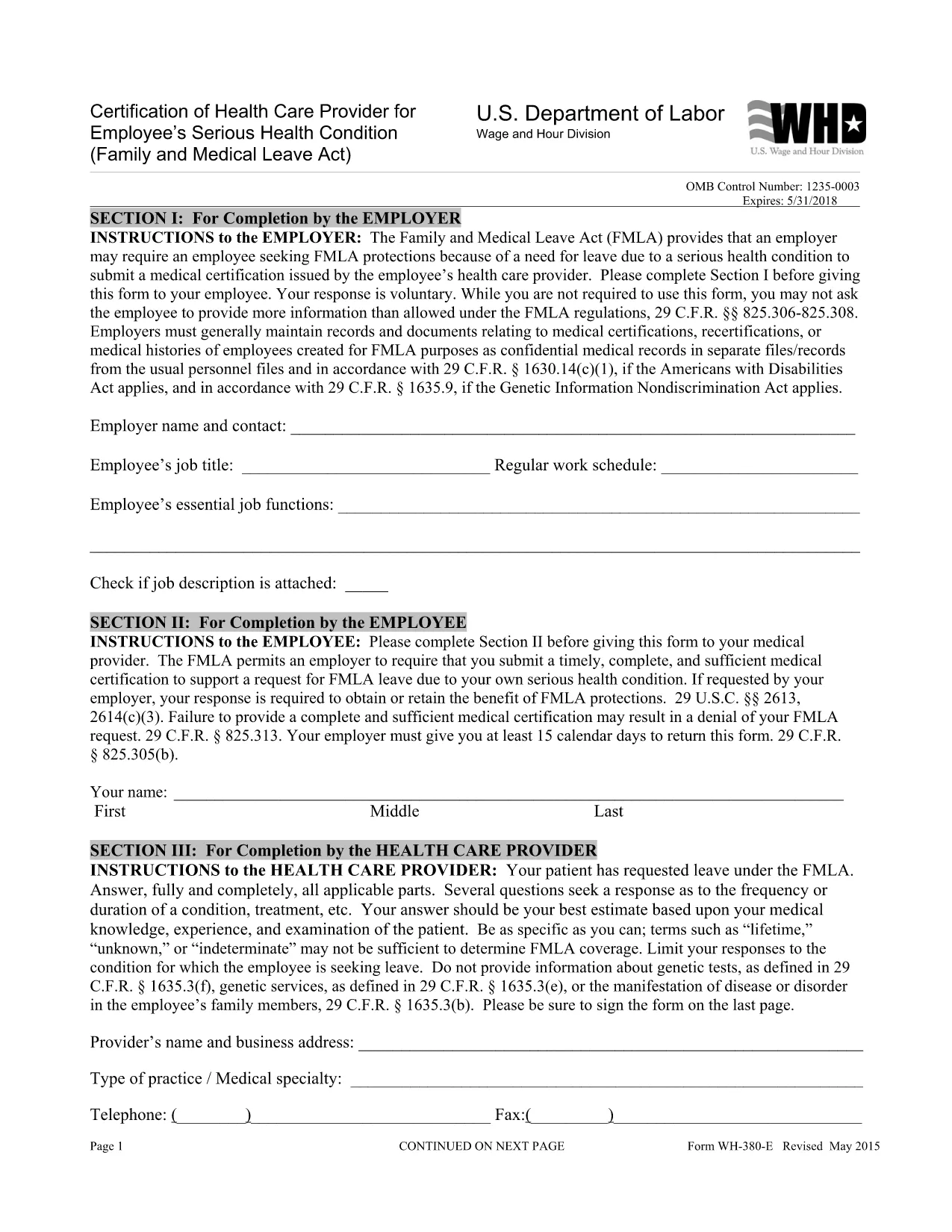
WH‑380‑E Fillable PDF – Family & Medical Leave Act Medical Certification

  1. Språk engelsk
  2. Land USA
  3. Avdelning Department of Labor
  4. Byrå Löne- och timfördelning
WH‑380‑E Fillable PDF – Family & Medical Leave Act Medical Certification

The WH‑380‑E is the official certification of a health care provider required under the Family and Medical Leave Act (FMLA). Employers use this form to verify an employee’s serious health condition, a newborn or newly‑adopted child, or a need for caretaker leave.

What Is the WH‑380‑E Form?

This government‑issued PDF collects detailed medical information, including diagnosis, treatment dates, and the provider’s certification that the condition qualifies for FMLA leave. It is used by federal, state, and private employers across the United States.

How to Complete the WH‑380‑E Online

Instead of downloading and editing the PDF in a separate editor, simply click the “Fill out this form” button on this page. The Formize PDF Filler app will load the fillable version instantly. Follow these steps:

  • Step 1: Click the “Fill out this form” button.
  • Step 2: The Formize filler loads – the document becomes interactive.
  • Step 3: Enter the employee’s information, health‑care provider details, and medical certification data.
  • Step 4: Review for completeness and accuracy.
  • Step 5: Click “Save & Download” to obtain a completed PDF you can print or email to HR.

Common Mistakes to Avoid

  • Leaving any required field blank – every asterisk (*) field must be completed.
  • Providing a diagnosis when the form states it is optional (unless your employer requests it).
  • Using illegible handwriting – the online filler ensures clear, typed text.
  • Submitting the form without the provider’s signature and date.

Where to Submit the Certified Form

After saving the completed WH‑380‑E, send it to your employer’s Human Resources or Benefits department according to your company’s leave‑request policy. Federal employees may also submit it to the agency’s HR office.

Download the Fillable WH‑380‑E PDF

If you prefer to keep a copy of the original document, you can download the official WH‑380‑E PDF from the West Virginia Legislature site. Our online filler uses the same version, guaranteeing compliance.

FAQ
  • What is the purpose of the WH‑380‑E form?

    The WH‑380‑E certifies that an employee’s serious health condition (or a family member’s condition) meets the eligibility criteria for FMLA leave.

  • Can I fill out WH‑380‑E on a mobile device?

    Yes. The Formize PDF Filler works on smartphones and tablets, allowing you to complete the form on any modern browser.

  • Do I need to include a diagnosis on the form?

    A diagnosis is optional unless your employer specifically requests it. The form’s instructions note that the provider may omit the diagnosis while still meeting FMLA requirements.

  • How many copies of the completed WH‑380‑E do I need?

    Typically one completed, signed copy is submitted to HR. Keep a personal copy for your records.

  • Is the WH‑380‑E required for all FMLA leave types?

    The form is required for serious health conditions of the employee or an immediate family member. Separate certification forms exist for newborn or adopted child care.

  • What if I make a mistake after submitting the form?

    Contact your HR department immediately. You can submit a corrected WH‑380‑E with a note explaining the changes.

  • Is the WH‑380‑E a federal or state form?

    It is a federal form issued under the Family and Medical Leave Act, but many states adopt the same version for their own leave programs.

  • Do I need a notary for the WH‑380‑E?

    No. The health‑care provider’s signature and date satisfy the certification requirements.

HUR

Så här fyller du i WH-380-E gratis, online i 5 enkla steg:

  1. 1
    Open the Fillable Form
    Click the “Fill out this form” button on the page. The Formize PDF Filler loads the WH‑380‑E as an interactive document.
  2. 2
    Enter Required Information
    Type the employee’s name, dates of care, and the health‑care provider’s details into the highlighted fields.
  3. 3
    Complete the Medical Certification
    Provide the diagnosis (if required), treatment plan, and any functional limitations. Ensure the provider signs and dates the form.
  4. 4
    Review and Save
    Double‑check all entries for accuracy, then click “Save & Download” to get a completed PDF you can print or email.
  5. 5
    Submit to HR
    Send the saved PDF to your employer’s HR or Benefits department following your organization’s leave‑submission guidelines.
Formize PDF Filler app
HANDLA OM

Department of Labor (DOL) blanketter

WH-380-E är ett av de officiella formulären som används av USA:s arbetsdepartement och dess olika myndigheter för att samla in information, administrera program och upprätthålla arbetsrelaterade lagar och förordningar. Department of Labor är en federal verkställande avdelning som ansvarar för att främja och skydda arbetstagarnas välfärd, säkerställa rättvisa anställningsmetoder och övervaka olika aspekter av arbete och sysselsättning i USA.

Här är några exempel på arbetsministeriets former:

Verifiering av anställningsbehörighet (formulär I-9): Medan det administreras av US Citizenship and Immigration Services (USCIS), är formulär I-9 ofta associerat med Department of Labor. Det används av arbetsgivare för att verifiera identiteten och anställningsbehörigheten för individer som anställts för anställning i USA.

Family and Medical Leave Act (FMLA) Forms: DOL:s löne- och timavdelning administrerar FMLA, och olika former används för att implementera och följa bestämmelserna i denna federala lag, inklusive Certification of Health Care Leverantörsformulär och formuläret FMLA Notice of Eligibility and Rights & Responsibilities.

Occupational Safety and Health Administration (OSHA) Blanketter: OSHA, en avdelning av DOL, kräver att vissa arbetsgivare för register över arbetsplatsskador och sjukdomar med hjälp av formulär som OSHA Form 300, OSHA Form 300A och OSHA Blankett 301.

Blanketter för arbetslöshetsförsäkring: DOL:s sysselsättnings- och utbildningsadministration övervakar programmet för arbetslöshetsförsäkring (UI), och olika formulär används av statliga arbetskraftsbyråer för att administrera och behandla anspråk på UI-förmåner.

Blanketter för efterlevnad av löner och timmar: DOL:s löne- och timavdelning tillämpar olika arbetslagar, inklusive Fair Labor Standards Act (FLSA) och Family and Medical Leave Act (FMLA). Arbetsgivare kan behöva använda specifika formulär för att upprätthålla efterlevnaden av dessa lagar, såsom register över arbetade timmar, lönesatser och annan relaterad information.

Dessa exempel representerar några vanliga kategorier av Department of Labor-formulär, men det finns många andra formulär som används av DOL och dess olika byråer för att utföra sitt ansvar relaterat till arbete och sysselsättning. De specifika formulär som krävs kan variera beroende på programmet, förordningen eller verkställighetsåtgärden. Det är tillrådligt att besöka den officiella webbplatsen för det amerikanska arbetsdepartementet (www.dol.gov) eller rådgöra med relevanta DOL-byråer eller juridiska yrkesverksamma för att få korrekt och uppdaterad datuminformation om de specifika DOL-formulär som är relevanta för dina arbetsrelaterade behov eller efterlevnadskrav.

FUNKTIONER

PDF-fyllare

Det enklaste sättet att fylla i WH-380-E online

  • Fyll snabbt i WH-380-E
    Letar du efter ett sätt att snabbt fylla WH-380-E online? Med vår online gratis PDF-formulärfyllare vet du hur du redigerar och fyller i detta pdf-dokument på mindre än en minut.
  • Lätt att använda online PDF-redigerare
    Är du trött på att skriva ut PDF-filer så att du kan redigera dem innan du skannar om och skickar tillbaka dem? Redigera PDF-dokument gratis online. Använd vår online pdf-redigerare för att spara tid och papper.
  • Bra verktyg, alla plattformar
    Undrar du hur man fyller i WH-380-E på en Mac, eller kanske hur man använder ett PDF-fyllmedel gratis? Våra online PDF-verktyg fungerar på alla plattformar.
  • Säker fillagring
    Färdiga "WH-380-E"-filer lagras i en säker databas som hanteras av Amazon Cloud-hosting. Du kan ta bort dina filer från vårt system när som helst. I alla fall raderas dessa filer automatiskt efter 24 timmar.
  • Chatta med WH-380-E
    Chatta med "WH-380-E" på Chatize som är en gratis PDF-läsare. Ställ frågor och få svar från "WH-380-E". Klicka bara på knappen Chatta med dokument ovan.

Ta bort fyllningssession

Ta bort den valda fyllningssessionen? I det här fallet kommer dina framsteg i att fylla i formuläret att gå förlorade.

Ta bort redigeringssession

Vill du ta bort den valda redigeringssessionen? I det här fallet kommer dina framsteg i att skapa och redigera formuläret att gå förlorade.