
Välj språk

MVR-3 Fillable PDF – North Carolina DMV Vehicle Form

  1. Språk engelsk
  2. Land USA
  3. Aktivitet Fordonsregistrering
  4. Avdelning Transportdepartementet
  5. stat norra Carolina
MVR-3 Fillable PDF – North Carolina DMV Vehicle Form

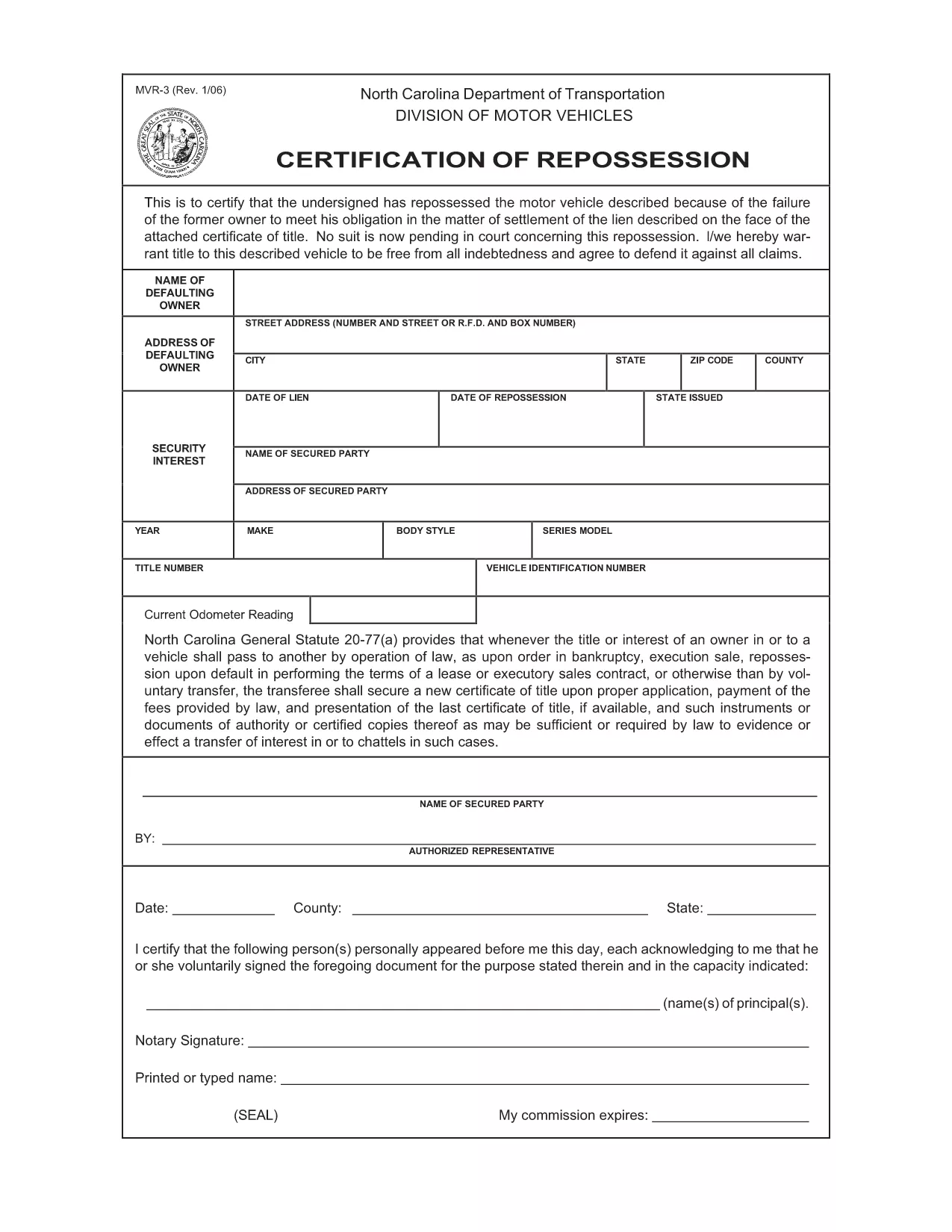
The MVR-3 is the official North Carolina Department of Transportation (NCDOT) vehicle registration application. Whether you’re registering a new vehicle, updating ownership information, or correcting a title, the MVR-3 is the required paperwork.

What Is the MVR-3 Form?

The MVR-3 collects essential vehicle details such as VIN, make, model, year, and current odometer reading. It also captures owner information, lienholder data, and any special exemptions.

Key Sections of the MVR-3

  • Section A – Owner Information: Name, address, driver’s license number.
  • Section B – Vehicle Details: VIN, year, make, model, body style.
  • Section C – Lienholder Data (if applicable): Name and address of the lienholder.
  • Section D – Certification & Signature: Owner’s signature and date.

How to Complete the Form Online

Instead of printing, downloading, and hand‑filling the PDF, use Formize’s built‑in filler:

  1. Click the "Fill out this form" button on this page.
  2. Wait a few seconds while the Formize PDF Filler loads the MVR-3.
  3. Enter your information directly into each field. The filler validates required entries in real time.
  4. Review the completed form for accuracy.
  5. Save a copy to your device or print it for submission at your local NCDOT office.

Common Mistakes & Tips

  • Incorrect VIN: Double‑check the 17‑character VIN; a single digit error can delay processing.
  • Missing Signature: The form is invalid without the owner’s signature and date.
  • Odometer Disclosure: Provide the exact current mileage; tampering can result in penalties.
  • Out‑of‑date Address: Ensure the mailing address matches the one on file with the DMV.

Download & Save Your Completed Form

After filling out the MVR-3 with Formize, you can download a PDF copy for your records or print it for immediate submission. Keep a saved copy in case the DMV requests additional information.

FAQ
  • What is the purpose of the MVR-3 form?

    The MVR-3 is used to register a vehicle, transfer ownership, or correct title information with the North Carolina DMV.

  • Can I submit the MVR-3 electronically?

    North Carolina currently requires a printed and signed copy for most transactions, but you can fill it out online and print it yourself.

  • Do I need a notary for the MVR-3?

    No notary is required unless a lienholder specifically requests notarization on the lien section.

  • How long does it take for the DMV to process the MVR-3?

    Processing typically takes 7‑10 business days after the form is submitted, provided all information is correct.

  • What should I do if I make a mistake on the form?

    Cross out the error with a single line, initial it, and write the correct information. Alternatively, start a new form to avoid confusion.

  • Is there a fee associated with filing the MVR-3?

    Yes, filing fees vary depending on the transaction type (e.g., title transfer, registration renewal). Check the NCDOT fee schedule for current rates.

  • Where can I get help if I have questions about the MVR-3?

    Contact your local NCDOT office or visit the official NCDOT website for FAQs and contact information.

HUR

Så här fyller du i MVR-3 gratis, online i 5 enkla steg:

  1. 1
    Open the Fillable Form
    Click the "Fill out this form" button on the page to launch the Formize PDF Filler.
  2. 2
    Wait for the Filler to Load
    A short loading screen appears while the MVR-3 PDF is prepared for editing.
  3. 3
    Enter Your Information
    Type directly into each highlighted field. Required fields are marked with an asterisk.
  4. 4
    Review and Validate
    Check every section for completeness. The filler will alert you to any missing or invalid entries.
  5. 5
    Save or Print
    Download the completed PDF to your device or print it for submission at your local NCDOT office.
Formize PDF Filler app
HANDLA OM

Formulär för registrering av fordon

MVR-3 är en av DMV-formulär, även känd som Department of Motor Vehicles-formulär, som är dokument som används i olika transaktioner och processer relaterade till motorfordon. DMV är en statlig myndighet som ansvarar för körkort, fordonsregistrering och upprätthållande av motorfordonslagar. De specifika DMV-formulären som är tillgängliga kan variera beroende på jurisdiktion, men här är några vanliga exempel:

Körkortsformulär: Dessa formulär används för att ansöka om ett körkort eller för att begära ändringar eller förnyelser. De kräver vanligtvis personlig information, identitetsbevis och kan innehålla avsnitt för medicinsk information eller körhistorik.

Fordonsregistreringsformulär: Dessa formulär används för att registrera ett motorfordon hos DMV. De kräver fordonsinformation, ägarinformation och försäkringsbevis.

Titelöverföringsformulär: När du köper eller säljer ett fordon används dessa formulär för att överföra äganderätten från en part till en annan. De kräver information om köparen, säljaren, fordonsinformation och kan innehålla en köpeskilling.

Blanketter för frigörande av ansvar för fordon: När du säljer eller överför äganderätten till ett fordon meddelar dessa formulär DMV att säljaren inte längre är ansvarig för fordonet. Det hjälper till att skydda säljaren från ansvar för olyckor eller incidenter som involverar fordonet efter försäljningen.

Blanketter för förnyelse av registreringsskyltar och registreringar: Dessa formulär används för att förnya fordonsregistrering eller begära nya registreringsskyltar. De kräver vanligtvis information om den registrerade ägaren, aktuell registreringsinformation och betalning av tillämpliga avgifter.

formulär för begäran om körjournaler: Dessa formulär tillåter individer att begära sina körjournaler från DMV, som ger information om köröverträdelser, licensstatus och andra relevanta detaljer.

Special- eller personliga registreringsskyltformulär: Dessa formulär används för att ansöka om personliga registreringsskyltar eller specialskyltar, som tillåter individer att anpassa sin registreringsskylt med specifika tecken eller mönster.

Det här är bara några exempel på de många formulär som kan vara tillgängliga via DMV. De specifika formulären och kraven kan variera beroende på jurisdiktion, så det är viktigt att konsultera den lokala DMV-webbplatsen eller besöka ett DMV-kontor för att få rätt formulär för dina specifika behov.

FUNKTIONER

PDF-fyllare

Det enklaste sättet att fylla i MVR-3 online

  • Fyll snabbt i MVR-3
    Letar du efter ett sätt att snabbt fylla MVR-3 online? Med vår online gratis PDF-formulärfyllare vet du hur du redigerar och fyller i detta pdf-dokument på mindre än en minut.
  • Lätt att använda online PDF-redigerare
    Är du trött på att skriva ut PDF-filer så att du kan redigera dem innan du skannar om och skickar tillbaka dem? Redigera PDF-dokument gratis online. Använd vår online pdf-redigerare för att spara tid och papper.
  • Bra verktyg, alla plattformar
    Undrar du hur man fyller i MVR-3 på en Mac, eller kanske hur man använder ett PDF-fyllmedel gratis? Våra online PDF-verktyg fungerar på alla plattformar.
  • Säker fillagring
    Färdiga "MVR-3"-filer lagras i en säker databas som hanteras av Amazon Cloud-hosting. Du kan ta bort dina filer från vårt system när som helst. I alla fall raderas dessa filer automatiskt efter 24 timmar.
  • Chatta med MVR-3
    Chatta med "MVR-3" på Chatize som är en gratis PDF-läsare. Ställ frågor och få svar från "MVR-3". Klicka bara på knappen Chatta med dokument ovan.

Ta bort fyllningssession

Ta bort den valda fyllningssessionen? I det här fallet kommer dina framsteg i att fylla i formuläret att gå förlorade.

Ta bort redigeringssession

Vill du ta bort den valda redigeringssessionen? I det här fallet kommer dina framsteg i att skapa och redigera formuläret att gå förlorade.