
Välj språk

DL‑329S Gender Designation Request – Fillable PDF

  1. Språk engelsk
  2. Land USA
  3. Aktivitet Körkort
  4. stat Kalifornien
DL‑329S Gender Designation Request – Fillable PDF

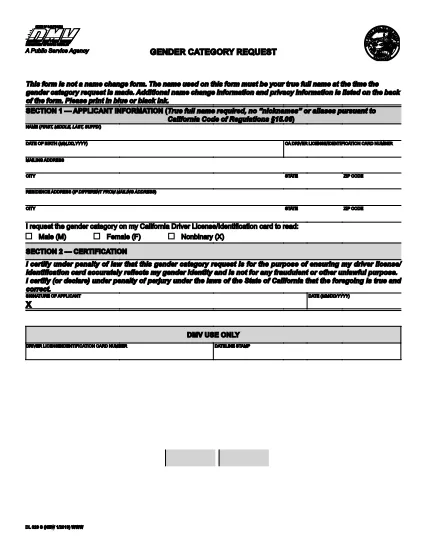
The DL‑329S is the California Department of Motor Vehicles (DMV) form used to request a change to the gender designation on a driver license or identification card. Whether you are updating from male to female, female to male, or adding a non‑binary option, this form is required by the DMV.

What Is the DL‑329S Form?

DL‑329S, officially titled “Gender Designation Request,” captures the applicant’s personal information, current license details, and the new gender marker they wish to use. The form must be signed by the applicant and, in some cases, accompanied by a certified court order.

How to Complete the DL‑329S Online with Formize

Instead of downloading, printing, and scanning, you can fill the form directly in your browser:

  1. Click the "Fill out this form" button on this page.
  2. The Formize PDF Filler app will load the DL‑329S PDF in a secure, editable window.
  3. Enter all required fields – name, driver license number, new gender marker, and signature.
  4. When you’re done, click Save & Download to get a completed PDF you can print or email to the DMV.

Common Mistakes & Tips for a Smooth Submission

  • Leave no blank fields. The DMV rejects any form with empty required sections.
  • Use the exact gender option wording. Choose "Male," "Female," or "Non‑binary" as it appears on the form.
  • Attach a certified court order if your gender change is not based on a physician’s statement (required for non‑binary requests).
  • Sign electronically. Formize allows a typed signature that the DMV accepts.
  • Double‑check your driver license number. A typo will delay processing.

Where to Submit the Completed Form

After filling out and saving the PDF, you have two options:

  • Bring the printed form to any California DMV office and submit it in person.
  • Mail the form to the address on the DMV website along with any required supporting documents.

There is a $28 fee for processing the gender designation change, payable at the DMV.

FAQ
  • Do I need a physician’s letter to change my gender on a California driver license?

    No. Since January 2019, a physician’s letter is no longer required. A certified court order is sufficient for gender marker changes.

  • Can I submit the DL‑329S form online?

    The DMV still requires a paper copy, but you can fill the PDF online with Formize, then print and bring it to the DMV or mail it.

  • What gender options are available on the DL‑329S?

    The form offers "Male," "Female," and "Non‑binary" as selectable gender markers.

  • How long does it take for the DMV to process the gender change?

    Processing typically takes 2‑4 weeks after the DMV receives the completed form and any required supporting documents.

  • Is there a fee to change my gender marker?

    Yes, the DMV charges a $28 fee for processing a gender designation request. The fee is paid at the DMV office.

  • What should I do if I make a mistake on the form?

    If you notice an error before submitting, simply correct it in the Formize editor and re‑download the PDF. If you have already submitted, you will need to fill out a new DL‑329S.

  • Can I use the same DL‑329S form for a name change?

    No. A name change requires a separate form (DL‑44) and a certified court order for the name update.

HUR

Så här fyller du i DL‑329S gratis, online i 4 enkla steg:

  1. 1
    Open the Fillable Form
    Click the "Fill out this form" button on the page. The Formize PDF Filler will open the DL‑329S PDF in an editable view.
  2. 2
    Enter Your Information
    Complete every required field – name, license number, new gender marker, and signature. Use the navigation tabs to move between sections.
  3. 3
    Save and Download
    When all fields are filled, click "Save & Download". A finished PDF will be saved to your device, ready for printing or electronic submission.
  4. 4
    Submit to the DMV
    Print the completed form (if mailing) or bring the printed copy to your local DMV office along with any supporting documents and the $28 fee.
Formize PDF Filler app
HANDLA OM

Ansökningsformulär för körkort

I de flesta länder är det obligatoriskt att ha ett körkort innan du kan ge dig ut på vägen. Att ta körkort är en viktig milstolpe för alla som vill köra bil.

DL‑329S är ett av ansökningsformulären för körkort som är dokument som används för att samla in information från personer som vill ansöka om körkort. Den innehåller vanligtvis fält för den sökandes namn, födelsedatum, ID-nummer, kontaktuppgifter, samt körkortshistorik och erfarenhet.

FUNKTIONER

PDF-fyllare

Det enklaste sättet att fylla i DL‑329S online

  • Fyll snabbt i DL‑329S
    Letar du efter ett sätt att snabbt fylla DL‑329S online? Med vår online gratis PDF-formulärfyllare vet du hur du redigerar och fyller i detta pdf-dokument på mindre än en minut.
  • Lätt att använda online PDF-redigerare
    Är du trött på att skriva ut PDF-filer så att du kan redigera dem innan du skannar om och skickar tillbaka dem? Redigera PDF-dokument gratis online. Använd vår online pdf-redigerare för att spara tid och papper.
  • Bra verktyg, alla plattformar
    Undrar du hur man fyller i DL‑329S på en Mac, eller kanske hur man använder ett PDF-fyllmedel gratis? Våra online PDF-verktyg fungerar på alla plattformar.
  • Säker fillagring
    Färdiga "DL‑329S"-filer lagras i en säker databas som hanteras av Amazon Cloud-hosting. Du kan ta bort dina filer från vårt system när som helst. I alla fall raderas dessa filer automatiskt efter 24 timmar.
  • Chatta med DL‑329S
    Chatta med "DL‑329S" på Chatize som är en gratis PDF-läsare. Ställ frågor och få svar från "DL‑329S". Klicka bara på knappen Chatta med dokument ovan.

Ta bort fyllningssession

Ta bort den valda fyllningssessionen? I det här fallet kommer dina framsteg i att fylla i formuläret att gå förlorade.

Ta bort redigeringssession

Vill du ta bort den valda redigeringssessionen? I det här fallet kommer dina framsteg i att skapa och redigera formuläret att gå förlorade.