
Välj språk

OL 801 Student License Application – Fillable PDF

  1. Språk engelsk
  2. Land USA
  3. Aktivitet Körkort
  4. stat Kalifornien
OL 801 Student License Application – Fillable PDF

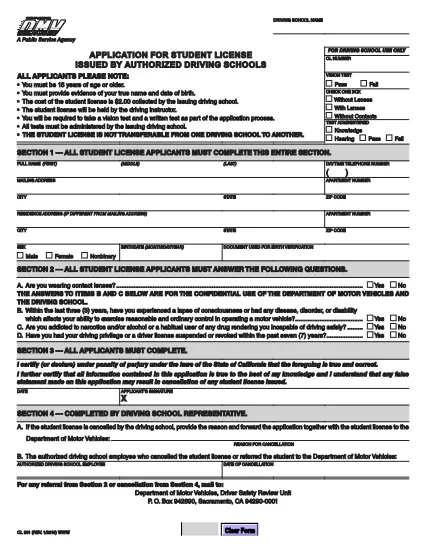
The OL 801 is the California Department of Motor Vehicles (DMV) application used by driving schools and students to obtain a learner’s permit or student driver license. This form must be completed accurately before you can start behind‑the‑wheel training.

Formize makes the process effortless. Instead of printing, scanning, or editing the PDF manually, simply click the Fill out this form button on this page. Our secure PDF filler loads the official DMV document, lets you type directly into each field, and saves a completed copy that you can print or email.

What Is the OL 801 Form?

The OL 801 collects essential information about the student driver, the driving school, and any required endorsements. California law requires a signed, completed form before a student can be issued a provisional license.

How to Complete the OL 801 Online

Follow the step‑by‑step guide below to finish the form in minutes:

  • Click the “Fill out this form” button.
  • Wait for the Formize PDF Filler app to load the official DMV PDF.
  • Enter the requested details – student name, address, school information, and signatures.
  • Review the completed form for accuracy.
  • Download, print, or email the filled PDF directly from the filler.

Common Mistakes to Avoid

  • Leaving any required field blank – the DMV will reject incomplete submissions.
  • Using an outdated version of the form – always use the latest PDF linked below.
  • Incorrectly entering the school’s license number – double‑check with your driving school.
  • Forgetting the student’s signature; an unsigned form is invalid.

Where to Submit Your Completed Form

After filling out the OL 801, you can submit it in one of three ways:

  1. Mail it to the DMV Driver Safety Review Unit, P.O. Box 942890, Sacramento, CA 94290‑0001.
  2. Bring a printed copy to your local DMV office.
  3. Upload a scanned copy through the California DMV online portal (if available).

Download the Official PDF

For reference or offline use, you can also download the original, unfilled PDF directly from the California DMV:

Official OL 801 PDF (2020 version)

FAQ
  • What is the purpose of the OL 801 form?

    The OL 801 is used by California driving schools to apply for a student driver license (learner’s permit) for their students. It verifies the student’s eligibility and records the school’s endorsement.

  • Do I need a printed copy to submit the form?

    Yes. The DMV requires a hard copy with original signatures. You can print the completed PDF from Formize after filling it out online.

  • Can I edit the PDF after I download it?

    Once you download the filled PDF, you can still edit it with any PDF editor, but the Formize filler already lets you complete all fields accurately before download.

  • Is the Formize filler free to use?

    Yes, filling out the OL 801 with Formize’s online PDF filler is completely free and does not require any software installation.

  • How often is the OL 801 form updated?

    The California DMV updates the form as needed. The version linked here (2020) is the current official version; always use the latest PDF from the DMV website.

  • What should I do if I make a mistake while filling out the form?

    If you notice an error before downloading, simply correct it in the Formize filler. If you’ve already printed it, you may need to start a new form or cross out the mistake and initial it, depending on DMV guidelines.

  • Where can I mail the completed OL 801?

    Mail the signed form to: Department of Motor Vehicles, Driver Safety Review Unit, P. O. Box 942890, Sacramento, CA 94290‑0001.

  • Do I need any additional documents with the OL 801?

    Typically you’ll need a copy of the student’s ID, proof of residency, and the driving school’s certification. Check the DMV checklist for your specific situation.

HUR

Så här fyller du i OL 801 gratis, online i 4 enkla steg:

  1. 1
    Click the Fill‑out Button
    Press the “Fill out this form” button on this page to launch the Formize PDF Filler.
  2. 2
    Wait for the Filler to Load
    The app loads the official OL 801 PDF in a secure viewer. This takes only a few seconds.
  3. 3
    Enter All Required Information
    Type directly into each field – student details, school information, and signatures. Use the tab key to move quickly between fields.
  4. 4
    Save, Print, or Email
    When you’re finished, click “Save”. You can download the completed PDF, print it for a hard copy, or email it straight to the DMV.
Formize PDF Filler app
HANDLA OM

Ansökningsformulär för körkort

I de flesta länder är det obligatoriskt att ha ett körkort innan du kan ge dig ut på vägen. Att ta körkort är en viktig milstolpe för alla som vill köra bil.

OL 801 är ett av ansökningsformulären för körkort som är dokument som används för att samla in information från personer som vill ansöka om körkort. Den innehåller vanligtvis fält för den sökandes namn, födelsedatum, ID-nummer, kontaktuppgifter, samt körkortshistorik och erfarenhet.

FUNKTIONER

PDF-fyllare

Det enklaste sättet att fylla i OL 801 online

  • Fyll snabbt i OL 801
    Letar du efter ett sätt att snabbt fylla OL 801 online? Med vår online gratis PDF-formulärfyllare vet du hur du redigerar och fyller i detta pdf-dokument på mindre än en minut.
  • Lätt att använda online PDF-redigerare
    Är du trött på att skriva ut PDF-filer så att du kan redigera dem innan du skannar om och skickar tillbaka dem? Redigera PDF-dokument gratis online. Använd vår online pdf-redigerare för att spara tid och papper.
  • Bra verktyg, alla plattformar
    Undrar du hur man fyller i OL 801 på en Mac, eller kanske hur man använder ett PDF-fyllmedel gratis? Våra online PDF-verktyg fungerar på alla plattformar.
  • Säker fillagring
    Färdiga "OL 801"-filer lagras i en säker databas som hanteras av Amazon Cloud-hosting. Du kan ta bort dina filer från vårt system när som helst. I alla fall raderas dessa filer automatiskt efter 24 timmar.
  • Chatta med OL 801
    Chatta med "OL 801" på Chatize som är en gratis PDF-läsare. Ställ frågor och få svar från "OL 801". Klicka bara på knappen Chatta med dokument ovan.

Ta bort fyllningssession

Ta bort den valda fyllningssessionen? I det här fallet kommer dina framsteg i att fylla i formuläret att gå förlorade.

Ta bort redigeringssession

Vill du ta bort den valda redigeringssessionen? I det här fallet kommer dina framsteg i att skapa och redigera formuläret att gå förlorade.