
Välj språk

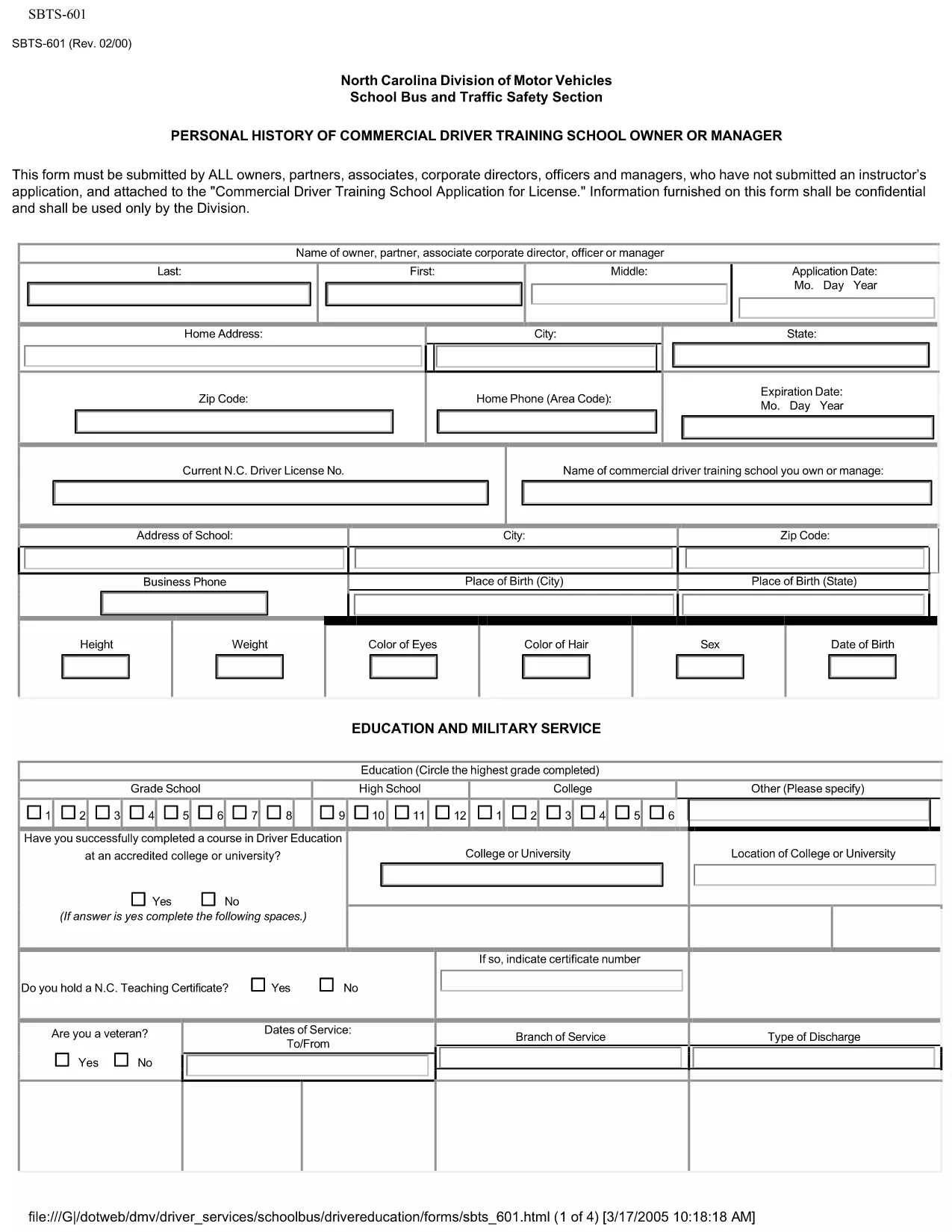
SBTS-601 Personal History Form – Fillable PDF for NC Driver Training Schools

  1. Språk engelsk
  2. Land USA
  3. Aktivitet Körkort
  4. stat norra Carolina
SBTS-601 Personal History Form – Fillable PDF for NC Driver Training Schools

The SBTS‑601 Personal History form is required by the North Carolina Department of Transportation (NCDOT) for every owner, partner, corporate director, officer, or manager of a Commercial Driver Training School who has not previously submitted an instructor’s application. This confidential questionnaire helps the State evaluate the background of school leadership before issuing a training school license.

Our fillable PDF version lets you complete the form quickly, securely, and without printing. Simply click the "Fill out this form" button below and the Formize PDF Filler app will load the document ready for you to enter data.

What Is SBTS-601?

SBTS‑601 collects personal history details such as employment background, criminal record, driving violations, and financial information. The data is used solely for licensing decisions and is kept confidential by the NCDOT.

Who Must Complete This Form

  • Owners, partners, or shareholders of a commercial driver training school
  • Corporate officers, directors, and managers involved in school operations
  • Anyone who has not already submitted an instructor application (SBTS‑602)

How to Fill Out SBTS-601 Online

Follow the simple steps in the "How‑To" section below. The online filler saves your progress, validates required fields, and lets you download a completed PDF ready for submission.

Common Mistakes to Avoid

  • Leaving required fields blank – the filler will highlight missing information.
  • Providing outdated addresses or phone numbers – ensure all contact details are current.
  • Omitting prior convictions or driving violations – full disclosure is mandatory.
  • Submitting the form without the required supporting documents (e.g., driver’s license copy, background check).

Where to Submit the Completed Form

After you download the completed SBTS‑601 PDF, mail or hand‑deliver it to the NCDOT – School Bus and Traffic Safety Department at the address listed on the form. Include any required attachments and the applicable filing fee.

Need help? Review the FAQs below or contact the NCDOT Driver Services Division.

FAQ
  • Who is required to submit SBTS‑601?

    All owners, partners, corporate officers, directors, and managers of a commercial driver training school who have not already filed an instructor application must submit SBTS‑601.

  • Can I submit SBTS‑601 electronically?

    The NCDOT currently accepts only printed and signed PDFs. Use the fillable version to complete the form, then print and mail it.

  • What supporting documents are needed?

    Attach a copy of your driver’s license, a recent criminal background check, and any relevant financial statements as listed on the form.

  • How long does the approval process take?

    After the completed SBTS‑601 is received, the NCDOT typically reviews the application within 15‑20 business days, provided all required information is included.

  • Is the information on SBTS‑601 kept confidential?

    Yes. All data submitted on SBTS‑601 is confidential and used solely for licensing decisions by the NCDOT.

  • What if I make a mistake after submitting?

    Contact the NCDOT School Bus and Traffic Safety Department immediately. They may allow you to submit an amended form or additional documentation.

  • Is there a filing fee for SBTS‑601?

    A processing fee is required when you submit the complete application package. Refer to the form’s instructions for the current amount.

HUR

Så här fyller du i SBTS-601 gratis, online i 4 enkla steg:

  1. 1
    Open the Fillable Form
    Click the "Fill out this form" button on the page. The Formize PDF Filler app will open the SBTS‑601 document directly in your browser.
  2. 2
    Enter Your Information
    Complete each section. Required fields are highlighted in red and will prevent you from saving until they are filled.
  3. 3
    Review & Validate
    Use the "Validate" button to check for missing or incorrectly formatted data. Correct any issues shown.
  4. 4
    Download the Completed PDF
    When all fields are complete, click "Download" to save the filled PDF. Print and submit it to the NCDOT as instructed on the form.
Formize PDF Filler app
HANDLA OM

Ansökningsformulär för körkort

SBTS-601 är en av körkortsformulären som är dokument som används för att ansöka om körkort eller för att begära olika tjänster relaterade till körkort. Dessa formulär tillhandahålls vanligtvis av den avdelning eller byrå som ansvarar för att utfärda körkort i en specifik jurisdiktion, såsom Department of Motor Vehicles (DMV) i USA.

Vanliga körkortsformulär inkluderar:

Ansökan om körkort: Detta formulär används för att ansöka om ett nytt körkort eller för att förnya ett befintligt. Det kräver vanligtvis personlig information som namn, adress, födelsedatum och personnummer.

Identifieringsdokument: Vissa jurisdiktioner kräver specifika identifieringsdokument för att verifiera sökandens identitet och hemvist. Dessa kan inkludera blanketter som ett födelsebevis, pass eller socialförsäkringskort.

Synundersökning: Många körkortsansökningar kräver ett synundersökningsformulär, där en auktoriserad läkare eller ögonläkare intygar att sökanden uppfyller minimikraven för syn för körning.

Formulär för förarutbildning: I vissa fall kan individer behöva tillhandahålla bevis på att de har slutfört en förarutbildningskurs, till exempel ett certifikat för förarutbildning eller ett formulär undertecknat av en instruktör.

Medicinsk utvärdering: Vissa medicinska tillstånd kan kräva att ytterligare formulär fylls i av en sjukvårdspersonal. Dessa blanketter verifierar den sökandes fysiska och mentala lämplighet att köra bil.

Adressändringsformulär: Om en körkortsinnehavare flyttar till en ny adress kan de behöva fylla i ett adressändringsformulär för att uppdatera sin körkortsinformation.

Blanketter för körkort kan erhållas från det lokala DMV-kontoret eller laddas ner från deras hemsida. Det är viktigt att noggrant fylla i och skicka in de nödvändiga formulären tillsammans med eventuella stödjande dokument för att säkerställa en smidig ansöknings- eller serviceprocess.

FUNKTIONER

PDF-fyllare

Det enklaste sättet att fylla i SBTS-601 online

  • Fyll snabbt i SBTS-601
    Letar du efter ett sätt att snabbt fylla SBTS-601 online? Med vår online gratis PDF-formulärfyllare vet du hur du redigerar och fyller i detta pdf-dokument på mindre än en minut.
  • Lätt att använda online PDF-redigerare
    Är du trött på att skriva ut PDF-filer så att du kan redigera dem innan du skannar om och skickar tillbaka dem? Redigera PDF-dokument gratis online. Använd vår online pdf-redigerare för att spara tid och papper.
  • Bra verktyg, alla plattformar
    Undrar du hur man fyller i SBTS-601 på en Mac, eller kanske hur man använder ett PDF-fyllmedel gratis? Våra online PDF-verktyg fungerar på alla plattformar.
  • Säker fillagring
    Färdiga "SBTS-601"-filer lagras i en säker databas som hanteras av Amazon Cloud-hosting. Du kan ta bort dina filer från vårt system när som helst. I alla fall raderas dessa filer automatiskt efter 24 timmar.
  • Chatta med SBTS-601
    Chatta med "SBTS-601" på Chatize som är en gratis PDF-läsare. Ställ frågor och få svar från "SBTS-601". Klicka bara på knappen Chatta med dokument ovan.

Ta bort fyllningssession

Ta bort den valda fyllningssessionen? I det här fallet kommer dina framsteg i att fylla i formuläret att gå förlorade.

Ta bort redigeringssession

Vill du ta bort den valda redigeringssessionen? I det här fallet kommer dina framsteg i att skapa och redigera formuläret att gå förlorade.