
Välj språk

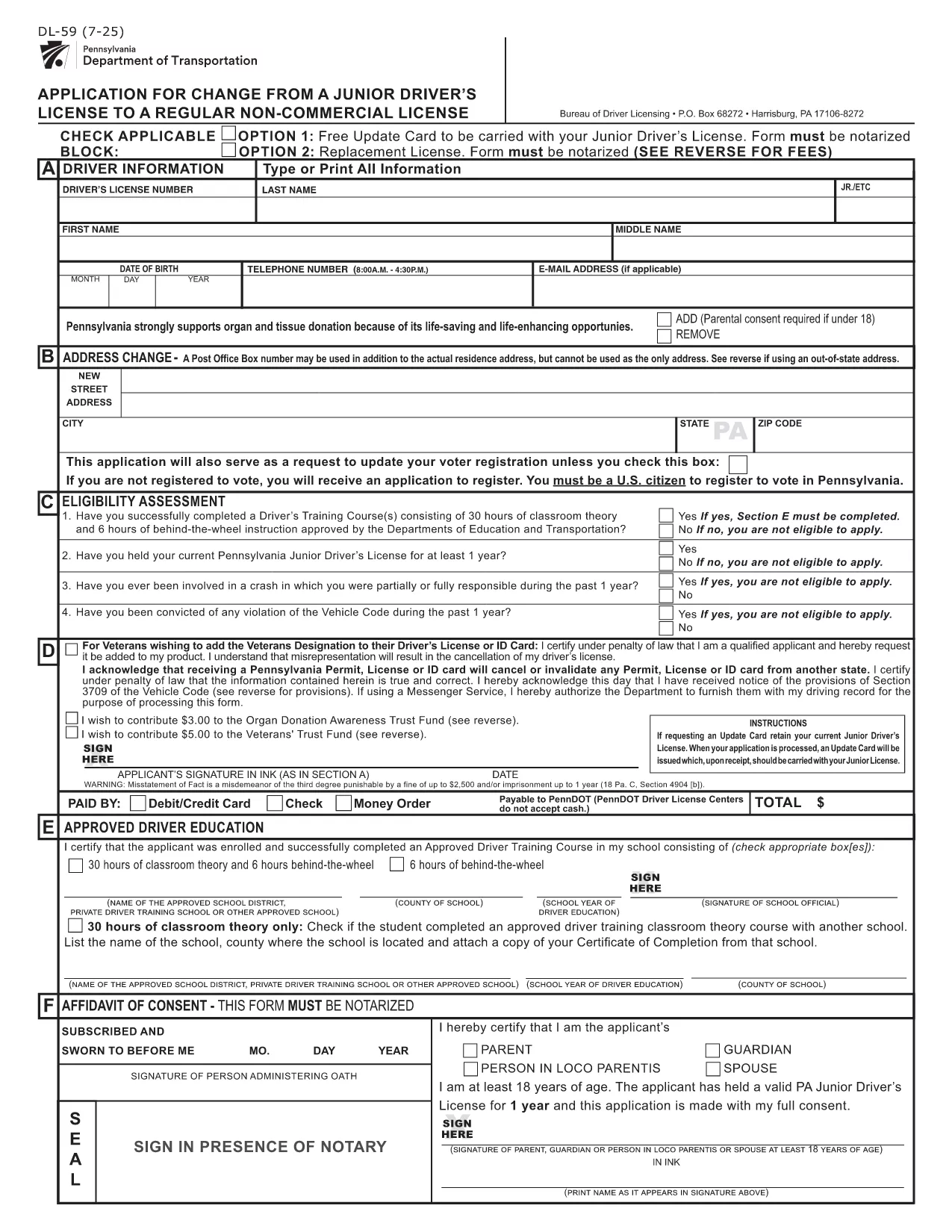
PennDOT DL-59 – Junior Driver License Upgrade Form

  1. Språk engelsk
  2. Land USA
  3. Aktivitet Körkort
  4. stat Pennsylvania
PennDOT DL-59 – Junior Driver License Upgrade Form

The DL-59 is the Pennsylvania Department of Transportation (PennDOT) application used to change a junior driver’s license to a regular non‑commercial license. Whether you’re turning 18, adding a new class, or simply need an updated ID, the DL-59 streamlines the process.

What Is the DL-59 Form?

This official PennDOT PDF collects personal details, eye color, height, and the new license class you’re requesting. It must be signed and, in some cases, notarized before submission.

How to Complete the DL-59 Online

Instead of downloading, printing, and scanning, use Formize’s built‑in PDF filler:

  1. Click the "Fill out this form" button on this page.
  2. Wait a few seconds while the Formize PDF Filler app loads.
  3. Enter the required information directly into the fillable fields.
  4. Review the completed form for accuracy.
  5. Save or print the finished PDF and submit it to PennDOT.

Common Mistakes to Avoid

  • Leaving the eye color or height fields blank – PennDOT uses these as fraud‑prevention identifiers.
  • Forgetting to sign the form in the designated area.
  • Submitting an outdated address; always double‑check your mailing address.
  • Not notarizing when a notary seal is required (e.g., certain name changes).

Where to Submit Your Completed Form

Mail the finished DL-59 to the address listed on the form or deliver it in person to any PennDOT Driver License Center. Include the appropriate fee (usually $12‑$17) unless you qualify for a free update.

Download the Official Fillable PDF

If you prefer the traditional route, you can still download the official form below. It is fully fillable and compatible with most PDF editors.

FAQ
  • Who needs to fill out the DL-59 form?

    Anyone who holds a Pennsylvania junior driver’s license and wants to upgrade to a regular non‑commercial license, typically after turning 18 or adding a new class.

  • Is the DL-59 form free?

    The form itself is free to download, but PennDOT charges a processing fee (usually $12‑$17) unless you qualify for a fee‑waiver update.

  • Do I need a notary for the DL-59?

    A notary is required only if the form includes a name change or other circumstances that PennDOT specifies. Check the form’s instructions.

  • Can I submit the DL-59 electronically?

    PennDOT currently accepts only printed and mailed or in‑person submissions. Use the fillable PDF to avoid errors before printing.

  • How long does it take to process the upgrade?

    Processing typically takes 7‑10 business days after PennDOT receives the completed form and payment.

  • What documents should I attach?

    Include proof of residency, a copy of your current junior license, and any required fee payment receipt.

  • What if I make a mistake after submitting?

    Contact your local PennDOT Driver License Center to request a correction; you may need to submit a new DL-59.

HUR

Så här fyller du i DL-59 gratis, online i 5 enkla steg:

  1. 1
    Open the Fillable Form
    Click the "Fill out this form" button on the page. The Formize PDF Filler will open in a new window.
  2. 2
    Enter Your Information
    Type directly into each highlighted field—personal details, eye color, height, and the new license class.
  3. 3
    Review and Sign
    Double‑check every entry, then use the built‑in signature tool to add your signature.
  4. 4
    Save or Print
    Save the completed PDF to your device or print it for submission to PennDOT.
  5. 5
    Submit to PennDOT
    Mail or deliver the form along with any required fees to the address shown on the PDF.
Formize PDF Filler app
HANDLA OM

Ansökningsformulär för körkort

DL-59 är en av körkortsformulären som är dokument som används i processen att erhålla eller förnya ett körkort, vilket är ett officiellt dokument som utfärdats av myndigheten som tillåter individer att köra ett motorfordon på allmänna vägar. Dessa formulär kan variera beroende på jurisdiktion, men de inkluderar vanligtvis följande:

Ansökningsformulär: Det här formuläret används för att ansöka om ett körkort och kräver vanligtvis personlig information som namn, adress, födelsedatum och personnummer.

Identifieringsdokumentation: Tillsammans med ansökningsformuläret måste individer vanligtvis tillhandahålla specifika identifieringsdokument för att bevisa sin identitet, bosättning och juridiska närvaro i landet. Dessa kan inkludera ett giltigt pass, födelsebevis, socialförsäkringskort eller annan statligt utfärdad legitimation.

Bevis på hemvist: Många jurisdiktioner kräver att de sökande tillhandahåller bevis på hemvist, till exempel en elräkning, hyresavtal eller kontoutdrag, för att verifiera sin adress.

Formulär för medicinsk undersökning: Vissa jurisdiktioner kan kräva en medicinsk undersökning för att säkerställa att sökanden uppfyller de nödvändiga fysiska och mentala kraven för säker körning. En läkare fyller vanligtvis i detta formulär.

Formulär för att slutföra förarutbildning: För förstagångsförare kan ett förarutbildningsprogram krävas. Ett formulär eller intyg som indikerar framgångsrikt genomförande är ofta nödvändigt för att ansöka om ett körkort.

Vision Test Form: Ett syntest utförs vanligtvis under ansökningsprocessen för körkort. En ögonläkare eller auktoriserad personal kommer att bedöma den sökandes synskärpa och fylla i det formulär som krävs.

Dessa formulär är vanligtvis tillgängliga på den lokala avdelningen för motorfordon (DMV) eller motsvarande statlig myndighet som ansvarar för körkort. Det är viktigt att kontrollera de specifika krav och formulär som gäller för din jurisdiktion, eftersom de kan variera.

FUNKTIONER

PDF-fyllare

Det enklaste sättet att fylla i DL-59 online

  • Fyll snabbt i DL-59
    Letar du efter ett sätt att snabbt fylla DL-59 online? Med vår online gratis PDF-formulärfyllare vet du hur du redigerar och fyller i detta pdf-dokument på mindre än en minut.
  • Lätt att använda online PDF-redigerare
    Är du trött på att skriva ut PDF-filer så att du kan redigera dem innan du skannar om och skickar tillbaka dem? Redigera PDF-dokument gratis online. Använd vår online pdf-redigerare för att spara tid och papper.
  • Bra verktyg, alla plattformar
    Undrar du hur man fyller i DL-59 på en Mac, eller kanske hur man använder ett PDF-fyllmedel gratis? Våra online PDF-verktyg fungerar på alla plattformar.
  • Säker fillagring
    Färdiga "DL-59"-filer lagras i en säker databas som hanteras av Amazon Cloud-hosting. Du kan ta bort dina filer från vårt system när som helst. I alla fall raderas dessa filer automatiskt efter 24 timmar.
  • Chatta med DL-59
    Chatta med "DL-59" på Chatize som är en gratis PDF-läsare. Ställ frågor och få svar från "DL-59". Klicka bara på knappen Chatta med dokument ovan.

Ta bort fyllningssession

Ta bort den valda fyllningssessionen? I det här fallet kommer dina framsteg i att fylla i formuläret att gå förlorade.

Ta bort redigeringssession

Vill du ta bort den valda redigeringssessionen? I det här fallet kommer dina framsteg i att skapa och redigera formuläret att gå förlorade.