
Välj språk

Pennsylvania DL-82 Out‑of‑State Address & Photo Exemption Form (Fillable PDF)

  1. Språk engelsk
  2. Land USA
  3. Aktivitet Körkort
  4. stat Pennsylvania
Pennsylvania DL-82 Out‑of‑State Address & Photo Exemption Form (Fillable PDF)

What Is the DL-82 Form?

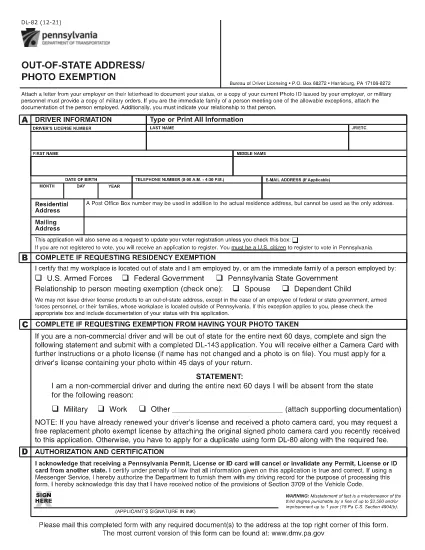
The DL-82 is the Pennsylvania Department of Transportation (PennDOT) form used to request an out‑of‑state address and photo exemption for a driver’s license. It allows military members, federal or state employees, and their immediate families to keep a valid PA license while stationed outside the Commonwealth.

Who Is Eligible for the Exemption?

  • U.S. Armed Forces personnel stationed outside Pennsylvania
  • Federal, state, or local government employees working out of state
  • Immediate family members of the above qualifying applicants
  • Non‑commercial drivers who need a photo exemption while away from Pennsylvania

How to Complete the DL-82 Online with Formize

Instead of downloading the PDF and editing it manually, simply click the “Fill out this form” button on this page. The Formize PDF Filler app will load in your browser, letting you:

  1. Enter your driver’s license number, name, and date of birth.
  2. Select the appropriate exemption check‑boxes.
  3. Upload supporting documents (military orders, employment verification, etc.).
  4. Apply an electronic signature.
  5. Save, print, or submit the completed form directly from the app.

Common Mistakes to Avoid

  • Leaving required fields blank – the form will be rejected.
  • Using an outdated version of the DL-82 – always use the latest PDF linked below.
  • Failing to attach proof of military or employment status.
  • Signing with a handwritten image instead of the built‑in e‑signature tool.

Where to Submit Your Completed Form

After completing the form, you can:

  • Mail it to the PennDOT Bureau of Driver Licensing, Harrisburg, PA.
  • Deliver it in person at any Pennsylvania DMV office.
  • If your employer’s human‑resources department accepts electronic submissions, you may forward the PDF directly.

Processing typically takes 7‑10 business days. Keep a copy of the submitted PDF for your records.

FAQ
  • What is the purpose of the DL-82 form?

    It allows qualified individuals to request an exemption from providing a new address and photo on their Pennsylvania driver’s license while they are stationed or employed out of state.

  • Can I submit the DL-82 electronically?

    Yes. With Formize you can fill, sign, and download the completed PDF. You still need to mail or deliver the printed form to PennDOT unless your agency accepts electronic copies.

  • How long is the exemption valid?

    The exemption is typically valid for one year, after which you must submit a new DL-82 if you remain out of state.

  • Do I need to provide a new photo if I move back to Pennsylvania?

    When you return to Pennsylvania and renew your license, you must provide a current photo. The DL-82 exemption only applies while you are out of state.

  • What supporting documents are required?

    Proof of military orders, federal or state employment letters, or a spouse’s employment verification if you are a family member. Attach clear copies when you upload them in Formize.

  • Is there a fee to file the DL-82?

    There is no separate fee for the exemption itself, but standard driver’s license renewal or replacement fees still apply.

HUR

Så här fyller du i DL-82 gratis, online i 4 enkla steg:

  1. 1
    Open the Fillable Form
    Click the “Fill out this form” button on the page. The Formize PDF Filler will launch in a new tab.
  2. 2
    Enter Your Information
    Fill in your driver’s license number, name, date of birth, and select the exemption boxes that apply to you.
  3. 3
    Upload Supporting Documents
    Use the upload field to attach military orders, employment verification letters, or any other required proof.
  4. 4
    Sign and Submit
    Add your electronic signature, review all entries, then click “Save” or “Print” to finalize. You can mail the PDF or keep a digital copy.
Formize PDF Filler app
HANDLA OM

Ansökningsformulär för körkort

I de flesta länder är det obligatoriskt att ha ett körkort innan du kan ge dig ut på vägen. Att ta körkort är en viktig milstolpe för alla som vill köra bil.

DL-82 är ett av ansökningsformulären för körkort som är dokument som används för att samla in information från personer som vill ansöka om körkort. Den innehåller vanligtvis fält för den sökandes namn, födelsedatum, ID-nummer, kontaktuppgifter, samt körkortshistorik och erfarenhet.

FUNKTIONER

PDF-fyllare

Det enklaste sättet att fylla i DL-82 online

  • Fyll snabbt i DL-82
    Letar du efter ett sätt att snabbt fylla DL-82 online? Med vår online gratis PDF-formulärfyllare vet du hur du redigerar och fyller i detta pdf-dokument på mindre än en minut.
  • Lätt att använda online PDF-redigerare
    Är du trött på att skriva ut PDF-filer så att du kan redigera dem innan du skannar om och skickar tillbaka dem? Redigera PDF-dokument gratis online. Använd vår online pdf-redigerare för att spara tid och papper.
  • Bra verktyg, alla plattformar
    Undrar du hur man fyller i DL-82 på en Mac, eller kanske hur man använder ett PDF-fyllmedel gratis? Våra online PDF-verktyg fungerar på alla plattformar.
  • Säker fillagring
    Färdiga "DL-82"-filer lagras i en säker databas som hanteras av Amazon Cloud-hosting. Du kan ta bort dina filer från vårt system när som helst. I alla fall raderas dessa filer automatiskt efter 24 timmar.
  • Chatta med DL-82
    Chatta med "DL-82" på Chatize som är en gratis PDF-läsare. Ställ frågor och få svar från "DL-82". Klicka bara på knappen Chatta med dokument ovan.

Ta bort fyllningssession

Ta bort den valda fyllningssessionen? I det här fallet kommer dina framsteg i att fylla i formuläret att gå förlorade.

Ta bort redigeringssession

Vill du ta bort den valda redigeringssessionen? I det här fallet kommer dina framsteg i att skapa och redigera formuläret att gå förlorade.