
Välj språk

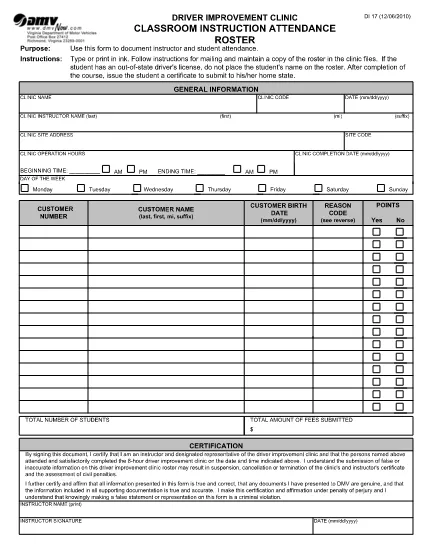
DI-17 Classroom Instruction Attendance Roster (Fillable PDF)

  1. Land USA
  2. Språk engelsk
  3. Aktivitet Körkort
  4. stat Virginia
DI-17 Classroom Instruction Attendance Roster (Fillable PDF)

The DI-17 is the Virginia Department of Motor Vehicles (DMV) form used to record attendance for classroom driver‑education instruction. Schools, driving instructors, and training programs must submit this roster within 24 hours of completing a class.

What Is the DI-17 Form?

DI-17 captures essential details such as the instructor’s name, student information, dates of instruction, and the specific curriculum covered. It ensures compliance with Virginia DMV regulations and helps verify that learners have met the required training hours before taking the road‑skills test.

How to Complete the DI-17 Online

With Formize’s fillable PDF technology you can complete the DI‑17 directly in your browser—no extra software needed. Follow the simple steps below:

  • Click the Fill out this form button on this page.
  • Wait for the Formize PDF Filler app to load (usually a few seconds).
  • Enter all required fields exactly as they appear on the original paper form.
  • Use the Save button to store a copy on your device or in the cloud.
  • When finished, click Download to get the completed PDF ready for submission.

Common Errors to Avoid

Even a small mistake can delay processing. Keep these tips in mind:

  • Incorrect dates: Verify the class date matches the DMV’s calendar.
  • Missing signatures: Both the instructor and each student must sign.
  • Illegible handwriting: The fillable fields ensure clear, legible text.
  • Wrong form version: Use the latest DI‑17 PDF provided by the Virginia DMV (the link below is always up‑to‑date).

Submit Your Completed DI-17

After saving the filled PDF, upload it to the Virginia DMV Extranet portal or email it according to your organization’s instructions. The DMV requires receipt within 24 hours of the class.

Why Use Formize Fillable PDF

Formize turns static PDFs into interactive, web‑based forms. Benefits include:

  • Instant access: No downloads or installations.
  • Data accuracy: Built‑in validation reduces entry errors.
  • Secure storage: Your completed form is saved locally or to cloud storage of your choice.
  • Compliance‑ready: The PDF matches the official DMV layout exactly.

Ready to start? Click the button below and fill out the DI‑17 in seconds.

FAQ
  • What is the purpose of the DI‑17 form?

    The DI‑17 records attendance for classroom driver‑education instruction and verifies that students have completed the required training before taking the road‑skills test.

  • Can I fill out the DI‑17 on a mobile device?

    Yes. Formize’s fillable PDF works on smartphones and tablets with any modern browser.

  • Do I need Adobe Acrobat to complete the DI‑17?

    No. The Formize PDF Filler runs entirely in the browser, eliminating the need for separate PDF editors.

  • How soon must the DI‑17 be submitted after a class?

    Virginia DMV requires the completed DI‑17 to be submitted within 24 hours of the class date.

  • What if I make a mistake after saving the form?

    Open the saved PDF again in the Formize filler, correct the error, and re‑save before submitting.

  • Is the DI‑17 form free to download?

    Yes. The official DI‑17 PDF is provided by the Virginia DMV at no cost.

  • Do I need a DMV account to use the fillable version?

    No. You can fill out and download the PDF without a DMV login; however, submission through the Extranet may require an authorized account.

  • Can I print the completed DI‑17 after filling it online?

    Absolutely. After saving, you can print the PDF for your records or to submit a hard copy if required.

HUR

Så här fyller du i DI-17 gratis, online i 5 enkla steg:

  1. 1
    Click the Fill‑out Button
    On this page, press the “Fill out this form” button to launch the Formize PDF Filler.
  2. 2
    Wait for the Filler to Load
    The web app loads the DI‑17 PDF in a few seconds. No download or installation is required.
  3. 3
    Enter Required Information
    Complete each fillable field with accurate data—dates, instructor name, student details, and signatures.
  4. 4
    Review and Save
    Double‑check all entries, then click Save to store a copy on your device or cloud storage.
  5. 5
    Download or Submit
    Download the finished PDF and upload it to the Virginia DMV Extranet portal, or follow your organization’s submission guidelines.
Formize PDF Filler app
HANDLA OM

Ansökningsformulär för körkort

I de flesta länder är det obligatoriskt att ha ett körkort innan du kan ge dig ut på vägen. Att ta körkort är en viktig milstolpe för alla som vill köra bil.

DI-17 är ett av ansökningsformulären för körkort som är dokument som används för att samla in information från personer som vill ansöka om körkort. Den innehåller vanligtvis fält för den sökandes namn, födelsedatum, ID-nummer, kontaktuppgifter, samt körkortshistorik och erfarenhet.

FUNKTIONER

PDF-fyllare

Det enklaste sättet att fylla i DI-17 online

  • Fyll snabbt i DI-17
    Letar du efter ett sätt att snabbt fylla DI-17 online? Med vår online gratis PDF-formulärfyllare vet du hur du redigerar och fyller i detta pdf-dokument på mindre än en minut.
  • Lätt att använda online PDF-redigerare
    Är du trött på att skriva ut PDF-filer så att du kan redigera dem innan du skannar om och skickar tillbaka dem? Redigera PDF-dokument gratis online. Använd vår online pdf-redigerare för att spara tid och papper.
  • Bra verktyg, alla plattformar
    Undrar du hur man fyller i DI-17 på en Mac, eller kanske hur man använder ett PDF-fyllmedel gratis? Våra online PDF-verktyg fungerar på alla plattformar.
  • Säker fillagring
    Färdiga "DI-17"-filer lagras i en säker databas som hanteras av Amazon Cloud-hosting. Du kan ta bort dina filer från vårt system när som helst. I alla fall raderas dessa filer automatiskt efter 24 timmar.
  • Chatta med DI-17
    Chatta med "DI-17" på Chatize som är en gratis PDF-läsare. Ställ frågor och få svar från "DI-17". Klicka bara på knappen Chatta med dokument ovan.

Ta bort fyllningssession

Ta bort den valda fyllningssessionen? I det här fallet kommer dina framsteg i att fylla i formuläret att gå förlorade.

Ta bort redigeringssession

Vill du ta bort den valda redigeringssessionen? I det här fallet kommer dina framsteg i att skapa och redigera formuläret att gå förlorade.