
Välj språk

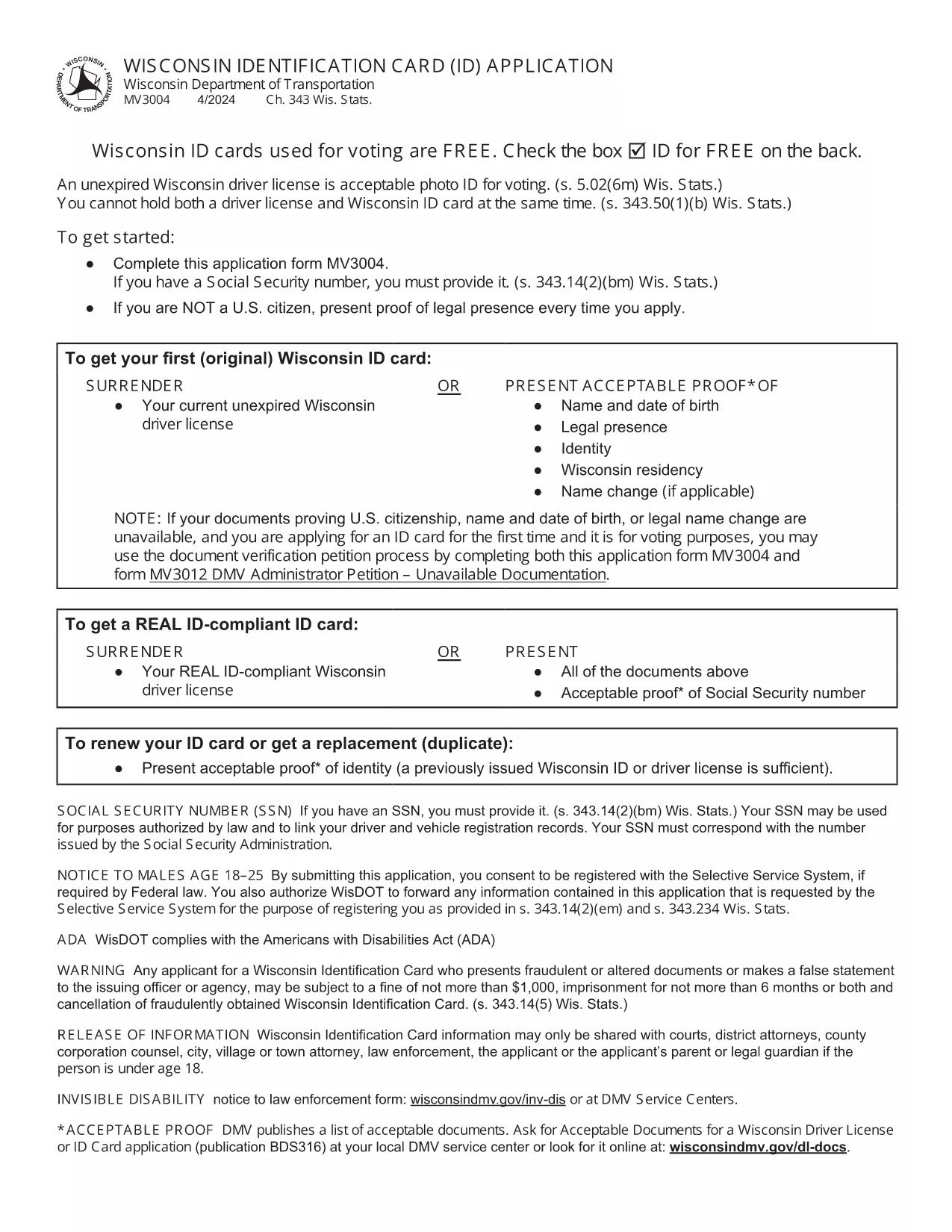
Wisconsin Identification Card Application (Form MV3004) – Fillable PDF

  1. Språk engelsk
  2. Land USA
  3. Aktivitet Körkort
  4. stat Wisconsin
Wisconsin Identification Card Application (Form MV3004) – Fillable PDF

Form MV3004 is the official Wisconsin Identification Card (ID) application issued by the Wisconsin Department of Transportation (DOT). Whether you need an ID for voting, travel, or everyday identification, this fillable PDF lets you complete the entire request from the comfort of your home.

What Is Form MV3004?

The MV3004 form collects personal details, proof‑of‑citizenship documents, and a photo consent statement. It is required for first‑time applicants, name changes, or renewals when a new photo is needed.

How to Complete the MV3004 Online

Instead of downloading and editing the PDF manually, simply click the "Fill out this form" button on this page. The Formize PDF Filler app will load directly in your browser, allowing you to type, select, and sign without any extra software.

  • Step 1: Click the button and wait for the Formize PDF Filler to appear.
  • Step 2: Enter your name, address, date of birth, and other required information.
  • Step 3: Upload scanned copies of your citizenship and name‑change documents.
  • Step 4: Review the completed form for accuracy.
  • Step 5: Submit the form electronically or print it for mailing.

Common Mistakes to Avoid

  • Leaving any required field blank – the online filler will highlight missing data.
  • Uploading blurry or non‑PDF supporting documents – use clear, high‑resolution scans.
  • Signing with a stylus that does not create a vector signature – use the built‑in signature tool.
  • Mismatching the name on your ID with the name on supporting documents – ensure exact spelling.

Where to Submit Your Completed Form

After you finish, you have two options:

  • Electronic submission: Save the completed PDF and email it to your local DMV office (check the Wisconsin DOT contact page for the correct address).
  • Mail submission: Print the form, attach your original documents or certified copies, and mail everything to the address listed on the form.

Processing typically takes 7‑10 business days. Keep a copy of the submitted PDF for your records.

FAQ
  • Who needs to fill out Form MV3004?

    Anyone applying for a Wisconsin state identification card for the first time, changing their legal name, or needing a new photo on an existing ID.

  • Can I submit the form online?

    Yes. After completing the fillable PDF, you can email the file to your local DMV office. Check the Wisconsin DOT website for the correct email address.

  • What documents must I attach?

    Proof of U.S. citizenship (e.g., birth certificate or passport), a legal name‑change document if applicable, and a recent head‑shot photo if a new picture is required.

  • How long does processing take?

    Standard processing is 7‑10 business days after the DMV receives a complete application and supporting documents.

  • Is there a fee for the Wisconsin ID card?

    Yes. As of 2026, the fee is $30 for a standard ID card. Check the latest fee schedule on the Wisconsin DOT website.

  • What if I make a mistake on the form?

    If you notice an error after submission, contact your local DMV office immediately. In most cases, you can submit a corrected form without paying an additional fee.

  • Do I need a notarized signature?

    No. The electronic signature created in the Formize PDF Filler is accepted for the MV3004 application.

  • Can I use a mobile device to fill out MV3004?

    Yes. The Formize PDF Filler works on modern smartphones and tablets, but a larger screen makes it easier to review scanned documents.

HUR

Så här fyller du i MV3004 gratis, online i 5 enkla steg:

  1. 1
    Open the Fillable Form
    Click the "Fill out this form" button on the page. The Formize PDF Filler loads instantly in your browser.
  2. 2
    Enter Your Information
    Type your personal details into each field. Use the dropdown menus for state, gender, and document types.
  3. 3
    Upload Supporting Documents
    Attach clear PDF or JPEG scans of your citizenship proof, name‑change documents, and a recent photo if required.
  4. 4
    Review and Sign
    Double‑check every entry, then use the built‑in signature tool to add your electronic signature.
  5. 5
    Submit or Print
    Save the completed PDF. You can either email it directly to your local DMV office or print it for postal submission.
Formize PDF Filler app
HANDLA OM

Ansökningsformulär för körkort

MV3004 är en av körkortsformulären som är dokument som används för att ansöka om körkort eller för att begära olika tjänster relaterade till körkort. Dessa formulär tillhandahålls vanligtvis av den avdelning eller byrå som ansvarar för att utfärda körkort i en specifik jurisdiktion, såsom Department of Motor Vehicles (DMV) i USA.

Vanliga körkortsformulär inkluderar:

Ansökan om körkort: Detta formulär används för att ansöka om ett nytt körkort eller för att förnya ett befintligt. Det kräver vanligtvis personlig information som namn, adress, födelsedatum och personnummer.

Identifieringsdokument: Vissa jurisdiktioner kräver specifika identifieringsdokument för att verifiera sökandens identitet och hemvist. Dessa kan inkludera blanketter som ett födelsebevis, pass eller socialförsäkringskort.

Synundersökning: Många körkortsansökningar kräver ett synundersökningsformulär, där en auktoriserad läkare eller ögonläkare intygar att sökanden uppfyller minimikraven för syn för körning.

Formulär för förarutbildning: I vissa fall kan individer behöva tillhandahålla bevis på att de har slutfört en förarutbildningskurs, till exempel ett certifikat för förarutbildning eller ett formulär undertecknat av en instruktör.

Medicinsk utvärdering: Vissa medicinska tillstånd kan kräva att ytterligare formulär fylls i av en sjukvårdspersonal. Dessa blanketter verifierar den sökandes fysiska och mentala lämplighet att köra bil.

Adressändringsformulär: Om en körkortsinnehavare flyttar till en ny adress kan de behöva fylla i ett adressändringsformulär för att uppdatera sin körkortsinformation.

Blanketter för körkort kan erhållas från det lokala DMV-kontoret eller laddas ner från deras hemsida. Det är viktigt att noggrant fylla i och skicka in de nödvändiga formulären tillsammans med eventuella stödjande dokument för att säkerställa en smidig ansöknings- eller serviceprocess.

FUNKTIONER

PDF-fyllare

Det enklaste sättet att fylla i MV3004 online

  • Fyll snabbt i MV3004
    Letar du efter ett sätt att snabbt fylla MV3004 online? Med vår online gratis PDF-formulärfyllare vet du hur du redigerar och fyller i detta pdf-dokument på mindre än en minut.
  • Lätt att använda online PDF-redigerare
    Är du trött på att skriva ut PDF-filer så att du kan redigera dem innan du skannar om och skickar tillbaka dem? Redigera PDF-dokument gratis online. Använd vår online pdf-redigerare för att spara tid och papper.
  • Bra verktyg, alla plattformar
    Undrar du hur man fyller i MV3004 på en Mac, eller kanske hur man använder ett PDF-fyllmedel gratis? Våra online PDF-verktyg fungerar på alla plattformar.
  • Säker fillagring
    Färdiga "MV3004"-filer lagras i en säker databas som hanteras av Amazon Cloud-hosting. Du kan ta bort dina filer från vårt system när som helst. I alla fall raderas dessa filer automatiskt efter 24 timmar.
  • Chatta med MV3004
    Chatta med "MV3004" på Chatize som är en gratis PDF-läsare. Ställ frågor och få svar från "MV3004". Klicka bara på knappen Chatta med dokument ovan.

Ta bort fyllningssession

Ta bort den valda fyllningssessionen? I det här fallet kommer dina framsteg i att fylla i formuläret att gå förlorade.

Ta bort redigeringssession

Vill du ta bort den valda redigeringssessionen? I det här fallet kommer dina framsteg i att skapa och redigera formuläret att gå förlorade.