Välj språk

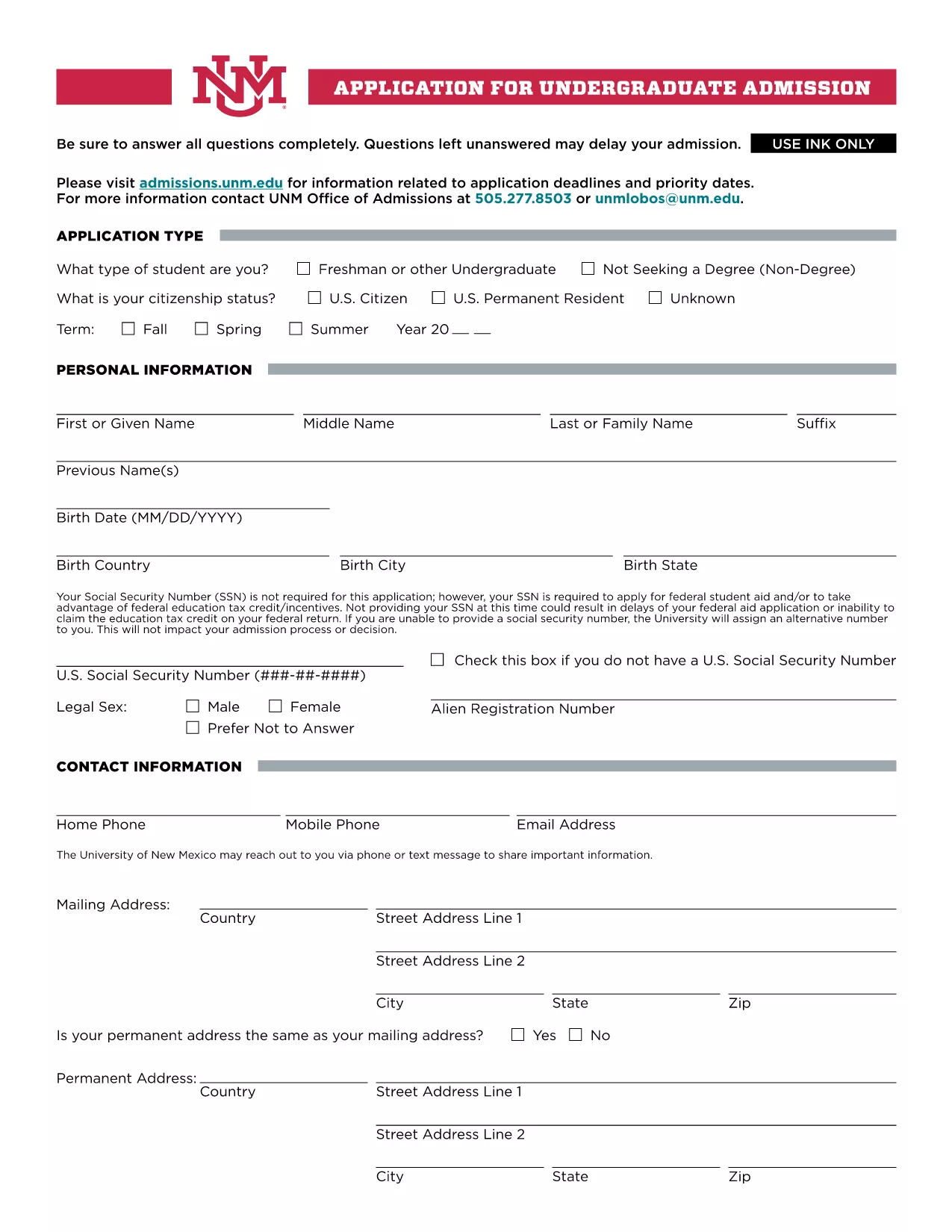
UNM Undergraduate Application Form (Fillable PDF)

  1. Språk engelsk
  2. Land USA
  3. Aktivitet College Admissions
  4. Avdelning Education
UNM Undergraduate Application Form (Fillable PDF)

Welcome to the official landing page for the UNM Undergraduate Application Form. This fillable PDF lets prospective students apply to the University of New Mexico quickly, securely, and without the need for any additional software.

Our integrated Fill out this form button launches the Formize PDF Filler app directly in your browser, so you can complete every section, save your progress, and submit the application with just a few clicks.

Why Choose the Fillable UNM Application Form?

The fillable version offers several advantages over a static PDF:

  • Instant validation: The form checks required fields and formatting as you type.
  • Save & resume: You can pause, close your browser, and return later without losing data.
  • Environmentally friendly: No printing needed unless you choose to keep a hard copy.
  • Secure transmission: Your information is encrypted during the online submission.

How to Complete the Form Online

Follow these simple steps to fill out the UNM application:

  1. Click the Fill out this form button above.
  2. Wait a few seconds while the Formize PDF Filler loads.
  3. Enter your personal, academic, and residency information in the highlighted fields.
  4. Upload required documents (transcripts, test scores, etc.) using the attachment icons.
  5. Review each section, correct any validation warnings, and click Submit when you’re ready.

Common Mistakes to Avoid

  • Leaving the Social Security Number blank if you plan to apply for federal aid – the form will warn you.
  • Submitting outdated transcripts; always upload the most recent official copy.
  • Skipping the “Signature” field – the digital signature is required for processing.
  • Exceeding the file size limit for uploads; compress large PDFs before attaching.

Submission & Next Steps

After you submit, you will receive an automated confirmation email with a reference number. The UNM admissions office will review your application and contact you if additional information is needed. Keep an eye on your email and the UNM applicant portal for status updates.

Ready to start? Click the button below and let Formize handle the rest.

FAQ
  • Do I need to provide my Social Security Number?

    The SSN is not required for the basic application, but it is mandatory if you plan to apply for federal student aid or claim education tax credits.

  • Can I save my progress and finish later?

    Yes. The Formize PDF Filler lets you save a draft in your browser. When you return, simply reload the form and continue where you left off.

  • What file formats are accepted for supporting documents?

    PDF, JPEG, and PNG files are accepted. Each file must be under 5 MB to ensure successful upload.

  • How do I know my application was received?

    After submission, you will receive an automatic confirmation email with a reference number. You can also check the status in the UNM applicant portal.

  • Is there a deadline for the undergraduate application?

    UNM’s regular admission deadline is March 1 for fall enrollment. Check the UNM admissions website for special program deadlines.

  • Can I print a hard copy after completing the form online?

    Absolutely. Once you finish, use the “Print” option in the Formize toolbar to generate a printable PDF version.

  • What should I do if I encounter an error while filling the form?

    Refresh the page and try again. If the problem persists, clear your browser cache or try a different browser.

  • Is there a fee to use the fillable PDF?

    No. The fillable UNM application form and the Formize PDF Filler are completely free to use.

HUR

Så här fyller du i UNM application form gratis, online i 5 enkla steg:

  1. 1
    Open the Fillable Form
    Click the “Fill out this form” button on the page. The Formize PDF Filler will open in a new browser tab.
  2. 2
    Load the Form
    Wait a few seconds while the PDF loads. All fillable fields will be highlighted for easy entry.
  3. 3
    Enter Your Information
    Complete each section—personal data, academic history, residency, and any required test scores.
  4. 4
    Attach Supporting Documents
    Use the attachment icons to upload transcripts, test scores, and other required files.
  5. 5
    Review & Submit
    Double‑check all entries, resolve any validation warnings, then click the Submit button to send your application securely.
Formize PDF Filler app
HANDLA OM

UNM application form mall

Med den traditionella uppsättningen funktioner för att visa och fylla i ett PDF-dokument, kombinerat med fördelarna med en webbapplikation och responsiv layout, kan du slutföra UNM application form på några minuter.

FUNKTIONER

PDF-fyllare

Det enklaste sättet att fylla i UNM application form online

  • Fyll snabbt i UNM application form
    Letar du efter ett sätt att snabbt fylla UNM application form online? Med vår online gratis PDF-formulärfyllare vet du hur du redigerar och fyller i detta pdf-dokument på mindre än en minut.
  • Lätt att använda online PDF-redigerare
    Är du trött på att skriva ut PDF-filer så att du kan redigera dem innan du skannar om och skickar tillbaka dem? Redigera PDF-dokument gratis online. Använd vår online pdf-redigerare för att spara tid och papper.
  • Bra verktyg, alla plattformar
    Undrar du hur man fyller i UNM application form på en Mac, eller kanske hur man använder ett PDF-fyllmedel gratis? Våra online PDF-verktyg fungerar på alla plattformar.
  • Säker fillagring
    Färdiga "UNM application form"-filer lagras i en säker databas som hanteras av Amazon Cloud-hosting. Du kan ta bort dina filer från vårt system när som helst. I alla fall raderas dessa filer automatiskt efter 24 timmar.
  • Chatta med UNM application form
    Chatta med "UNM application form" på Chatize som är en gratis PDF-läsare. Ställ frågor och få svar från "UNM application form". Klicka bara på knappen Chatta med dokument ovan.

Ta bort fyllningssession

Ta bort den valda fyllningssessionen? I det här fallet kommer dina framsteg i att fylla i formuläret att gå förlorade.

Ta bort redigeringssession

Vill du ta bort den valda redigeringssessionen? I det här fallet kommer dina framsteg i att skapa och redigera formuläret att gå förlorade.