Välj språk

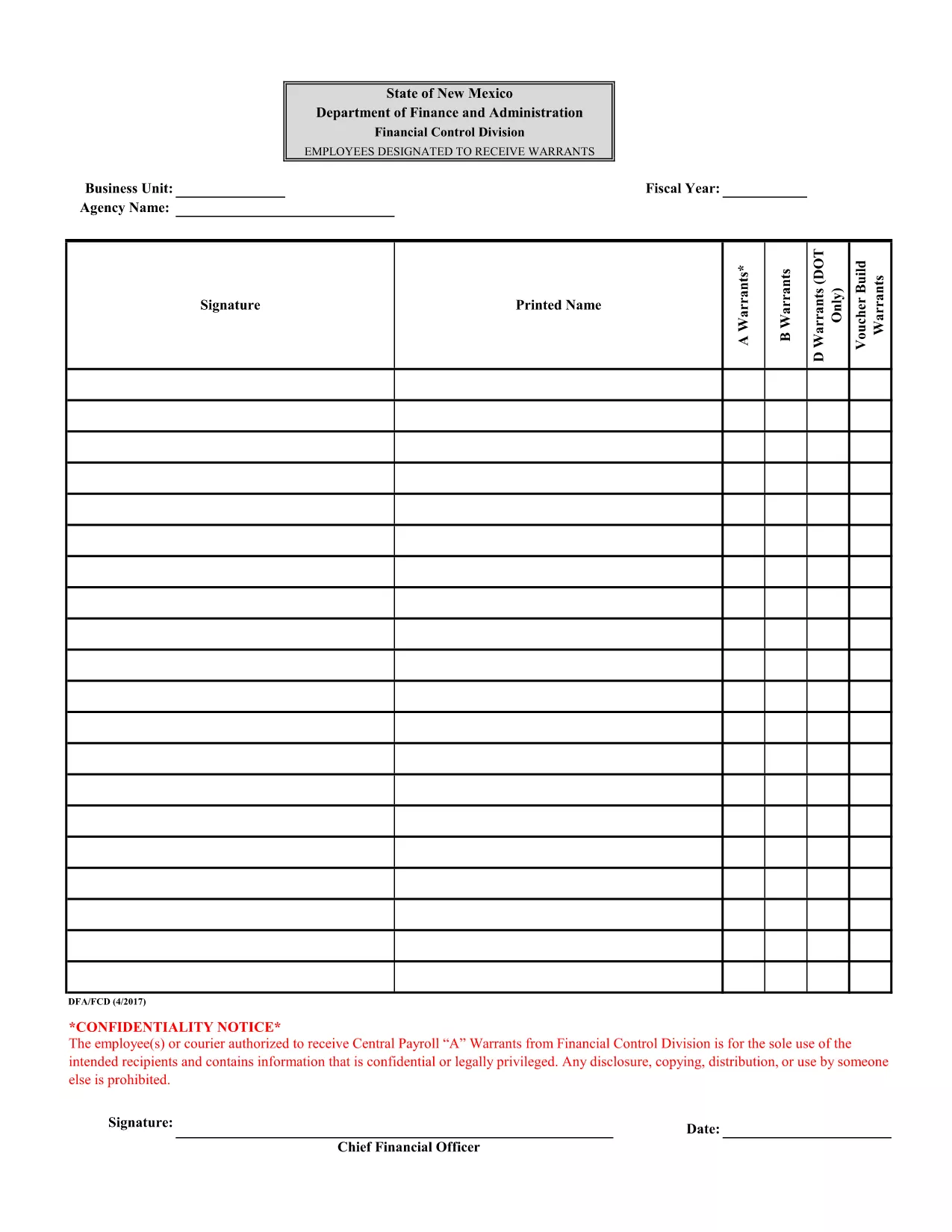
Attachment F – Employees Designated to Receive Warrants (Fillable PDF)

  1. Språk engelsk
  2. Land USA
  3. Avdelning Financial Control Division
  4. Aktivitet Payroll Warrants
Attachment F – Employees Designated to Receive Warrants (Fillable PDF)

The Attachment F – Employees Designated to Receive Warrants is a confidential form used by the Financial Control Division to authorize specific employees or couriers to receive Central Payroll "A" warrants. This document contains sensitive payroll information and must be handled securely.

Formize.com provides a seamless, browser‑based PDF filler so you can complete the form without installing any software. Simply click the “Fill out this form” button, enter the required data, and download the completed PDF.

Using a fillable PDF ensures that all fields are completed correctly, reduces errors, and speeds up the approval process. The form is compliant with state confidentiality requirements and is suitable for both desktop and mobile browsers.

Below you’ll find step‑by‑step instructions, tips to avoid common mistakes, and answers to the most frequently asked questions.

FAQ
  • Is this form truly fillable online?

    Yes. Formize’s PDF Filler turns the original PDF into an interactive, web‑based form that you can complete without any extra software.

  • Do I need a Formize account to use the filler?

    No. You can fill out the form as a guest. Creating an account only adds the ability to save drafts for later.

  • Can I print the completed form directly from the browser?

    Absolutely. After you finish, click the “Download” button and open the saved PDF, then print it like any other document.

  • What security measures protect the data I enter?

    Formize uses SSL encryption for all data transmission and does not store your completed form unless you choose to save it to your account.

  • Is the original PDF still available for download?

    Yes. The “Download Original PDF” link is provided on the page for reference or archival purposes.

  • Who should I contact if I encounter an error while filling the form?

    For technical issues, use the “Report a problem” link within the Formize interface. For content‑related questions, contact your organization’s Financial Control Division.

HUR

Så här fyller du i fillable PDF form gratis, online i 4 enkla steg:

  1. 1
    Open the Form
    Click the “Fill out this form” button on this page. The Formize PDF Filler will load directly in your browser.
  2. 2
    Complete the Fields
    Enter the required information in each fillable field. Use the dropdowns, checkboxes, and text boxes as indicated.
  3. 3
    Review Your Entries
    Double‑check all data for accuracy. The form will highlight any missing mandatory fields.
  4. 4
    Save or Download
    When you are satisfied, click “Save” to store the completed form in your account or “Download” to get a finalized PDF copy.
Formize PDF Filler app
HANDLA OM

fillable PDF form mall

Med den traditionella uppsättningen funktioner för att visa och fylla i ett PDF-dokument, kombinerat med fördelarna med en webbapplikation och responsiv layout, kan du slutföra fillable PDF form på några minuter.

FUNKTIONER

PDF-fyllare

Det enklaste sättet att fylla i fillable PDF form online

  • Fyll snabbt i fillable PDF form
    Letar du efter ett sätt att snabbt fylla fillable PDF form online? Med vår online gratis PDF-formulärfyllare vet du hur du redigerar och fyller i detta pdf-dokument på mindre än en minut.
  • Lätt att använda online PDF-redigerare
    Är du trött på att skriva ut PDF-filer så att du kan redigera dem innan du skannar om och skickar tillbaka dem? Redigera PDF-dokument gratis online. Använd vår online pdf-redigerare för att spara tid och papper.
  • Bra verktyg, alla plattformar
    Undrar du hur man fyller i fillable PDF form på en Mac, eller kanske hur man använder ett PDF-fyllmedel gratis? Våra online PDF-verktyg fungerar på alla plattformar.
  • Säker fillagring
    Färdiga "fillable PDF form"-filer lagras i en säker databas som hanteras av Amazon Cloud-hosting. Du kan ta bort dina filer från vårt system när som helst. I alla fall raderas dessa filer automatiskt efter 24 timmar.
  • Chatta med fillable PDF form
    Chatta med "fillable PDF form" på Chatize som är en gratis PDF-läsare. Ställ frågor och få svar från "fillable PDF form". Klicka bara på knappen Chatta med dokument ovan.

Ta bort fyllningssession

Ta bort den valda fyllningssessionen? I det här fallet kommer dina framsteg i att fylla i formuläret att gå förlorade.

Ta bort redigeringssession

Vill du ta bort den valda redigeringssessionen? I det här fallet kommer dina framsteg i att skapa och redigera formuläret att gå förlorade.