
Välj språk

IRS Form 15110 – Fillable PDF (Additional Child Tax Credit)

  1. Land USA
  2. Språk engelsk
  3. Aktivitet Skatter
  4. Avdelning IRS
IRS Form 15110 – Fillable PDF (Additional Child Tax Credit)

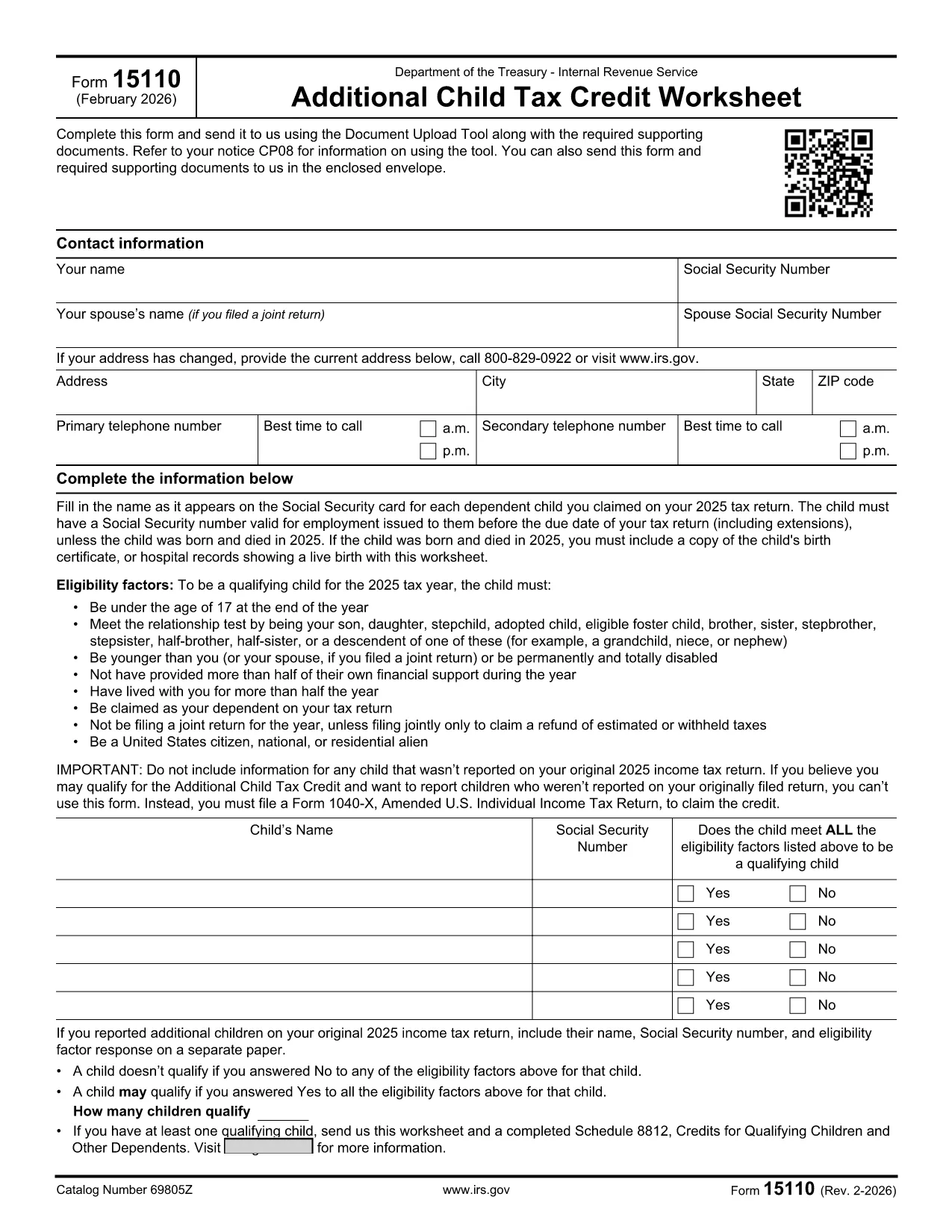
Form 15110 is the Additional Child Tax Credit Worksheet the IRS sends when you receive a CP08 notice. It lets you claim any refundable portion of the child tax credit that wasn’t captured on your original return.

What Is Form 15110 and When Do You Need It?

This one‑page worksheet collects:

  • Taxpayer contact information
  • Social Security numbers for you, your spouse, and each qualifying child
  • Eligibility details for each child (age, relationship, residency, etc.)

If the IRS has told you to complete Form 15110, you must return it with any required supporting documents to claim the additional credit.

How to Complete Form 15110 Online with Formize

Instead of printing, printing, and scanning, use our Formize PDF Filler – a secure, browser‑based editor that works on any device.

  1. Click the "Fill out this form" button on this page.
  2. Wait a few seconds while the Formize PDF Filler app loads the fillable PDF.
  3. Enter your information exactly as it appears on your tax return.
  4. Review each field for accuracy; the filler highlights required fields.
  5. When you’re done, click Save & Download to get a completed PDF you can attach to your CP08 response.

Common Mistakes & Tips for a Smooth Submission

  • Social Security numbers: Double‑check every SSN. A missing or transposed digit will delay processing.
  • Child eligibility: Verify that each child is under 17, lives with you > ½ year, and is a U.S. citizen or resident.
  • Address changes: Use the most recent address on your last filed return; update it in the form if needed.
  • Signature: The fillable PDF allows you to type a digital signature. Make sure it’s legible.
  • Supporting documents: Attach any required proof (e.g., birth certificates) as separate PDFs when you upload your response.

Download the Official Fillable PDF

Need the original PDF for offline use? Click the link below to download the IRS‑provided fillable version.

Download IRS Form 15110 (PDF)

FAQ
  • Do I need a special program to open Form 15110?

    No. With Formize you can fill out the form directly in your web browser. If you prefer, you can also download the PDF and use any standard PDF reader.

  • What is a CP08 notice?

    A CP08 notice is sent by the IRS when they need additional information to process your claim for the Additional Child Tax Credit. The notice includes Form 15110.

  • Can I use an ITIN instead of an SSN for my children?

    No. For the child tax credit and additional child tax credit, each qualifying child must have a Social Security Number before the tax return due date.

  • How many children can I list on Form 15110?

    You can list up to three qualifying children on a single Form 15110 worksheet. If you have more, you must submit additional worksheets.

  • What happens if I make a mistake on the form?

    Errors can delay your refund. Review the form carefully, use the built‑in validation in Formize, and correct any mistakes before submitting.

  • Is there a filing deadline for Form 15110?

    You should return the completed Form 15110 as soon as possible after receiving the CP08 notice. Late submissions may result in a reduced credit.

  • Do I need to attach proof of residency for each child?

    Typically the IRS only requires the worksheet, but if they request additional documentation, you may need to provide school records, medical bills, or a lease showing the child lived with you > ½ year.

HUR

Så här fyller du i IRS Form 15110 gratis, online i 4 enkla steg:

  1. 1
    Open the Fillable Form
    Click the "Fill out this form" button on the page. The Formize PDF Filler will load the Form 15110 directly in your browser.
  2. 2
    Enter Your Information
    Fill in all required fields—name, SSN, address, and each child's details. Required fields are highlighted in red.
  3. 3
    Review and Save
    Double‑check every entry, then click "Save & Download" to get a completed PDF you can attach to your CP08 response.
  4. 4
    Submit to the IRS
    Upload the completed PDF (and any supporting documents) using the IRS Document Upload Tool or mail it in the envelope provided with the notice.
Formize PDF Filler app
HANDLA OM

Skatteformulär

IRS Form 15110 är ett av skatteformulär som är dokument som används för att rapportera information om en individs eller företags inkomst, avdrag och skatteskuld till relevant skattemyndighet. Dessa formulär är nödvändiga för att följa skattelagar och uppfylla skatteförpliktelser. Skatteformerna varierar beroende på land och de specifika skattekraven. Här är några vanliga typer av skatteformulär:

Individuella skatteformulär: Dessa formulär används av enskilda skattebetalare för att rapportera sin personliga inkomst och kräva avdrag, krediter och undantag. Exempel inkluderar 1040-formuläret i USA eller formuläret för självskattedeklaration i Storbritannien.

Företagsskatteformulär: Företagsskatteformulär används av företag, partnerskap eller egenföretagare för att rapportera sina företagsinkomster, utgifter och annan skatterelaterad information. Exempel inkluderar formulär C-formuläret (Profit or Loss from Business) i USA eller CT600-formuläret (Company Tax Return) i Storbritannien.

Löneskatteformulär: Dessa formulär används av arbetsgivare för att rapportera löner, löner och skatter som hålls inne från sina anställdas lönecheckar. Exempel inkluderar W-2-formuläret i USA eller P60-formuläret i Storbritannien.

Skatteformulär: Blanketter för försäljningsskatt används av företag för att rapportera och betala omsättningsskatt som samlats in på skattepliktiga varor eller tjänster. De specifika momsformulären varierar beroende på jurisdiktion.

Formulärer för mervärdesskatt (moms): Momsformulär används i länder som tar ut en mervärdesskatt för att rapportera och betala moms insamlad på försäljning och begära momskrediter för köp. Exempel är de blanketter för momsdeklaration som används i många länder.

Uppskattade skatteformulär: Uppskattade skatteformulär används för att rapportera och betala beräknade skatter på inkomster som inte är föremål för källskatt, till exempel inkomster från egenföretagare eller kapitalinkomster.

Detta är bara några exempel på de många skatteformer som kan finnas. Vilka specifika formulär som krävs beror på skattelagar och regler i ditt land eller jurisdiktion. Det är viktigt att ta del av skattemyndighetens riktlinjer eller söka professionell rådgivning för att avgöra vilka blanketter som är tillämpliga för din situation.

FUNKTIONER

PDF-fyllare

Det enklaste sättet att fylla i IRS Form 15110 online

  • Fyll snabbt i IRS Form 15110
    Letar du efter ett sätt att snabbt fylla IRS Form 15110 online? Med vår online gratis PDF-formulärfyllare vet du hur du redigerar och fyller i detta pdf-dokument på mindre än en minut.
  • Lätt att använda online PDF-redigerare
    Är du trött på att skriva ut PDF-filer så att du kan redigera dem innan du skannar om och skickar tillbaka dem? Redigera PDF-dokument gratis online. Använd vår online pdf-redigerare för att spara tid och papper.
  • Bra verktyg, alla plattformar
    Undrar du hur man fyller i IRS Form 15110 på en Mac, eller kanske hur man använder ett PDF-fyllmedel gratis? Våra online PDF-verktyg fungerar på alla plattformar.
  • Säker fillagring
    Färdiga "IRS Form 15110"-filer lagras i en säker databas som hanteras av Amazon Cloud-hosting. Du kan ta bort dina filer från vårt system när som helst. I alla fall raderas dessa filer automatiskt efter 24 timmar.
  • Chatta med IRS Form 15110
    Chatta med "IRS Form 15110" på Chatize som är en gratis PDF-läsare. Ställ frågor och få svar från "IRS Form 15110". Klicka bara på knappen Chatta med dokument ovan.

Ta bort fyllningssession

Ta bort den valda fyllningssessionen? I det här fallet kommer dina framsteg i att fylla i formuläret att gå förlorade.

Ta bort redigeringssession

Vill du ta bort den valda redigeringssessionen? I det här fallet kommer dina framsteg i att skapa och redigera formuläret att gå förlorade.