
Välj språk

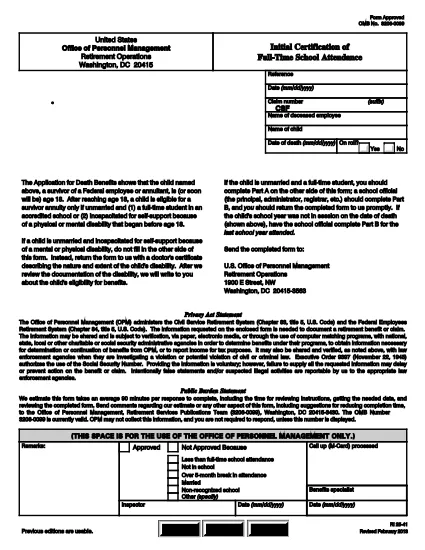
RI 25‑41 Fillable PDF – Initial Certification of Full‑Time School Attendance

  1. Land USA
  2. Språk engelsk
  3. Avdelning Kontoret för personalförvaltning
  4. Sektor Pensions- och försäkringsformulär
RI 25‑41 Fillable PDF – Initial Certification of Full‑Time School Attendance

The RI 25‑41 is the federal “Initial Certification of Full‑Time School Attendance” used by the Office of Personnel Management (OPM) to verify a student’s eligibility for federal education benefits. This form is required for each school year and must be completed by both the payee (the student’s parent or guardian) and an official of the educational institution.

What Is the RI 25‑41 Form?

RI 25‑41 collects detailed information about the student’s enrollment, the school’s accreditation, and the anticipated dates of attendance. Part A is filled out by the payee, while Part B is completed by a school official. The form must be signed and returned to OPM before benefits are paid.

How to Fill Out RI 25‑41 Online with Formize

Instead of printing, scanning, or editing the PDF in a separate program, you can fill the form directly on our site. Follow the simple steps below:

  1. Click the “Fill out this form” button on the page.
  2. Wait a few seconds while the Formize PDF Filler app loads the fillable RI 25‑41 document.
  3. Enter your information in each field. Use the TAB key to jump between fields.
  4. When all required fields are completed, click Save & Download to get a copy of the completed PDF.
  5. Print the signed copy (if a signature is required) and submit it to OPM as instructed.

Key Sections & Common Mistakes to Avoid

  • Part A – Payee Information: Double‑check the Social Security Number and date of birth; a typo will delay processing.
  • Part B – School Official: Ensure the official’s title and phone number are current; OPM may contact them for verification.
  • Attendance Dates: Use the exact start and end dates of the academic term. Do not leave blanks.
  • Signatures: Electronic signatures are accepted only if the PDF is printed, signed, and scanned back. The online filler does not replace a handwritten signature where required.
  • Attachments: If the school requires additional documentation (e.g., enrollment verification), attach those files before downloading the final PDF.

Where to Submit the Completed Form

After saving the completed RI 25‑41, mail or fax the signed PDF to the address listed on the OPM website. For most federal employees, the preferred method is to upload the PDF to the OPM portal under “Retirement & Insurance Forms.”

Need a printable version? Use the direct download link below.

FAQ
  • Can I submit the RI 25‑41 electronically?

    Yes. After completing the form in the Formize filler, you can download the PDF and upload it to the OPM portal. If a signature is required, print, sign, and scan the document before uploading.

  • Who can fill out Part B of the form?

    Part B must be completed by an authorized official of the educational institution, such as the registrar or dean.

  • What happens if I make a mistake on the form?

    Incorrect or missing information can delay benefit payments. Review all entries carefully and correct any errors before submitting.

  • Do I need to attach proof of enrollment?

    OPM may request additional enrollment verification. Attach any required documents before downloading the final PDF.

  • Is the RI 25‑41 form still valid for 2024‑2025 school years?

    Yes. The RI 25‑41 form is the current version for all upcoming school years unless OPM announces a revision.

  • How long does it take for OPM to process the form?

    Processing typically takes 10‑14 business days after receipt of a complete and signed form.

HUR

Så här fyller du i RI 25-41 gratis, online i 4 enkla steg:

  1. 1
    Open the Fillable Form
    Click the “Fill out this form” button on this page. The Formize PDF Filler will open the RI 25‑41 document automatically.
  2. 2
    Enter Your Information
    Type directly into each field. Use TAB to move to the next field. All required fields are marked with an asterisk.
  3. 3
    Save and Download
    When you’re finished, click “Save & Download” to get a copy of the completed PDF. Print and sign if a handwritten signature is required.
  4. 4
    Submit to OPM
    Mail, fax, or upload the signed PDF to the OPM portal as instructed in the form’s instructions.
Formize PDF Filler app
HANDLA OM

Office of Personal Management (OPM) Blanketter

RI 25-41 är en av de officiella formulären som används av United States Office of Personal Management, som är en oberoende myndighet inom den federala regeringen som ansvarar för förvaltningen av den offentliga personalstyrkan och federala personalförmåner. OPM fastställer policyer och föreskrifter relaterade till federal anställning, administrerar olika personalprogram och tillhandahåller tjänster till federala anställda, pensionärer och arbetssökande.

Här är några exempel på Office of Personal Management-formulär:

Standard Form 86 (SF-86) : Detta formulär används för bakgrundsutredningsprocessen för individer som ansöker om säkerhetsprövning. Den samlar in omfattande personlig, anställnings-, utbildnings- och finansiell information, såväl som detaljer om utländska kontakter och aktiviteter.

Standard Form 2809 (SF-2809) : Detta formulär används för att registrera sig i Federal Employees Health Benefits (FEHB) Program, som ger sjukförsäkringsskydd till federala anställda, pensionärer och deras berättigade familjemedlemmar.

Standardformulär 2817 (SF-2817): Detta formulär används för att ansöka om fortsatt täckning under Federal Employees Dental and Vision Insurance Program (FEDVIP) efter pensionering eller separation från federal tjänst.

Standard Form 3107 (SF-3107) : Detta formulär används för att ansöka om pensionsförmåner enligt Civil Service Retirement System (CSRS).

Standard Form 2801 (SF-2801) : Detta formulär används för att ansöka om pensionsförmåner enligt Federal Employees Retirement System (FERS).

Standard Form 15 (SF-15) : Det här formuläret används för att ansöka om veterans preferens i federal anställning. Den lämnas in av veteraner eller deras berättigade familjemedlemmar som söker anställningsmöjligheter i den federala regeringen.

Dessa exempel representerar några vanliga OPM-formulär som används i samband med federala anställnings- och personalförmåner. OPM har dock en rad andra former relaterade till olika personalprogram, pension, försäkring och andra aspekter av federal anställning. De specifika formulär som krävs kan variera beroende på typen av transaktion, program eller förmån som eftersträvas. Det är tillrådligt att konsultera den officiella webbplatsen för U.S. Office of Personal Management (www.opm.gov) eller söka vägledning från OPM eller relevant personal för personal för att få korrekt och uppdaterad aktuell information om de specifika OPM-formulär som är relevanta för dina federala anställnings- eller förmånsrelaterade behov.

FUNKTIONER

PDF-fyllare

Det enklaste sättet att fylla i RI 25-41 online

  • Fyll snabbt i RI 25-41
    Letar du efter ett sätt att snabbt fylla RI 25-41 online? Med vår online gratis PDF-formulärfyllare vet du hur du redigerar och fyller i detta pdf-dokument på mindre än en minut.
  • Lätt att använda online PDF-redigerare
    Är du trött på att skriva ut PDF-filer så att du kan redigera dem innan du skannar om och skickar tillbaka dem? Redigera PDF-dokument gratis online. Använd vår online pdf-redigerare för att spara tid och papper.
  • Bra verktyg, alla plattformar
    Undrar du hur man fyller i RI 25-41 på en Mac, eller kanske hur man använder ett PDF-fyllmedel gratis? Våra online PDF-verktyg fungerar på alla plattformar.
  • Säker fillagring
    Färdiga "RI 25-41"-filer lagras i en säker databas som hanteras av Amazon Cloud-hosting. Du kan ta bort dina filer från vårt system när som helst. I alla fall raderas dessa filer automatiskt efter 24 timmar.
  • Chatta med RI 25-41
    Chatta med "RI 25-41" på Chatize som är en gratis PDF-läsare. Ställ frågor och få svar från "RI 25-41". Klicka bara på knappen Chatta med dokument ovan.

Ta bort fyllningssession

Ta bort den valda fyllningssessionen? I det här fallet kommer dina framsteg i att fylla i formuläret att gå förlorade.

Ta bort redigeringssession

Vill du ta bort den valda redigeringssessionen? I det här fallet kommer dina framsteg i att skapa och redigera formuläret att gå förlorade.