
Välj språk

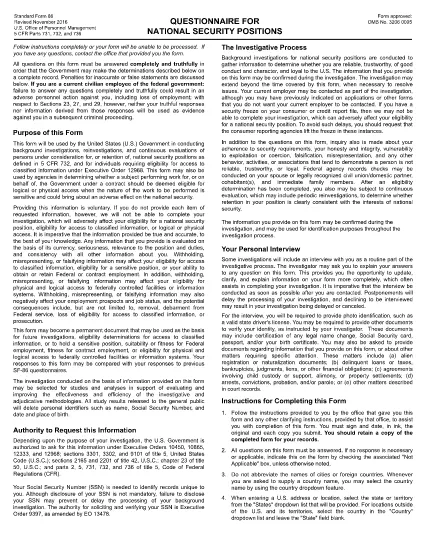
SF-86 Questionnaire – Fillable PDF for Security Clearance

  1. Språk engelsk
  2. Land USA
  3. Avdelning Kontoret för personalförvaltning
  4. Sektor Standardformulär
SF-86 Questionnaire – Fillable PDF for Security Clearance

The SF-86 (Standard Form 86) is the U.S. government’s official questionnaire used for background investigations, reinvestigations, and continuous evaluations of individuals seeking access to classified information or national‑security positions. Completing it accurately is essential for obtaining a security clearance.

This page provides a fillable PDF version of the SF-86 that you can complete directly in your browser using the Formize PDF Filler app. No additional software or printing is required.

What Is the SF-86 Form?

The SF-86 collects detailed personal information, including:

  • Education and employment history (last 10 years)
  • Foreign contacts, travel, and residences
  • Criminal record, financial disclosures, and drug use
  • Military service and security‑related activities

Agencies use this data to assess eligibility for a security clearance.

Key Sections of the SF-86

Understanding the major sections helps you gather the right documents before you start:

  1. Personal Information – name, date of birth, Social Security number.
  2. Residence History – every address for the past 10 years.
  3. Employment & Education – employers, schools, dates, and supervisors.
  4. Foreign Contacts & Travel – individuals, countries, and trips abroad.
  5. Legal & Financial Matters – arrests, convictions, bankruptcies, debts.

How to Complete the SF-86 Online

Follow these simple steps to fill out the form quickly and securely:

  • Click the "Fill out this form" button below.
  • Wait a few seconds while the Formize PDF Filler loads.
  • Enter your information field‑by‑field; the app auto‑saves as you go.
  • When finished, click "Save & Download" to get a completed PDF copy.
  • Submit the saved PDF to your agency or upload it through e‑QIP as instructed.

Common Mistakes & Tips

Tip 1: Answer every question truthfully. Incomplete or false information can delay or deny your clearance.

Tip 2: Use exact dates (MM/DD/YYYY) and full legal names for contacts.

Tip 3: Keep supporting documents (travel itineraries, employment letters) handy for reference.

Tip 4: Review the form twice before saving. The Formize filler highlights required fields you might have missed.

Ready to start? Click below to launch the fillable SF-86 PDF.

FAQ
  • What is the SF-86 used for?

    The SF-86 is the standard questionnaire for background investigations and security clearances for U.S. government, military, and contractor positions.

  • Can I fill out the SF-86 on a mobile device?

    Yes. The Formize PDF Filler works on most modern smartphones and tablets, but a desktop browser provides the best experience.

  • Is the fillable PDF version official?

    Yes. The PDF linked below is the official OPM form, now available as a fillable document through Formize.

  • Do I need an e‑QIP account to use this form?

    No. You can complete the PDF offline with Formize and then upload the finished file to e‑QIP if your agency requires it.

  • How long does it take to complete the SF-86?

    Preparation time varies, but most applicants finish the form in 2–4 hours. Gather employment, travel, and foreign‑contact records beforehand.

  • What happens if I make a mistake?

    Incorrect or omitted information can delay your clearance. Use the Formize auto‑save and review features, then double‑check before submitting.

  • Is my data secure while using Formize?

    Formize uses SSL encryption and does not store your personal data on its servers after you download the completed PDF.

HUR

Så här fyller du i SF-86 gratis, online i 5 enkla steg:

  1. 1
    Click the Fill Out Button
    Press the "Fill out this form" button on this page to open the SF-86 in the Formize PDF Filler.
  2. 2
    Wait for the Filler to Load
    The Formize app loads in a few seconds; a loading bar will appear at the top of the screen.
  3. 3
    Enter Your Information
    Complete each section of the questionnaire. The filler auto‑saves as you type and highlights any required fields you missed.
  4. 4
    Save and Download
    When all fields are filled, click "Save & Download" to get a completed PDF copy on your device.
  5. 5
    Submit to Your Agency
    Follow your agency’s instructions—usually uploading the PDF to e‑QIP or providing a printed copy to your security officer.
Formize PDF Filler app
HANDLA OM

Office of Personal Management (OPM) Blanketter

SF-86 är en av de officiella formulären som används av United States Office of Personal Management, som är en oberoende myndighet inom den federala regeringen som ansvarar för förvaltningen av den offentliga personalstyrkan och federala personalförmåner. OPM fastställer policyer och föreskrifter relaterade till federal anställning, administrerar olika personalprogram och tillhandahåller tjänster till federala anställda, pensionärer och arbetssökande.

Här är några exempel på Office of Personal Management-formulär:

Standard Form 86 (SF-86) : Detta formulär används för bakgrundsutredningsprocessen för individer som ansöker om säkerhetsprövning. Den samlar in omfattande personlig, anställnings-, utbildnings- och finansiell information, såväl som detaljer om utländska kontakter och aktiviteter.

Standard Form 2809 (SF-2809) : Detta formulär används för att registrera sig i Federal Employees Health Benefits (FEHB) Program, som ger sjukförsäkringsskydd till federala anställda, pensionärer och deras berättigade familjemedlemmar.

Standardformulär 2817 (SF-2817): Detta formulär används för att ansöka om fortsatt täckning under Federal Employees Dental and Vision Insurance Program (FEDVIP) efter pensionering eller separation från federal tjänst.

Standard Form 3107 (SF-3107) : Detta formulär används för att ansöka om pensionsförmåner enligt Civil Service Retirement System (CSRS).

Standard Form 2801 (SF-2801) : Detta formulär används för att ansöka om pensionsförmåner enligt Federal Employees Retirement System (FERS).

Standard Form 15 (SF-15) : Det här formuläret används för att ansöka om veterans preferens i federal anställning. Den lämnas in av veteraner eller deras berättigade familjemedlemmar som söker anställningsmöjligheter i den federala regeringen.

Dessa exempel representerar några vanliga OPM-formulär som används i samband med federala anställnings- och personalförmåner. OPM har dock en rad andra former relaterade till olika personalprogram, pension, försäkring och andra aspekter av federal anställning. De specifika formulär som krävs kan variera beroende på typen av transaktion, program eller förmån som eftersträvas. Det är tillrådligt att konsultera den officiella webbplatsen för U.S. Office of Personal Management (www.opm.gov) eller söka vägledning från OPM eller relevant personal för personal för att få korrekt och uppdaterad aktuell information om de specifika OPM-formulär som är relevanta för dina federala anställnings- eller förmånsrelaterade behov.

FUNKTIONER

PDF-fyllare

Det enklaste sättet att fylla i SF-86 online

  • Fyll snabbt i SF-86
    Letar du efter ett sätt att snabbt fylla SF-86 online? Med vår online gratis PDF-formulärfyllare vet du hur du redigerar och fyller i detta pdf-dokument på mindre än en minut.
  • Lätt att använda online PDF-redigerare
    Är du trött på att skriva ut PDF-filer så att du kan redigera dem innan du skannar om och skickar tillbaka dem? Redigera PDF-dokument gratis online. Använd vår online pdf-redigerare för att spara tid och papper.
  • Bra verktyg, alla plattformar
    Undrar du hur man fyller i SF-86 på en Mac, eller kanske hur man använder ett PDF-fyllmedel gratis? Våra online PDF-verktyg fungerar på alla plattformar.
  • Säker fillagring
    Färdiga "SF-86"-filer lagras i en säker databas som hanteras av Amazon Cloud-hosting. Du kan ta bort dina filer från vårt system när som helst. I alla fall raderas dessa filer automatiskt efter 24 timmar.
  • Chatta med SF-86
    Chatta med "SF-86" på Chatize som är en gratis PDF-läsare. Ställ frågor och få svar från "SF-86". Klicka bara på knappen Chatta med dokument ovan.

Ta bort fyllningssession

Ta bort den valda fyllningssessionen? I det här fallet kommer dina framsteg i att fylla i formuläret att gå förlorade.

Ta bort redigeringssession

Vill du ta bort den valda redigeringssessionen? I det här fallet kommer dina framsteg i att skapa och redigera formuläret att gå förlorade.