
Välj språk

U.S. Passport Renewal Application (Form DS‑82) – Fillable PDF

  1. Språk engelsk
  2. Land USA
  3. Aktivitet Pass
U.S. Passport Renewal Application (Form DS‑82) – Fillable PDF

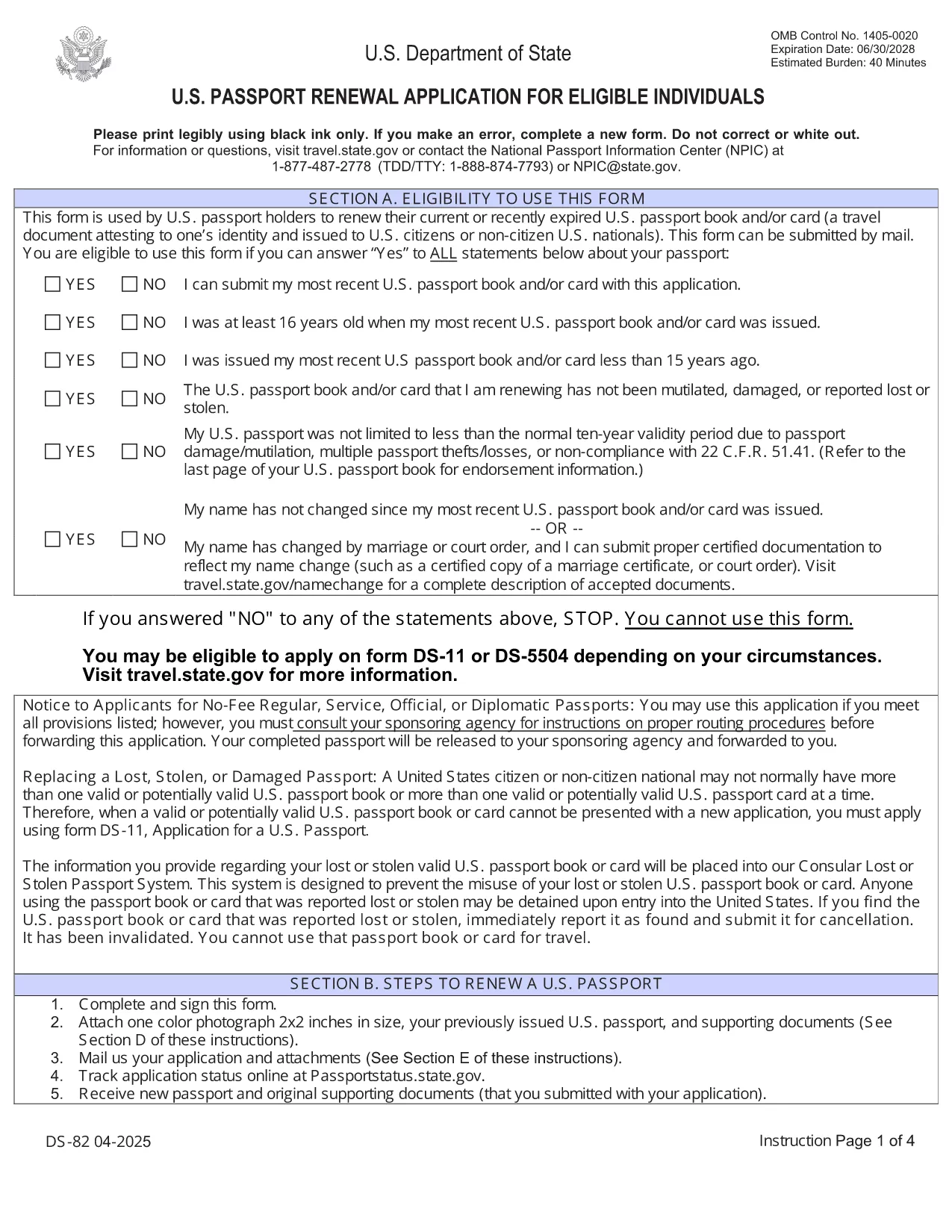
Need to renew your U.S. passport quickly and without errors? The DS‑82 is the official application for eligible individuals. Our fillable PDF, powered by the Formize PDF Filler, lets you complete the form directly in your browser, save a copy, and print it ready for submission.

Why Use the Fillable DS‑82 Form

  • Instant online editing: No need to print, write, scan, or fax.
  • Auto‑validation: Formize checks required fields and formatting as you type.
  • Secure storage: Save a digital copy for future reference.
  • Time‑saving: Complete the entire application in minutes.

How to Complete the DS‑82 Online with Formize

Just click the "Fill out this form" button below and wait for the Formize PDF Filler app to load. The interface mirrors the official DS‑82 layout, so you’ll know exactly where each piece of information belongs.

Common Mistakes to Avoid

  • Leaving the Middle Name field blank when you have one – it must match your current legal name.
  • Submitting an expired passport photo (must be taken within the last 6 months).
  • Forgetting to sign the form – an unsigned DS‑82 is rejected.
  • Using a non‑U.S. mailing address without a proper explanation.

Where to Submit Your Renewal

After completing and printing the form, mail it with your current passport, a new passport photo, and the renewal fee to the address listed on the U.S. Department of State website. If you’re using a passport acceptance facility, bring the printed form and supporting documents.

Frequently Asked Questions

Explore the most common questions below. If you need more help, the State Department’s official site has detailed guidance.

FAQ
  • Who can use the DS‑82 form?

    U.S. citizens with a passport that is still valid or expired less than 5 years ago, and who can submit the same name and personal data as on the current passport.

  • Can I renew my passport if my name changed?

    Yes, but you must also submit a legal name‑change document (marriage certificate, court order, etc.) along with the DS‑82.

  • How long does the renewal process take?

    Standard processing is about 8‑11 weeks. Expedited service (for an additional fee) reduces the time to 5‑7 weeks.

  • Do I need to bring my old passport?

    Yes. Your current passport must be submitted with the DS‑82; it will be returned to you after processing.

  • What photo requirements apply?

    The photo must be 2×2 inches, taken within the last 6 months, on a plain white background, and show a full‑face view.

  • Is the Formize filler secure?

    Yes. Formize uses HTTPS encryption and does not store any personal data after you download or print the completed PDF.

HUR

Så här fyller du i DS-82 gratis, online i 5 enkla steg:

  1. 1
    Open the Fillable Form
    Click the "Fill out this form" button on the page. The Formize PDF Filler will open in a new tab.
  2. 2
    Wait for the Filler to Load
    Allow a few seconds for the app to initialize. You’ll see the DS‑82 layout with editable fields.
  3. 3
    Enter Your Information
    Fill in each field exactly as it appears on your current passport and supporting documents. Required fields are marked with an asterisk.
  4. 4
    Review and Validate
    Use the built‑in validation to check for missing or incorrectly formatted entries. Correct any highlighted issues.
  5. 5
    Save, Print, and Submit
    Save a digital copy, then print the completed form. Mail it with your passport, photo, and fee to the address provided by the U.S. Department of State.
Formize PDF Filler app
HANDLA OM

Passformulär

DS-82 är en av passformerna som är dokument som används för att ansöka om ett pass, vilket är ett resedokument som intygar innehavarens identitet och nationalitet och tillåter dem att resa internationellt. Passformerna kan variera beroende på vilket land som utfärdar passet, men de innehåller vanligtvis personlig information om sökanden, såsom namn, födelsedatum och födelseort, samt information om sökandens föräldrar och eventuella tidigare pass eller resehandlingar .

I USA är de två vanligaste passformerna DS-11 och DS-82. DS-11-formuläret används för förstagångssökande, minderåriga eller individer som inte är berättigade att använda DS-82-formuläret. DS-82-formuläret används för att förnya pass via post för behöriga sökande. Båda formulären kräver att den sökande tillhandahåller personlig information och styrkande dokumentation, såsom ett passfoto och bevis på medborgarskap.

Andra länder kan ha andra passformer och krav, men den grundläggande processen innefattar vanligtvis att fylla i en passansökan, tillhandahålla styrkande dokumentation och delta i en intervju med en passtjänsteman på en statlig anläggning eller ambassad. Det är viktigt att notera att ansökningsprocessen för pass kan ta flera veckor eller till och med månader, så det rekommenderas att ansöka i god tid före alla planerade resor.

FUNKTIONER

PDF-fyllare

Det enklaste sättet att fylla i DS-82 online

  • Fyll snabbt i DS-82
    Letar du efter ett sätt att snabbt fylla DS-82 online? Med vår online gratis PDF-formulärfyllare vet du hur du redigerar och fyller i detta pdf-dokument på mindre än en minut.
  • Lätt att använda online PDF-redigerare
    Är du trött på att skriva ut PDF-filer så att du kan redigera dem innan du skannar om och skickar tillbaka dem? Redigera PDF-dokument gratis online. Använd vår online pdf-redigerare för att spara tid och papper.
  • Bra verktyg, alla plattformar
    Undrar du hur man fyller i DS-82 på en Mac, eller kanske hur man använder ett PDF-fyllmedel gratis? Våra online PDF-verktyg fungerar på alla plattformar.
  • Säker fillagring
    Färdiga "DS-82"-filer lagras i en säker databas som hanteras av Amazon Cloud-hosting. Du kan ta bort dina filer från vårt system när som helst. I alla fall raderas dessa filer automatiskt efter 24 timmar.
  • Chatta med DS-82
    Chatta med "DS-82" på Chatize som är en gratis PDF-läsare. Ställ frågor och få svar från "DS-82". Klicka bara på knappen Chatta med dokument ovan.

Ta bort fyllningssession

Ta bort den valda fyllningssessionen? I det här fallet kommer dina framsteg i att fylla i formuläret att gå förlorade.

Ta bort redigeringssession

Vill du ta bort den valda redigeringssessionen? I det här fallet kommer dina framsteg i att skapa och redigera formuläret att gå förlorade.