
Välj språk

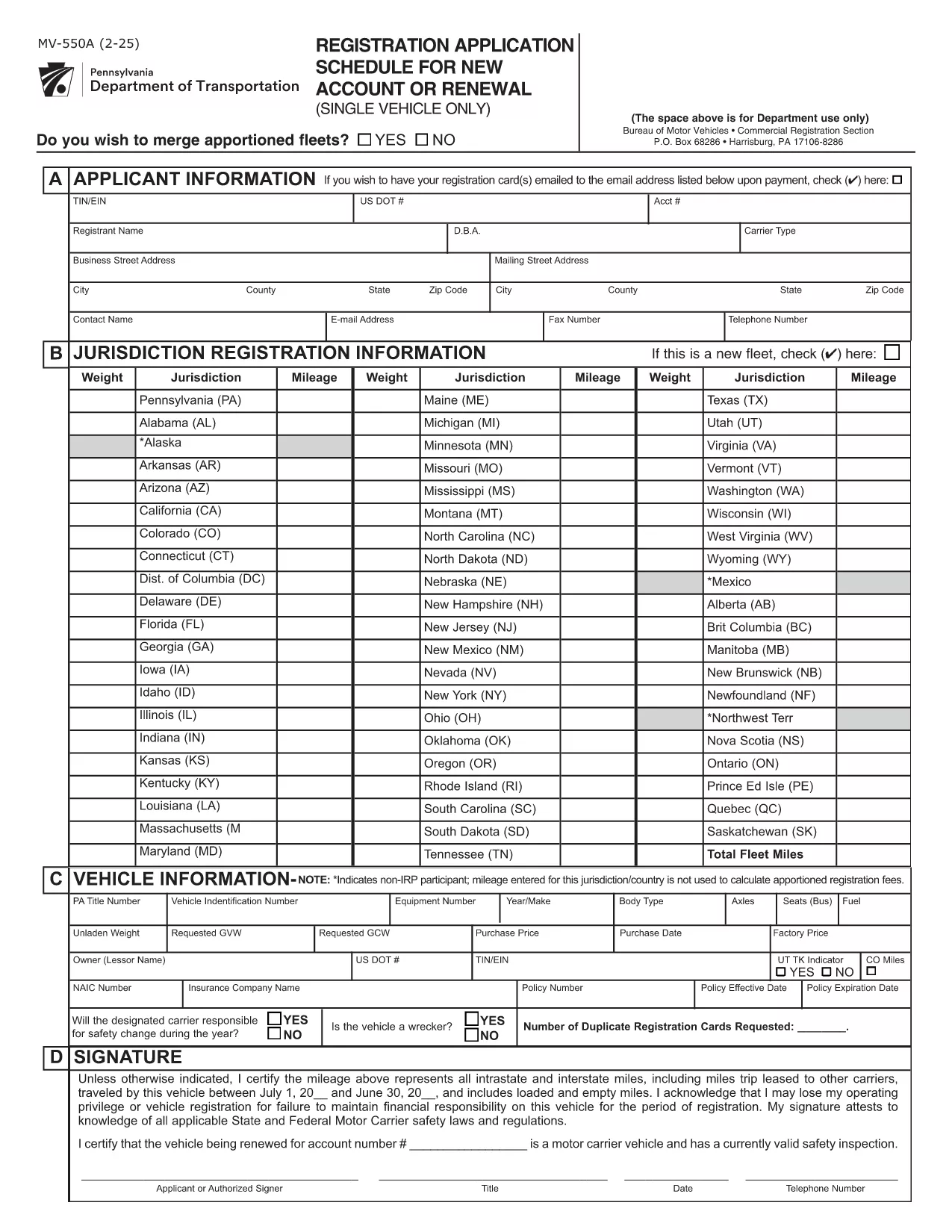
Pennsylvania MV-550A – Apportioned Registration Schedule A (Fillable PDF)

  1. Språk engelsk
  2. Land USA
  3. Aktivitet Fordonsregistrering
  4. Avdelning Pennsylvania Department of Transportation
Pennsylvania MV-550A – Apportioned Registration Schedule A (Fillable PDF)

The MV-550A, also known as the "Apportioned Registration Application – Schedule A," is required by the Pennsylvania Department of Transportation (PennDOT) when you need to register multiple vehicles that will be used across state lines. This schedule captures detailed information about each vehicle, ownership, and the apportioned tax calculation.

Instead of printing, printing, and hand‑writing, you can now complete the official MV-550A form directly in your browser. Formize’s fillable PDF technology loads the original Pennsylvania PDF, turns every field into an interactive input, and lets you save, print, or email the finished form with a single click.

Using the online fillable version reduces errors, speeds up processing, and ensures that the form meets PennDOT’s formatting requirements.

Key features of the Formize MV-550A filler:

  • All fields are auto‑mapped to the official PDF layout.
  • Real‑time validation for VIN, dates, and numeric entries.
  • Save your progress and return later.
  • Download a completed PDF ready for submission.
FAQ
  • Who needs to file Form MV-550A?

    Any individual or business that registers multiple vehicles for apportioned (interstate) use in Pennsylvania must complete Schedule A (MV-550A).

  • Can I submit the filled PDF electronically?

    PennDOT currently requires a printed copy with a signature. Use the fillable PDF to print a clean, legible document.

  • Do I need a PennDOT account to use the online filler?

    No. The Formize filler works directly in the browser—no login or account is required.

  • What if I make a mistake after saving?

    Open the saved PDF again with the Formize filler, correct the fields, and re‑save. The original PDF remains unchanged.

  • Is there a fee to use Formize’s filler?

    The filler is free to use for completing the MV-550A. Any PennDOT fees are paid directly to the state, not to Formize.

  • How long does it take to complete the form?

    Most users finish the MV-550A in 5–10 minutes when using the fillable PDF, compared to 20‑30 minutes with a paper form.

  • What should I do if a field is grayed out?

    A grayed‑out field means it is not applicable for your situation. Leave it blank or follow the instructions on the form.

HUR

Så här fyller du i MV-550A gratis, online i 4 enkla steg:

  1. 1
    Open the Fillable Form
    Click the **Fill out this form** button on the page. The Formize PDF Filler app will load the MV-550A PDF directly in your browser.
  2. 2
    Enter Your Information
    Type the required data into each highlighted field. The app validates VIN numbers, dates, and numeric values as you go.
  3. 3
    Review & Save
    Once all sections are completed, review the summary screen, then click **Save** to download a copy or **Print** to produce a hard copy.
  4. 4
    Submit to PennDOT
    Mail or deliver the saved PDF to your local PennDOT office or BMV as instructed on the form.
Formize PDF Filler app
HANDLA OM

Formulär för registrering av fordon

Om du äger eller leasar ett motorfordon, trailer eller båt måste du uppfylla vissa skyldigheter för att hålla ditt fordon lagligt registrerat och säkert.

MV-550A är en av fordonsregistreringsformulären som är dokument som används för att registrera ett motorfordon hos den relevanta staten eller provinsmyndigheten. Dessa formulär krävs vanligtvis när en person köper ett nytt eller begagnat fordon eller när de flyttar till en ny stat eller provins med ett fordon.

De exakta kraven och formulären som behövs för fordonsregistrering kan variera beroende på plats, men i allmänhet innebär processen att tillhandahålla information om fordonet, ägaren och eventuella panträtter på fordonet.

När registreringsformulären och avgifterna har lämnats in, kommer staten eller provinsmyndigheten att utfärda ett registreringsbevis eller registreringsskylt till fordonets ägare. Denna registrering gör att fordonet kan köras lagligt på allmänna vägar och motorvägar.

FUNKTIONER

PDF-fyllare

Det enklaste sättet att fylla i MV-550A online

  • Fyll snabbt i MV-550A
    Letar du efter ett sätt att snabbt fylla MV-550A online? Med vår online gratis PDF-formulärfyllare vet du hur du redigerar och fyller i detta pdf-dokument på mindre än en minut.
  • Lätt att använda online PDF-redigerare
    Är du trött på att skriva ut PDF-filer så att du kan redigera dem innan du skannar om och skickar tillbaka dem? Redigera PDF-dokument gratis online. Använd vår online pdf-redigerare för att spara tid och papper.
  • Bra verktyg, alla plattformar
    Undrar du hur man fyller i MV-550A på en Mac, eller kanske hur man använder ett PDF-fyllmedel gratis? Våra online PDF-verktyg fungerar på alla plattformar.
  • Säker fillagring
    Färdiga "MV-550A"-filer lagras i en säker databas som hanteras av Amazon Cloud-hosting. Du kan ta bort dina filer från vårt system när som helst. I alla fall raderas dessa filer automatiskt efter 24 timmar.
  • Chatta med MV-550A
    Chatta med "MV-550A" på Chatize som är en gratis PDF-läsare. Ställ frågor och få svar från "MV-550A". Klicka bara på knappen Chatta med dokument ovan.

Ta bort fyllningssession

Ta bort den valda fyllningssessionen? I det här fallet kommer dina framsteg i att fylla i formuläret att gå förlorade.

Ta bort redigeringssession

Vill du ta bort den valda redigeringssessionen? I det här fallet kommer dina framsteg i att skapa och redigera formuläret att gå förlorade.