Välj språk

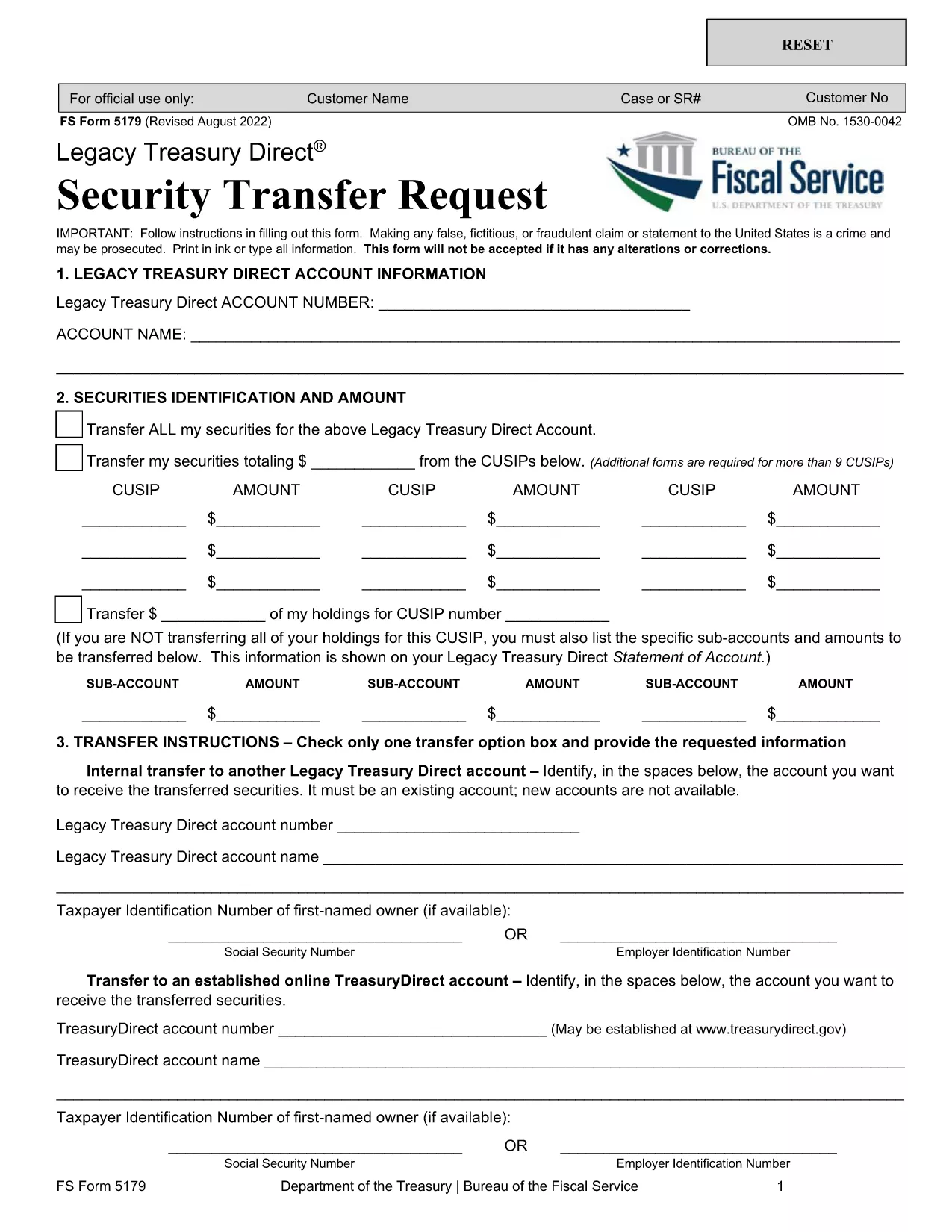
Form 5179 – Treasury Direct Security Transfer Request

  1. Land USA
  2. Språk engelsk
  3. Avdelning Treasury
  4. Aktivitet Securities Transfer
Form 5179 – Treasury Direct Security Transfer Request

Form 5179 is the official Treasury Direct Security Transfer Request used to move Treasury securities from a legacy TreasuryDirect account to another account, a brokerage firm, or a financial institution. This fillable PDF lets you complete the form quickly, sign electronically, and submit it without printing.

What Is Form 5179 and When to Use It

The form captures essential details such as the owner’s account information, security identification numbers, quantity of securities, and the destination account. You’ll need Form 5179 whenever you want to:

  • Transfer Treasury bonds, notes, or bills from an old TreasuryDirect account.
  • Move securities to a new TreasuryDirect account.
  • Send securities to a broker, bank, or other financial institution.

How to Fill Out Form 5179 Online with Formize

Instead of downloading the PDF and opening a separate editor, simply click the “Fill out this form” button on this page. The Formize PDF Filler app loads in your browser, letting you complete every field, add signatures, and save a copy—all for free.

Common Mistakes to Avoid on Form 5179

  • Incorrect security identifiers: Double‑check the CUSIP or Treasury‑specific number.
  • Missing signatures: Both the account holder and the authorized representative must sign.
  • Wrong account numbers: Verify the destination account details before submitting.
  • Leaving optional fields blank: If a field is marked “optional,” you may leave it empty, but ensure required fields are fully completed.

Where to Submit Your Completed Form

After you finish the form in Formize, download the completed PDF and mail it to:

Bureau of the Public Debt
Treasury Direct – Security Transfer Unit
1500 Pennsylvania Avenue, NW
Washington, DC 20220
United States

Or follow any electronic submission instructions provided by your receiving institution.

FAQ
  • What types of Treasury securities can I transfer with Form 5179?

    You can transfer Treasury bonds, notes, bills, and Treasury Inflation‑Protected Securities (TIPS) that are held in a legacy TreasuryDirect account.

  • Do I need a notary for the signatures on Form 5179?

    No. The Treasury Direct system accepts electronic signatures entered through the Formize filler, provided the signer is the account holder or an authorized representative.

  • Can I submit Form 5179 electronically?

    The Treasury still requires a paper copy for most transfers. However, you can create the PDF electronically, print it, and mail it. Some financial institutions may accept a scanned copy.

  • How long does the transfer process take after I mail the form?

    Typical processing time is 7‑10 business days once the Treasury receives the completed and signed form.

  • What should I do if I make a mistake after submitting the form?

    Contact the Bureau of the Public Debt at 1‑800‑722‑2678 as soon as possible. They will advise whether a corrected form can be submitted.

  • Is there a fee to use Form 5179?

    There is no fee from the Treasury for filing the transfer request. Your broker or financial institution may have its own processing fees.

  • Can I transfer securities to an account outside the United States?

    Form 5179 is intended for transfers to U.S. TreasuryDirect accounts or U.S. financial institutions. International transfers require a different procedure.

HUR

Så här fyller du i Form 5179 gratis, online i 4 enkla steg:

  1. 1
    Open the Fillable Form
    Click the “Fill out this form” button on the page. The Formize PDF Filler app will launch in a new tab.
  2. 2
    Enter Your Information
    Complete each field – account numbers, security identifiers, transfer amount, and signatures – using your keyboard.
  3. 3
    Validate and Save
    When you finish, click “Validate” to check for missing or incorrect data, then press “Save” to download the completed PDF.
  4. 4
    Submit the Form
    Print the saved PDF (if required) and mail it to the Treasury Direct address, or follow any electronic submission instructions from your receiving institution.
Formize PDF Filler app
HANDLA OM

Form 5179 mall

Med den traditionella uppsättningen funktioner för att visa och fylla i ett PDF-dokument, kombinerat med fördelarna med en webbapplikation och responsiv layout, kan du slutföra Form 5179 på några minuter.

FUNKTIONER

PDF-fyllare

Det enklaste sättet att fylla i Form 5179 online

  • Fyll snabbt i Form 5179
    Letar du efter ett sätt att snabbt fylla Form 5179 online? Med vår online gratis PDF-formulärfyllare vet du hur du redigerar och fyller i detta pdf-dokument på mindre än en minut.
  • Lätt att använda online PDF-redigerare
    Är du trött på att skriva ut PDF-filer så att du kan redigera dem innan du skannar om och skickar tillbaka dem? Redigera PDF-dokument gratis online. Använd vår online pdf-redigerare för att spara tid och papper.
  • Bra verktyg, alla plattformar
    Undrar du hur man fyller i Form 5179 på en Mac, eller kanske hur man använder ett PDF-fyllmedel gratis? Våra online PDF-verktyg fungerar på alla plattformar.
  • Säker fillagring
    Färdiga "Form 5179"-filer lagras i en säker databas som hanteras av Amazon Cloud-hosting. Du kan ta bort dina filer från vårt system när som helst. I alla fall raderas dessa filer automatiskt efter 24 timmar.
  • Chatta med Form 5179
    Chatta med "Form 5179" på Chatize som är en gratis PDF-läsare. Ställ frågor och få svar från "Form 5179". Klicka bara på knappen Chatta med dokument ovan.

Ta bort fyllningssession

Ta bort den valda fyllningssessionen? I det här fallet kommer dina framsteg i att fylla i formuläret att gå förlorade.

Ta bort redigeringssession

Vill du ta bort den valda redigeringssessionen? I det här fallet kommer dina framsteg i att skapa och redigera formuläret att gå förlorade.