Välj språk

Form I-134 Instructions – Complete the Affidavit of Support Online

  1. Land USA
  2. Språk engelsk
  3. Avdelning U.S.S. medborgarskap och immigrationstjänster
Form I-134 Instructions – Complete the Affidavit of Support Online

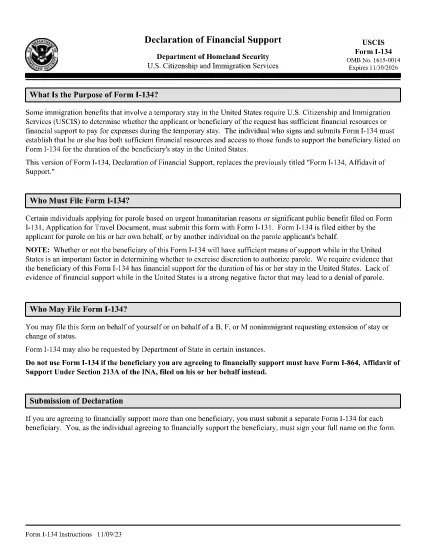
The Form I-134, Affidavit of Support is used by U.S. Citizenship and Immigration Services (USCIS) to prove that a visa applicant or beneficiary has adequate financial backing for a temporary stay in the United States. Whether you are sponsoring a visitor, a fiancé(e), or a student, the instructions must be followed precisely to avoid delays.

What Is Form I-134 and When Is It Required?

Form I-134 is an affidavit of support that demonstrates the sponsor’s ability to cover the applicant’s expenses, including housing, food, medical care, and transportation. It is typically required for:

  • B-2 tourist visas
  • K-1 fiancé(e) visas
  • F-1 student dependents
  • Other non‑immigrant classifications that need proof of financial support

How to Fill Out the I-134 Form Using Formize

Instead of downloading the PDF and editing it in a desktop program, you can complete the form directly in your browser with Formize’s Fillable PDF feature. Follow these simple steps:

  1. Click the "Fill out this form" button on the page.
  2. Wait a few seconds while the Formize PDF Filler app loads the I-134 document.
  3. Enter your information in each highlighted field. The app automatically saves your progress.
  4. Use the built‑in validation to catch formatting errors before moving on.
  5. When all sections are complete, click Download to get a fully‑filled PDF you can print or submit electronically.

Common Mistakes to Avoid When Completing I-134

  • Leaving blank fields – every required box must be filled, even if the answer is “N/A.”
  • Incorrect financial figures – use the most recent tax return and bank statements; round to the nearest dollar.
  • Missing signatures – both the sponsor and, when applicable, the beneficiary must sign.
  • Mismatched dates – ensure the dates on the form match the dates on supporting documents.

Where to Submit the Completed Affidavit of Support

After you download the completed I-134 PDF, attach it to your visa application packet or upload it through the online portal indicated on your specific visa category instructions. Always keep a copy for your records.

For the official, up‑to‑date instructions, you can view the PDF directly below or open it in the Formize filler.

FAQ
  • Do I need a separate PDF for each visa category?

    No. The I-134 form is the same for all non‑immigrant categories that require financial support. Only the supporting documents differ.

  • Can I edit the I-134 after I download it?

    Yes, but it’s easier to make changes before downloading by using the Formize filler, which saves every edit automatically.

  • What financial information is required?

    You must provide your most recent federal tax return, current employment income, and any additional assets such as savings or investments.

  • Is a notarized signature required?

    USCIS does not require notarization for the I-134, but the signature must be legible and match the name on your supporting documents.

  • How long is the I-134 valid?

    The affidavit is generally valid for the duration of the beneficiary’s stay, up to one year, unless the sponsor’s financial situation changes.

  • Can I submit the form electronically?

    Yes. Most visa categories accept a scanned PDF of the completed I-134 uploaded through the online application portal.

  • What should I do if I make a mistake after downloading?

    Print a new version using the Formize filler, correct the error, and submit the updated PDF. Keep the old version for reference.

HUR

Så här fyller du i I-134 instructions gratis, online i 4 enkla steg:

  1. 1
    Click the Fill‑out Button
    Press the "Fill out this form" button on the page to launch the Formize PDF Filler.
  2. 2
    Wait for the Filler to Load
    A few seconds later the fillable I-134 document appears in your browser.
  3. 3
    Enter Your Information
    Complete each highlighted field, following the on‑screen prompts and validation checks.
  4. 4
    Review and Download
    After reviewing for accuracy, click the Download button to save the filled PDF for submission.
Formize PDF Filler app
HANDLA OM

I-134 instructions mall

Med den traditionella uppsättningen funktioner för att visa och fylla i ett PDF-dokument, kombinerat med fördelarna med en webbapplikation och responsiv layout, kan du slutföra I-134 instructions på några minuter.

FUNKTIONER

PDF-fyllare

Det enklaste sättet att fylla i I-134 instructions online

  • Fyll snabbt i I-134 instructions
    Letar du efter ett sätt att snabbt fylla I-134 instructions online? Med vår online gratis PDF-formulärfyllare vet du hur du redigerar och fyller i detta pdf-dokument på mindre än en minut.
  • Lätt att använda online PDF-redigerare
    Är du trött på att skriva ut PDF-filer så att du kan redigera dem innan du skannar om och skickar tillbaka dem? Redigera PDF-dokument gratis online. Använd vår online pdf-redigerare för att spara tid och papper.
  • Bra verktyg, alla plattformar
    Undrar du hur man fyller i I-134 instructions på en Mac, eller kanske hur man använder ett PDF-fyllmedel gratis? Våra online PDF-verktyg fungerar på alla plattformar.
  • Säker fillagring
    Färdiga "I-134 instructions"-filer lagras i en säker databas som hanteras av Amazon Cloud-hosting. Du kan ta bort dina filer från vårt system när som helst. I alla fall raderas dessa filer automatiskt efter 24 timmar.
  • Chatta med I-134 instructions
    Chatta med "I-134 instructions" på Chatize som är en gratis PDF-läsare. Ställ frågor och få svar från "I-134 instructions". Klicka bara på knappen Chatta med dokument ovan.

Ta bort fyllningssession

Ta bort den valda fyllningssessionen? I det här fallet kommer dina framsteg i att fylla i formuläret att gå förlorade.

Ta bort redigeringssession

Vill du ta bort den valda redigeringssessionen? I det här fallet kommer dina framsteg i att skapa och redigera formuläret att gå förlorade.