Välj språk

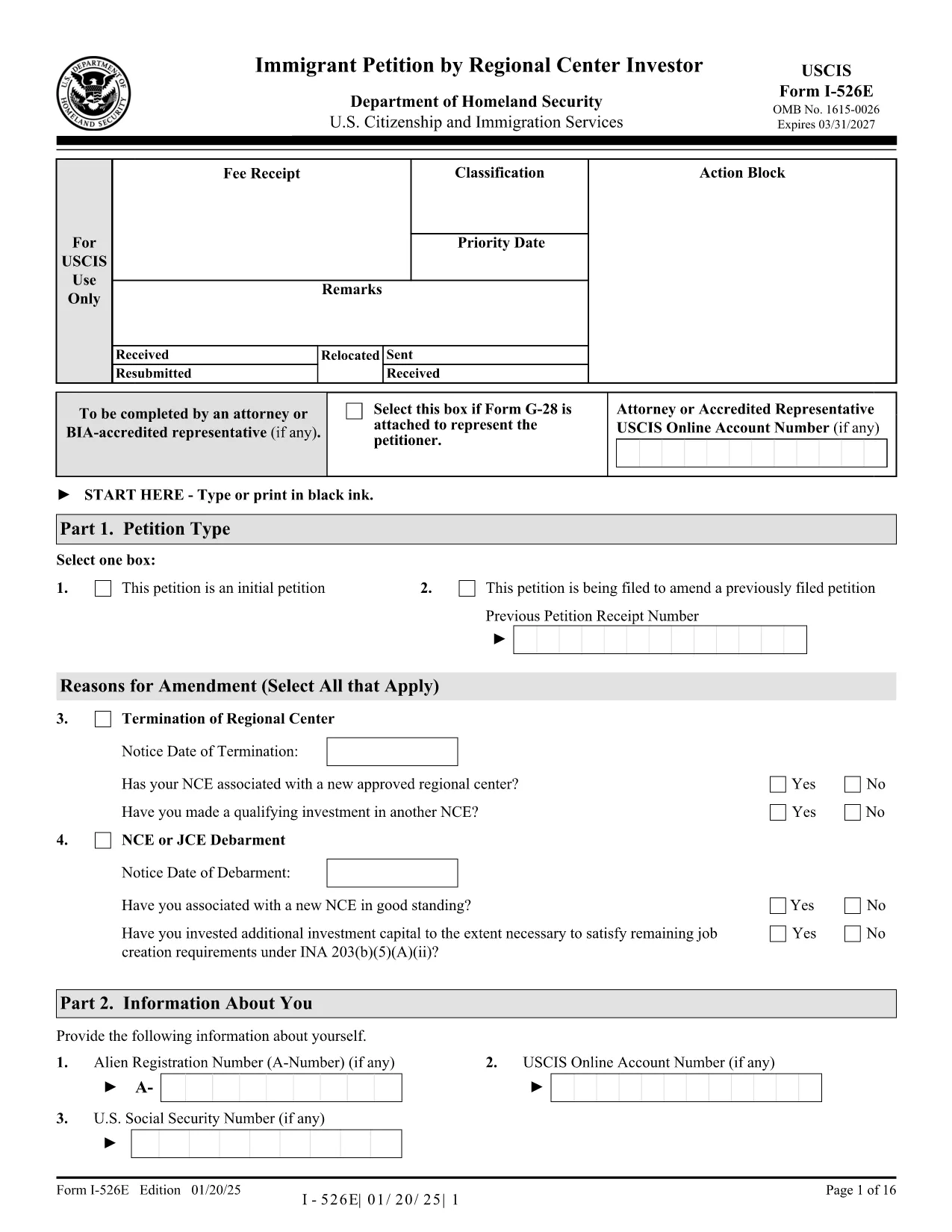
Form I-526E – Immigrant Petition by Regional Center Investor (Fillable PDF)

  1. Land USA
  2. Språk engelsk
  3. Avdelning U.S.S. medborgarskap och immigrationstjänster
Form I-526E – Immigrant Petition by Regional Center Investor (Fillable PDF)

The Form I-526E is the official USCIS petition used by investors who are participating in a Regional Center EB‑5 project. This fillable PDF lets you provide the required personal, investment, and project details so USCIS can evaluate your eligibility under INA 203(b)(5)(E).

What Is Form I-526E?

Form I-526E is distinct from the standalone I‑526 petition. It is specifically for:

  • Investors pooling capital with a USCIS‑approved Regional Center.
  • Petitioners reporting amendments when a Regional Center, enterprise, or job‑creating entity changes status.

Submitting the correct form helps prevent delays or rejections.

How to Fill the Form Online with Formize

Instead of downloading, printing, and scanning, use the Formize PDF Filler for a seamless experience:

  1. Click the "Fill out this form" button on this page.
  2. Wait a few seconds while the Formize PDF Filler app loads.
  3. Enter your information directly into the fillable fields.
  4. Save the completed PDF to your device or download a signed copy.

The filler automatically validates dates, numbers, and required fields, reducing the chance of errors.

Key Sections & Required Attachments

Pay special attention to these sections:

  • Part 1 – Information About the Investor: Full legal name, passport details, and address.
  • Part 2 – Investment Information: Amount invested, source of funds, and the Regional Center’s SEVIS ID.
  • Part 3 – Project Details: Name of the project, job‑creation estimates, and timeline.
  • Supporting Documents: Business plan, proof of lawful source of funds, and Regional Center approval letter.

Common Mistakes to Avoid

  • Leaving any required field blank – the form will be rejected.
  • Using an outdated PDF edition – always use the latest version (see download link).
  • Submitting a combined fee payment with other forms (USCIS now requires separate payments).
  • Signing the PDF with a scanned signature; use a digital signature tool or print‑sign‑scan.

Where to Submit Your Completed Petition

After completing the form, mail it to the appropriate USCIS lockbox address listed on the USCIS filing instructions. Include the separate filing fee and any required supplementary forms (e.g., G‑1450 for credit‑card payments).

Ready to start? Click the button below to open the fillable version of Form I-526E instantly.

FAQ
  • Who should use Form I-526E instead of Form I-526?

    Form I-526E is for investors who are pooling their capital with a USCIS‑approved Regional Center. Standalone investors use Form I-526.

  • Can I edit the PDF after I download it?

    Yes, but using the Formize PDF Filler is easier. It lets you edit, validate, and save the form without printing or scanning.

  • Do I need to sign the form digitally?

    USCIS accepts a digital signature if it meets their guidelines, but many applicants print, sign, and then scan the final document.

  • What happens if I submit an outdated version of Form I-526E?

    USCIS may reject the petition. Always use the latest PDF version – the link on this page points to the current edition.

  • Is there a filing fee for Form I-526E?

    Yes. The fee is listed on the USCIS Fee Schedule page and must be paid separately from any other forms.

  • Can I submit Form I-526E online?

    No, Form I-526E must be mailed as a paper petition. However, you can fill it out online with Formize before printing.

  • What supporting documents are required?

    Typical attachments include a business plan, proof of lawful source of funds, Regional Center approval notice, and any amendment notices if applicable.

  • How long does USCIS take to process a Form I-526E?

    Processing times vary; check the USCIS processing times page for the most current estimates.

HUR

Så här fyller du i Form I-526E gratis, online i 5 enkla steg:

  1. 1
    Open the Fillable Form
    Click the "Fill out this form" button on the page. The Formize PDF Filler will open in a new tab.
  2. 2
    Load the Form
    Wait a few seconds while the fillable PDF loads. All fields become editable automatically.
  3. 3
    Enter Your Information
    Type your answers directly into each section. The app validates dates, numbers, and required fields in real time.
  4. 4
    Save or Download
    When finished, click "Save" to store the completed file in your account or "Download" to get a signed PDF on your device.
  5. 5
    Print & Submit
    Print the completed form (if required) and mail it with the appropriate filing fee to the USCIS lockbox address.
Formize PDF Filler app
HANDLA OM

Form I-526E mall

Med den traditionella uppsättningen funktioner för att visa och fylla i ett PDF-dokument, kombinerat med fördelarna med en webbapplikation och responsiv layout, kan du slutföra Form I-526E på några minuter.

FUNKTIONER

PDF-fyllare

Det enklaste sättet att fylla i Form I-526E online

  • Fyll snabbt i Form I-526E
    Letar du efter ett sätt att snabbt fylla Form I-526E online? Med vår online gratis PDF-formulärfyllare vet du hur du redigerar och fyller i detta pdf-dokument på mindre än en minut.
  • Lätt att använda online PDF-redigerare
    Är du trött på att skriva ut PDF-filer så att du kan redigera dem innan du skannar om och skickar tillbaka dem? Redigera PDF-dokument gratis online. Använd vår online pdf-redigerare för att spara tid och papper.
  • Bra verktyg, alla plattformar
    Undrar du hur man fyller i Form I-526E på en Mac, eller kanske hur man använder ett PDF-fyllmedel gratis? Våra online PDF-verktyg fungerar på alla plattformar.
  • Säker fillagring
    Färdiga "Form I-526E"-filer lagras i en säker databas som hanteras av Amazon Cloud-hosting. Du kan ta bort dina filer från vårt system när som helst. I alla fall raderas dessa filer automatiskt efter 24 timmar.
  • Chatta med Form I-526E
    Chatta med "Form I-526E" på Chatize som är en gratis PDF-läsare. Ställ frågor och få svar från "Form I-526E". Klicka bara på knappen Chatta med dokument ovan.

Ta bort fyllningssession

Ta bort den valda fyllningssessionen? I det här fallet kommer dina framsteg i att fylla i formuläret att gå förlorade.

Ta bort redigeringssession

Vill du ta bort den valda redigeringssessionen? I det här fallet kommer dina framsteg i att skapa och redigera formuläret att gå förlorade.