Välj språk

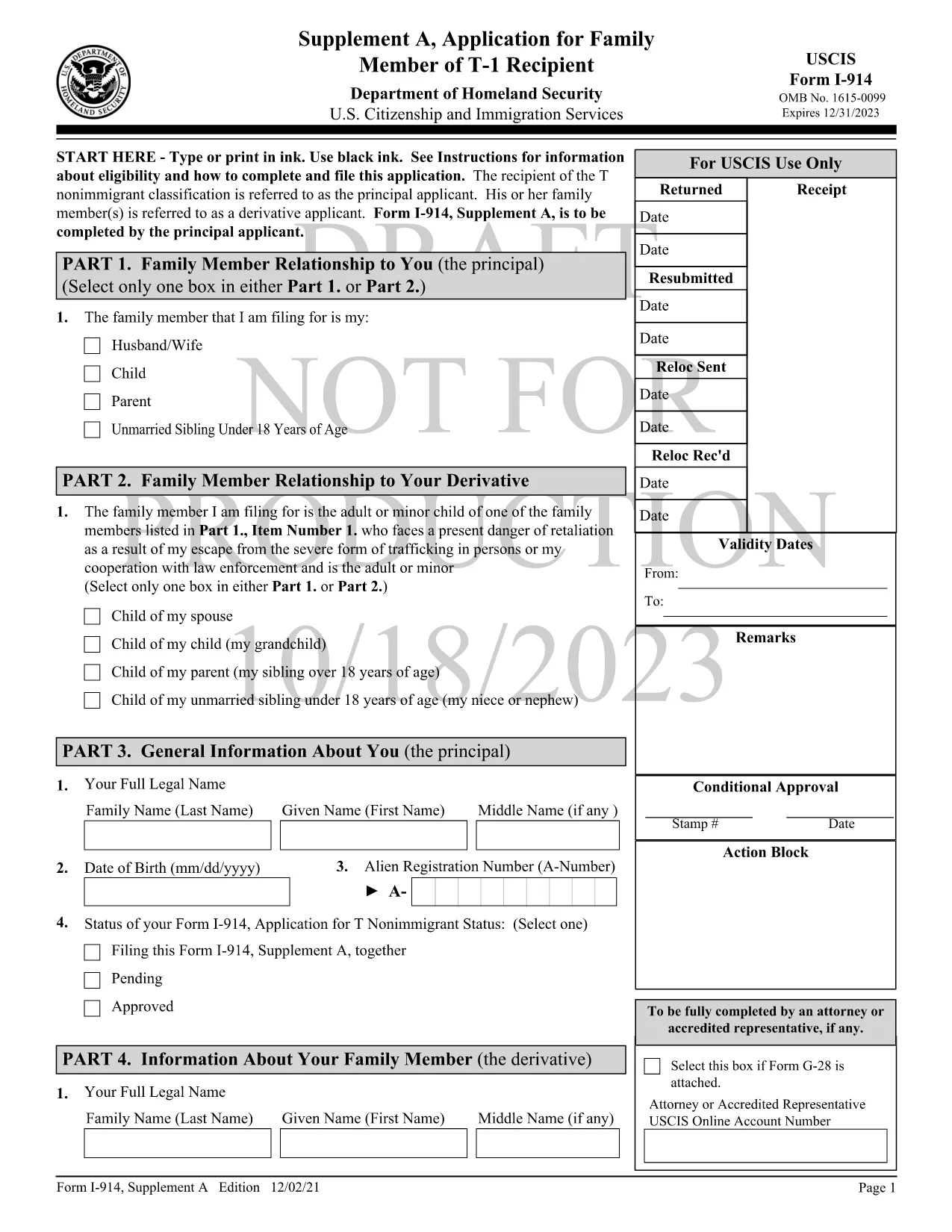
Form I-914 Supplement A – Fillable PDF for T‑Visa Family Members

  1. Land USA
  2. Språk engelsk
  3. Avdelning U.S.S. medborgarskap och immigrationstjänster
Form I-914 Supplement A – Fillable PDF for T‑Visa Family Members

Form I-914 Supplement A is the official USCIS application used by qualifying family members of a principal T‑1 nonimmigrant to request derivative T‑visa status. This supplement accompanies the main I-914, Application for T Nonimmigrant Status and must be completed accurately to avoid delays.

What Is Form I-914 Supplement A?

The supplement collects detailed information about the relationship between the principal T‑visa holder and the derivative applicant, as well as proof of eligibility. It is a fillable PDF that can be completed online, printed, and mailed to the appropriate USCIS lockbox.

Key Eligibility Requirements

  • The principal applicant must already have an approved I-914 (T‑1) petition.
  • Derivatives include spouses, children, parents, and unmarried siblings under 18, provided they meet the definition of a “family member” under 8 CFR 274a.12(c).
  • The family member must be physically present in the United States, American Samoa, the Northern Mariana Islands, or at a port of entry.
  • Evidence of the qualifying relationship (marriage certificate, birth certificate, etc.) must be submitted with the form.

How to Complete the Fillable PDF with Formize

Instead of downloading the PDF and using a separate editor, follow these simple steps to fill it out directly on Formize:

  1. Click the "Fill out this form" button on this page.
  2. Wait a few seconds while the Formize PDF Filler app loads the I-914 Supplement A template.
  3. Enter your information in each field using black ink‑style typing. The app automatically saves your progress.
  4. Review the completed form for any missing or incorrect entries.
  5. When you’re satisfied, download the finished PDF or print it directly for mailing.

Common Mistakes to Avoid

  • Leaving fields blank: Every field marked with an asterisk (*) is required.
  • Using the wrong edition: Ensure the PDF you are filling matches the edition date shown on the bottom of each page (currently 01/20/25).
  • Mismatched signatures: The signature on Supplement A must be the derivative applicant’s, not the principal’s.
  • Incorrect document attachments: Attach only the documents listed in the instructions and label them clearly.

Where to Submit the Completed Form

After printing and signing, mail the form to the USCIS lockbox that corresponds to your residence. Refer to the USCIS I-914 filing locations page for the correct address.

Using Formize’s fillable version reduces the risk of errors, speeds up processing, and keeps your data secure.

FAQ
  • Who can file Form I-914 Supplement A?

    Spouses, children, parents, and unmarried siblings under 18 of a principal T‑1 applicant who meet USCIS eligibility criteria can file Supplement A.

  • Do I need to submit the main I-914 with Supplement A?

    Yes. Supplement A is filed together with the principal applicant’s approved I-914 petition and any required supporting evidence.

  • Can I submit the form electronically?

    USCIS currently requires a printed, signed copy for mailing. The fillable PDF helps you complete the form accurately before printing.

  • What happens if I make a mistake on the form?

    USCIS may issue a Request for Evidence (RFE) or reject the filing, causing delays. Use the Formize filler to reduce errors.

  • How long does USCIS take to process Supplement A?

    Processing times vary by service center but typically range from 2 to 6 months after receipt of a complete application.

  • Do I need to include a filing fee with Supplement A?

    Supplement A itself does not have a separate fee, but the principal I-914 filing fee applies. Check the USCIS fee schedule for the latest amounts.

  • Can I use a PDF editor instead of Formize?

    You can, but Formize’s fillable version ensures proper field alignment and reduces the chance of formatting errors that cause rejections.

HUR

Så här fyller du i I-914 Supplement A gratis, online i 5 enkla steg:

  1. 1
    Open the Fillable Form
    Click the "Fill out this form" button on the page to launch the Formize PDF Filler.
  2. 2
    Load the Template
    Wait a few seconds while the I-914 Supplement A template loads in the browser.
  3. 3
    Enter Your Information
    Type your answers into each field. The app saves your progress automatically.
  4. 4
    Review and Sign
    Check every required field for completeness, then add your electronic signature if allowed, or print to sign.
  5. 5
    Download or Print
    Download the completed PDF for your records or print it to mail to the USCIS lockbox.
Formize PDF Filler app
HANDLA OM

I-914 Supplement A mall

Med den traditionella uppsättningen funktioner för att visa och fylla i ett PDF-dokument, kombinerat med fördelarna med en webbapplikation och responsiv layout, kan du slutföra I-914 Supplement A på några minuter.

FUNKTIONER

PDF-fyllare

Det enklaste sättet att fylla i I-914 Supplement A online

  • Fyll snabbt i I-914 Supplement A
    Letar du efter ett sätt att snabbt fylla I-914 Supplement A online? Med vår online gratis PDF-formulärfyllare vet du hur du redigerar och fyller i detta pdf-dokument på mindre än en minut.
  • Lätt att använda online PDF-redigerare
    Är du trött på att skriva ut PDF-filer så att du kan redigera dem innan du skannar om och skickar tillbaka dem? Redigera PDF-dokument gratis online. Använd vår online pdf-redigerare för att spara tid och papper.
  • Bra verktyg, alla plattformar
    Undrar du hur man fyller i I-914 Supplement A på en Mac, eller kanske hur man använder ett PDF-fyllmedel gratis? Våra online PDF-verktyg fungerar på alla plattformar.
  • Säker fillagring
    Färdiga "I-914 Supplement A"-filer lagras i en säker databas som hanteras av Amazon Cloud-hosting. Du kan ta bort dina filer från vårt system när som helst. I alla fall raderas dessa filer automatiskt efter 24 timmar.
  • Chatta med I-914 Supplement A
    Chatta med "I-914 Supplement A" på Chatize som är en gratis PDF-läsare. Ställ frågor och få svar från "I-914 Supplement A". Klicka bara på knappen Chatta med dokument ovan.

Ta bort fyllningssession

Ta bort den valda fyllningssessionen? I det här fallet kommer dina framsteg i att fylla i formuläret att gå förlorade.

Ta bort redigeringssession

Vill du ta bort den valda redigeringssessionen? I det här fallet kommer dina framsteg i att skapa och redigera formuläret att gå förlorade.