Välj språk

Missouri Form 5435 – Fillable Sales Tax Exemption PDF

  1. Språk engelsk
  2. Land USA
  3. Aktivitet Fordonsregistrering
  4. stat Missouri
Missouri Form 5435 – Fillable Sales Tax Exemption PDF

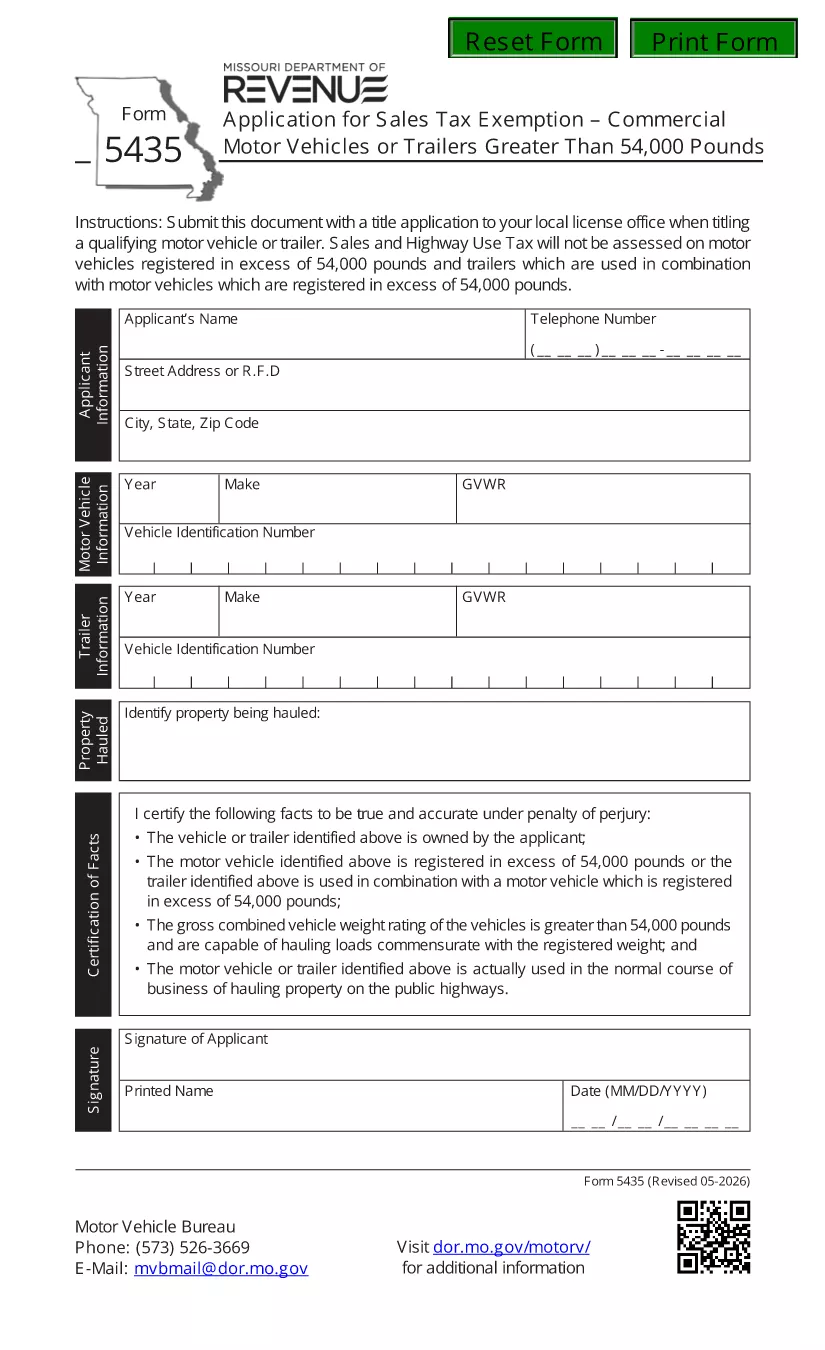
Form 5435 is the official Missouri Department of Revenue document used to apply for a sales‑ and highway‑use tax exemption on motor vehicles or trailers that weigh over 54,000 lbs. Whether you own a logging truck, a heavy‑duty trailer, or any qualifying commercial motor vehicle, this fillable PDF lets you complete the application quickly and submit it with confidence.

What Is Missouri Form 5435?

The form collects essential information such as the applicant’s name, address, vehicle identification number (VIN), gross vehicle weight rating (GVWR), and a certification that the vehicle is used exclusively for business purposes. Properly completed, Form 5435 serves as a legally binding request for tax exemption under Missouri statutes.

How to Fill Out Form 5435 with Formize

Instead of printing, scanning, or using a third‑party editor, you can fill the form directly on our site:

  1. Click “Fill out this form”. The Formize PDF Filler loads in your browser.
  2. Enter your information. All fields are interactive – just type, select dates, or upload supporting documents.
  3. Review and e‑sign. Use your finger or mouse to add a digital signature.
  4. Save or submit. Download the completed PDF or send it directly to the Missouri Department of Revenue.

Common Mistakes to Avoid

  • Leaving the VIN or GVWR blank – the exemption will be rejected.
  • Using an outdated form version. Always use the latest PDF (linked below).
  • Failing to sign the certification section.
  • Submitting the form to the wrong address – check the submission section for the correct mailing or electronic portal.

Where to Submit the Completed Form

After you’ve saved the filled PDF, you have two options:

  • Electronic submission: Upload the file through the Missouri Department of Revenue’s online portal.
  • Mail submission: Send the printed copy to the address listed in the form’s instructions.

Frequently Asked Questions

Below are quick answers to the most common queries about Form 5435.

Can I use Form 5435 for vehicles under 54,000 lbs?
No. The exemption only applies to vehicles or trailers exceeding 54,000 lbs.

Do I need a separate exemption for each vehicle?
Yes. Each qualifying vehicle requires its own completed Form 5435.

Is an electronic signature accepted?
Yes. The Missouri Department of Revenue accepts a valid e‑signature created in the Formize filler.

What is the filing deadline?
The form must be filed by the tax year’s filing deadline, typically April 15, unless an extension is granted.

Do I need to attach proof of weight?
Attach a copy of the vehicle’s weight certification or registration document showing the GVWR.

FAQ
  • Who can use Form 5435?

    Any individual or business that owns a motor vehicle or trailer over 54,000 lbs and uses it exclusively for qualified business purposes in Missouri.

  • Is there a filing fee for the exemption?

    No. The exemption request itself does not require a fee, but you must ensure all supporting documents are accurate.

  • Can I edit the form after I’ve saved it?

    Yes. Open the saved PDF again in the Formize filler to make changes before final submission.

  • What supporting documents are required?

    A copy of the vehicle’s registration showing GVWR, a weight certification, and any lease or ownership agreements.

  • How long does the approval process take?

    Typically 7‑10 business days after the Department of Revenue receives a complete and correctly signed Form 5435.

  • Can I submit Form 5435 for multiple vehicles on one form?

    No. Each vehicle must have its own separate Form 5435 submission.

  • What if I make a mistake after submission?

    Contact the Missouri Department of Revenue immediately to request a correction or submit a new, corrected form.

HUR

Så här fyller du i Missouri Form 5435 gratis, online i 4 enkla steg:

  1. 1
    Open the Fillable Form
    Click the “Fill out this form” button on the page. The Formize PDF Filler loads instantly in your browser.
  2. 2
    Enter Your Details
    Type your name, address, VIN, GVWR, and other required information into the interactive fields.
  3. 3
    Add Your Digital Signature
    Use your mouse, trackpad, or finger to sign the certification section. The signature is saved automatically.
  4. 4
    Save or Submit
    Download the completed PDF for your records or upload it directly to the Missouri Department of Revenue portal.
Formize PDF Filler app
HANDLA OM

Formulär för registrering av fordon

Missouri Form 5435 är ett av fordonsregistreringsformulär som är dokument som används för att registrera ett motorfordon hos den relevanta statliga myndigheten, vanligtvis Department of Motor Vehicles (DMV) eller motsvarande byrå. Dessa formulär krävs när en person köper ett nytt eller begagnat fordon, överför äganderätten till ett fordon eller flyttar till en ny jurisdiktion med ett fordon.

De specifika fordonsregistreringsformulären kan variera beroende på jurisdiktion, men de kräver i allmänhet följande information:

Fordonsinformation: Detta inkluderar information om fordonet, som fabrikat, modell, år, fordonsidentifikationsnummer (VIN) och vägmätaravläsning.

Ägarinformation: Formuläret kommer att kräva information om fordonets ägare, inklusive deras namn, adress, kontaktinformation och körkortsnummer.

Äganderättsbevis: Beroende på omständigheterna kan ägarbevis krävas, till exempel ett titelcertifikat, köpebrev eller tillverkarens ursprungsintyg (för nya fordon).

Försäkringsinformation: Bevis på giltigt fordonsförsäkringsskydd krävs vanligtvis. Detta kan inkludera att ange försäkringsnummer, datum för täckning och försäkringsbolagsinformation.

Betalning av avgifter: Fordonsregistrering innebär betalning av olika avgifter, såsom registreringsavgifter, skatter och eventuellt andra avgifter som är specifika för jurisdiktionen.

Utöver dessa grundläggande krav kan vissa jurisdiktioner ha ytterligare formulär eller dokumentationskrav. Till exempel kan utsläppstestresultat, säkerhetsinspektioner eller bevis på hemvist vara nödvändiga i vissa områden.

När fordonsregistreringsformulären är ifyllda och inlämnade kommer den statliga myndigheten att utfärda ett registreringsbevis, registreringsskyltar och registreringsetiketter. Dessa dokument visar att fordonet är lagligt registrerat och tillåtet att köras på allmän väg.

Det är viktigt att notera att kraven på fordonsregistrering kan variera avsevärt beroende på jurisdiktion. Därför rekommenderas det att du konsulterar den lokala DMV eller motsvarande byrå för de specifika formulär och procedurer som gäller för din plats.

FUNKTIONER

PDF-fyllare

Det enklaste sättet att fylla i Missouri Form 5435 online

  • Fyll snabbt i Missouri Form 5435
    Letar du efter ett sätt att snabbt fylla Missouri Form 5435 online? Med vår online gratis PDF-formulärfyllare vet du hur du redigerar och fyller i detta pdf-dokument på mindre än en minut.
  • Lätt att använda online PDF-redigerare
    Är du trött på att skriva ut PDF-filer så att du kan redigera dem innan du skannar om och skickar tillbaka dem? Redigera PDF-dokument gratis online. Använd vår online pdf-redigerare för att spara tid och papper.
  • Bra verktyg, alla plattformar
    Undrar du hur man fyller i Missouri Form 5435 på en Mac, eller kanske hur man använder ett PDF-fyllmedel gratis? Våra online PDF-verktyg fungerar på alla plattformar.
  • Säker fillagring
    Färdiga "Missouri Form 5435"-filer lagras i en säker databas som hanteras av Amazon Cloud-hosting. Du kan ta bort dina filer från vårt system när som helst. I alla fall raderas dessa filer automatiskt efter 24 timmar.
  • Chatta med Missouri Form 5435
    Chatta med "Missouri Form 5435" på Chatize som är en gratis PDF-läsare. Ställ frågor och få svar från "Missouri Form 5435". Klicka bara på knappen Chatta med dokument ovan.

Ta bort fyllningssession

Ta bort den valda fyllningssessionen? I det här fallet kommer dina framsteg i att fylla i formuläret att gå förlorade.

Ta bort redigeringssession

Vill du ta bort den valda redigeringssessionen? I det här fallet kommer dina framsteg i att skapa och redigera formuläret att gå förlorade.