
Välj språk

Nevada DMV VP-193 Registration Services Transmittal Form (Fillable PDF)

  1. Språk engelsk
  2. Land USA
  3. Aktivitet Fordonsregistrering
  4. stat Nevada
Nevada DMV VP-193 Registration Services Transmittal Form (Fillable PDF)

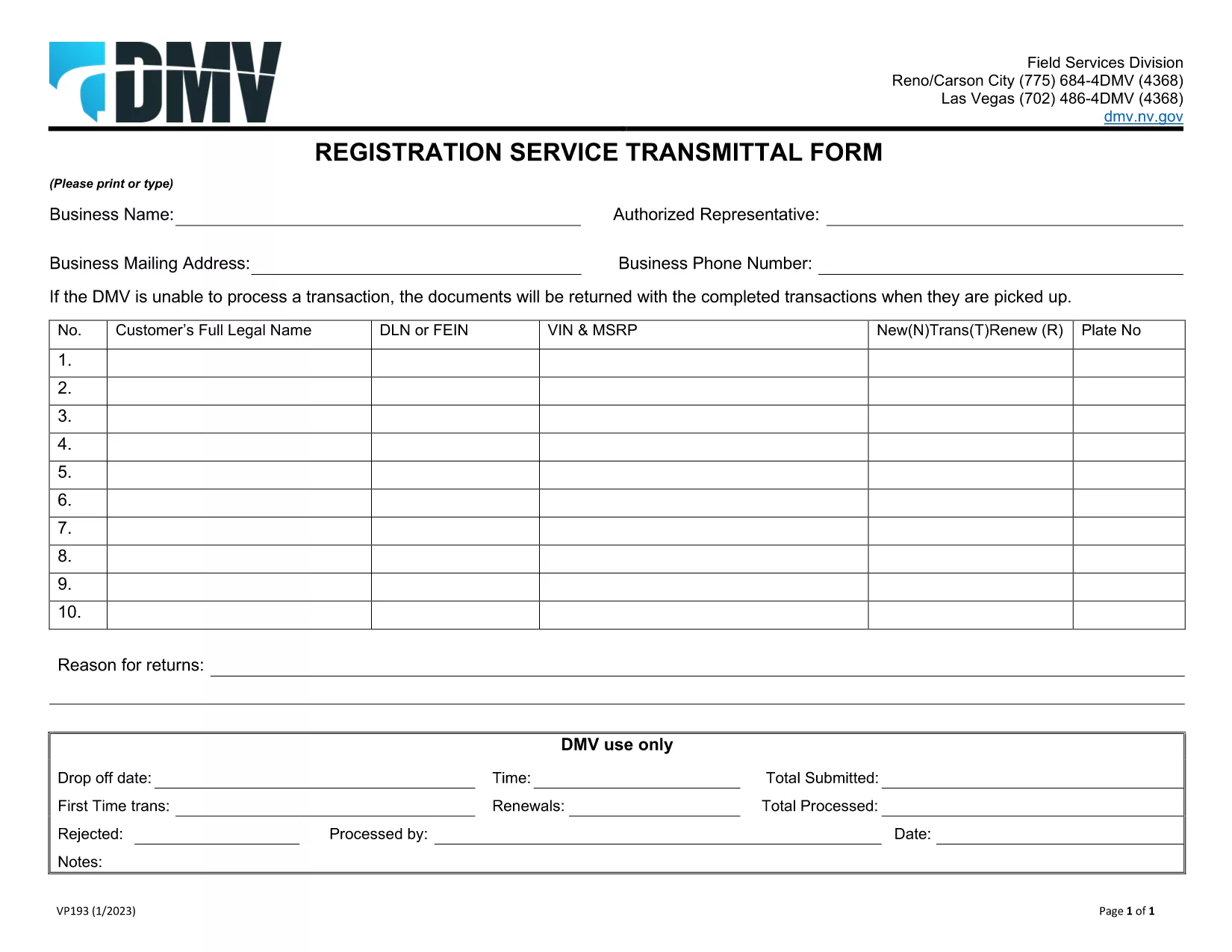
The VP-193 Registration Services Transmittal Form is the official Nevada DMV document used to transmit registration‑related information between dealers, lenders, and the Department of Motor Vehicles. Whether you are a vehicle dealer, a lien holder, or an individual preparing a registration packet, this fillable PDF saves you time and ensures compliance.

What Is the VP-193 Form?

VP-193 serves as a cover sheet for registration packages. It captures essential data such as the business name, authorized representative, mailing address, and the specific registration services requested. The form must be printed or typed, signed in person, and submitted with the supporting registration documents.

How to Complete the VP-193 Online

With Formize’s integrated PDF filler you can fill out the VP-193 directly in your browser—no download‑and‑install needed. Follow the simple steps below:

  • Click the Fill out this form button on this page.
  • Wait a few seconds while the Formize PDF Filler app loads.
  • Enter the required information in each field. Required fields are highlighted in red.
  • Review the completed form for accuracy.
  • Save a copy to your computer or cloud storage, then print and sign in person.

Common Mistakes to Avoid

  • Leaving required fields blank – the DMV will reject the package.
  • Using a digital signature – the form must be signed with a wet ink signature.
  • Incorrect business address – double‑check mailing address formats.
  • Mismatched VIN or plate numbers – ensure the numbers match the accompanying registration documents.

Where to Submit the Completed Form

After printing and signing, include the VP-193 with your registration packet and mail it to the address listed on the form, or deliver it in person to any Nevada DMV office. For expedited processing, you may also submit the package at a DMV “Express” window.

Need a printable version? Download the official VP-193 PDF and start filling it out now.

FAQ
  • Do I need a digital signature on the VP‑193?

    No. The Nevada DMV requires a wet‑ink signature. Use the online filler for data entry, then print and sign manually.

  • Can I submit the VP‑193 electronically?

    The form must be printed and signed before submission. Electronic submission is not accepted for this transmittal form.

  • What if I make a mistake after printing?

    Cross out the error with a single line, initial it, and write the correct information. For major errors, re‑fill the form using Formize and print a new copy.

  • Is the VP‑193 required for every vehicle registration?

    Only when a dealer, lender, or third party is transmitting registration services on behalf of the vehicle owner.

  • How long does it take for the DMV to process a VP‑193 package?

    Standard processing usually takes 7‑10 business days after receipt. Expedited services are available at select DMV locations.

  • Do I need to include supporting documents with the VP‑193?

    Yes. Attach the vehicle title, registration application, proof of insurance, and any lien release documents required for your transaction.

HUR

Så här fyller du i VP-193 gratis, online i 5 enkla steg:

  1. 1
    Click the Fill‑out Button
    Press the “Fill out this form” button on this page to launch the Formize PDF Filler.
  2. 2
    Wait for the Filler to Load
    A few seconds later the fillable PDF will appear in the browser window.
  3. 3
    Enter All Required Information
    Complete each highlighted field with accurate business and registration details.
  4. 4
    Review, Save, and Print
    Check your entries, save a digital copy, then print the form for a wet‑ink signature.
  5. 5
    Submit to the Nevada DMV
    Attach the signed VP‑193 to your registration packet and mail or deliver it to the DMV.
Formize PDF Filler app
HANDLA OM

Formulär för registrering av fordon

Om du äger eller leasar ett motorfordon, trailer eller båt måste du uppfylla vissa skyldigheter för att hålla ditt fordon lagligt registrerat och säkert.

VP-193 är en av fordonsregistreringsformulären som är dokument som används för att registrera ett motorfordon hos den relevanta staten eller provinsmyndigheten. Dessa formulär krävs vanligtvis när en person köper ett nytt eller begagnat fordon eller när de flyttar till en ny stat eller provins med ett fordon.

De exakta kraven och formulären som behövs för fordonsregistrering kan variera beroende på plats, men i allmänhet innebär processen att tillhandahålla information om fordonet, ägaren och eventuella panträtter på fordonet.

När registreringsformulären och avgifterna har lämnats in, kommer staten eller provinsmyndigheten att utfärda ett registreringsbevis eller registreringsskylt till fordonets ägare. Denna registrering gör att fordonet kan köras lagligt på allmänna vägar och motorvägar.

FUNKTIONER

PDF-fyllare

Det enklaste sättet att fylla i VP-193 online

  • Fyll snabbt i VP-193
    Letar du efter ett sätt att snabbt fylla VP-193 online? Med vår online gratis PDF-formulärfyllare vet du hur du redigerar och fyller i detta pdf-dokument på mindre än en minut.
  • Lätt att använda online PDF-redigerare
    Är du trött på att skriva ut PDF-filer så att du kan redigera dem innan du skannar om och skickar tillbaka dem? Redigera PDF-dokument gratis online. Använd vår online pdf-redigerare för att spara tid och papper.
  • Bra verktyg, alla plattformar
    Undrar du hur man fyller i VP-193 på en Mac, eller kanske hur man använder ett PDF-fyllmedel gratis? Våra online PDF-verktyg fungerar på alla plattformar.
  • Säker fillagring
    Färdiga "VP-193"-filer lagras i en säker databas som hanteras av Amazon Cloud-hosting. Du kan ta bort dina filer från vårt system när som helst. I alla fall raderas dessa filer automatiskt efter 24 timmar.
  • Chatta med VP-193
    Chatta med "VP-193" på Chatize som är en gratis PDF-läsare. Ställ frågor och få svar från "VP-193". Klicka bara på knappen Chatta med dokument ovan.

Ta bort fyllningssession

Ta bort den valda fyllningssessionen? I det här fallet kommer dina framsteg i att fylla i formuläret att gå förlorade.

Ta bort redigeringssession

Vill du ta bort den valda redigeringssessionen? I det här fallet kommer dina framsteg i att skapa och redigera formuläret att gå förlorade.