
Välj språk

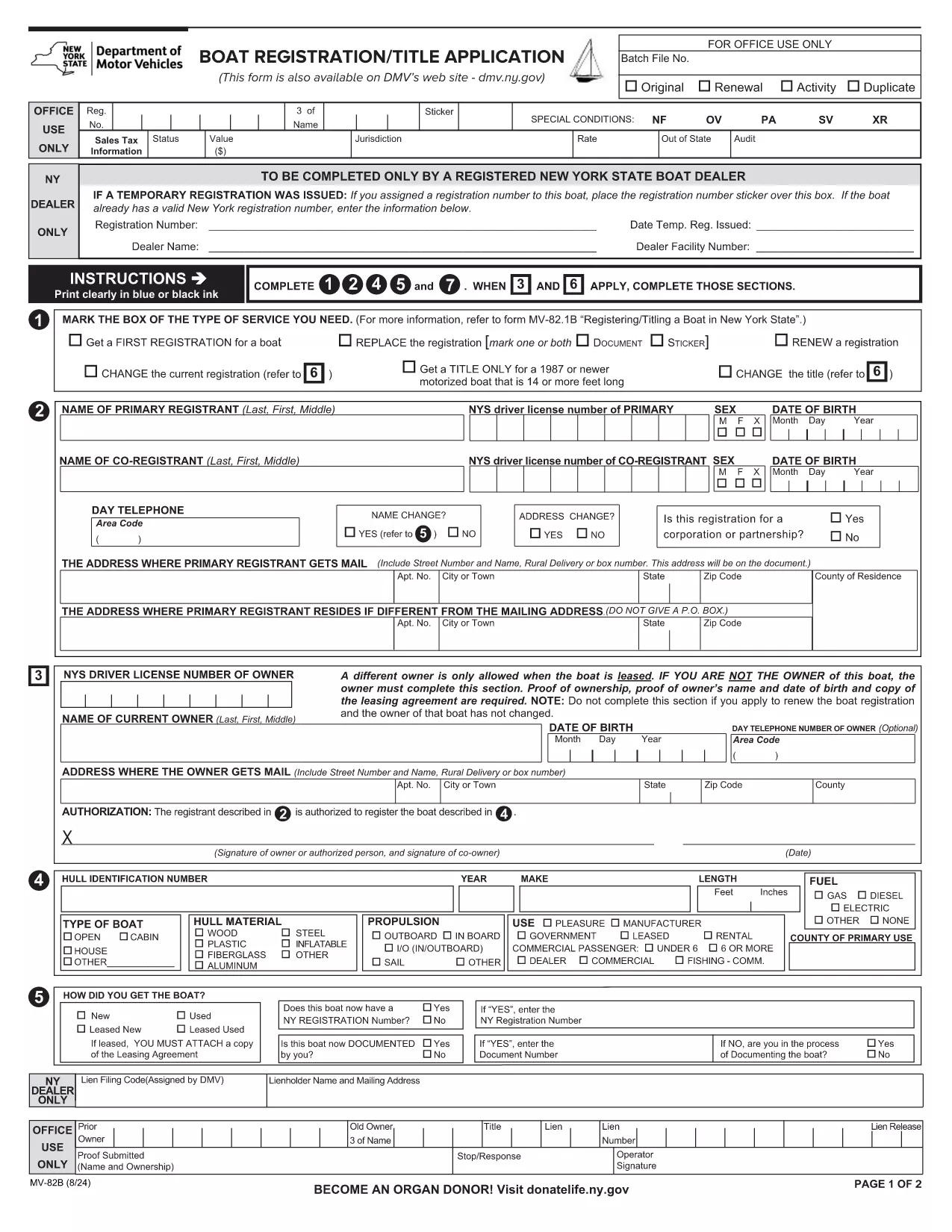
NY MV-82B Boat Registration & Title Application – Fillable PDF

  1. Land USA
  2. Språk engelsk
  3. Aktivitet Fordonsregistrering
  4. stat New York
NY MV-82B Boat Registration & Title Application – Fillable PDF

The MV-82B is New York State's official Boat Registration and Title Application. Whether you’re registering a new vessel, transferring ownership, or renewing a title, this fillable PDF lets you provide all required details quickly and accurately.

What Is the MV-82B Form?

Issued by the New York Department of Motor Vehicles (DMV), the MV-82B collects essential data about the boat, its hull identification number (HIN), ownership, and the registrant’s contact information. Completing this form is a legal requirement for any motorized or non‑motorized boat operating on New York waters.

How to Complete the MV-82B Online with Formize

Instead of downloading the PDF and opening it in a separate editor, simply click the "Fill out this form" button on this page. The Formize PDF Filler app will load in your browser, providing a smooth, fillable experience:

  1. Click "Fill out this form" – the Formize interface appears instantly.
  2. Enter your information in each highlighted field. The app auto‑saves as you type.
  3. eSign the document using the built‑in signature tool.
  4. Review & submit – you can download the completed PDF, email it, or print it for mailing.

Key Information Required

  • Hull Identification Number (HIN) or Manufacturer’s Serial Number
  • Boat type, length, and motor specifications
  • Current owner’s full name, address, and date of birth
  • Proof of ownership (bill of sale, previous registration, or lease agreement)
  • Contact information for the registrant

Common Mistakes & Tips

  • Leaving the HIN blank – the DMV will reject the application.
  • Incorrect owner name format – use "Last, First Middle" as shown on the form.
  • Missing signatures – both owner and dealer (if applicable) must sign.
  • Using the wrong PDF version – always use the latest official form linked below.
  • Failing to attach required documents – include a copy of the bill of sale or previous registration.

Where to Submit the Completed Form

After completing the MV-82B, you can:

  • Mail it to your local NY DMV office (address listed on the form).
  • Bring the printed PDF to a DMV Customer Service Center.
  • Submit electronically if your local office accepts scanned copies.

Using Formize ensures your data is entered correctly the first time, reducing processing delays and avoiding costly penalties.

FAQ
  • Do I need a separate title application for my boat?

    If the boat is new or you are transferring ownership, the MV-82B serves as both the registration and title application.

  • Can I submit the MV-82B electronically?

    Many NY DMV offices accept scanned copies. Check the local office’s guidelines or submit the printed form by mail.

  • What if I make a mistake after submitting?

    Contact the NY DMV to request a correction. You may need to submit a new MV-82B with the corrected information.

  • Is there a fee for filing the MV-82B?

    Yes, registration fees vary by boat length and type. The fee schedule is listed on the NY DMV website.

  • Do I need a hull identification number (HIN) for non‑motorized boats?

    Non‑motorized boats under 12 feet are exempt from HIN requirements, but you still must complete the MV-82B.

HUR

Så här fyller du i MV-82B gratis, online i 4 enkla steg:

  1. 1
    Open the Fillable Form
    Click the "Fill out this form" button on the page. The Formize PDF Filler loads directly in your browser.
  2. 2
    Enter Required Details
    Complete each highlighted field with your boat and owner information. The app saves your entries automatically.
  3. 3
    Add Your Electronic Signature
    Use the built‑in eSign tool to sign as the owner (and dealer, if applicable).
  4. 4
    Review and Download
    Double‑check all entries, then download the finished PDF or print it for mailing to the NY DMV.
Formize PDF Filler app
HANDLA OM

Formulär för registrering av fordon

Om du äger eller leasar ett motorfordon, trailer eller båt måste du uppfylla vissa skyldigheter för att hålla ditt fordon lagligt registrerat och säkert.

MV-82B är en av fordonsregistreringsformulären som är dokument som används för att registrera ett motorfordon hos den relevanta staten eller provinsmyndigheten. Dessa formulär krävs vanligtvis när en person köper ett nytt eller begagnat fordon eller när de flyttar till en ny stat eller provins med ett fordon.

De exakta kraven och formulären som behövs för fordonsregistrering kan variera beroende på plats, men i allmänhet innebär processen att tillhandahålla information om fordonet, ägaren och eventuella panträtter på fordonet.

När registreringsformulären och avgifterna har lämnats in, kommer staten eller provinsmyndigheten att utfärda ett registreringsbevis eller registreringsskylt till fordonets ägare. Denna registrering gör att fordonet kan köras lagligt på allmänna vägar och motorvägar.

FUNKTIONER

PDF-fyllare

Det enklaste sättet att fylla i MV-82B online

  • Fyll snabbt i MV-82B
    Letar du efter ett sätt att snabbt fylla MV-82B online? Med vår online gratis PDF-formulärfyllare vet du hur du redigerar och fyller i detta pdf-dokument på mindre än en minut.
  • Lätt att använda online PDF-redigerare
    Är du trött på att skriva ut PDF-filer så att du kan redigera dem innan du skannar om och skickar tillbaka dem? Redigera PDF-dokument gratis online. Använd vår online pdf-redigerare för att spara tid och papper.
  • Bra verktyg, alla plattformar
    Undrar du hur man fyller i MV-82B på en Mac, eller kanske hur man använder ett PDF-fyllmedel gratis? Våra online PDF-verktyg fungerar på alla plattformar.
  • Säker fillagring
    Färdiga "MV-82B"-filer lagras i en säker databas som hanteras av Amazon Cloud-hosting. Du kan ta bort dina filer från vårt system när som helst. I alla fall raderas dessa filer automatiskt efter 24 timmar.
  • Chatta med MV-82B
    Chatta med "MV-82B" på Chatize som är en gratis PDF-läsare. Ställ frågor och få svar från "MV-82B". Klicka bara på knappen Chatta med dokument ovan.

Ta bort fyllningssession

Ta bort den valda fyllningssessionen? I det här fallet kommer dina framsteg i att fylla i formuläret att gå förlorade.

Ta bort redigeringssession

Vill du ta bort den valda redigeringssessionen? I det här fallet kommer dina framsteg i att skapa och redigera formuläret att gå förlorade.