
Välj språk

Pennsylvania MV‑38L Fillable Form – Duplicate Title & Lien Requests

  1. Språk engelsk
  2. Land USA
  3. Aktivitet Fordonsregistrering
  4. stat Pennsylvania
Pennsylvania MV‑38L Fillable Form – Duplicate Title & Lien Requests

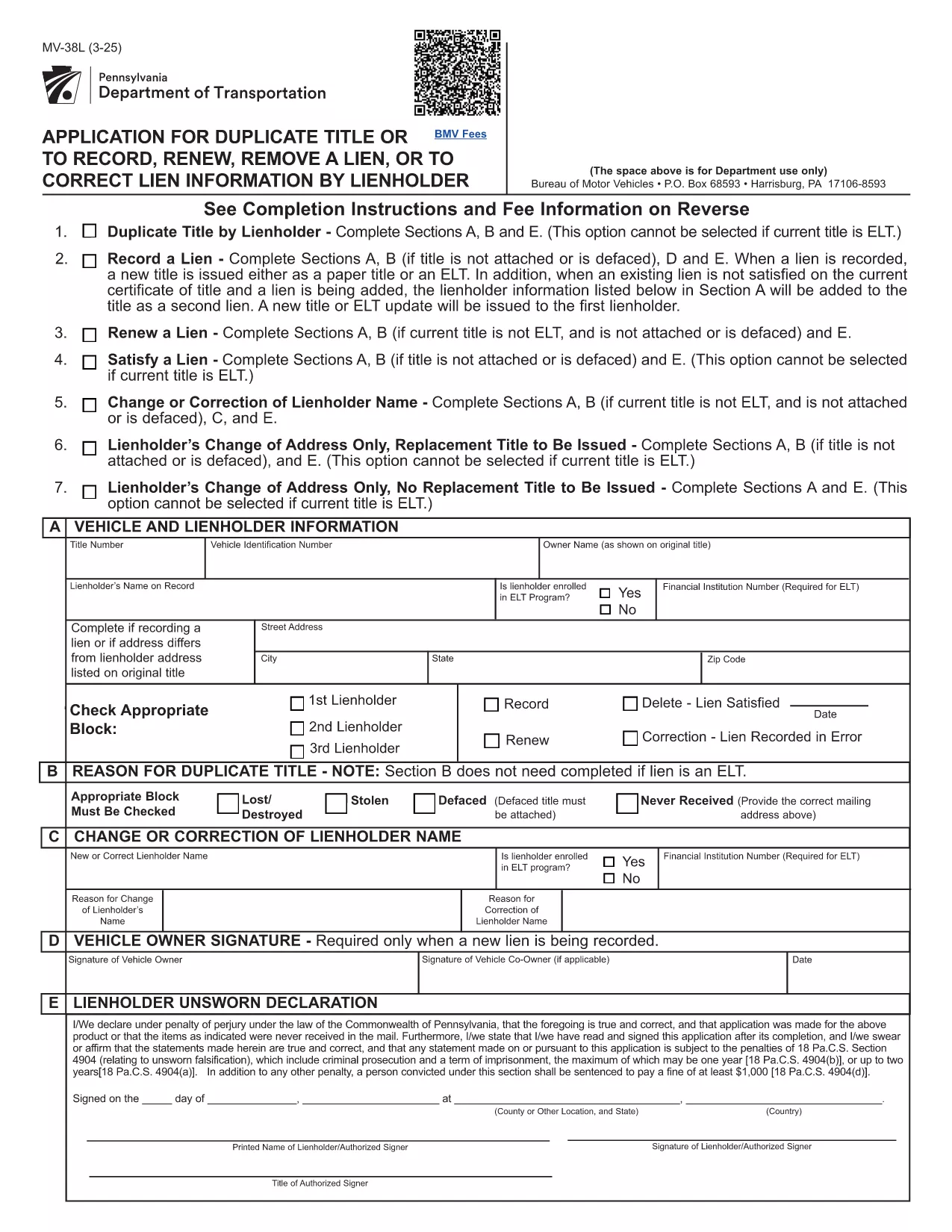
The MV‑38L is Pennsylvania's official application for a duplicate vehicle title, title renewal, lien removal, or title correction. Historically you had to print a paper copy, fill it out by hand, and mail it to PennDOT. With Formize you can now complete the entire form online, save a printed copy for your records, and submit it the way PennDOT requires.

What Is the MV‑38L Form?

MV‑38L is a fillable PDF issued by the Pennsylvania Department of Transportation (PennDOT). It replaces a lost, stolen, or damaged title and can also be used to:

  • Record a new lienholder or remove an existing lien.
  • Renew an expired title.
  • Correct errors on the original title.

When to Use MV‑38L

Typical scenarios include:

  • Your original title was misplaced or destroyed.
  • You have paid off a loan and need the lien released.
  • You are transferring ownership and the buyer needs a clean title.
  • You need to update the vehicle’s information (e.g., name change).

How to Complete the Form Online

Instead of downloading, printing, and scanning, follow these simple steps:

  1. Click the "Fill out this form" button on this page.
  2. The Formize PDF Filler app loads the MV‑38L PDF directly in your browser.
  3. Enter the required information in each field. All fields are editable and auto‑saved.
  4. When finished, click Save & Download to get a completed PDF you can print or email to PennDOT.

The online filler also validates required fields, helping you avoid common errors before submission.

Common Mistakes to Avoid

  • Incorrect VIN: Double‑check the Vehicle Identification Number; a single digit error can delay processing.
  • Missing Notarization: If Block #5 or #6 is checked, PennDOT requires a notarized signature and a fee receipt.
  • Wrong Fee Amount: Fees change annually. Verify the current amount on the PennDOT website before paying.
  • Omitting Lienholder Info: When removing a lien, provide the lender’s name, address, and account number.

Fees, Notarization, and Submission Details

Depending on the option you select, PennDOT may charge a fee (e.g., $22.50 for lien removal) and require notarization. After completing the form, you can either:

  • Print and mail the PDF to the address listed on the form, or
  • Submit electronically if your local PennDOT office accepts e‑filing.

Keep a copy of the completed PDF for your records – it serves as proof of application.

FAQ
  • What is the purpose of the MV‑38L form?

    MV‑38L is used to request a duplicate vehicle title, renew an existing title, remove or record a lien, or correct errors on a Pennsylvania title.

  • Do I need a notary for every MV‑38L submission?

    Notary is required only if you check Block #5 (lien removal) or Block #6 (title correction). Otherwise, a signature alone is sufficient.

  • How much does it cost to get a duplicate title?

    The fee varies; as of the latest update it is $22.50 for lien‑related requests. Check the PennDOT website for the current fee schedule.

  • Can I submit the completed MV‑38L online?

    Many PennDOT offices accept electronic submissions, but some still require a mailed paper copy. Review the instructions on the form for your local office.

  • What information is required for the VIN?

    Enter the 17‑character Vehicle Identification Number exactly as it appears on the registration or insurance card. A single typo can delay processing.

  • Is the Formize filler free to use?

    Yes, Formize provides a free, secure PDF filler for the MV‑38L form. No software download is needed.

  • What should I do if I lose the completed PDF after filling it?

    The Formize app automatically saves a copy to your browser’s download folder. You can also email the PDF to yourself before printing.

  • Do I need to attach any supporting documents?

    If you are removing a lien, attach a lien release letter from the lender. For title corrections, include any relevant proof (e.g., court order).

HUR

Så här fyller du i MV-38L gratis, online i 5 enkla steg:

  1. 1
    Open the Fillable Form
    Click the "Fill out this form" button on the page. The Formize PDF Filler will open the MV‑38L PDF directly in your browser.
  2. 2
    Enter Your Information
    Complete each editable field—vehicle details, owner information, and lien data. The app highlights required fields.
  3. 3
    Add Notarization (if required)
    If you checked Block #5 or #6, print the completed form, have it notarized, and scan it back into the PDF.
  4. 4
    Save and Download
    When all fields are filled, click "Save & Download" to get a finished PDF you can print or email to PennDOT.
  5. 5
    Submit to PennDOT
    Mail the printed PDF with the appropriate fee, or follow any electronic submission instructions provided on the form.
Formize PDF Filler app
HANDLA OM

Formulär för registrering av fordon

MV-38L är ett av fordonsregistreringsformulär som är dokument som används för att registrera ett motorfordon hos den relevanta statliga myndigheten, vanligtvis Department of Motor Vehicles (DMV) eller motsvarande byrå. Dessa formulär krävs när en person köper ett nytt eller begagnat fordon, överför äganderätten till ett fordon eller flyttar till en ny jurisdiktion med ett fordon.

De specifika fordonsregistreringsformulären kan variera beroende på jurisdiktion, men de kräver i allmänhet följande information:

Fordonsinformation: Detta inkluderar information om fordonet, som fabrikat, modell, år, fordonsidentifikationsnummer (VIN) och vägmätaravläsning.

Ägarinformation: Formuläret kommer att kräva information om fordonets ägare, inklusive deras namn, adress, kontaktinformation och körkortsnummer.

Äganderättsbevis: Beroende på omständigheterna kan ägarbevis krävas, till exempel ett titelcertifikat, köpebrev eller tillverkarens ursprungsintyg (för nya fordon).

Försäkringsinformation: Bevis på giltigt fordonsförsäkringsskydd krävs vanligtvis. Detta kan inkludera att ange försäkringsnummer, datum för täckning och försäkringsbolagsinformation.

Betalning av avgifter: Fordonsregistrering innebär betalning av olika avgifter, såsom registreringsavgifter, skatter och eventuellt andra avgifter som är specifika för jurisdiktionen.

Utöver dessa grundläggande krav kan vissa jurisdiktioner ha ytterligare formulär eller dokumentationskrav. Till exempel kan utsläppstestresultat, säkerhetsinspektioner eller bevis på hemvist vara nödvändiga i vissa områden.

När fordonsregistreringsformulären är ifyllda och inlämnade kommer den statliga myndigheten att utfärda ett registreringsbevis, registreringsskyltar och registreringsetiketter. Dessa dokument visar att fordonet är lagligt registrerat och tillåtet att köras på allmän väg.

Det är viktigt att notera att kraven på fordonsregistrering kan variera avsevärt beroende på jurisdiktion. Därför rekommenderas det att du konsulterar den lokala DMV eller motsvarande byrå för de specifika formulär och procedurer som gäller för din plats.

FUNKTIONER

PDF-fyllare

Det enklaste sättet att fylla i MV-38L online

  • Fyll snabbt i MV-38L
    Letar du efter ett sätt att snabbt fylla MV-38L online? Med vår online gratis PDF-formulärfyllare vet du hur du redigerar och fyller i detta pdf-dokument på mindre än en minut.
  • Lätt att använda online PDF-redigerare
    Är du trött på att skriva ut PDF-filer så att du kan redigera dem innan du skannar om och skickar tillbaka dem? Redigera PDF-dokument gratis online. Använd vår online pdf-redigerare för att spara tid och papper.
  • Bra verktyg, alla plattformar
    Undrar du hur man fyller i MV-38L på en Mac, eller kanske hur man använder ett PDF-fyllmedel gratis? Våra online PDF-verktyg fungerar på alla plattformar.
  • Säker fillagring
    Färdiga "MV-38L"-filer lagras i en säker databas som hanteras av Amazon Cloud-hosting. Du kan ta bort dina filer från vårt system när som helst. I alla fall raderas dessa filer automatiskt efter 24 timmar.
  • Chatta med MV-38L
    Chatta med "MV-38L" på Chatize som är en gratis PDF-läsare. Ställ frågor och få svar från "MV-38L". Klicka bara på knappen Chatta med dokument ovan.

Ta bort fyllningssession

Ta bort den valda fyllningssessionen? I det här fallet kommer dina framsteg i att fylla i formuläret att gå förlorade.

Ta bort redigeringssession

Vill du ta bort den valda redigeringssessionen? I det här fallet kommer dina framsteg i att skapa och redigera formuläret att gå förlorade.