
Välj språk

VTR-265-SSF Fillable PDF – Self‑Service Storage Facility Lien Foreclosure

  1. Språk engelsk
  2. Land USA
  3. Aktivitet Fordonsregistrering
  4. stat Texas
VTR-265-SSF Fillable PDF – Self‑Service Storage Facility Lien Foreclosure

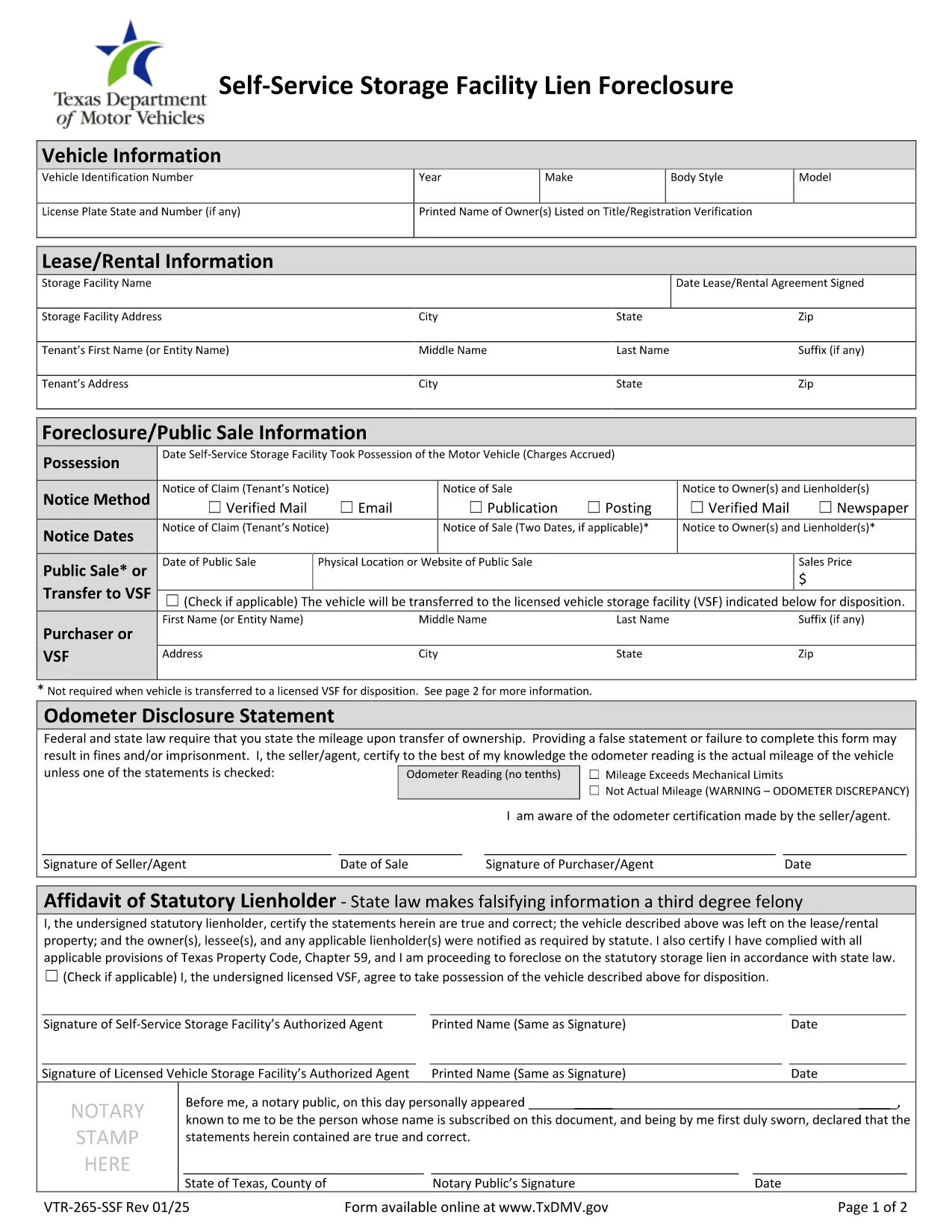
The VTR-265-SSF is the Texas Department of Motor Vehicles (TxDMV) form used to verify title and registration when a self‑service storage facility forecloses on a lien. Whether you’re a storage operator, a lien holder, or the vehicle owner, this form is required to transfer ownership after a lien foreclosure.

What Is Form VTR-265-SSF?

This form is officially titled Verification of Title and/or Registration – Self‑Service Storage Facility Lien Foreclosure. It collects:

  • Vehicle identification details (VIN, make, model, year)
  • Proof of lien foreclosure
  • Owner and lienholder signatures
  • Evidence that the title can be transferred

How to Complete the VTR-265-SSF Online

Instead of downloading, printing, and scanning, use Formize’s built‑in PDF filler:

  1. Click “Fill out this form” on the page.
  2. Wait a few seconds while the Formize PDF Filler app loads.
  3. Enter the required information in each fillable field. The app validates dates, VIN length, and required signatures.
  4. Review the completed form for accuracy.
  5. Save the filled PDF or submit it directly to the TxDMV portal if instructed.

Common Mistakes to Avoid

  • Incorrect VIN: Double‑check the 17‑character VIN; a single digit error will cause rejection.
  • Missing signatures: Both the lienholder and the vehicle owner must sign; electronic signatures are accepted in the Formize filler.
  • Wrong lien documentation: Attach the foreclosure notice and any court order before uploading.
  • Out‑of‑date form version: Use the PDF linked below – it is the current TxDMV version.

Where to Submit the Completed Form

After filling the form, you can:

  • Mail it to the Texas Department of Motor Vehicles, Vehicle Services Division.
  • Submit electronically through the TxDMV online portal if you have an account.
  • Deliver it in person to any TxDMV Regional Service Center.

Download the Official PDF

For reference or offline use, you can download the official VTR-265-SSF PDF directly from the Texas DMV website.

FAQ
  • Who needs to complete Form VTR-265-SSF?

    The form is required by storage facility owners, lienholders, and vehicle owners when a lien is foreclosed and title ownership must be transferred in Texas.

  • Can I submit the form electronically?

    Yes. After filling the form with Formize, you can upload the completed PDF to the TxDMV online portal or email it if the agency permits electronic submissions.

  • What documentation must accompany the form?

    Attach the foreclosure notice, any court order, and proof of notification (certified mail receipts). These documents verify the lien’s validity.

  • Is the PDF fillable on mobile devices?

    The Formize PDF Filler works on most modern smartphones and tablets, allowing you to complete the form on the go.

  • How long does the TxDMV take to process the form?

    Processing typically takes 7‑10 business days after receipt, provided all required fields and supporting documents are complete.

  • What if I make a mistake after submitting?

    Contact the TxDMV Vehicle Services Division to request a correction. You may need to submit a new VTR-265-SSF with the corrected information.

  • Is there a fee to file VTR-265-SSF?

    There is no filing fee for the VTR-265-SSF itself, but standard title transfer fees may apply when the new title is issued.

HUR

Så här fyller du i VTR-265-SSF gratis, online i 4 enkla steg:

  1. 1
    Open the Fillable Form
    Click the “Fill out this form” button on the page. The Formize PDF Filler will open in your browser.
  2. 2
    Enter Required Information
    Fill in each field – VIN, owner details, lienholder information, and attach the foreclosure notice. The filler checks for correct formats.
  3. 3
    Review and Sign
    Double‑check all entries, then add electronic signatures for the owner and lienholder using the built‑in signature tool.
  4. 4
    Save or Submit
    Save the completed PDF to your computer or submit it directly to the TxDMV portal as instructed.
Formize PDF Filler app
HANDLA OM

Formulär för registrering av fordon

VTR-265-SSF är en av DMV-formulär, även känd som Department of Motor Vehicles-formulär, som är dokument som används i olika transaktioner och processer relaterade till motorfordon. DMV är en statlig myndighet som ansvarar för körkort, fordonsregistrering och upprätthållande av motorfordonslagar. De specifika DMV-formulären som är tillgängliga kan variera beroende på jurisdiktion, men här är några vanliga exempel:

Körkortsformulär: Dessa formulär används för att ansöka om ett körkort eller för att begära ändringar eller förnyelser. De kräver vanligtvis personlig information, identitetsbevis och kan innehålla avsnitt för medicinsk information eller körhistorik.

Fordonsregistreringsformulär: Dessa formulär används för att registrera ett motorfordon hos DMV. De kräver fordonsinformation, ägarinformation och försäkringsbevis.

Titelöverföringsformulär: När du köper eller säljer ett fordon används dessa formulär för att överföra äganderätten från en part till en annan. De kräver information om köparen, säljaren, fordonsinformation och kan innehålla en köpeskilling.

Blanketter för frigörande av ansvar för fordon: När du säljer eller överför äganderätten till ett fordon meddelar dessa formulär DMV att säljaren inte längre är ansvarig för fordonet. Det hjälper till att skydda säljaren från ansvar för olyckor eller incidenter som involverar fordonet efter försäljningen.

Blanketter för förnyelse av registreringsskyltar och registreringar: Dessa formulär används för att förnya fordonsregistrering eller begära nya registreringsskyltar. De kräver vanligtvis information om den registrerade ägaren, aktuell registreringsinformation och betalning av tillämpliga avgifter.

formulär för begäran om körjournaler: Dessa formulär tillåter individer att begära sina körjournaler från DMV, som ger information om köröverträdelser, licensstatus och andra relevanta detaljer.

Special- eller personliga registreringsskyltformulär: Dessa formulär används för att ansöka om personliga registreringsskyltar eller specialskyltar, som tillåter individer att anpassa sin registreringsskylt med specifika tecken eller mönster.

Det här är bara några exempel på de många formulär som kan vara tillgängliga via DMV. De specifika formulären och kraven kan variera beroende på jurisdiktion, så det är viktigt att konsultera den lokala DMV-webbplatsen eller besöka ett DMV-kontor för att få rätt formulär för dina specifika behov.

FUNKTIONER

PDF-fyllare

Det enklaste sättet att fylla i VTR-265-SSF online

  • Fyll snabbt i VTR-265-SSF
    Letar du efter ett sätt att snabbt fylla VTR-265-SSF online? Med vår online gratis PDF-formulärfyllare vet du hur du redigerar och fyller i detta pdf-dokument på mindre än en minut.
  • Lätt att använda online PDF-redigerare
    Är du trött på att skriva ut PDF-filer så att du kan redigera dem innan du skannar om och skickar tillbaka dem? Redigera PDF-dokument gratis online. Använd vår online pdf-redigerare för att spara tid och papper.
  • Bra verktyg, alla plattformar
    Undrar du hur man fyller i VTR-265-SSF på en Mac, eller kanske hur man använder ett PDF-fyllmedel gratis? Våra online PDF-verktyg fungerar på alla plattformar.
  • Säker fillagring
    Färdiga "VTR-265-SSF"-filer lagras i en säker databas som hanteras av Amazon Cloud-hosting. Du kan ta bort dina filer från vårt system när som helst. I alla fall raderas dessa filer automatiskt efter 24 timmar.
  • Chatta med VTR-265-SSF
    Chatta med "VTR-265-SSF" på Chatize som är en gratis PDF-läsare. Ställ frågor och få svar från "VTR-265-SSF". Klicka bara på knappen Chatta med dokument ovan.

Ta bort fyllningssession

Ta bort den valda fyllningssessionen? I det här fallet kommer dina framsteg i att fylla i formuläret att gå förlorade.

Ta bort redigeringssession

Vill du ta bort den valda redigeringssessionen? I det här fallet kommer dina framsteg i att skapa och redigera formuläret att gå förlorade.