
hamburger-menu icon
เลือกภาษา

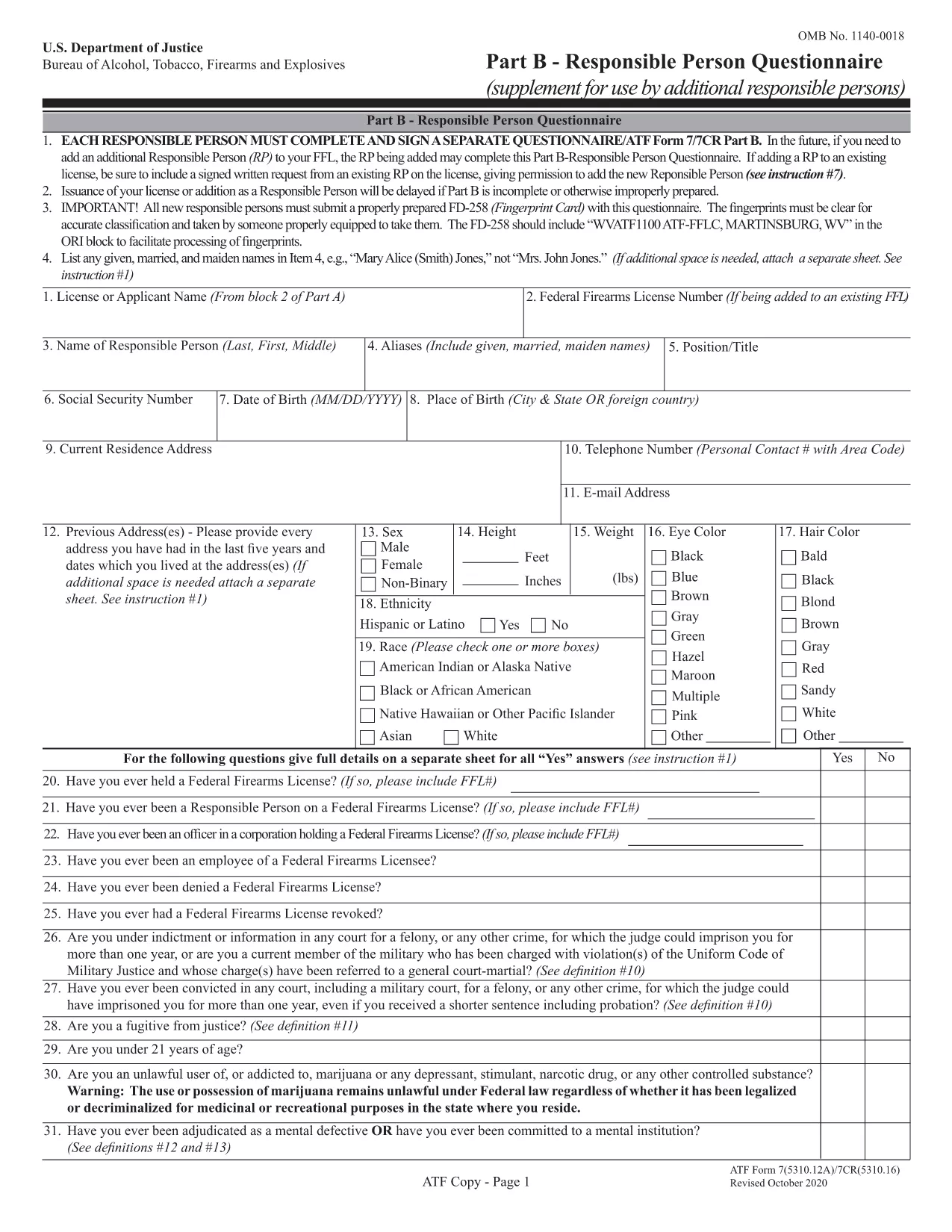
Whether you are applying for a new Federal Firearms License (FFL) or need to add a responsible person to an existing license, the ATF’s Form 5310.12 and Form 5310.16 are essential. Formize provides a secure, fillable PDF that lets you complete both forms directly in your browser – no extra software required.

What Is ATF Form 5310.12?

Form 5310.12 is the official application used to request any type of FFL (Dealer, Manufacturer, Importer, etc.). It collects business information, background details, and the specific license class you are seeking.

Understanding Form 5310.16 – Responsible Person Questionnaire

Form 5310.16 (also known as Part B) is a questionnaire that must be completed by every responsible person added to an FFL. It includes personal background questions, fingerprint instructions, and a photo requirement.

How to Fill Out the Forms Online with Formize

Follow the simple steps below to fill the PDF without leaving the page.

  • Click the "Fill out this form" button on the page.
  • Wait a few seconds while the Formize PDF Filler app loads.
  • Enter your information directly into the fillable fields.
  • Use the Save button to download a completed copy or Print it for mailing.
  • Mail the printed form to the ATF address shown on the form instructions.

Common Mistakes to Avoid

  • Leaving required fields blank – the filler highlights empty mandatory sections.
  • Using an outdated form version – our PDF is the latest revision (effective 2022).
  • Submitting the wrong mailing address – double‑check the address on the form’s last page.
  • Forgetting the fingerprint card for Form 5310.16 – attach it before mailing.

Where to Submit Your Completed Forms

After completing the forms, mail them to the ATF’s Federal Firearms Licensing Center (FFLC) at the address printed on the last page of each form. For expedited processing, consider using certified mail with tracking.

Need more help? Review the ATF’s official instructions linked on each form or consult a qualified firearms attorney.

คำถามที่พบบ่อย
  • Do I need to fill out both Form 5310.12 and 5310.16?

    Form 5310.12 is required for a new FFL. Form 5310.16 is only needed when adding or updating a responsible person on an existing FFL.

  • Can I submit the forms electronically?

    The ATF currently requires a hard‑copy submission for these forms. Use the online filler to complete them, then print and mail.

  • Is the PDF fillable on mobile devices?

    Yes. The Formize filler works on most modern smartphones and tablets, though a larger screen makes data entry easier.

  • What address should I use for mailing?

    The correct mailing address is printed on the last page of each form. For Form 5310.12, use the Federal Firearms Licensing Center address; for Form 5310.16, use the ATF address shown in the questionnaire instructions.

  • How long does it take the ATF to process my application?

    Processing times vary, but most FFL applications are reviewed within 60‑90 days after receipt.

  • Do I need a fingerprint card for Form 5310.16?

    Yes. Every responsible person must submit a fingerprint card (FD‑258) along with the completed questionnaire.

  • What if I make a mistake after mailing?

    Contact the ATF’s Federal Firearms Licensing Center immediately. They may allow a corrected form to be resubmitted before final approval.

ทำอย่างไร

วิธีกรอก ATF Form 5310.12 ฟรีทางออนไลน์ใน 5 ขั้นตอนง่ายๆ:

  1. 1
    Click the Fill Out Button
    Press the "Fill out this form" button on the page to launch the Formize PDF Filler.
  2. 2
    Wait for the Filler to Load
    A short loading screen appears while the secure fillable PDF is prepared.
  3. 3
    Enter Your Information
    Type directly into each highlighted field. Use the navigation tabs to jump between sections.
  4. 4
    Save or Print Your Completed Form
    When finished, click "Save" to download a copy or "Print" to produce a hard‑copy for mailing.
  5. 5
    Mail to the ATF
    Attach any required fingerprint cards or photos and mail the form to the address shown on the last page.
สร้างแอป PDF Filler
เกี่ยวกับ

แบบฟอร์มหน่วยงานแอลกอฮอล์ ยาสูบ อาวุธปืน และวัตถุระเบิด (ATF)

ATF Form 5310.12 เป็นหนึ่งในแบบฟอร์มอย่างเป็นทางการที่ใช้โดย ATF ซึ่งเป็นหน่วยงานบังคับใช้กฎหมายของรัฐบาลกลางภายในกระทรวงยุติธรรมของสหรัฐอเมริกา ATF มีหน้าที่รับผิดชอบในการบังคับใช้กฎหมายและข้อบังคับของรัฐบาลกลางที่เกี่ยวข้องกับเครื่องดื่มแอลกอฮอล์ ยาสูบ อาวุธปืน และวัตถุระเบิด แบบฟอร์มเหล่านี้ใช้เพื่อวัตถุประสงค์ต่างๆ รวมถึงการจดทะเบียน การออกใบอนุญาต และการควบคุมธุรกิจและบุคคลที่เกี่ยวข้องกับอุตสาหกรรมเหล่านี้ นี่คือตัวอย่างบางส่วนของแบบฟอร์ม ATF:

แบบฟอร์ม ATF 4473: แบบฟอร์มนี้ใช้สำหรับกระบวนการตรวจสอบภูมิหลังเมื่อมีบุคคลซื้ออาวุธปืนจากตัวแทนจำหน่ายอาวุธปืนที่ได้รับอนุญาตจากรัฐบาลกลาง โดยรวบรวมข้อมูลเกี่ยวกับตัวตนของผู้ซื้อ ภูมิหลัง และคุณสมบัติในการครอบครองอาวุธปืน

แบบฟอร์ม ATF 1: แบบฟอร์มนี้ใช้เพื่อสมัครขอสร้างและจดทะเบียนอาวุธปืน โดยทั่วไปจะใช้สำหรับบุคคลที่ต้องการผลิตอาวุธปืนเพื่อใช้ส่วนตัว หรือแปลงอาวุธปืนที่มีอยู่ให้เป็นรูปแบบอื่น

แบบฟอร์ม ATF 4: แบบฟอร์มนี้ใช้สำหรับการโอนและการจดทะเบียนอาวุธปืนจากบุคคลหรือนิติบุคคลหนึ่งไปยังอีกบุคคลหนึ่ง โดยทั่วไปจะใช้ในกระบวนการซื้ออาวุธปืนจากบุคคลหรือโอนอาวุธปืนไปยังทรัสต์หรือบริษัท

แบบฟอร์ม ATF 6: แบบฟอร์มนี้ใช้สำหรับการนำเข้าอาวุธปืน เครื่องกระสุนปืน และสิ่งของอื่นๆ บางรายการที่ควบคุมโดย ATF จำเป็นสำหรับบุคคลหรือธุรกิจที่ต้องการนำเข้าสินค้าดังกล่าวเข้ามาในประเทศสหรัฐอเมริกา

แบบฟอร์ม ATF 7: แบบฟอร์มนี้ใช้สำหรับการสมัครและการต่ออายุใบอนุญาตอาวุธปืนของรัฐบาลกลาง (FFL) ข้อกำหนดนี้จำเป็นสำหรับบุคคลหรือธุรกิจที่ประกอบธุรกิจการผลิต การซื้อขาย หรือการนำเข้าอาวุธปืน

แบบฟอร์ม ATF 5320.20: แบบฟอร์มนี้ใช้สำหรับการแจ้งและการอนุมัติการขนส่งอาวุธปืน หรืออุปกรณ์ทำลายล้างข้ามแนวรัฐ

แบบฟอร์ม ATF 5400.13: แบบฟอร์มนี้ใช้สำหรับการลงทะเบียนและการรายงานของ วัสดุและอุปกรณ์ที่ระเบิดได้

นี่เป็นเพียงตัวอย่างเล็กๆ น้อยๆ ของแบบฟอร์ม ATF ที่ใช้เพื่อวัตถุประสงค์ต่างๆ ที่เกี่ยวข้องกับการควบคุมและการบังคับใช้กฎหมายของรัฐบาลกลางว่าด้วยเครื่องดื่มแอลกอฮอล์ ยาสูบ อาวุธปืน และวัตถุระเบิด แบบฟอร์มเฉพาะที่กำหนดขึ้นอยู่กับกิจกรรมหรือธุรกรรมเฉพาะที่กำลังดำเนินการและกฎระเบียบที่บังคับใช้ สิ่งสำคัญคือต้องปรึกษาเว็บไซต์อย่างเป็นทางการของสำนักแอลกอฮอล์ ยาสูบ อาวุธปืน และวัตถุระเบิด (www.atf.gov) หรือขอคำแนะนำจากผู้เชี่ยวชาญเพื่อรับข้อมูลที่ถูกต้องและทันสมัย เกี่ยวกับแบบฟอร์ม ATF เฉพาะที่เกี่ยวข้องกับสถานการณ์ของคุณ

คุณสมบัติ

PDF ฟิลเลอร์

วิธีที่ง่ายที่สุดในการกรอกแบบฟอร์ม PDF ทางออนไลน์

  • กรอก ATF Form 5310.12 อย่างรวดเร็ว
    กำลังมองหาวิธีเติม ATF Form 5310.12 ทางออนไลน์อย่างรวดเร็วอยู่ใช่ไหม ด้วยตัวกรอกแบบฟอร์ม PDF ออนไลน์ฟรีของเรา คุณจะรู้วิธีแก้ไขและกรอกเอกสาร PDF นี้ในเวลาไม่ถึงนาที
  • โปรแกรมแก้ไข PDF ออนไลน์ที่ใช้งานง่าย
    เบื่อกับการพิมพ์ไฟล์ PDF เพื่อให้คุณสามารถแก้ไขได้ก่อนที่จะสแกนซ้ำและส่งกลับหรือไม่? แก้ไขเอกสาร PDF ออนไลน์ฟรี ใช้โปรแกรมแก้ไข PDF ออนไลน์ของเราเพื่อประหยัดเวลาและกระดาษ
  • เครื่องมือที่ยอดเยี่ยมสำหรับทุกแพลตฟอร์ม
    สงสัยวิธีเติม ATF Form 5310.12 บน Mac หรืออาจใช้ตัวเติม PDF ฟรีได้อย่างไร เครื่องมือ PDF ออนไลน์ของเราทำงานได้บนทุกแพลตฟอร์ม
  • การจัดเก็บไฟล์ที่ปลอดภัย
    ไฟล์ "ATF Form 5310.12" ที่เสร็จสมบูรณ์จะถูกจัดเก็บไว้ในฐานข้อมูลที่ปลอดภัยซึ่งจัดการโดย Amazon Cloud hosting คุณสามารถลบไฟล์ของคุณออกจากระบบของเราได้ตลอดเวลา ไม่ว่าในกรณีใด ไฟล์เหล่านี้จะถูกลบโดยอัตโนมัติหลังจากผ่านไป 24 ชั่วโมง
  • สนทนากับ ATF Form 5310.12
    แชทกับ "ATF Form 5310.12" บน Chatize ที่เป็นผู้ช่วยอ่าน PDF ฟรี ถามคำถามและรับคำตอบจาก "ATF Form 5310.12" เพียงคลิกที่ปุ่ม แชทด้วยเอกสาร ด้านบน

ลบเซสชันการบรรจุ

ลบเซสชันการกรอกข้อมูลที่เลือกหรือไม่?ในกรณีนี้ความคืบหน้าในการกรอกแบบฟอร์มจะหายไป

ลบเซสชันการแก้ไข

ลบเซสชันการแก้ไขที่เลือกหรือไม่ ในกรณีนี้ ความคืบหน้าในการสร้างและแก้ไขแบบฟอร์มจะหายไป